

CacheService drops a stored result when the TTL ends, and the sheet flickers
Updated
CacheService stores strings for a limited time. put(key, value, expirationInSeconds) keeps the entry for at most that many seconds, and the platform may drop it sooner. The longest expiration you can ask for is 21600 (six hours). The default when you omit it is 600 seconds. get returns null on a miss. It does not throw. A script that writes get’s result straight into the grid will blank a block that was full a moment ago, then fill it again on the next successful fetch. That blank is the flicker.
Sheet Error is an independent formula-error library, not a Google product. A live cross-sheet formula that sits on Loading is IMPORTRANGE loading. A custom function that sits still until an argument changes is custom function cache. Those are different caches. Keep the Google Sheets UI in English.
Recreate it on a blank sheet
Section titled “Recreate it on a blank sheet”- Open a blank spreadsheet. In A1 type
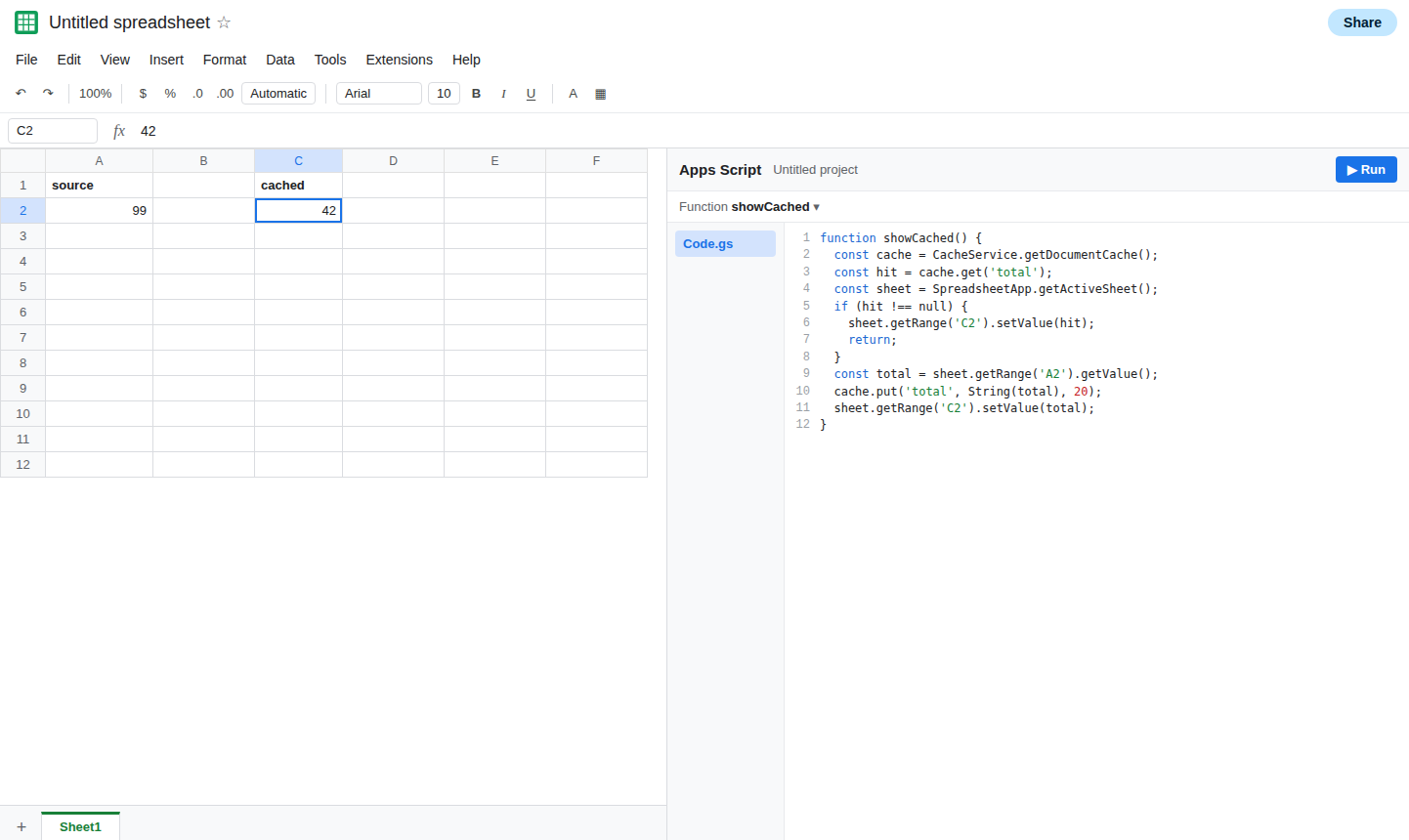
source. In A2 type42. Extensions → Apps Script. Replace the sample with this. Save. The expiration is20seconds so you can watch it die. Do not use20in a report you care about.
function showCached() { const cache = CacheService.getDocumentCache(); const hit = cache.get('total'); const sheet = SpreadsheetApp.getActiveSheet(); if (hit !== null) { sheet.getRange('C2').setValue(hit); return; } const total = sheet.getRange('A2').getValue(); cache.put('total', String(total), 20); sheet.getRange('C2').setValue(total);}A hit, then a miss. Run showCached. C2 shows 42. Change A2 to 99. Run showCached again before 20 seconds pass. C2 stays 42. The cache served the string from the first run. A2 and C2 disagree. That stale 42 is the first half of the bug.
Wait more than 20 seconds. Run showCached again. C2 becomes 99. The entry expired, get returned null, and the script read A2. If you had written setValue(hit) without the null check, C2 would have gone blank on this run. Put that mistake in once so you can see it: temporarily setValue(hit) before the if, run after the entry is cold, and C2 clears. Then restore the if above. Leave C2 showing whichever value the last run wrote, and remember the blank.
Which cache you called. getDocumentCache() is this spreadsheet. getUserCache() is this user. A trigger running as the owner and a menu item running as an editor do not share a user cache. getScriptCache() is the script project. A second spreadsheet bound to another project does not see it. If a colleague’s menu never hits your entry, compare which getter you used before you blame the TTL.
This does not run from a cell. UrlFetchApp inside a custom function is refused. Cache calls from a custom function are the wrong tool as well. The cell cache on that page is custom function cache. Run showCached from the editor.
What is actually wrong
Section titled “What is actually wrong”- Expiration is a maximum, not a promise. Google’s cache can evict an entry before the seconds you passed. A miss in the middle of a session is normal. Code that treats
nullas “write null to the sheet” flickers. Code that treats a hit as “this will stay until the TTL” shows a stale total after A2 changes. - Values are strings.
putof a number coerces.getreturns'42', not the number 42. A later+can still coerce. A later exact comparison to a number can fail. The size cap is about 100KB per value. A dump of thousands of import rows will not stick.putdoes not becomeIMPORTRANGE. - You cannot pass an expiration above
21600. A seventh hour is not stored as a week-long pin. Asking for a longer life does not throw a helpful sheet error. The entry still dies on the platform’s clock. - The cache is not a calculation. Changing A2 does not invalidate
total. Invalidation is yourremoveor a newput. Until then the hit is whatever you stored. - Two overlapping runs can both see
null, both fetch, and both write. The cache does not lock. Lost updates of a counter are LockService.
Leave one short TTL in the project so you can still watch a miss. Point the sheet at a function that keeps the last good block when get misses and the fetch fails.
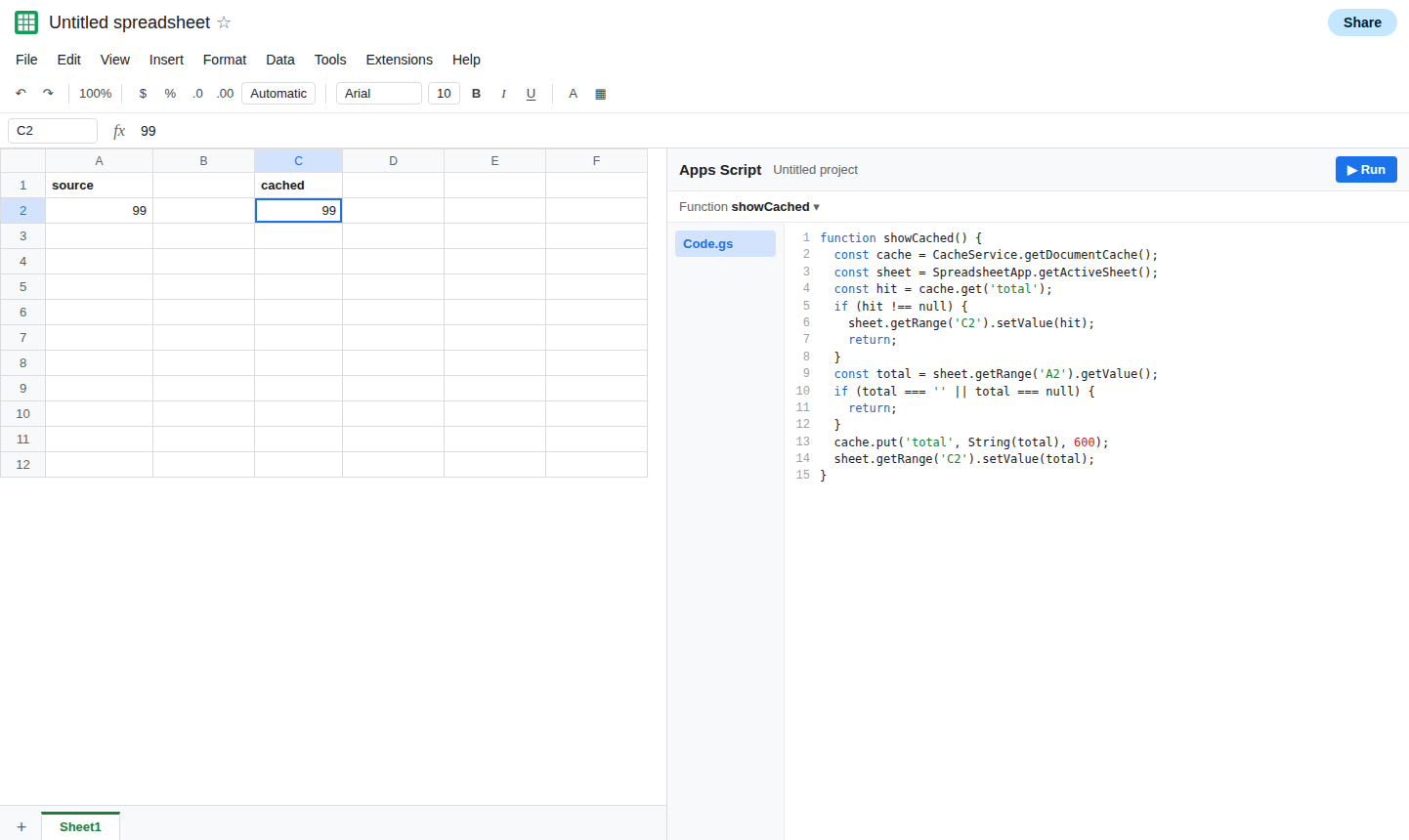
On a miss, fetch, then put. Do not clear the display first. After the 20 second demo, use an expiration you can live with, still at or under 21600. Run this after A2 is 99.
function showCached() { const cache = CacheService.getDocumentCache(); const sheet = SpreadsheetApp.getActiveSheet(); const hit = cache.get('total'); if (hit !== null) { sheet.getRange('C2').setValue(hit); return; } const total = sheet.getRange('A2').getValue(); if (total === '' || total === null) { return; } cache.put('total', String(total), 600); sheet.getRange('C2').setValue(total);}C2 updates when the entry is cold and A2 has a value. If A2 is empty, the function returns without wiping C2. Change A2 and either wait out the TTL or call cache.remove('total') from a one-off function when the source changes and you need the next run to refetch. Removing the key is the explicit refresh. Waiting is the other one. Neither one is instant for every user if you used getUserCache.
For a table another Google Sheet already publishes, use IMPORTRANGE and accept its permission and loading behavior. See IMPORTRANGE access. A cache in front of a fetch is a snapshot with a deadline. Say so in the cell note if editors think C2 is live.
If C2 blinks blank, the script wrote a null miss onto the sheet. If C2 stays old after the source changes, the TTL has not ended and nothing called remove. If the value is larger than the cache will store, it was never a cache entry. Use a formula or a smaller summary.