

UNIQUE keeps different case and accents as different rows
Updated
UNIQUE compares text as it is stored. Foo, foo, and FOO are three keys. José and Jose are two keys. The function is not broken when both rows remain. It did not apply a case fold or an accent fold. A second identical Foo does collapse. The match is exact, including case and diacritics.
Rows that appear twice and then vanish because exactly_once is TRUE are UNIQUE exactly once. Deduping across columns instead of down is UNIQUE by_col. Keep the Google Sheets UI in English. Sheet Error is an independent formula-error library, not a Google product.
Recreate it on a blank sheet
Section titled “Recreate it on a blank sheet”- Open a blank spreadsheet. In A1 type
name. A2Foo. A3foo. A4FOO. A5José. A6Jose. A7Foo. Six rows. The lastFoorepeats A2. The others only look related.
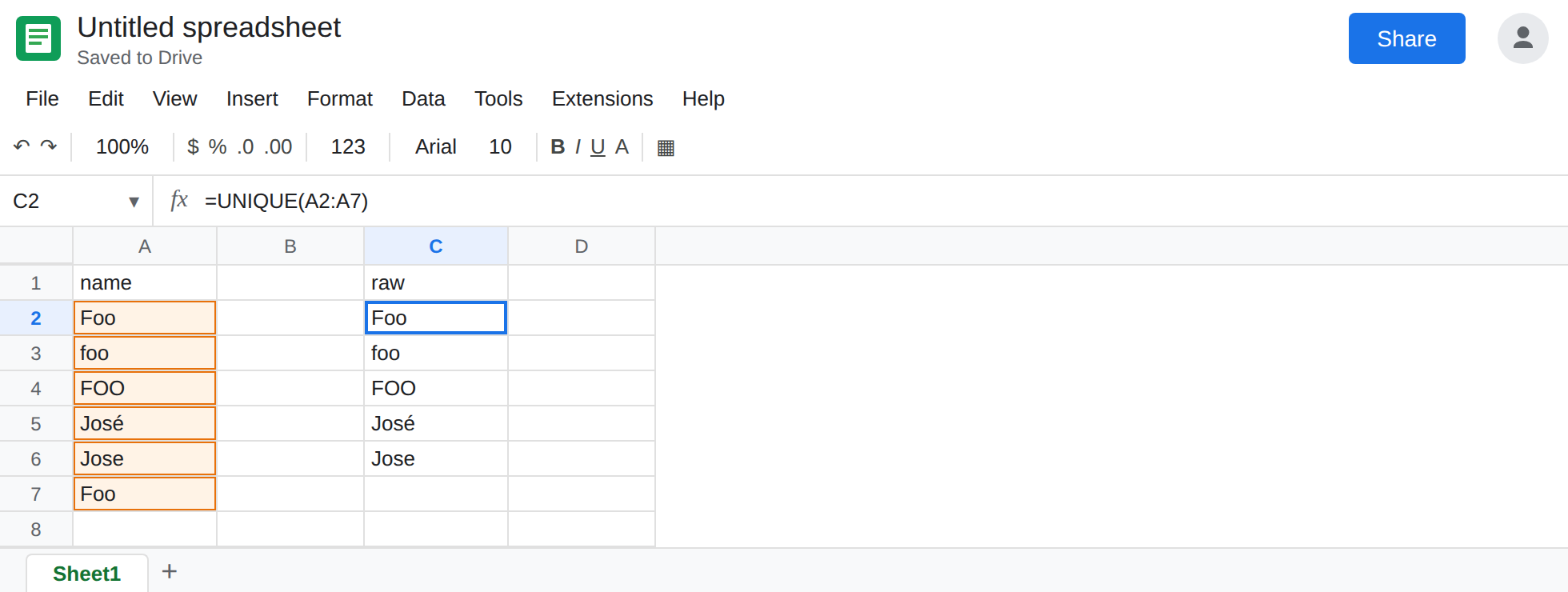
Default UNIQUE. Leave C2:C7 empty. In C1 type raw. In C2 enter =UNIQUE(A2:A7). The spill is Foo, foo, FOO, José, Jose. Five rows. A7 was dropped because it matches A2 exactly. A3 and A4 stayed. A5 and A6 stayed. That spill is the control for what UNIQUE actually promises.
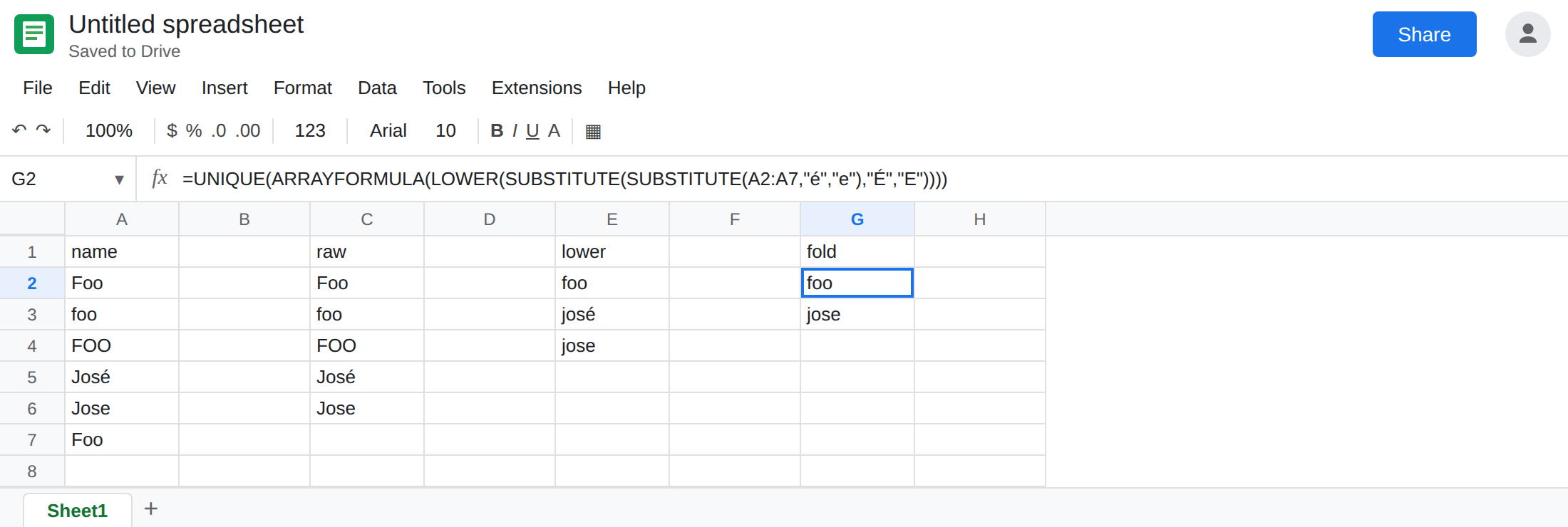
Case fold only. In E1 type lower. In E2 enter =UNIQUE(ARRAYFORMULA(LOWER(A2:A7))). The spill is foo, josé, jose. Three rows. Case no longer splits the Foo group. The accent still splits José from Jose. Leave E2 as those three.
A small accent map on top of the fold. In G1 type fold. In G2 enter =UNIQUE(ARRAYFORMULA(LOWER(SUBSTITUTE(SUBSTITUTE(A2:A7,"é","e"),"É","E")))). LOWER runs on the result, so É mapped to E still becomes e. The spill is foo and jose. Two rows. That is the list people usually wanted from this column. It is not what C2 does.
A trailing space is a third kind of difference. In A8 type Foo plus a space. In C8 enter =UNIQUE(A2:A8). Foo and Foo are both present. TRIM is the tool for that, not LOWER. Leave the space in A8 so C8 stays longer than C2.
Leave C2 as five rows. Leave E2 as three. Leave G2 as two.
What is actually wrong
Section titled “What is actually wrong”- Equality inside
UNIQUEis character-for-character. Upper and lower case are different characters. A precomposedéis not the lettere. C2 is that rule, applied correctly. LOWERfolds case and leaves accents. E2 is why a case-only fix still shows two Jose rows.UPPERandPROPERare the same idea with a different shape. They do not strip diacritics either.- Sheets has no built-in “remove accents” function. G2 maps the marks that actually appear in this column. A name with
ñ,ü, orôneeds those characters in theSUBSTITUTEchain or it will survive the wayjosésurvived E2. Add the pairs you have. Do not expect oneSUBSTITUTEto cover Unicode. - A decomposed
eplus a combining accent can still differ from a singleéafter a substitute that only searches for the precomposed character. If two cells look identical and both remain, paste each into aLENand aCODE/UNICODEcheck before you add another fold. - Whole-row
UNIQUEuses every column. A case difference in column B keeps the row even when column A matches. Fold the columns you mean, then runUNIQUEon the folded array.
This is not exactly_once. That flag drops rows that occur twice. See UNIQUE exactly once. C2 kept one Foo. It did not delete foo.
This is not a blocked spill. Five labels and no #REF! means the list is really five keys. See SORT / UNIQUE spill only when the tooltip says the array was not expanded.
Leave C2 as the exact list.
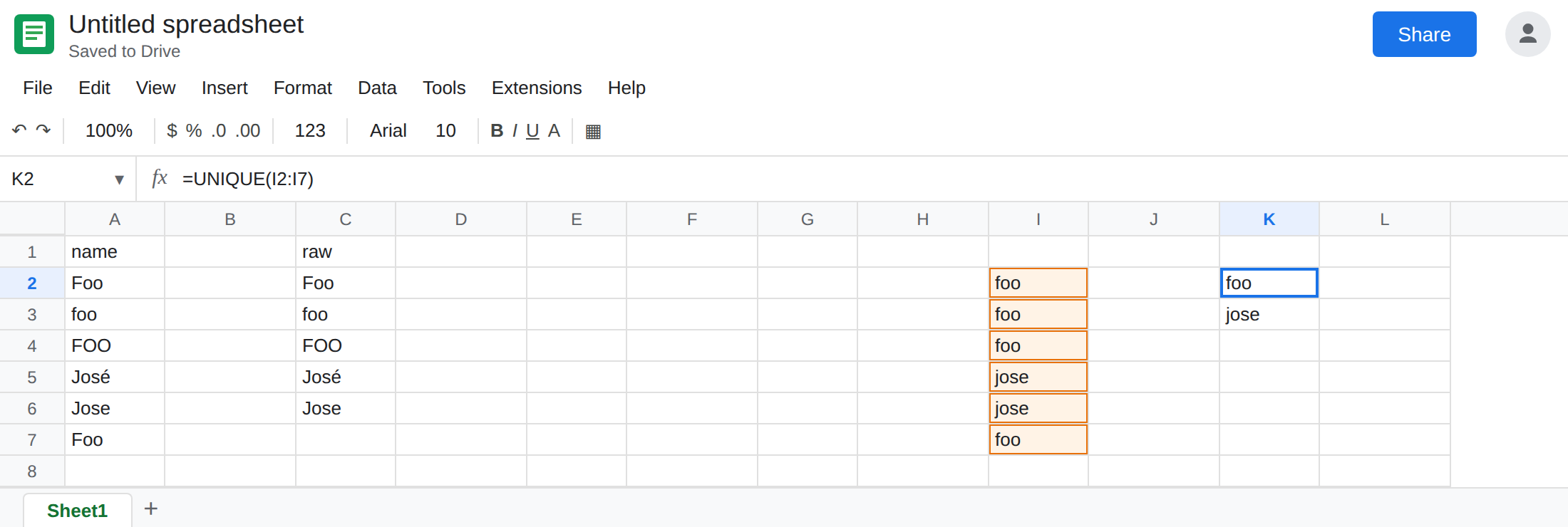
Fold, then dedupe. Keep G2 when this column’s only accent is é. For a cleaner helper, in I2 enter =ARRAYFORMULA(LOWER(SUBSTITUTE(SUBSTITUTE(TRIM(A2:A7),"é","e"),"É","E"))) and in K2 enter =UNIQUE(I2:I7). K2 matches G2’s two rows, and I2 is readable when a name fails to merge. TRIM on I2 also collapses the A8 problem if you extend the range.
When case is data, keep C2. Part numbers and symbols sometimes differ only by case on purpose. Folding those is a wrong report, not a cleanup.
Do not wrap C2 in IFERROR. It is not an error. The extra rows are the answer UNIQUE is defined to give.
If a distinct list still has Foo and foo, you have not folded case. If it has José and Jose, you have not mapped the accent. If a repeated exact row vanished entirely, the third argument is TRUE and you are on the exactly-once page.