

IMPORTFEED leaves url or summary blank on an Atom feed
Updated
IMPORTFEED reads an RSS or Atom URL into a table. The item columns it knows are title, summary, url, and created (plus author on the single-field queries). Those names are the function’s names, not the element names in the file. RSS usually puts the link in link and the body in description, and those land in url and summary. Atom puts the link in <link href="..."> and often puts the body in <content> rather than <summary>. The fetch succeeds. The url column, or the summary column, is blank.
A dead host, an HTML page, and an unknown query string are IMPORTFEED fetch. XPath on the same URL is IMPORTXML namespace. This page is a feed that loaded and a column that is empty. Sheet Error is not a Google product. Keep the Google Sheets UI in English.
Recreate it on a blank sheet
Section titled “Recreate it on a blank sheet”- Open a blank spreadsheet. In A1 type
kind, B1url, C1feed. Click Allow access if the external-data banner appears. That banner is not an Atom problem.
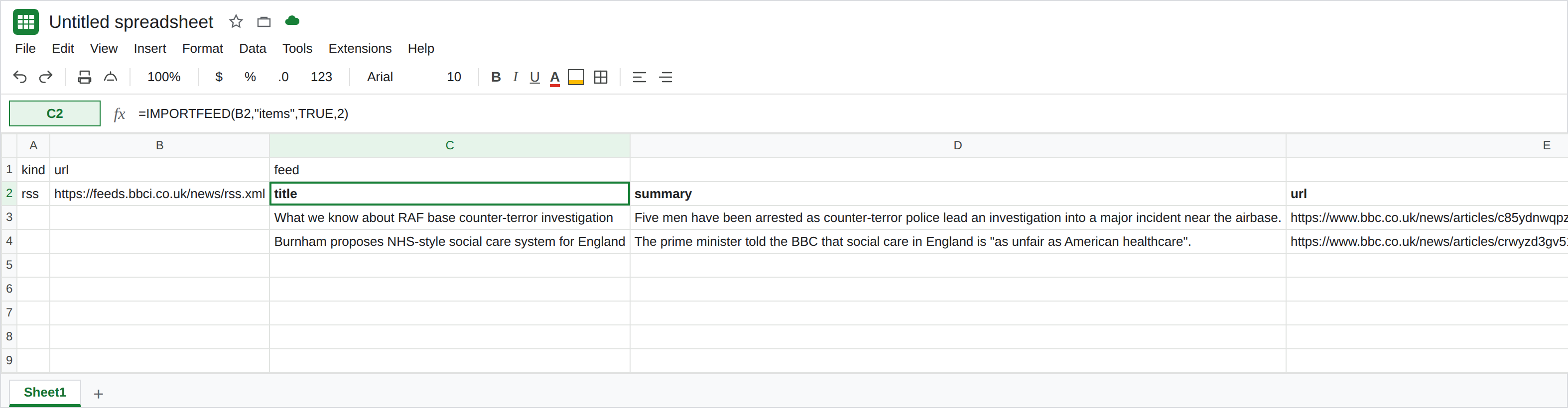
RSS fills the item columns. In A2 type rss. In B2 enter a public RSS URL you are allowed to fetch. The shape that spills is:
=IMPORTFEED(B2,"items",TRUE,2)
in C2. A working RSS spill has a header row (because the third argument is TRUE) and two items. The headers include title, summary, url, and created. Cells under url and summary have text. If the NASA breaking-news RSS from the fetch page loads for you, it is a valid B2. If it does not, use another RSS URL. C2 is the control only when those columns are non-blank. Leave C2 as that table.
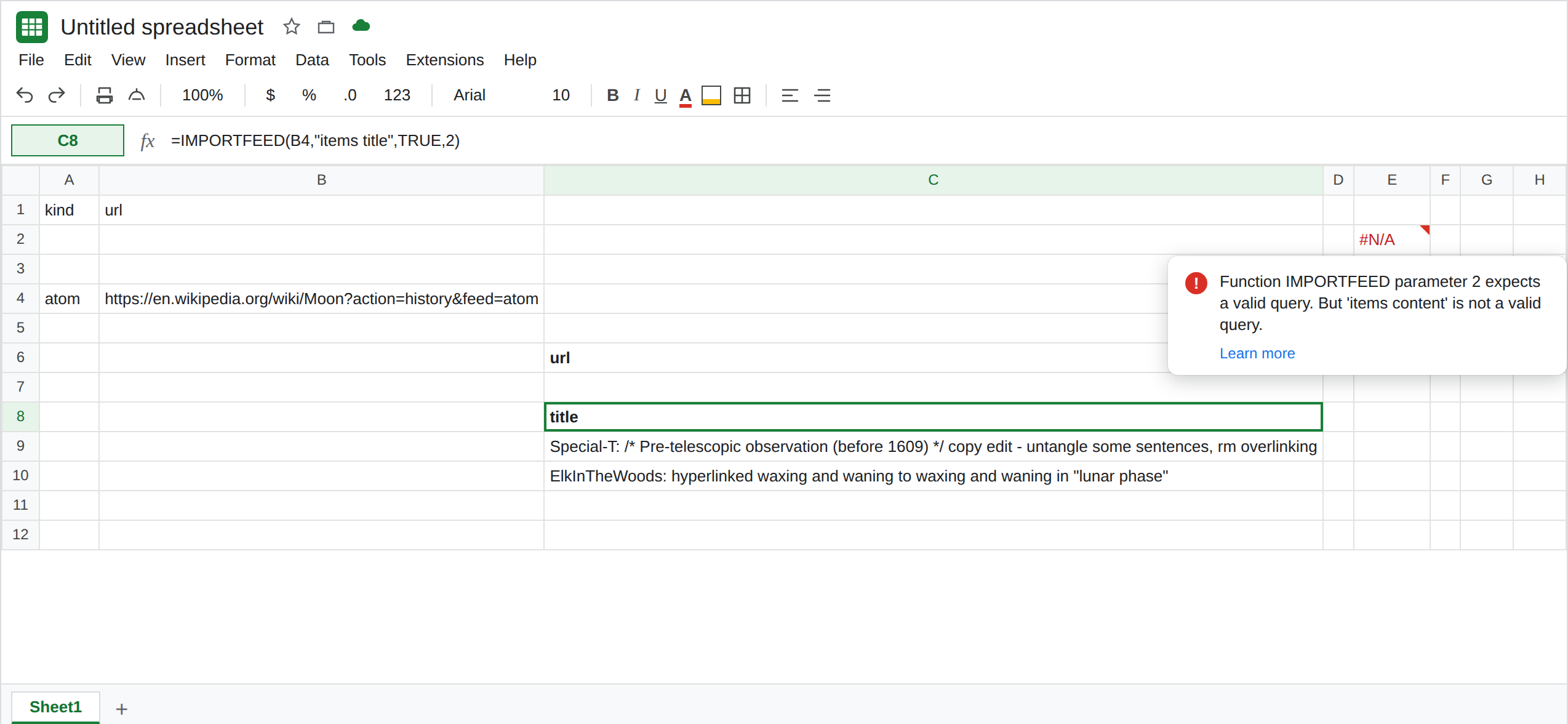
The same call on Atom. In A4 type atom. In B4 enter an Atom URL you are allowed to fetch. A small sample is https://validator.w3.org/feed/docs/atom.xml (the W3C Atom example). In C4 enter =IMPORTFEED(B4,"items",TRUE,2). Wait. If the URL fetches, C4 spills an items table. Compare it to C2. Title may be filled. url or summary may be empty, because the sample’s link is an href attribute and the body may sit in content rather than the summary field IMPORTFEED maps. Leave C4 as that spill, blanks included. If C4 is #N/A with Could not fetch url, the host failed. That is IMPORTFEED fetch. Pick an Atom URL that does fetch, then look at the columns again.
Ask for the url column alone. In C6 enter =IMPORTFEED(B4,"items url",TRUE,2). You get a header url and two item rows. If those rows are blank while =IMPORTFEED(B4,"items title",TRUE,2) in C8 shows titles, the feed has titles and the url field did not map. Leave C6 blank and C8 filled. That pair is the bug. It is not an empty feed.
A field name the function does not have. In E2 enter =IMPORTFEED(B4,"items content",TRUE,2). content is a common Atom element. It is not one of the query names. The cell errors. Leave E2 broken. Legal item queries are items, items title, items summary, items url, items created, and items author. feed, feed title, feed description, feed author, and feed url describe the feed, not each entry. See IMPORTFEED fetch for an unknown query on a URL that otherwise works.
What is actually wrong
Section titled “What is actually wrong”IMPORTFEEDmaps a feed into a fixed set of columns. It does not spill every XML element. Atom<content>and a<link>that only has anhrefcan leavesummaryandurlempty whiletitleis present. The formula ran.- RSS
descriptionandlinkline up withsummaryandurlmore often, which is why C2 looks complete and C4 does not. The function did not switch off because the file was Atom. Google’s help says the function accepts RSS and Atom. Acceptance is the fetch. The columns are still those four item fields. "items content"never becomes the content element. The second argument is not XPath and not a tag name. E2. To read a namespaced tag yourself, useIMPORTXMLandlocal-name(). See IMPORTXML namespace.headersTRUE adds a header row when items return. It does not invent a url the mapper missed.num_items2 limits how many items you pull. It does not fill a blank url.- Could not fetch url means the request failed. Blank cells under a real header mean the request returned a feed and the field was empty after mapping. Read the tooltip before you change the URL.
Leave E2 as the bad query. Leave C6 as a blank url column if that is what the Atom feed produced. Leave C2 as the RSS table if it loaded.
Read the column that actually filled. Use C8’s items title when the title is what you need. For a body that lives in Atom content, IMPORTFEED will not grow a content column. Pull that element with IMPORTXML and //*[local-name()='content'], or choose an RSS URL whose description already lands in summary.
Do not point IMPORTFEED at an HTML homepage to fill the blank. A wiki page is not a feed. See IMPORTFEED fetch.
Do not wrap C6 in IFERROR. The blank url would look the same as a failed fetch, and the titles in C8 would be the only clue. See IFERROR vs IFNA.
If the spill has titles and an empty url, the feed format’s link was not mapped into items url. Use the column that filled, or read the element with IMPORTXML. If the tooltip says Could not fetch url, the format never mattered. If the tooltip is an unknown query, the second argument is not items title, items summary, items url, or items created.