

MAP errors when the LAMBDA returns more than one value
Updated
MAP(array, LAMBDA) runs the lambda once per element and must get one value back each time. Those values spill in the shape of the input. If the lambda returns two cells — an array literal, HSTACK, SPLIT, or FILTER — Sheets stops. The tooltip is Single value expected. Nested array results are not supported. The cell is #N/A or #VALUE!. Excel’s #CALC! for a nested array is the same shape mistake under another name. This grid does not show #CALC!.
Input arrays of different height are MAP array size. BYROW returning the whole row is BYROW / MAP LAMBDA. Keep the Google Sheets UI in English. Helper names stay English: LAMBDA, MAP. Sheet Error is an independent formula-error library, not a Google product.
Recreate it on a blank sheet
Section titled “Recreate it on a blank sheet”- Open a blank spreadsheet. In A1 type
hours. A22. A34. A41. In B1 typenote. B2am. B3pm. B4am.
One value per row. In D1 type double. In D2 enter =MAP(A2:A4,LAMBDA(h,h*2)). The spill is 4, 8, 2. That column is the control.
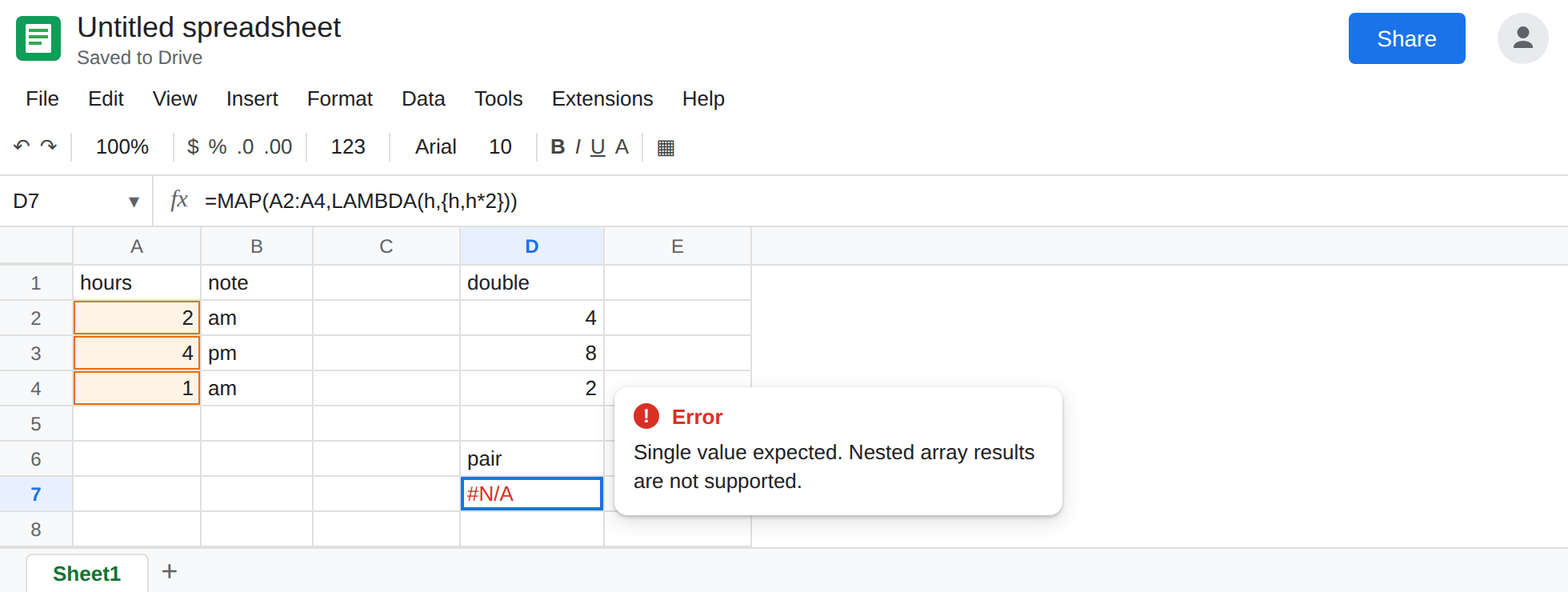
Two cells from the lambda. In D6 type pair. In D7 enter =MAP(A2:A4,LAMBDA(h,{h,h*2})). {h,h*2} is a row of two numbers. The cell shows #N/A or #VALUE!. Tooltip: Single value expected. Nested array results are not supported. If the braces are #ERROR! with a Formula parse error, this locale uses \ as the array column separator. Write {h\h*2}. See array literal locale. Leave D7 broken once the literal parses. You do not get a two-column spill of hours and doubles.
HSTACK and FILTER are the same refusal. In F1 type hstack. In F2 enter =MAP(A2:A4,LAMBDA(h,HSTACK(h,h*2))). F2 matches D7’s tooltip. Leave F2 broken. In F4 type filt. In F5 enter =MAP(A2:A4,LAMBDA(h,FILTER(B2:B4,A2:A4=h))). Each call tries to return every note for that hour. That is an array. F5 is the nested-array error, not a list of notes. Leave F5 broken.
A size error is a different tooltip. In F7 enter =MAP(A2:A4,B2:B5,LAMBDA(h,n,h)). B2:B5 is one row taller. Tooltip: Array arguments to MAP are of different size. The lambda would have returned one value. The inputs do not line up. That page is MAP array size. Leave F7 broken so the two tooltips sit side by side.
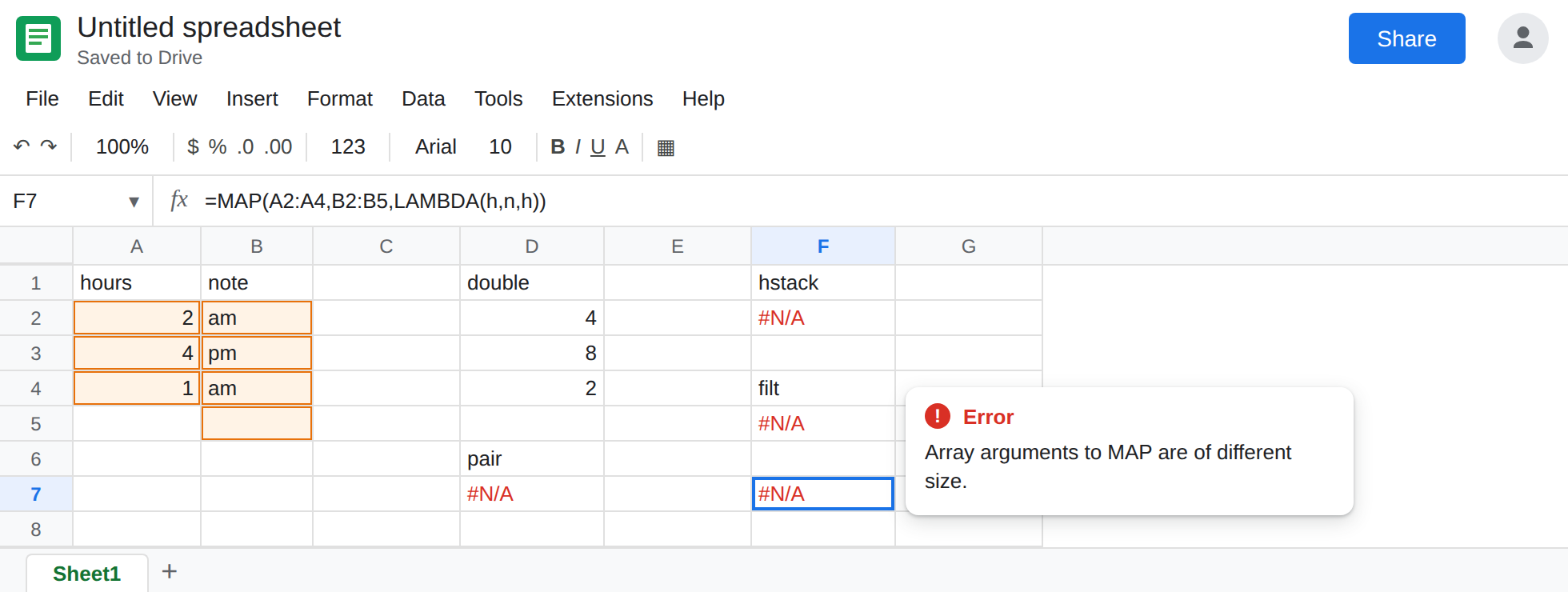
Leave D7, F2, and F5 broken. Leave D2 as 4, 8, 2.
What is actually wrong
Section titled “What is actually wrong”MAP’s output is one cell per input cell. The lambda is not a place to start a second spill.{h,h*2}asks one output cell to become two. Sheets refuses before any hours are written.HSTACKinside the lambda is still two cells. Wrapping the pair in a function does not make it a scalar.TEXTJOIN(",",TRUE,h,h*2)would be one string, which is legal and usually the wrong report.FILTERinsideMAPreturns every match, and the number of matches can change per row.MAPcannot spill a ragged list from each element. F5 fails even when a row would have returned one note.- The size tooltip never runs the lambda. F7 is not a nested array. Reading “different size” and then changing the return to
{h,n}stacks two bugs. - Excel documents this shape as
#CALC!. If a colleague says#CALC!and the Sheets cell says Single value expected, you are on this page. Do not search the grid for the Excel token. See the same note on MAKEARRAY LAMBDA.
This is not ARRAYFORMULA writing 0 on blank rows. There is no triangle on that page. See ARRAYFORMULA empty 0.
Leave D7 and F2 broken.
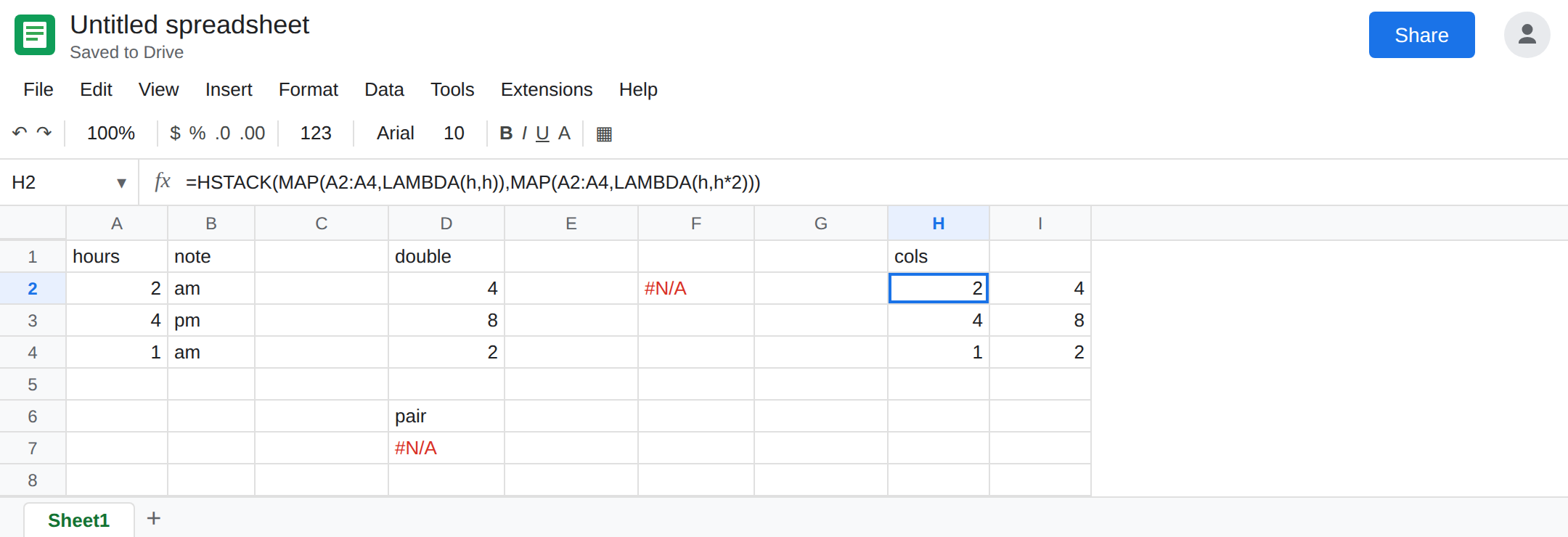
One MAP per output column, then stack those spills. In H1 type cols. In H2 enter =HSTACK(MAP(A2:A4,LAMBDA(h,h)),MAP(A2:A4,LAMBDA(h,h*2))). H2:I4 is 2/4, 4/8, 1/2. Each lambda returns a number. HSTACK joins the two finished columns. That is the two-column result D7 could not be.
A scalar from a row. Notes as one cell: =MAP(A2:A4,LAMBDA(h,TEXTJOIN(", ",TRUE,FILTER(B2:B4,A2:A4=h)))) in H6. TEXTJOIN collapses the FILTER. The lambda returns text. Use this when a single cell per hour is enough. When you need a real two-column table, build it with FILTER or QUERY on the source, not with MAP of FILTER.
Do not wrap D7 in IFERROR. The pair is still what the lambda returns. See IFERROR vs IFNA.
If the tooltip says Single value expected, the lambda returned an array. Return one value, or map each column separately and HSTACK outside. If the tooltip says the arrays are different sizes, fix the ranges first. If the cell says #CALC!, you are looking at Excel, not at this Sheets error.