

IMPORTHTML returns #N/A when the page has lists and you asked for a table
Updated
IMPORTHTML(url, query, index) takes two query words: "table" or "list". "table" counts <table> elements. "list" counts <ul> and <ol> elements. It does not count definition lists, and it does not count “the thing that looks like a table in the browser” if that thing is a list. Ask for "table" on a page that has no table and the cell is #N/A. The tooltip is Imported content is empty. The same URL with "list" and index 1 spills a list. The reverse mistake asks for "list" when the numbers live in a table. You get a navigation list, or #N/A when the document has no list at all.
Which table or list index 1 means is IMPORTHTML index. A page whose table exists only after JavaScript runs is IMPORTHTML JavaScript. The download-size tooltip is IMPORTHTML resource size. Keep the Google Sheets UI in English. Sheet Error is an independent formula-error library, not a Google product.
Recreate it on a blank sheet
Section titled “Recreate it on a blank sheet”- Open a blank spreadsheet. Click Allow access if the banner appears. That banner is not an empty import.
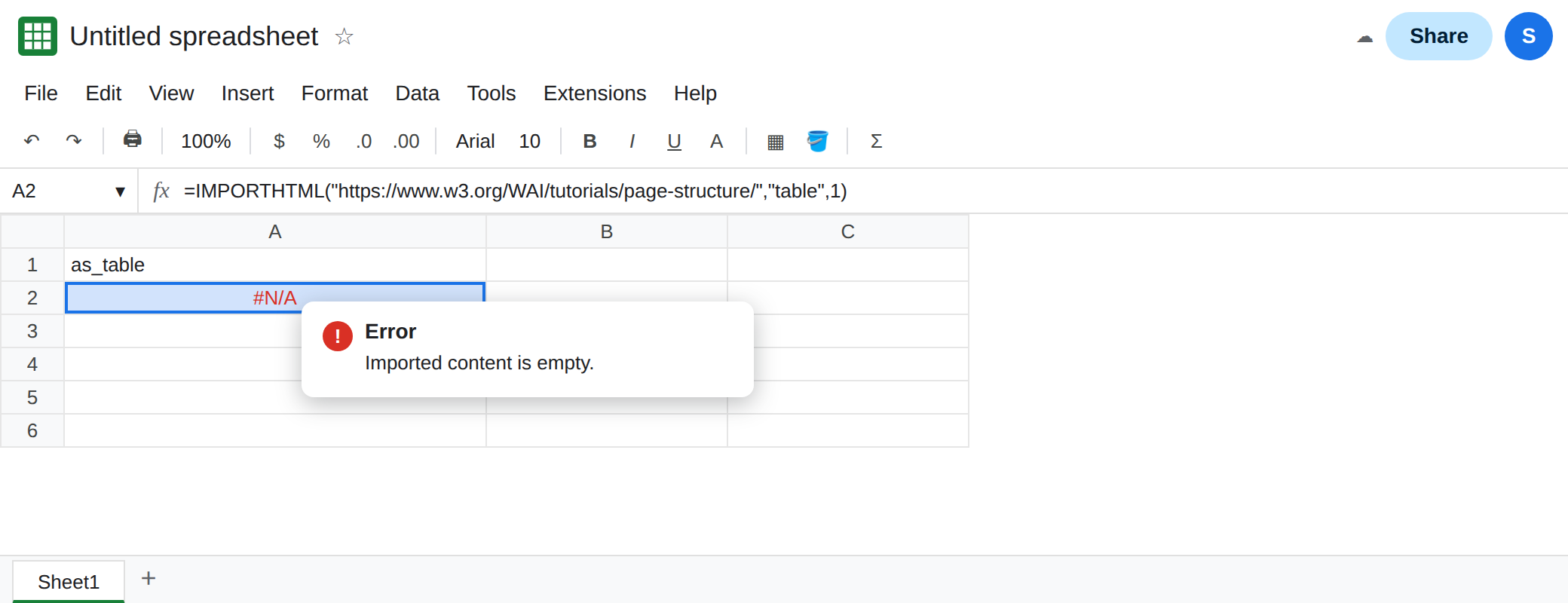
A page with lists and no table. In A1 type as_table. In A2 enter:
=IMPORTHTML("https://www.w3.org/WAI/tutorials/page-structure/","table",1)
That page’s HTML has lists and no <table>. A2 is #N/A. The tooltip is Imported content is empty. The URL loaded. There is no table at index 1 because there is no table at any index. Leave A2 broken.
The same URL as a list. In A4 type as_list. In A5 enter:
=IMPORTHTML("https://www.w3.org/WAI/tutorials/page-structure/","list",1)
A5 spills a list. Index 1 is the first <ul> in the document, which on this site is a skip-link menu, not the article body. The spill is still a list, and it is not #N/A. That contrast is the lesson: the query word changed, the URL did not. Leave A5 as the spill. If you need a later list on the same page, change the index. Index counting is IMPORTHTML index.
A page whose data is a table. In C1 type concerts. In C2 enter:
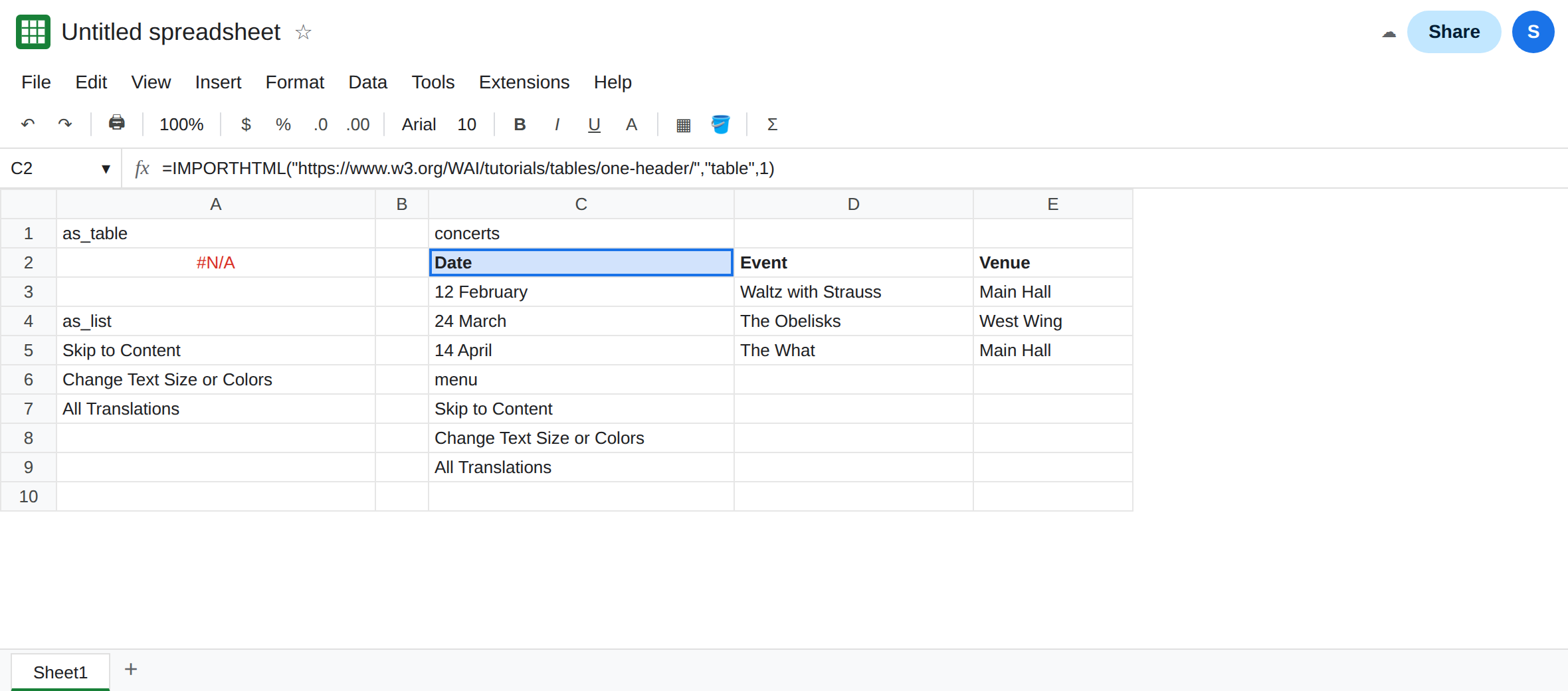
=IMPORTHTML("https://www.w3.org/WAI/tutorials/tables/one-header/","table",1)
C2 spills a small table whose first row is Date, Event, Venue, then rows such as 12 February and Waltz with Strauss. That spill is the control for "table". The numbers you came for are in a <table>.
“list” on that table page is not the concert grid. In C6 type menu. In C7 enter:
=IMPORTHTML("https://www.w3.org/WAI/tutorials/tables/one-header/","list",1)
C7 spills a list. It is the first <ul> on the page, a skip or navigation list, not Date / Event / Venue. The import succeeded. It answered a different question. Leave C7 next to C2 and compare the first cell. They do not match. "list" did not return #N/A here, because the page has lists in the chrome. #N/A on "list" means the document has no <ul> or <ol> at that index. A page that is only a table, with no list element, is that #N/A. C7 is the case people hit more often: data in hand, wrong object.
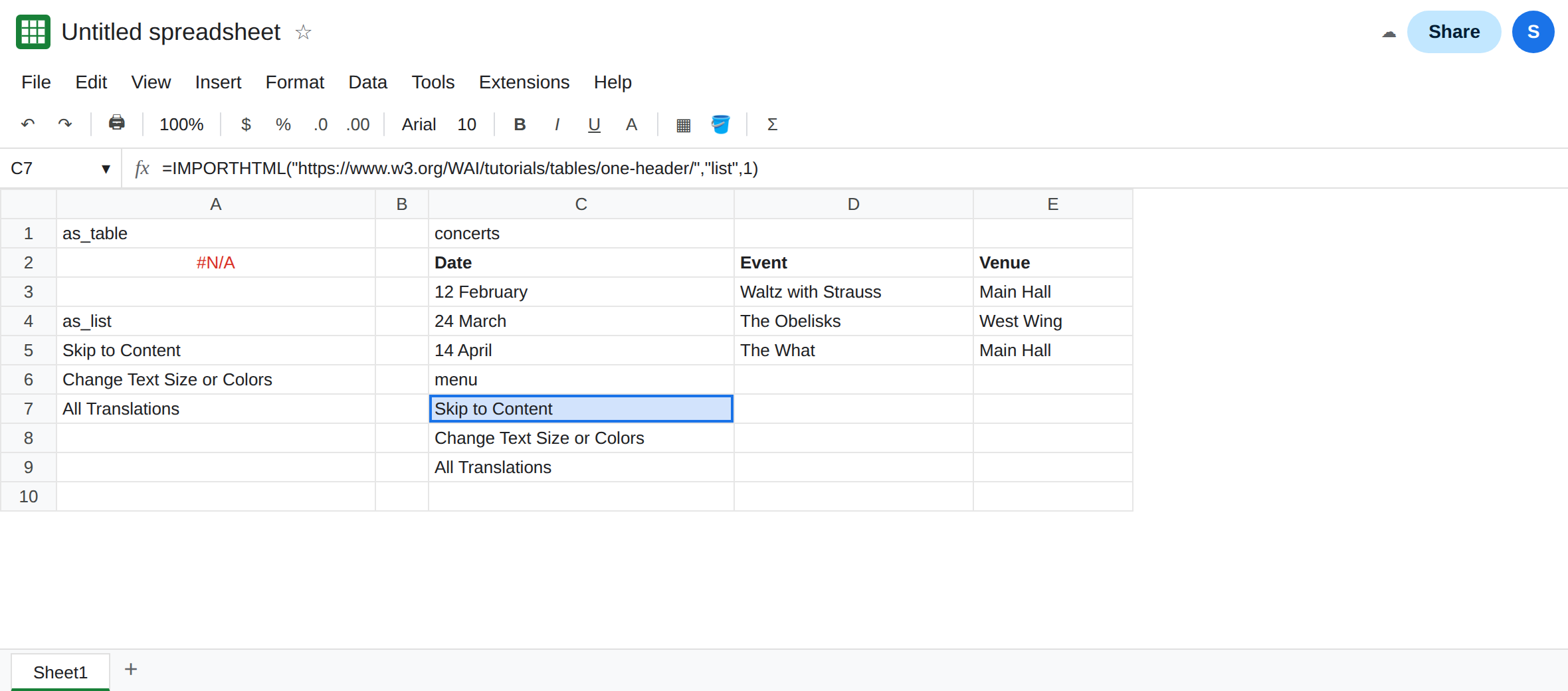
Leave A2 as #N/A. Leave C2 as the concert table.
What is actually wrong
Section titled “What is actually wrong”- The second argument is a kind, not a hint.
"table"never scans lists to be helpful."list"never scans tables. A2 is an empty kind. The tooltip matches a missing index, which is why this looks like IMPORTHTML index. On that page, index50is empty because the table exists and50is past it. On this page, index1of"table"is empty because the kind is absent. - Document order includes the site’s menus. C7’s first list is not the example table you see in the middle of the article. A successful spill can still be the wrong object. Read the first cells before you build a report on them.
"list"does not mean “everything on the page, listed.” Definition lists (<dl>) are not in the count. A glossary that looks like a list in the browser can be#N/Afor both words if it is neither<table>nor<ul>/<ol>.- The index does not change the kind.
"table", 2on the page-structure URL is still#N/A. You are not one index away from a table that is not there. - A table that is built in the browser by JavaScript is not in the HTML Sheets fetches. Both query words can be
#N/Afor that reason. See IMPORTHTML JavaScript. If C2 spills, the fetch is fine and the kind is the only question left. - An XPath such as
//ul[1]belongs inIMPORTXML, not in the query slot. See IMPORTXML XPath.
This is not IMPORTDATA. A CSV has no table-versus-list word. See IMPORTDATA delimiter.
Leave A2 as #N/A from "table". Leave C2 as the working table.
Use the word that names the element. On the page-structure URL, "list" is the word that returns a spill. On the one-header URL, "table" is the word that returns Date, Event, Venue. If the first list is a menu, raise the index until the first cell is the text you meant, or switch to "table" when the text lives in a grid.
Confirm emptiness before you change the URL. If "table", 1 and "list", 1 are both #N/A, the page has neither element in the fetched HTML. That is size, a client-rendered page, or a document that is only paragraphs. It is not fixed by swapping the two words again.
Do not wrap A2 in IFERROR. You would hide “no table” and show a blank that looks like a finished import. See IFERROR vs IFNA.
If the tooltip says Imported content is empty, check the query word before the index. A spill of a menu is a list import that worked. The concert dates are the table import beside it.