

Fix QUERY PIVOT errors in Google Sheets (mixed types or missing GROUP)
Updated
QUERY pivot spreads unique values of one column into header cells and fills an aggregate under each. Other select fields must be grouped or aggregated. Mixed types in the aggregated column (TBD next to numbers) fail with AVG_SUM_ONLY_NUMERIC. A leftover field that is not grouped, not aggregated, and not the pivot key fails with ADD_COL_TO_GROUP_BY_OR_AGG. pivot already groups; a stray column still has to collapse.
This page is PIVOT. It is not QUERY group by (sum without pivot, ugly sum qty header). It is not QUERY parse string (unquoted text, date 'yyyy-mm-dd'). It is not QUERY no rows. Keep the Google Sheets UI in English.
Recreate it on a blank sheet
Section titled “Recreate it on a blank sheet”- Open a blank spreadsheet. In A1 type
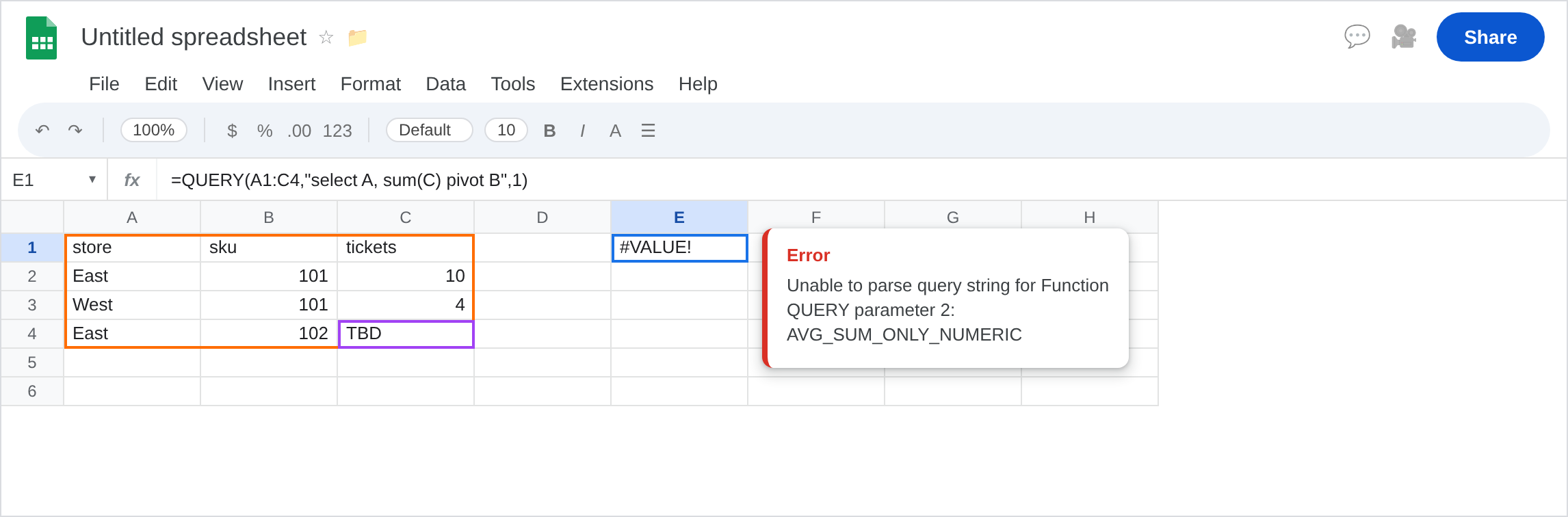
store, B1sku, C1tickets. A2East. B2101. C210. A3West. B3101. C34. A4East. B4102. C4TBDas text. Three fact rows. Tickets mix numbers andTBD. Skus101/102are the pivot keys you want as columns.
PIVOT with mixed tickets. In E1 enter =QUERY(A1:C4,"select A, sum(C) pivot B",1). The cell shows #VALUE!. Tooltip starts Unable to parse query string and names AVG_SUM_ONLY_NUMERIC (AVG_SUM_COLUMN). sum(C) needs a numeric column. TBD in C4 is enough. Leave E1 broken.
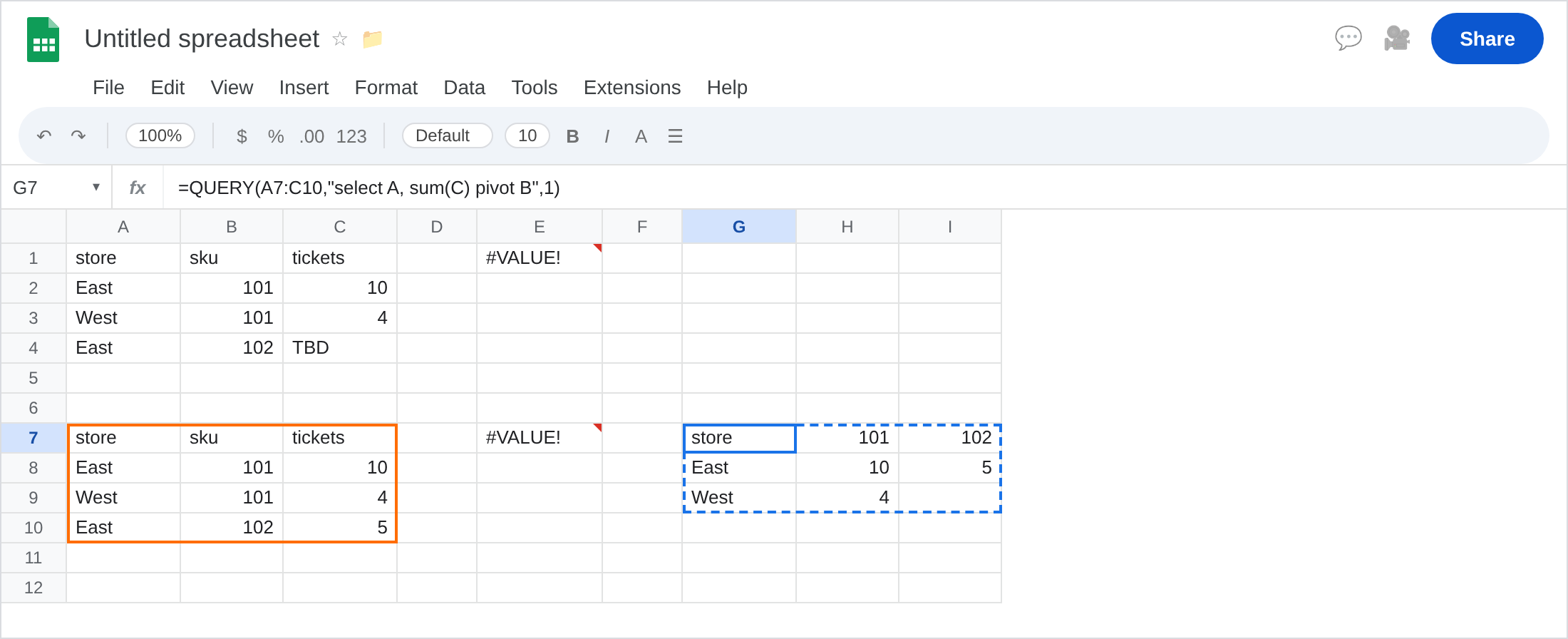
Selected column not collapsed. Keep C4 as TBD for E1. On a clean copy: A7 store, B7 sku, C7 tickets. A8 East. B8 101. C8 10. A9 West. B9 101. C9 4. A10 East. B10 102. C10 5. In E7 enter =QUERY(A7:C10,"select A, B, sum(C) pivot B",1). #VALUE!, ADD_COL_TO_GROUP_BY_OR_AGG: B cannot be selected raw and pivoted. Leave E7 broken.
A PIVOT that works. In G7 enter =QUERY(A7:C10,"select A, sum(C) pivot B",1). The spill has store and then columns 101 and 102 with East/West totals. Header labels may be the sku values. That block is the control.
GROUP BY without PIVOT (other page). In G12 enter =QUERY(A7:C10,"select A, sum(C) group by A",1). Totals by store only, no sku columns. That primer is QUERY group by. Leave it as contrast, not a “fix” for a pivot you still need.
Leave E1 and E7 broken. Leave G7 as the working pivot.
What is actually wrong
Section titled “What is actually wrong”pivot Bmakes each distinct sku a column.select A, sum(C)is store plus an aggregate. That is the legal shape (G7).sum(C)types the whole tickets column. OneTBDmakes the column non-numeric. E1. The numbers in C2 and C3 do not save it.select A, B, sum(C) pivot Basks for sku as a row field and as pivot headers. QUERY cannot place B twice. DropBfromselect(it already became columns).group bywithpivotis easy to over-specify. You usuallyselectthe non-pivot dimensions and aggregates only. Extra dimensions belong inselectand must be grouped — or leave them out.- Parse failures from unquoted
Eastare#VALUE!with a different tooltip. See QUERY parse string. E1 quotes nothing it should not; the agg type is the problem.
This is not year(A) on TBD dates. See QUERY mixed dates. TBD here sits in tickets. Empty output is QUERY no rows.
Leave E1 and E7 broken.
Make the aggregated column numeric. In C4 type 5 (or clear TBD). Then E1 can spill — but keep E1 broken for the screenshot story, and use G7 on the clean table: =QUERY(A7:C10,"select A, sum(C) pivot B",1).
Do not select the pivot column again. Keep select A, sum(C) pivot B. For a note column you must count(D) or add D to select and group it (usually the wrong grain for a pivot).
Do not wrap E1 in IFNA. The error is #VALUE!. See IFERROR vs IFNA. Prefer fixing C4 over N("TBD") (that is 0, a lie).
If the tooltip names AVG_SUM, clean the value column. If it names ADD_COL, drop the extra select field. If it names Unable to parse and a quote, leave for the parse primer.
PIVOT vs GROUP BY vs mixed dates
Section titled “PIVOT vs GROUP BY vs mixed dates”pivot B = sku values become columns. G7.
group by A = one row per store, no sku columns. G12. That is QUERY group by.
TBD in a date column breaks year(A). TBD in tickets breaks sum(C) on a pivot. Same letters, different primers. Empty pivot (no matching rows) is #N/A on QUERY no rows, not this #VALUE!.