

Fix TIMEVALUE #VALUE! in Google Sheets (text the locale will not parse as a time)
Updated
TIMEVALUE turns a time written as text into a Sheets time serial (a fraction of a day). #VALUE! means that string is not a time this spreadsheet’s locale will parse. The function name is fine. The text is the wrong shape for this file’s time convention, or it is not a time at all.
This page is locale-shaped time text. It is not DATEVALUE locale (a date string this locale will not parse). It is not wrong type as a generic primer (10 + pcs, TIMEVALUE("Widget") as a non-time word). Keep the Google Sheets UI in English. Locale is File → Settings → Locale, not the display language.
Recreate it on a blank sheet
Section titled “Recreate it on a blank sheet”- Open a blank spreadsheet. File → Settings. Set Display language to English if it is not already. Set Locale to United States. Save. United States reads times with a colon (
1:30 PM,13:30:00). - In A1 type
kind, B1text, C1timevalue. - A US string this locale accepts. In A2 type
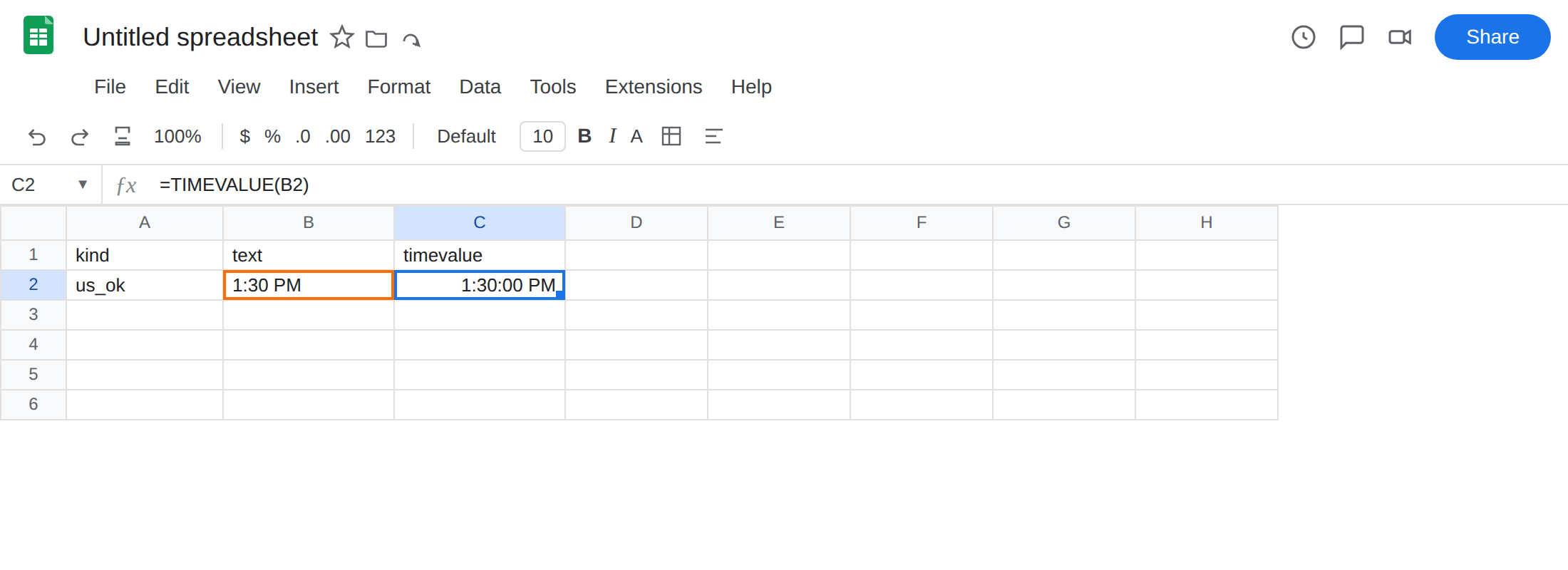
us_ok. In B2 type an apostrophe then1:30 PMso Sheets does not auto-convert to a time. In C2 enter=TIMEVALUE(B2). The cell shows a time (or a serial such as0.5625). Format C2 as a time if you only see a fraction. That row is the control:TIMEVALUEworks when the string matches the locale.
- A dotted time this US locale will not parse. In A3 type
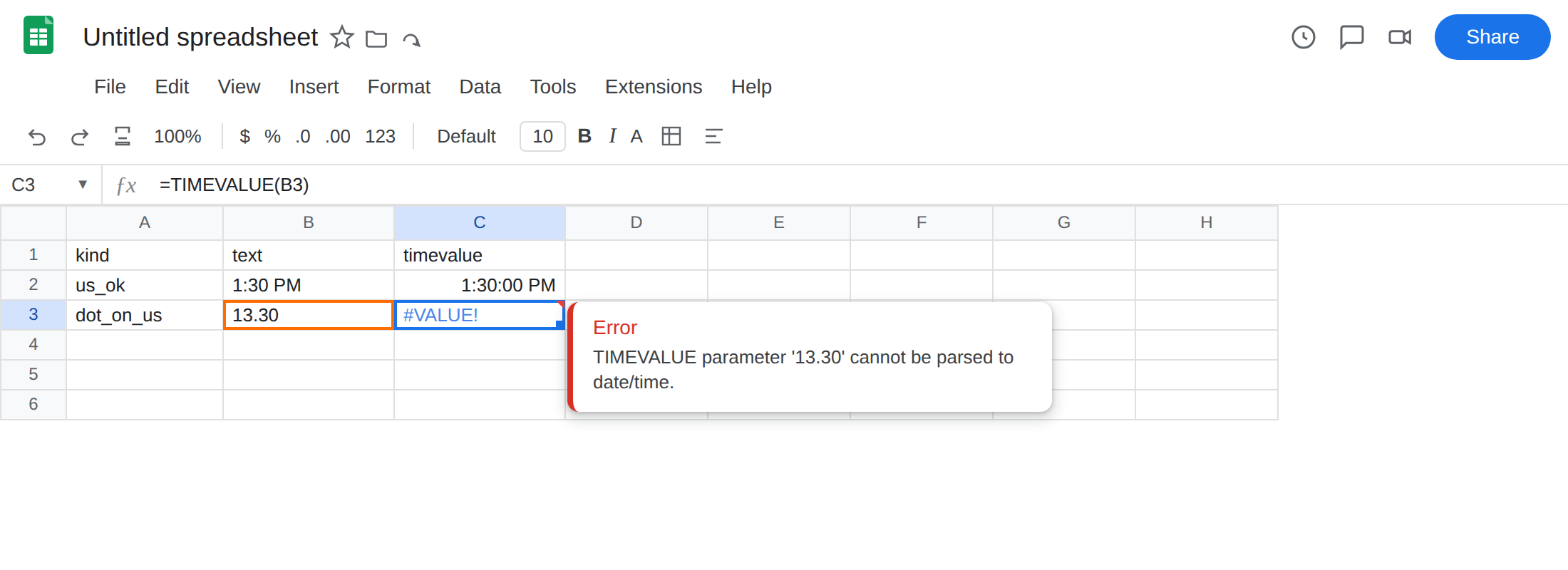
dot_on_us. In B3 type an apostrophe then13.30. In C3 enter=TIMEVALUE(B3). The cell shows#VALUE!. United States does not treat13.30as 1:30 PM. Some European locales do. Leave C3 broken.
- A date string is not a time. In A4 type
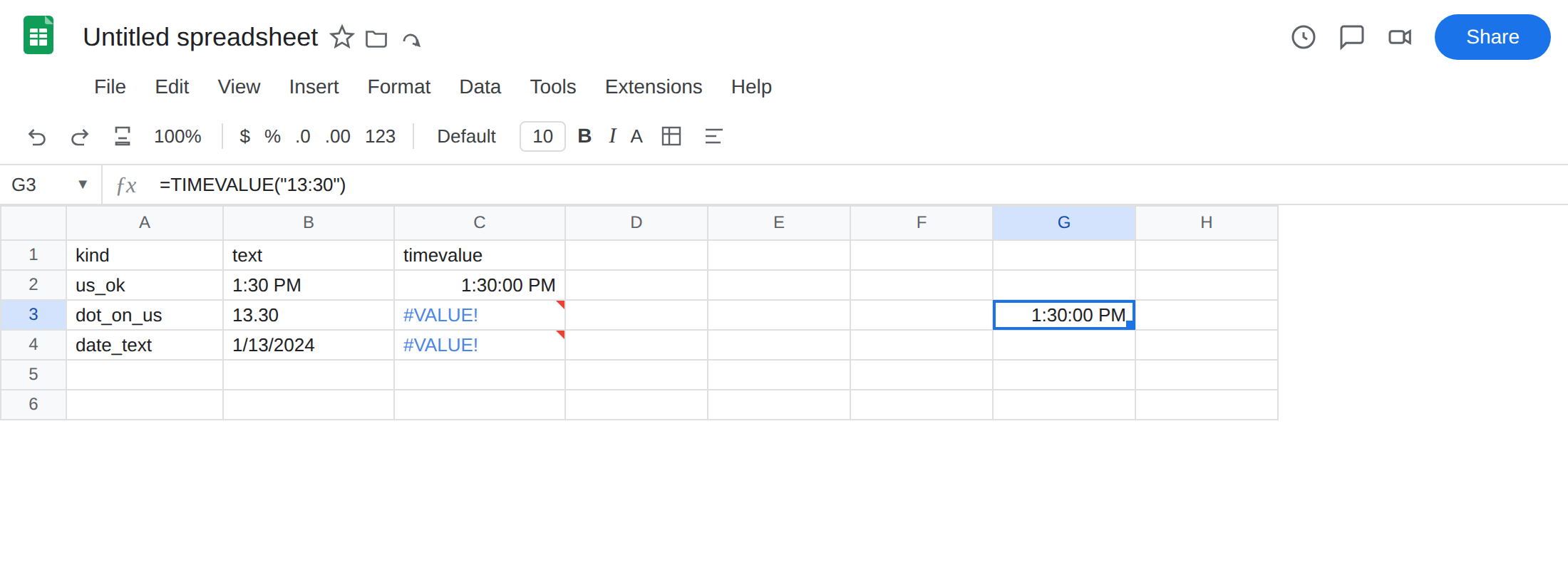
date_text. In B4 type an apostrophe then1/13/2024. In C4 enter=TIMEVALUE(B4). The cell shows#VALUE!. That string is a date on a US locale.DATEVALUE(B4)would parse it.TIMEVALUEwill not. Leave C4 broken.
The reverse locale. File → Settings → Locale → Denmark (English UI stays English). C3 may become a time. C2 may become #VALUE!. The same strings swap who fails. Set Locale back to United States. Do not change Display language.
Leave C3 as #VALUE!. Leave C2 as the working control.
What is actually wrong
Section titled “What is actually wrong”TIMEVALUEparses text with this spreadsheet’s locale. United States:1:30 PMand13:30:00are times.13.30is not. Denmark: the pair can flip. A clock export that uses.as the separator will#VALUE!on a US file until you rewrite the text.- Auto-conversion hides the bug. Type an apostrophe so the cell stays text.
ISTEXT(B3)TRUE,ISNUMBER(B3)FALSE. - A word is a different
#VALUE!.=TIMEVALUE("Widget")fails on every locale. That is wrong type. This page is a string that is a time somewhere, and not here — or a date string fed to a time parser. - A datetime phrase (
"2024-01-13 13:30:00"as text) often#VALUE!here. Split the time piece, or store a real datetime.TIMEVALUEwill not skip the date.
This is not DATEVALUE of 13/1/2024 on a US locale. That page is a date order problem. See DATEVALUE locale. C4 is TIMEVALUE of a date string. C3 is a time separator the locale will not read. Neither is DATEVALUE.
This is not a Formula parse error from commas vs semicolons. See locale parse error. C3 parsed. Then TIMEVALUE rejected the string.
This is not #N/A. Nothing is being looked up. See what #N/A means.
Leave the mismatched-locale cell broken so #VALUE! stays on the sheet.
Write the time in this locale’s shape. On United States, keep B2 (1:30 PM) and C2. For a 13:30 clock as text, type '13:30 or '1:30 PM, not '13.30. In G3 enter =TIMEVALUE("13:30"). The cell matches a 1:30 PM serial. Format G3 as a time.
Prefer numbers, not parse. =TIME(13,30,0) is hour, minute, second as numbers. TIME does not parse text. Use it when the parts live in separate cells.
Rewrite a dotted clock. If the export is 13.30 and the file must stay United States, substitute the separator: in G5 enter =TIMEVALUE(SUBSTITUTE(B3,".",":")). The cell becomes a time. Do not set Locale to Denmark to make one formula work and break every 1:30 PM already on the file.
Do not pass a date string to TIMEVALUE. For B4, use DATEVALUE locale or DATE(2024,1,13). If the cell is already a datetime serial, =MOD(the_datetime,1) is the time of day — not TIMEVALUE of the displayed text.
Do not wrap this #VALUE! in IFERROR. You still do not have 1:30 PM. Match the string to File → Settings → Locale, or pass TIME(hour, minute, second).
TIME vs TIMEVALUE vs DATEVALUE
Section titled “TIME vs TIMEVALUE vs DATEVALUE”TIME(h,m,s) builds a time from three numbers. No locale order. Use it when hour and minute already sit in cells.
TIMEVALUE is leftover text from a badge export or CSV — the time twin of DATEVALUE. The string must look like a time here. A date string is DATEVALUE locale. A word is wrong type. If C3 is #VALUE! and B3 looks like a clock, check . vs : before you rewrite the sheet. If B3 looks like a calendar date, you opened the wrong primer.