

QUERY LABEL fails when a comma or a Col reference is missing
Updated
QUERY renames a column in the label clause. The clause is a list of pairs: an expression, a space, a quoted header, and a comma before the next pair. label Col1 'Name' Col2 'Qty' has no comma. The cell is #VALUE!. The tooltip is Unable to parse query string for Function QUERY parameter 2. label Col3 on a two-column array is the same #VALUE! with NO_COLUMN: Col3. The data is fine. The clause is not.
select A as sku is QUERY LABEL alias. A header that appears because you omitted label entirely (sum qty) is QUERY group header. This page is commas, a Col that is not in the array, and clause order. Keep the Google Sheets UI in English. Locale United States so the formula uses commas. Inside the query string, the comma between label pairs is required in every locale.
Recreate it on a blank sheet
Section titled “Recreate it on a blank sheet”- Open a blank spreadsheet. In A1 type
sku, B1qty. A2101, B22. A3102, B35. A4101, B44. The array form{A1:B4}hasCol1andCol2. There is noCol3.
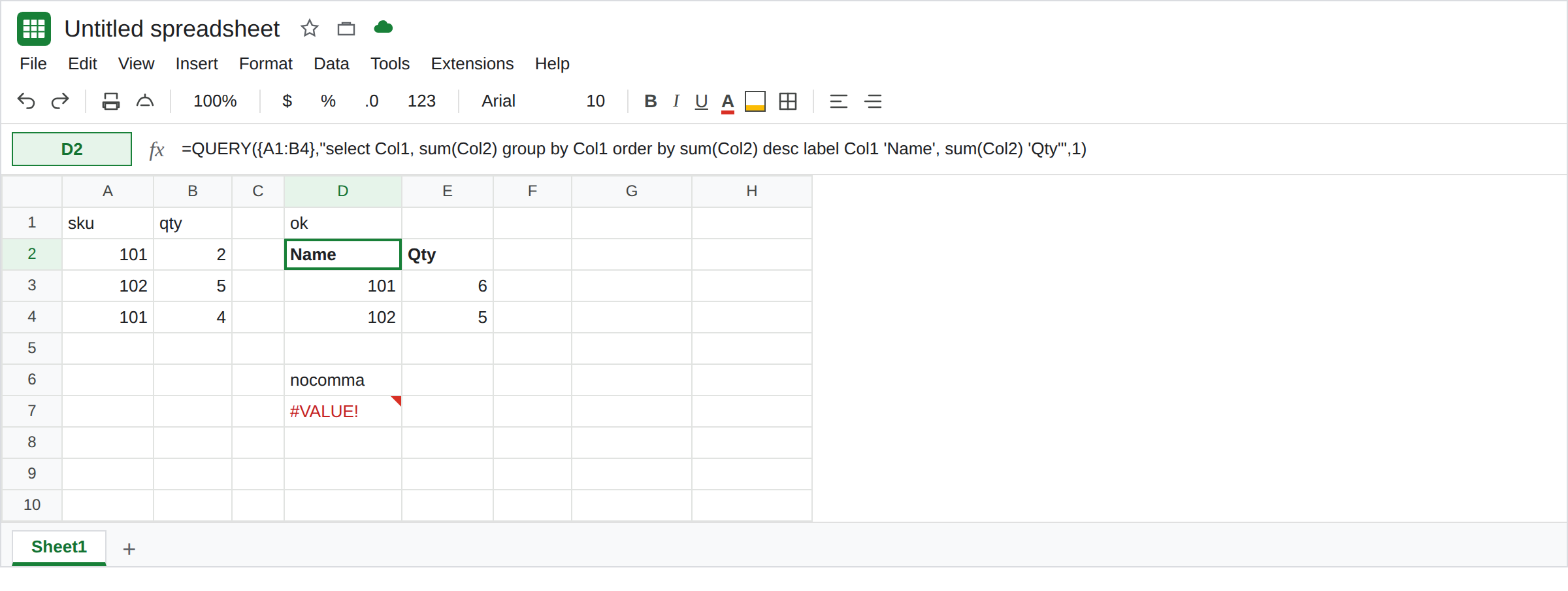
Two labels, comma present. In D1 type ok. In D2 enter =QUERY({A1:B4},"select Col1, sum(Col2) group by Col1 order by sum(Col2) desc label Col1 'Name', sum(Col2) 'Qty'",1). Headers are Name and Qty. Sku 101 is 6, then 102 is 5. That spill is the control. order by is before label. The two pairs are separated by a comma.
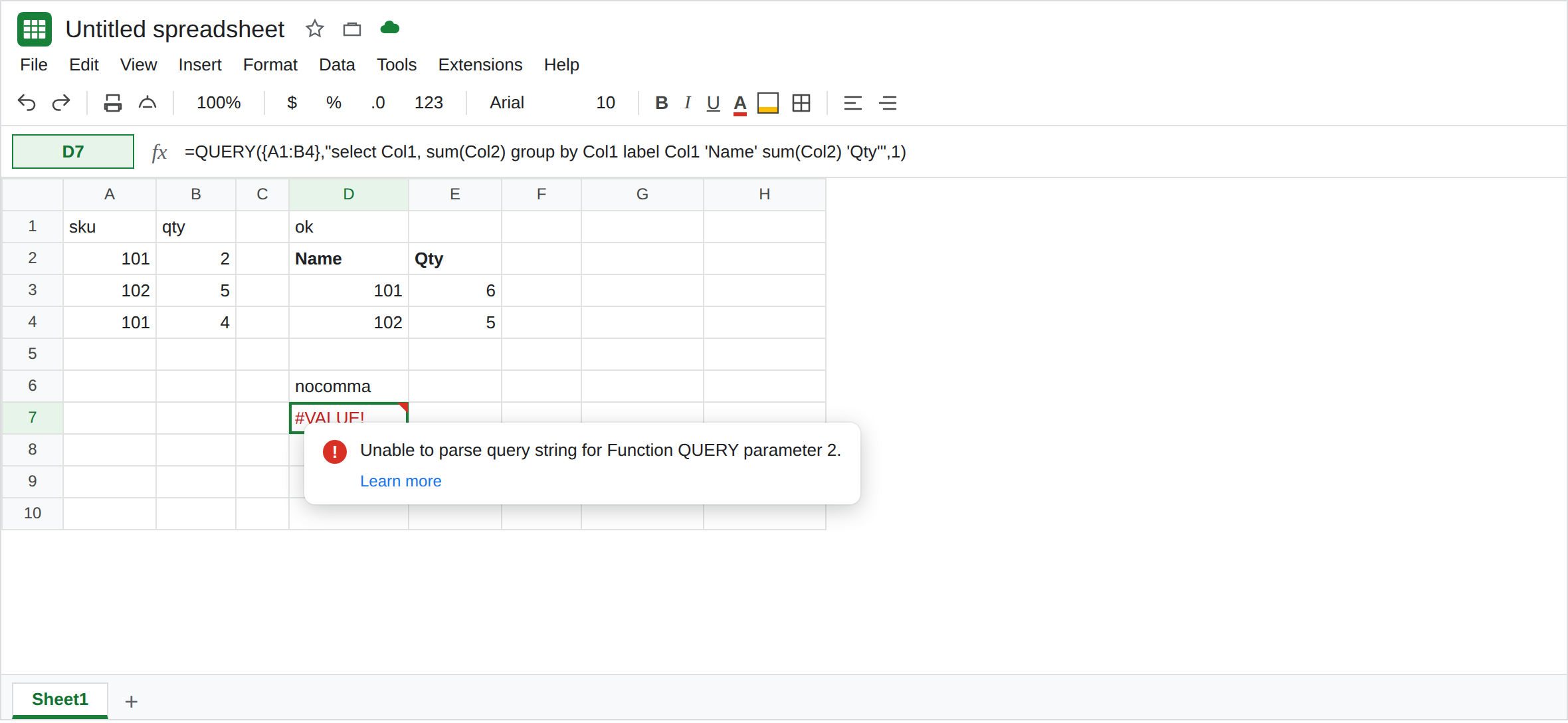
The comma left out. In D6 type nocomma. In D7 enter =QUERY({A1:B4},"select Col1, sum(Col2) group by Col1 label Col1 'Name' sum(Col2) 'Qty'",1). #VALUE!. Tooltip: Unable to parse query string for Function QUERY parameter 2. After 'Name' the parser expected a comma or the end of the clause, and found sum. Leave D7 broken.
A Col that is not in the array. In F1 type col3. In F2 enter =QUERY({A1:B4},"select Col1, sum(Col2) group by Col1 label Col3 'Name'",1). #VALUE!. The tooltip includes NO_COLUMN: Col3. The array has two columns. Leave F2 broken. label A 'Name' on this same {A1:B4} is also NO_COLUMN: A. Letters belong to sheet ranges. That mix is QUERY LABEL alias.
label before order by. In F4 type order. In F5 enter =QUERY({A1:B4},"select Col1, sum(Col2) group by Col1 label Col1 'Name', sum(Col2) 'Qty' order by sum(Col2) desc",1). #VALUE!. Unable to parse query string. Clause order is fixed: order by, then limit, offset, label, format. label earlier in the string never reaches the rename. Leave F5 broken. D2 has the same words in the legal order.
If { is Formula parse error, see array literal locale. That parse error is the spreadsheet formula, not NO_COLUMN.
What is actually wrong
Section titled “What is actually wrong”- Each label pair is
expression 'header'orexpression "header". The next pair starts with a comma. Google’s query language writes itlabel column_id label_string [,column_id label_string]. D7 omitted the comma. The headers you wanted never get applied. Col3counts from the left of the array you passed.{A1:B4}isCol1,Col2. A label cannot invent a third column.NO_COLUMNis the same family as QUERY parse string and Col1 vs A.labelis not a place to sort. F5 putsorder byafterlabel, so the statement is illegal before any row is ordered. D2 sorts bysum(Col2), then renames. Ordering by the header textQtyis a different mistake. See QUERY ORDER BY alias.- A missing
labelstill returns rows. The header will saysum qtyorsum Col2. That is QUERY group header. D7 did not get that far. ASis not a substitute for a comma.select Col1 as Nameis a parse error of its own. See QUERY LABEL alias.
Leave D7, F2, and F5 broken.
Comma, real Col, label last. Keep D2. Copy the select expressions into the label pairs unchanged: Col1 and sum(Col2), not Col3 and not B.
One label needs no comma. label sum(Col2) 'Qty' is legal when you are only renaming the total. Add the comma when the second pair appears, not before the first quote.
Do not wrap D7 in IFERROR. The parse error would become a blank and the qty would stay unlabeled. See IFERROR vs IFNA.
If the tooltip says Unable to parse and the label line has two quoted headers, put a comma between the pairs and move label to the end. If the tooltip says NO_COLUMN, the id is not a column of this array. If the spill works and the header says sum Col2, you omitted label. That is the group-header page.