

Fix NETWORKDAYS / NETWORKDAYS.INTL #NUM! in Google Sheets (bad dates or weekend number)
Updated
NETWORKDAYS counts working days between two dates, skipping Saturday/Sunday and an optional holiday list. NETWORKDAYS.INTL does the same with a custom weekend. #NUM! means a date serial, a holiday serial, or the weekend code is outside what those functions will accept. The formula parsed. The count cannot run.
This page is NETWORKDAYS / NETWORKDAYS.INTL #NUM!. It is not WORKDAY #NUM! (WORKDAY returns a date, not a count). It is not out of domain (SQRT(-1), LN(0), FACT(171)). Keep the Google Sheets UI in English.
Recreate it on a blank sheet
Section titled “Recreate it on a blank sheet”- Open a blank spreadsheet. In A1 type
kickoff. In A2 enter=DATE(2024,6,3)(a Monday). B1ship. In B2 enter=DATE(2024,6,14)(a Friday). C1holiday.
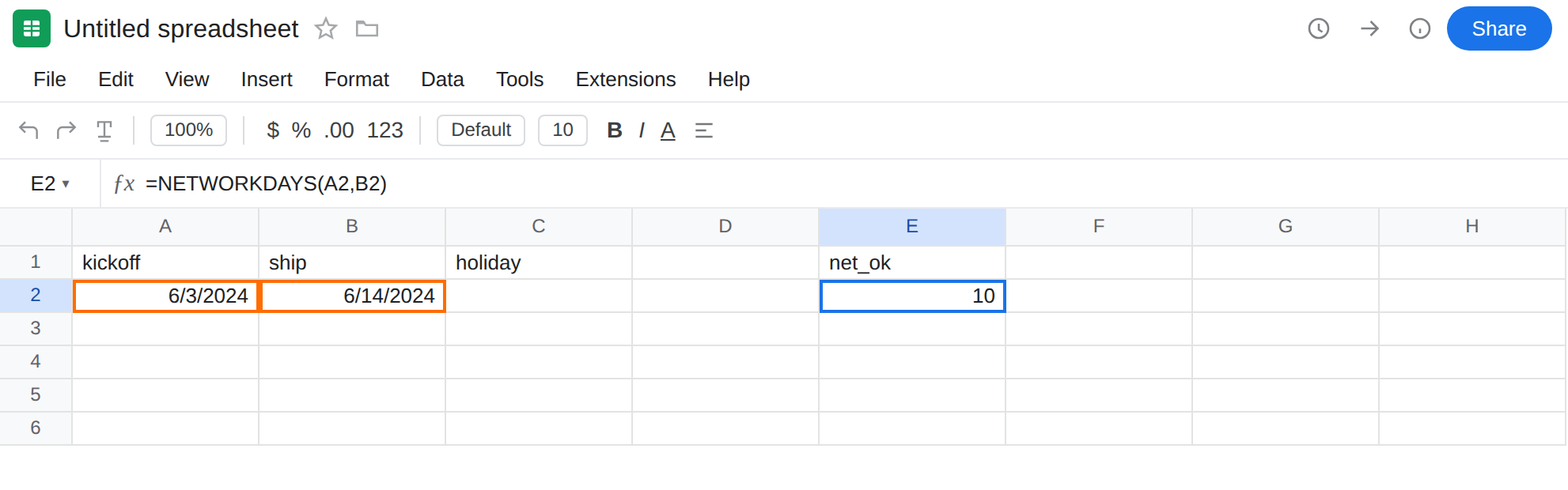
A count the function can return. In E1 type net_ok. In E2 enter =NETWORKDAYS(A2,B2). The cell shows 10 (weekdays from 3 Jun through 14 Jun, no holidays). That row is the control: two real dates, default weekend, a number.
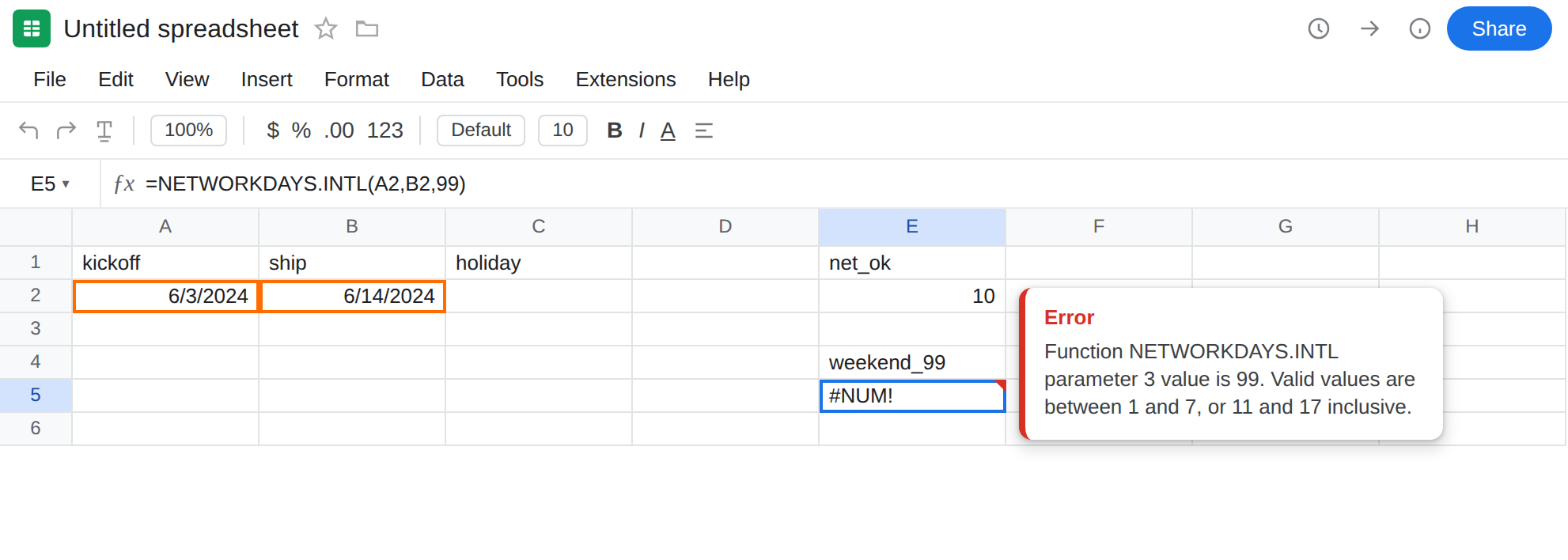
Invalid weekend code on NETWORKDAYS.INTL. In E4 type weekend_99. In E5 enter =NETWORKDAYS.INTL(A2,B2,99). The cell shows #NUM!. Weekend must be 1–7, 11–17, or a seven-character 0/1 string (Monday-first). 99 is none of those. Leave E5 broken.
Holiday list with an impossible serial. In C2 enter =DATE(2024,6,12). In C3 type 4000000 as a number — not a date this calendar can use. In E7 type bad_holiday. In E8 enter =NETWORKDAYS(A2,B2,C2:C3). The cell shows #NUM!. C2 is a fine holiday. C3 is not. Leave E8 broken.
End date overflow. In E11 enter =NETWORKDAYS(A2,4000000). #NUM! — B-side is not a date Sheets will count to. Leave E11 broken.
Text dates are a different error. =NETWORKDAYS("kickoff",B2) is #VALUE!, not #NUM!. That is wrong type / DATEVALUE locale. Stay on E5 and E8 for this page.
WORKDAY contrast. In G5 enter =WORKDAY.INTL(A2,10,99). Also #NUM!, also weekend 99, but the function is WORKDAY.INTL and the result you wanted is a date. That primer is WORKDAY #NUM!. Leave G5 as the contrast. Do not copy a WORKDAY day-count fix onto E5.
Leave E5, E8, and E11 as the broken formulas. Leave E2 as 10.
What is actually wrong
Section titled “What is actually wrong”NETWORKDAYS.INTL’s third argument is a weekend code, not “how many weekend days.”1is Saturday+Sunday (theNETWORKDAYSdefault).7is Friday+Saturday.11is Sunday only.99is not on the list.#NUM!.- A seven-character weekend string must be seven
0/1characters, Monday first (0000011is Saturday+Sunday)."weekend"and"11111111"are invalid. Sheets may show#NUM!or#VALUE!depending on the string. Treat both as a bad weekend argument. - Holidays must be valid date serials. A leftover
4000000, a negative serial Sheets will not use, or a value that is not a date in this file’s range, makesNETWORKDAYS#NUM!. One bad cell inC2:C3poisons the call even when C2 is fine. - An end (or start) serial the calendar cannot represent is the same
#NUM!. That is overflow in the date system, notFACT(171)— but it shares the error value with out of domain.
This is not WORKDAY / WORKDAY.INTL. Those answer “what date is N workdays after kickoff?” See WORKDAY #NUM!. E5 parsed NETWORKDAYS.INTL. The result type you wanted is a count sitting in E2.
This is not SQRT(-1). See out of domain. E5 is a weekend code, not a negative square root.
This is not #VALUE! from "kickoff" or locale-shaped date text. Parse starts with DATE / DATEVALUE first. See DATEVALUE locale.
This is not #N/A. Nothing is being looked up. See what #N/A means.
Leave E5, E8, and E11 broken so #NUM! stays on the sheet.
Pass a real weekend code. In F5 enter =NETWORKDAYS.INTL(A2,B2,1). The cell matches E2 (10). For Friday+Saturday, pass 7, or the string 0000110. Do not invent 99.
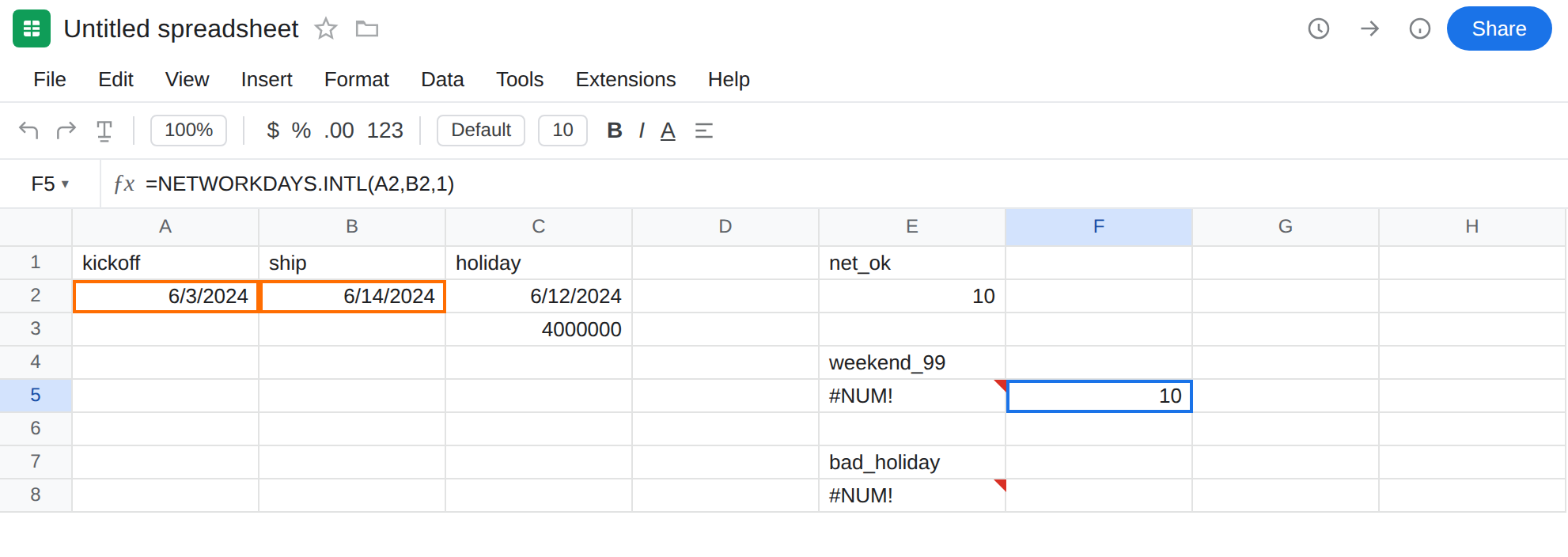
Clean the holiday list. Keep only real dates. In F8 enter =NETWORKDAYS(A2,B2,C2). The cell is 9 if 12 Jun is skipped as a holiday inside the window. Do not point holidays at a mixed column that still holds TBD or a huge number. Helper: =IF(ISNUMBER(C3)* (C3>0),C3,"") and use a range of true dates only.
Keep both ends as DATE. =DATE(2024,6,3) and =DATE(2024,6,14), not locale-fragile "6/3/2024" if you can avoid it.
Do not wrap E5 in IFERROR. You still have no working-day count. See IFERROR vs IFNA. IFNA will not catch #NUM!.
If NETWORKDAYS / NETWORKDAYS.INTL is #NUM!, read the weekend argument, then ISNUMBER on every holiday, then whether start and end are real dates. A text start is #VALUE!. A WORKDAY formula is the other primer.
NETWORKDAYS vs WORKDAY (and start after end)
Section titled “NETWORKDAYS vs WORKDAY (and start after end)”NETWORKDAYS answers “how many workdays sit between these two dates?” The result is a count. E2 is 10.
WORKDAY answers “what date is 10 workdays after kickoff?” The result is a date. Swapping them looks plausible in English and returns the wrong type of answer. #NUM! on WORKDAY is WORKDAY #NUM!. This page stays on the count.
Weekend 99 is the same illegal code on both families. Fix the code (1–7, 11–17, or seven 0/1 characters). Do not pass 2 because “the weekend is two days” unless you meant weekend code 2 (Sunday+Monday).
Start after end is not #NUM!. In F11 enter =NETWORKDAYS(B2,A2). The cell is -10 (or a negative count), not an error. Sheets will count backwards. If you expected #NUM! and got a negative, swap the arguments or wrap ABS only if a reversed pair should still print a positive length. Do not treat that negative as overflow. Overflow and weekend 99 are the red triangles on E5 and E11.