

Decimal-comma locales reject a period inside numbers and TEXT patterns
Updated
A comma-decimal locale writes one and a half as 1,5. In a formula, =1,5+1 is arithmetic. =1.5+1 is not the same literal: the period is not the decimal mark, and the cell is #ERROR! Formula parse error. TEXT format codes use the locale’s mark as well. A pattern copied from a United States sheet, "0.00", does not mean “two decimal places” on this file.
Separators between arguments are locale semicolons. This page is the mark inside a number and inside a format string. Parsing text into a number is VALUE() locale. United States TEXT codes, including why a foreign pattern misbehaves the other way, are TEXT format code.
Recreate it on a blank sheet
Section titled “Recreate it on a blank sheet”- Open a blank spreadsheet. File → Settings → Locale: Germany (or another comma-decimal locale). You may turn on Always use English function names. That checkbox does not make
1.5a number. Keep the menus in English if you can.
A numeric literal that works. In A1 type ok. In A2 enter =1,5+1. The cell shows 2,5 (one and a half plus one). The comma is the decimal mark. It is not an argument separator here, because 1,5 is one number. This is why locale semicolons refuses SUM(1,2) as a demo: that comma can be a decimal.
A period in a literal. In A4 type dot. In A5 enter =1.5+1. The cell shows #ERROR!. The tooltip is Formula parse error. 1.5 is not one-and-a-half on this locale, and it is not two arguments either. Leave A5 broken.
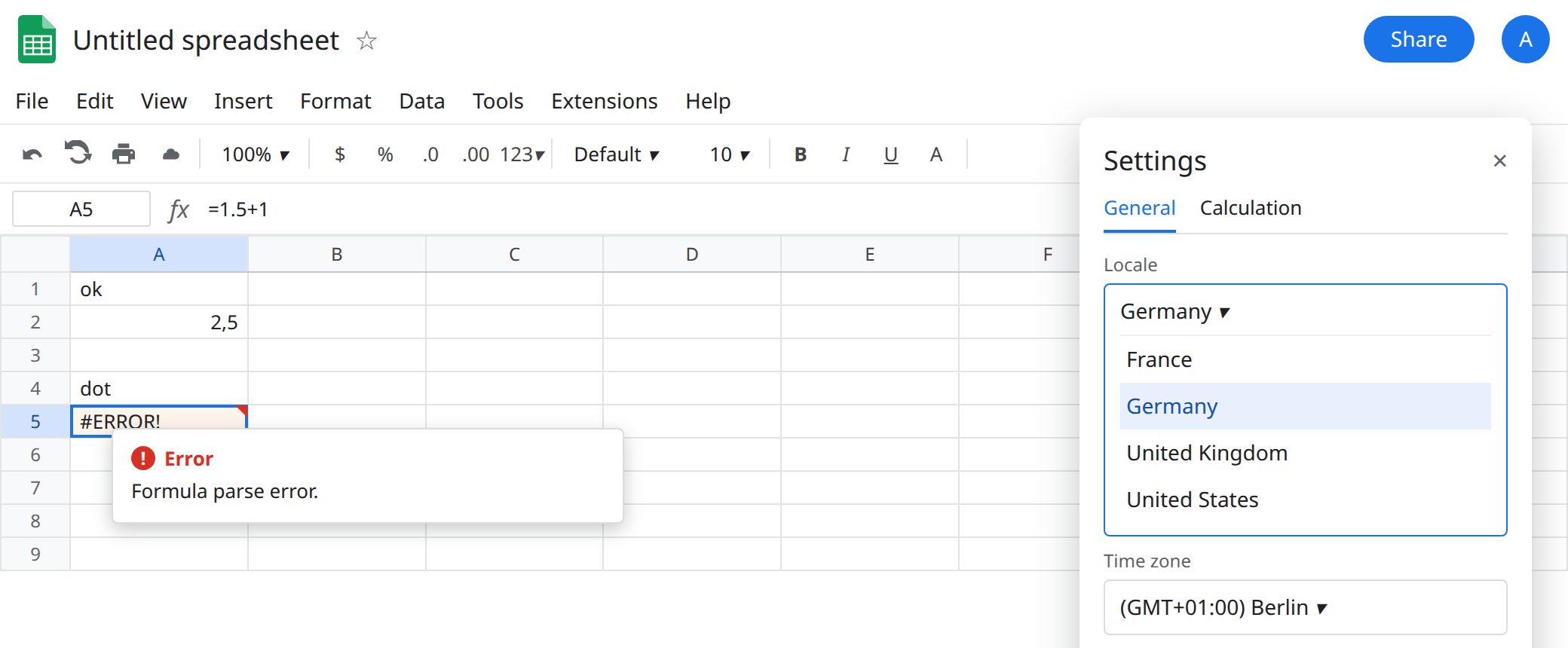
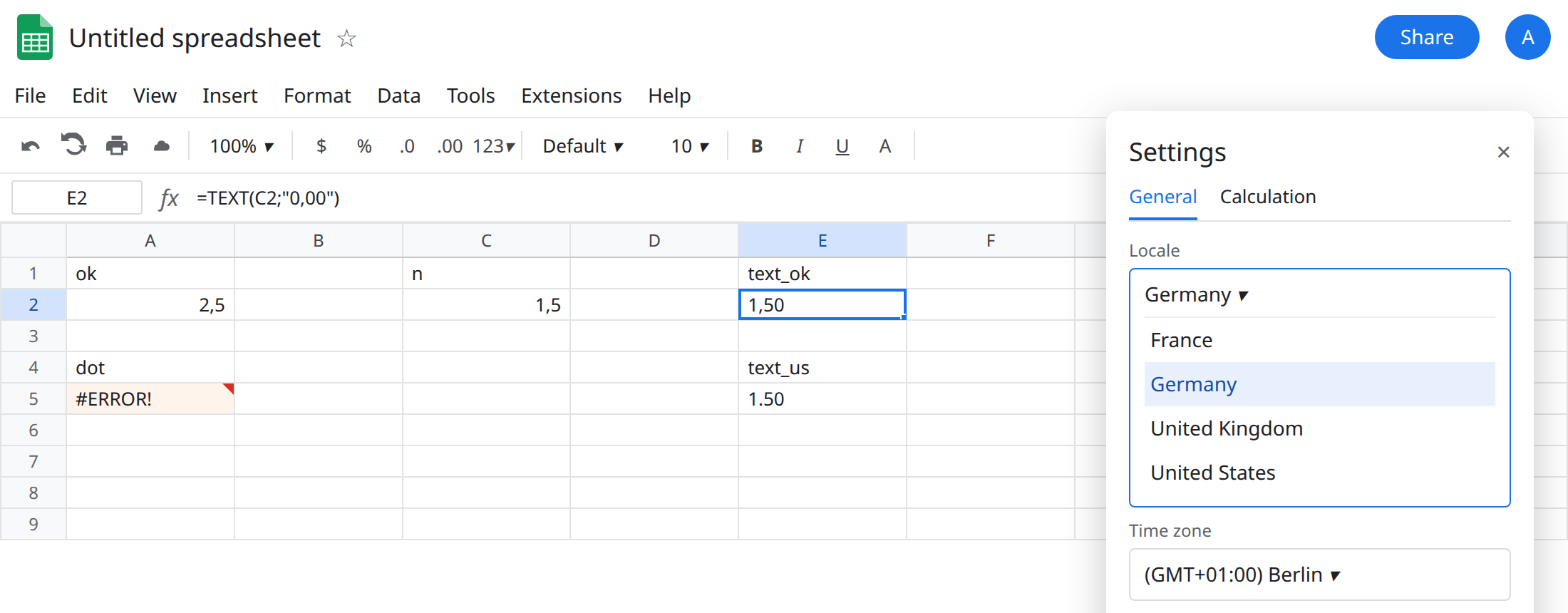
TEXT pattern. In C1 type n. In C2 enter =1,5. In E1 type text_ok. In E2 enter =TEXT(C2;"0,00"). The semicolon separates arguments. The comma inside the quotes is the decimal mark in the pattern. The cell shows 1,50. It is text. =ISTEXT(E2) is TRUE.
In E4 type text_us. In E5 enter =TEXT(C2;"0.00"). The period inside the pattern is the United States decimal mark. On this locale that pattern is not “two decimal places.” The result is not the 1,50 you just built in E2. The United States page notes that a foreign pattern often returns a wrong-shaped string and no triangle. Treat E5 as that mismatch. Do not copy E2’s caption onto E5. Leave E5 on the sheet.
A value typed into a cell. In C4 type 1.5 the way a United States CSV would. Check =ISNUMBER(C4). If it is FALSE, the import is text and SUM will skip it. See CSV text numbers. If the locale interpreted the period as a date, ISNUMBER may be TRUE and the value is not one and a half. Either way it is not the literal you proved in A2. Do not point TEXT at it and expect 1,50.
What is actually wrong
Section titled “What is actually wrong”- The decimal mark and the argument separator are a pair. Comma-decimal locales use
,inside numbers and;between arguments. Period-decimal locales use.inside numbers and,between arguments. A2 uses the comma as a decimal. A formula with three arguments still needs semicolons. Those two facts are easy to “fix” in opposite directions and break the other page. =1.5+1never runs.#ERROR!Formula parse error is the same tooltip as a comma-separatedIFon this locale. Look at the formula before you change separators. A5 has no argument list. The period is the token.TEXTpatterns are locale-aware."0,00"on Germany means two decimal places."0.00"is the pattern from TEXT format code, written there for United States. Pasting it here does not throw the asterisk-pattern#VALUE!from that page (a*in a pattern). It means the wrong shape. An invalid pattern can still be#VALUE!. If E5 shows#VALUE!, the tooltip names the pattern. If it shows text, compare it to E2 before you ship it.VALUE("1.5")andVALUE("1,5")follow the locale too. That is VALUE() locale.DATEVALUEof a day/month string is DATEVALUE locale. A5 is not a date string. It is a formula that does not parse.- Changing the locale does not rewrite A5 or E5. The characters stay. You edit them, or you set the locale before you paste. Flipping to United States to make A5 work will make A2’s comma mean something else. See locale semicolons.
Leave A5 and E5 broken.
Literals. Keep A2: =1,5+1. Type new decimals with a comma on this file.
TEXT. Keep E2: =TEXT(C2;"0,00"). Thousands on this locale use a period in the pattern where the United States pattern uses a comma. Build one known value (1,50) and copy that pattern. Do not paste $#,##0.00 from a United States tutorial into E5 and wrap it in IFERROR.
Text that arrived as 1.5. Convert with the tool that matches the locale, after you read VALUE() locale and TO_PURE_NUMBER. Do not add zero (C4+0) and hide #VALUE! with IFERROR. See IFERROR vs IFNA.
If the formula is #ERROR! and the only odd character is a period inside a number, you are on a comma-decimal locale. If the formula parses and TEXT does not match 1,50, the pattern’s decimal mark is the United States period.