

QUERY GROUP BY still returns a label row or Col1 headers
Updated
QUERY with sum and group by returns a header row even when the numbers are right. The header is the expression: sum qty, sum B, or sum Col2. That row is not a store. It is the label. Charts and second formulas that start at the top of the spill treat it as data. Col1 shows up when the input is an array, not a sheet range with column letters.
A group by that errors (mixed types, or a column that is neither grouped nor aggregated) is QUERY GROUP BY. Renaming with label, and why AS is not valid, is QUERY LABEL alias. Col1 versus A on an import is Col1 vs A. Keep the Google Sheets UI in English. Locale United States.
Recreate it on a blank sheet
Section titled “Recreate it on a blank sheet”- Open a blank spreadsheet. In A1 type
store, B1qty. A2East, B210. A3West, B38. A4East, B45. Headers in row 1. The third argument ofQUERYwill be1.
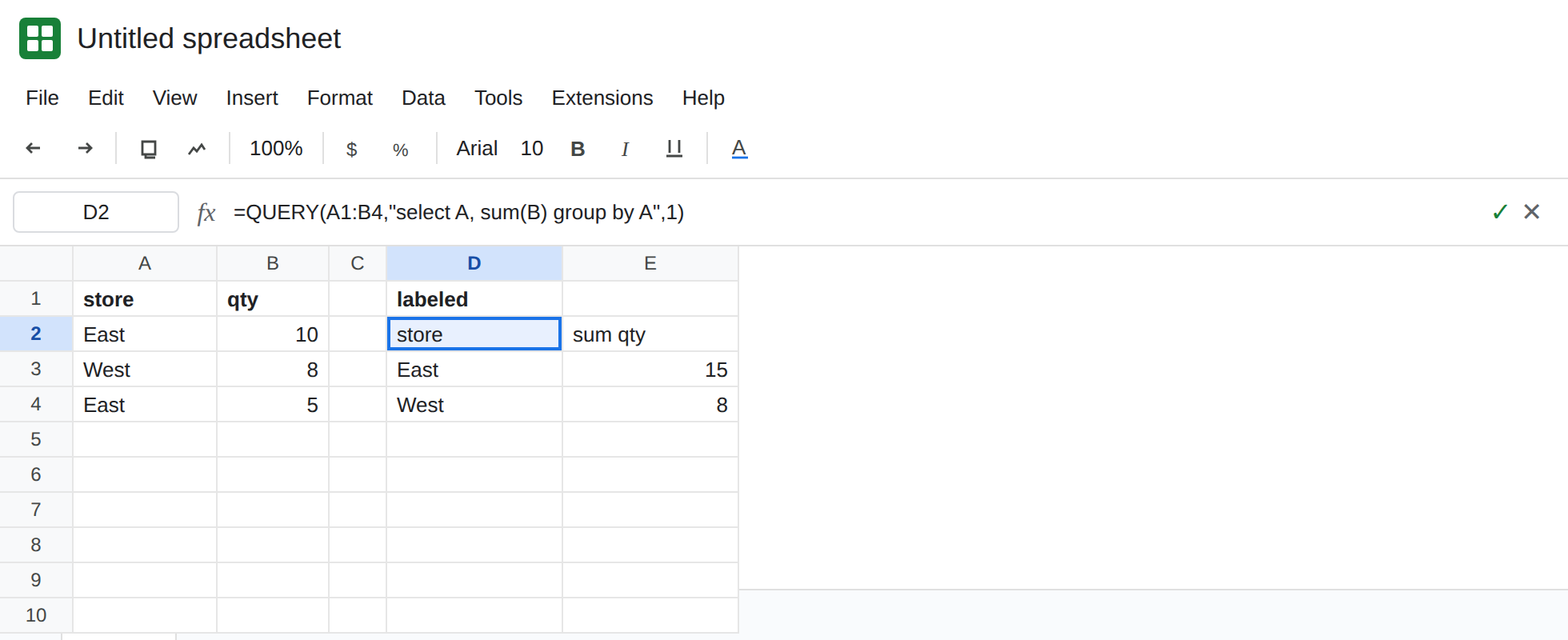
A total with a label you did not type. In D1 type labeled. In D2 enter =QUERY(A1:B4,"select A, sum(B) group by A",1). The spill’s first row is store and sum qty. Under it, East is 15 and West is 8. There is no #VALUE!. The arithmetic is right. The header sum qty is the surprise. Leave D2 as that spill.
An array speaks Col. In D7 type cols. In D8 enter =QUERY({A1:B4},"select Col1, sum(Col2) group by Col1",1). Curly braces make an array, so the query must say Col1 and Col2, not A and B. The spill header uses those names: Col1 and sum Col2, or the same words with different spacing. East is still 15. The header is not store / qty. Leave D8 as that contrast. Using select A on this array is NO_COLUMN. That parse is QUERY LABEL alias and Col1 vs A.
Empty label text still occupies a row. In F1 type blanklabel. In F2 enter =QUERY(A1:B4,"select A, sum(B) group by A label sum(B) ''",1). The qty header cell is blank. The row is still there. East is still the second row of the spill, not the first. label renames. It does not delete the header row.
The aggregation error is not a header. In F6 enter =QUERY(A1:B4,"select A, B group by A",1). #VALUE!. B is neither grouped nor aggregated. Tooltip ADD_COL_TO_GROUP_BY_OR_AGG. Leave F6 broken. That is QUERY GROUP BY. D2 succeeded.
What is actually wrong
Section titled “What is actually wrong”group byoutput includes labels. Sheets names an aggregate from the expression and the source header (sum qty) or from the column letter (sum B) when it has no better name. You did not type that header in row 1. The clause invented it.- The third argument
1tellsQUERYthat the input has a header row. It does not mean “omit labels on the way out.” Passing0when row 1 really is headers will treatstoreas a store name. Do not flip it to0to deletesum qty. {A1:B4}is not the rangeA1:B4. Inside the quotes the columns areCol1,Col2. The output labels follow. A sheet range keeps letters and the words in row 1.label sum(B) ''writes an empty label. The header row remains, so a chart series andINDEXof the whole spill still see an extra row.- This is not an empty query. D2 has rows. See QUERY no rows.
Leave D2 as the sum qty spill so you can see the rename. Leave F6 broken.
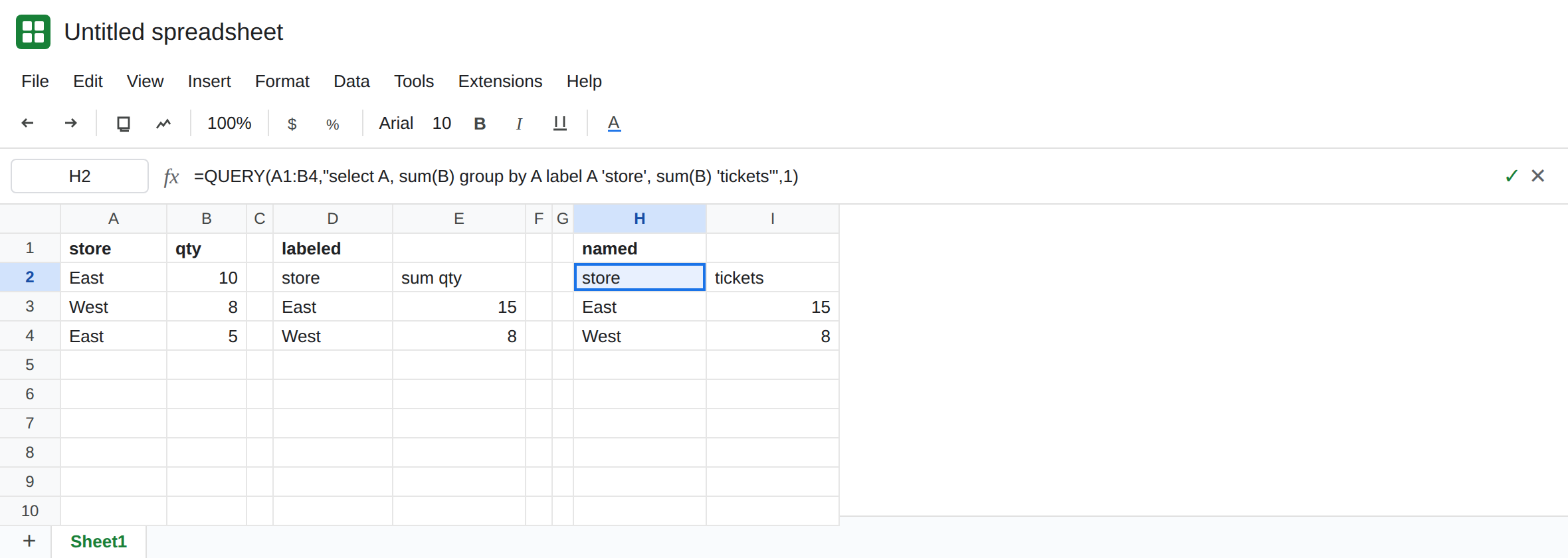
Name the column. In H1 type named. In H2 enter =QUERY(A1:B4,"select A, sum(B) group by A label A 'store', sum(B) 'tickets'",1). Headers are store and tickets. East is 15. The row is still a header. It is the header you asked for.
Drop the header row when the next step must be numbers only. In H6 enter =QUERY(H2:I4,"select * offset 1",0). H2:I4 is the named spill, two columns and a header. The outer query treats that block as having no header (0) and skips one row. What remains is East 15 and West 8. Do not offset 1 on D2’s query string alone with the third argument 1 and expect the label to vanish. offset skips data rows after the header is applied. The outer query with 0 is the cut. See QUERY LIMIT / OFFSET.
On an array, label the Col names. label Col1 'store', sum(Col2) 'tickets' matches D8’s select. Labeling A there is NO_COLUMN.
If the spill is correct and the first row says sum qty or sum Col2, add label or drop that row with an outer offset 1. If the cell is #VALUE! and the tooltip names AVG_SUM or ADD_COL_TO_GROUP_BY, you are on the aggregation page. The header never got a chance to appear.