

FILTER OR is addition; extra arguments are AND
Updated
FILTER(range, condition1, condition2) keeps rows where every condition is true. A second argument is AND, not OR. OR of two columns is (region="East")+(hours>10). The OR function is the wrong symbol: it returns one boolean for the whole range, and FILTER then reports mismatched range sizes.
AND and OR collapsing inside ARRAYFORMULA is ARRAYFORMULA AND/OR. This page is the FILTER arguments and the + / * operators. Blank versus "" is FILTER blank vs empty. Zero rows for a missing sku is FILTER #N/A.
Recreate it on a blank sheet
Section titled “Recreate it on a blank sheet”- Open a blank spreadsheet. Keep the Google Sheets UI in English. In A1 type
region, B1hours. A2East, B212. A3West, B320. A4East, B44. A5North, B530.
Two arguments are AND. In D1 type both. In D2 enter =FILTER(A2:B5,A2:A5="East",B2:B5>10). The spill is East and 12 only. West has the hours and fails the region. East in row 4 has the region and fails the hours. North fails both. This is a successful filter. It is the wrong list if you wanted “East or over 10 hours.”
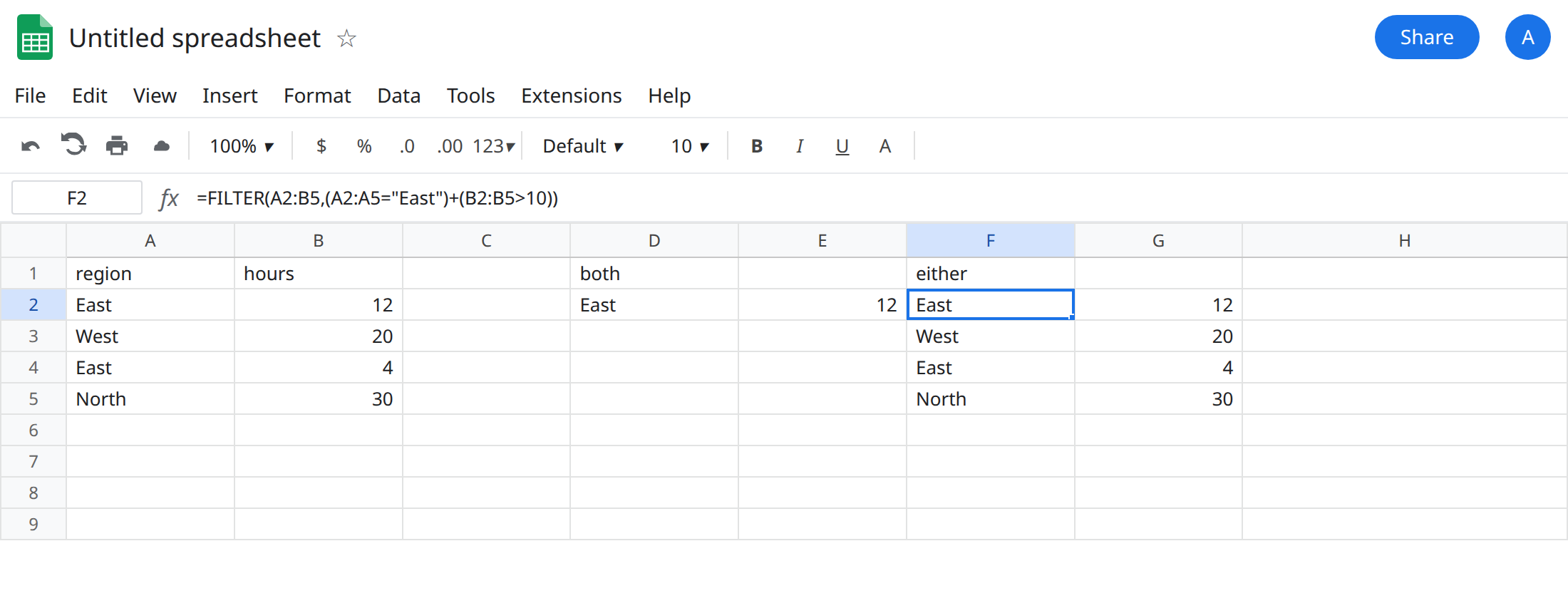
Addition is OR. In F1 type either. In F2 enter =FILTER(A2:B5,(A2:A5="East")+(B2:B5>10)). Parentheses matter. The spill is East/12, West/20, East/4, and North/30. North is not East, and 30 is over 10, so the hours test keeps that row. A row that passes both tests is included once, not twice. TRUE+TRUE is 2, and FILTER keeps any non-zero condition.
The OR function. In H1 type or_fn. In H2 enter =FILTER(A2:B5,OR(A2:A5="East",B2:B5>10)). The cell shows #N/A. The tooltip is FILTER has mismatched range sizes. Expected row count: 4. column count: 1. Actual row count: 1, column count: 1. OR already collapsed four rows into one boolean. FILTER will not copy that boolean down the list. Leave H2 broken.
Multiply is AND, if you would rather see it. In J1 type mult. In J2 enter =FILTER(A2:B5,(A2:A5="East")*(B2:B5>10)). The spill matches D2: East and 12. * and a second argument are the same logic. Use the second argument when each test is a simple range. Use * when you are already adding other tests and want the formula in one expression.
Leave H2 broken. Leave D2 as the single East row so the AND list stays visible.
What is actually wrong
Section titled “What is actually wrong”- Extra
FILTERarguments are combined with AND. The function does not have an OR flag. D2 is “East and hours greater than 10,” which the formula states by listing two conditions. Reading it as “East, or maybe hours” is the misread. +on two boolean arrays is OR becauseTRUEis1andFALSEis0. A sum of1or2is kept. A sum of0is dropped. You do not needARRAYFORMULAaroundFILTER. The conditions are already arrays.OR(...)andAND(...)are scalar functions. They return one value. H2’s tooltip names the actual size: 1 row, against 4 rows of data. That tooltip is also what ARRAYFORMULA AND/OR produces whenFILTERinherits a collapsedAND. Same message, same repair: stop callingORon the columns.- This
#N/Ais not “no matches.” No matches says No matches are found in FILTER evaluation. H2 says mismatched range sizes. See FILTER #N/A and FILTER range size. Swapping the data range to three rows will not makeORlegal. - Parentheses:
A2:A5="East"+B2:B5>10is not the OR you wrote in F2. Comparison and addition do not bind the way the English sentence does. Keep the parentheses in F2. - A third OR member is another
+. AND mixed with OR needs parentheses. In K2 enter=FILTER(A2:B5,((A2:A5="East")+(A2:A5="West"))*(B2:B5>10)). The spill is East/12 and West/20. East/4 fails the hours test even though the region was allowed. North fails the region even though30is over 10. Without the inner parentheses, the*and+bind in an order that is not the English “East or West, and over 10.” K2 is the formula to copy when a colleague says the plus “stopped working” after they added an hours test.
Leave H2 broken. Leave D2 if you still want the AND example on the sheet.
Either region or hours. Keep F2: =FILTER(A2:B5,(A2:A5="East")+(B2:B5>10)).
Both. Keep D2, or use J2. Do not add a second argument and describe it as OR in the column header.
One label from a list. =(A2:A5="East")+(A2:A5="West")+(A2:A5="North") is OR across labels. When every row is one of those three, the filter returns the whole table, which is a sign you did not exclude anything. North/30 is already in the F2 spill, because 30 is over 10.
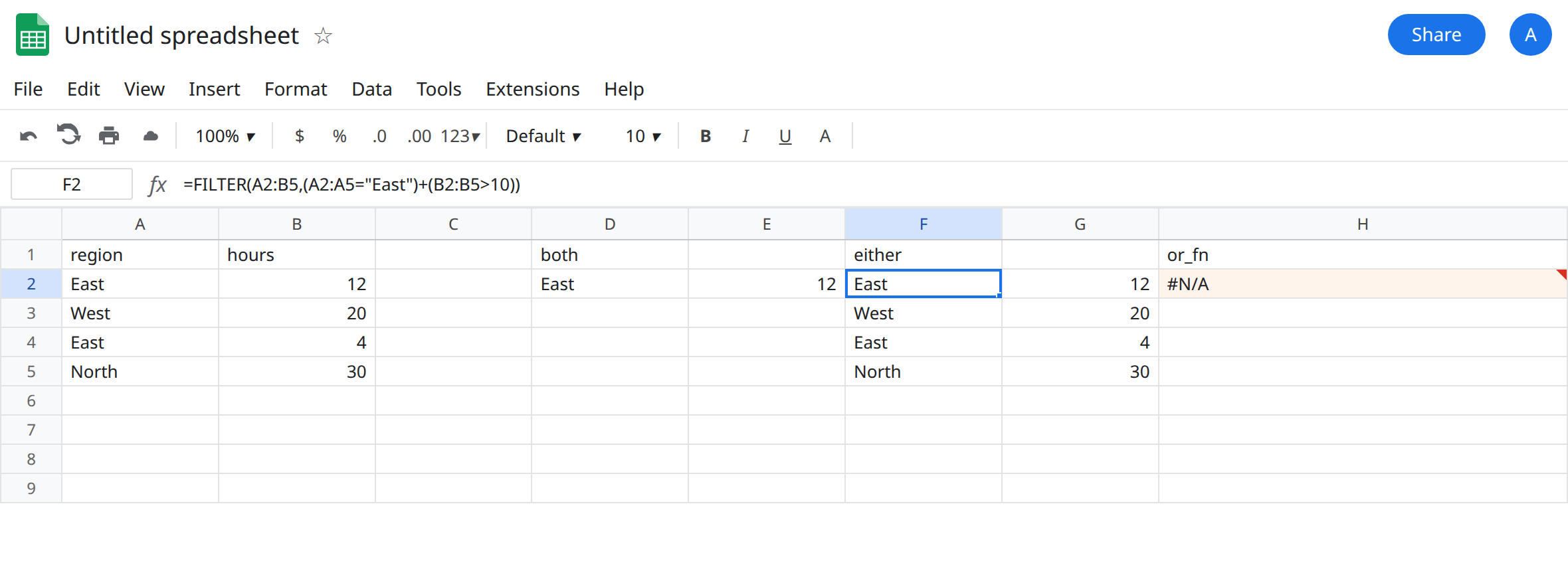
Do not wrap H2 in IFERROR or IFNA. IFNA would turn a size error into a blank and you would ship an empty region report. See IFERROR vs IFNA. The OR function is the bug. Removing it is the fix.
If the spill is shorter than the rows that match either test, you passed two arguments (AND) or you multiplied. If the tooltip says mismatched range sizes and the formula contains OR( or AND(, replace that call with + or *.