

QUERY SELECT * shifts columns after you insert a field
Updated
QUERY with select * returns every column of the range you passed, in that range’s current order. The star is not a list of headers. Insert a column inside the range and Sheets widens the reference. The same formula then spills the new field in the middle. Nothing turns red. A later INDEX that still asks for “column 3” reads the inserted field.
This page is that silent shift. A VLOOKUP index that moved for the same insert is VLOOKUP insert column. A pivot that fails on mixed types is QUERY PIVOT. Keep the Google Sheets UI in English. Sheet Error is an independent formula-error library, not a Google product.
Recreate it on a blank sheet
Section titled “Recreate it on a blank sheet”- Open a blank spreadsheet. In A1 type
sku, B1name, C1price. A2101, B2Widget, C24. A3102, B3Gadget, C39.
Star before the insert. In E1 enter =QUERY(A1:C3,"select *",1). The spill is the header row plus 101 / Widget / 4 and 102 / Gadget / 9. In H1 type third. In H2 enter =INDEX(E1:G3,2,3). H2 is 4, the price on the first data row of the spill. That pair is the control. Do not edit either formula in the next step.
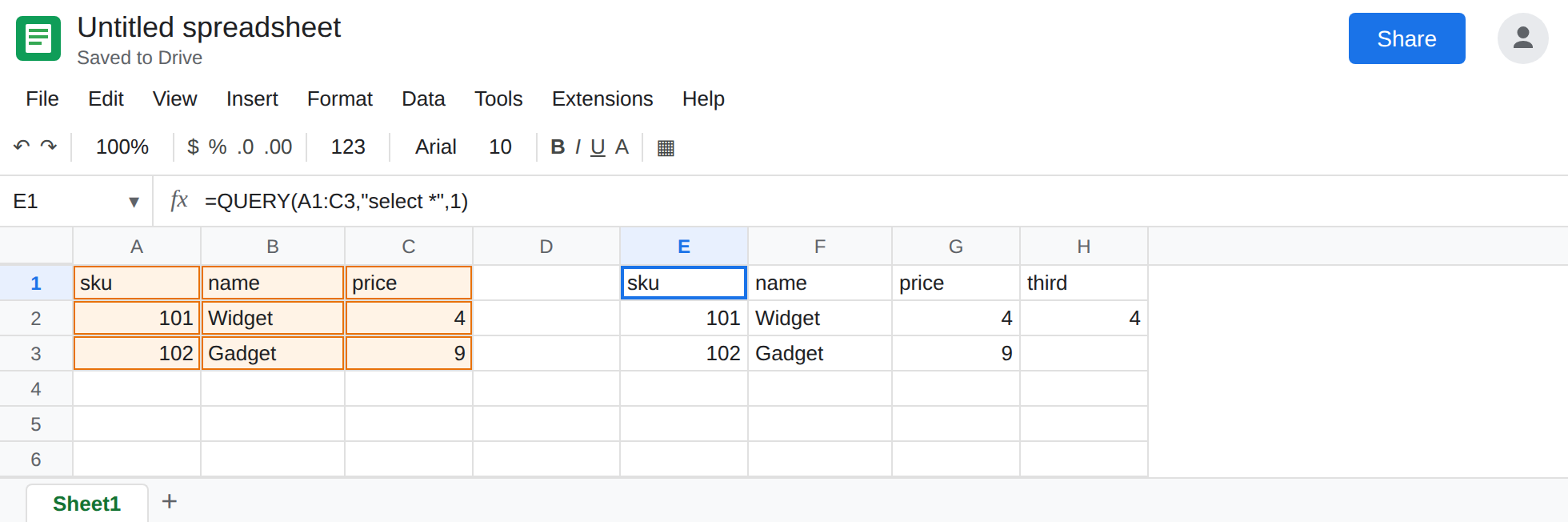
Insert a column inside the range. Click column C. Insert → Columns → Insert 1 column left. Price moves to D. The new C is empty. In C1 type bin. C2 N. C3 S.
Sheets rewrites the range in E1 from A1:C3 to A1:D3. The query string is still "select *". It does not get rewritten. The spill is now four columns: sku, name, bin, price. H2 still says =INDEX(E1:G3,2,3). Column 3 of that block is bin. H2 shows N, not 4. No #REF!, no #N/A. Leave H2 as N.
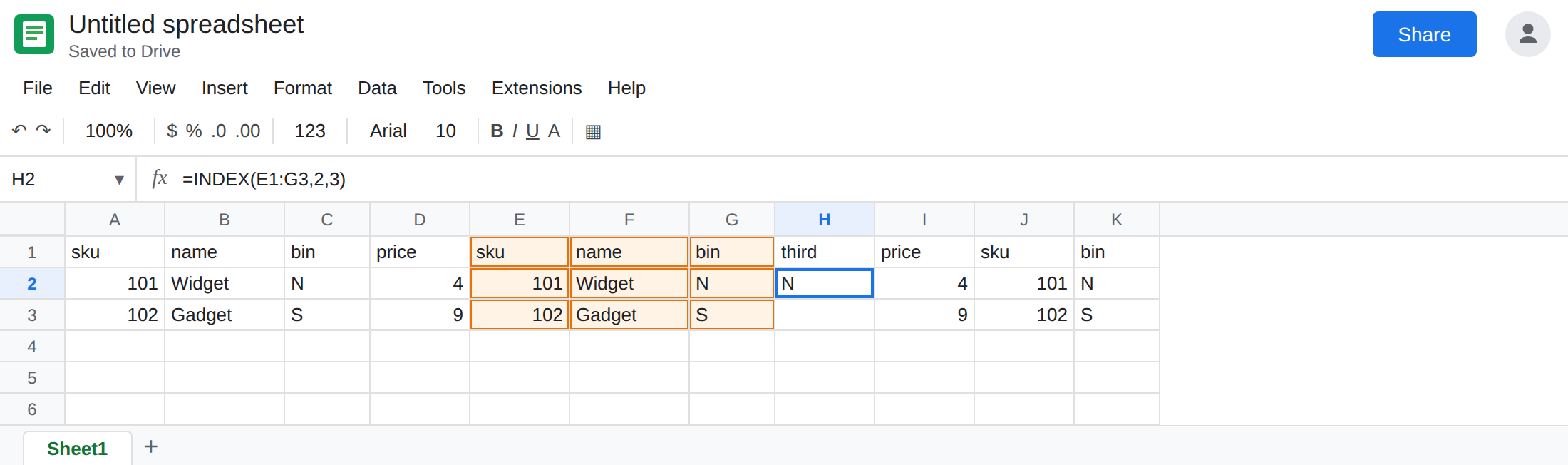
Letters are positions too. In J1 enter =QUERY(A1:D3,"select A, C",1). You might read C as “the price column on the sheet.” Inside QUERY, C means the third column of the data argument. After the insert that is bin. The spill is sku and bin. Leave J1 as that pair so the star is not the only positional form on the sheet.
Leave H2 as N. Leave E1 as the widened star. Leave J1 as sku / bin.
What is actually wrong
Section titled “What is actually wrong”select *means “every column the range has now,” left to right. It does not mean “the columns this report listed when I wrote the formula.”- Inserting a column inside
A1:C3makes Sheets expand the reference. The text"select *"has no column list for Sheets to adjust. The new field appears in the spill at the inserted position. INDEX(..., 3)counts spill columns. It does not look at the headerprice. After the insert, column 3 isbin. H2 is that miss, and it looks like a normal text result.- Query letters are offsets into the data argument, not fixed sheet addresses.
select Ais the first column of the range even when the range starts at column C of the sheet. After a growth of the range,select A, Cstill means “1st and 3rd,” which is J1. - A value sitting in the new spill path is a different failure:
#REF!and Array result was not expanded. That is SORT / UNIQUE spill. H2 did not do that. H2 returned the wrong field quietly.
This is not VLOOKUP’s column index. See VLOOKUP insert column. The same insert, a different function. Fixing the index in VLOOKUP does not rewrite this QUERY.
Leave H2 and J1 in place.
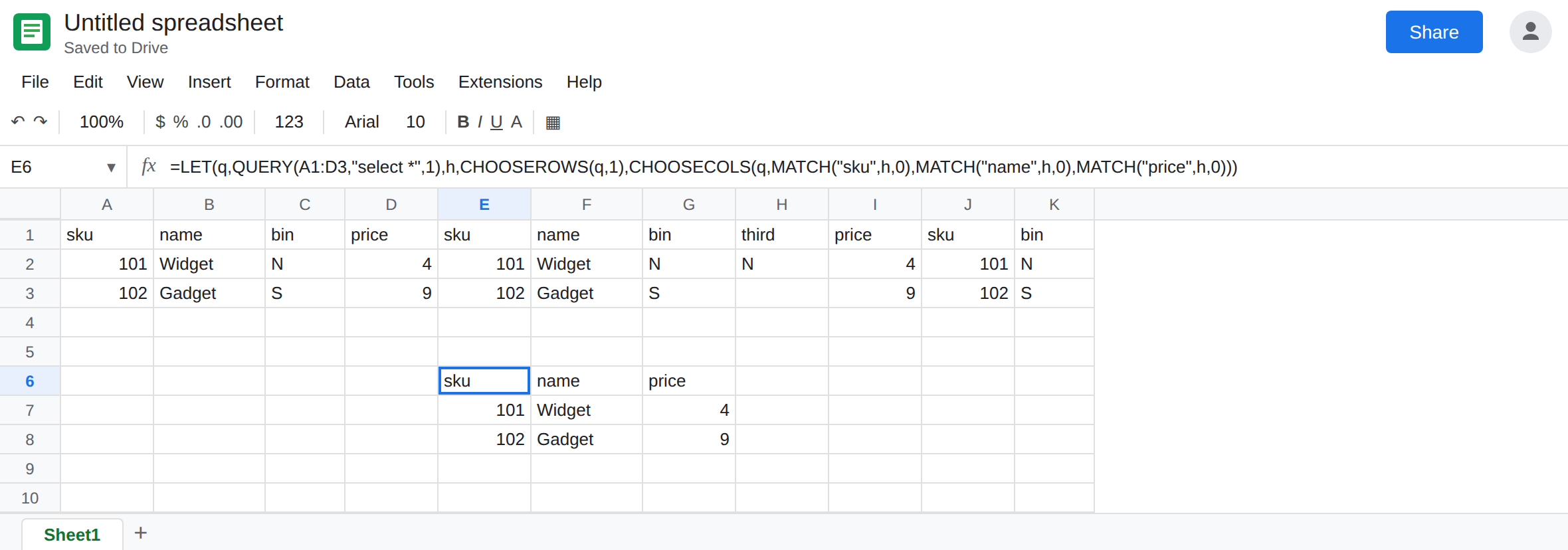
Ask for the columns by the headers you mean. In E6 enter:
=LET(q,QUERY(A1:D3,"select *",1),h,CHOOSEROWS(q,1),CHOOSECOLS(q,MATCH("sku",h,0),MATCH("name",h,0),MATCH("price",h,0)))
The spill is sku, name, price only. MATCH finds price wherever the star put it. Another insert that keeps those three header texts will not move H-style indexes if you point them at E6 instead of E1.
Or name the positions after you know them. =QUERY(A1:D3,"select A, B, D",1) is price in D for this layout. You must edit that string the next time you insert. The letters will not follow the header price.
Do not wrap H2 in IFERROR. It is not an error. It is N. See IFERROR vs IFNA.
If a QUERY spill grew a column and a downstream index changed meaning, the star (or a letter that still means “nth column”) is the reason. Pin the fields by header, or write the letters you want after the insert and stop using column numbers against that spill.