

MMULT of two columns is #VALUE!; the dot product needs one row vector
Updated
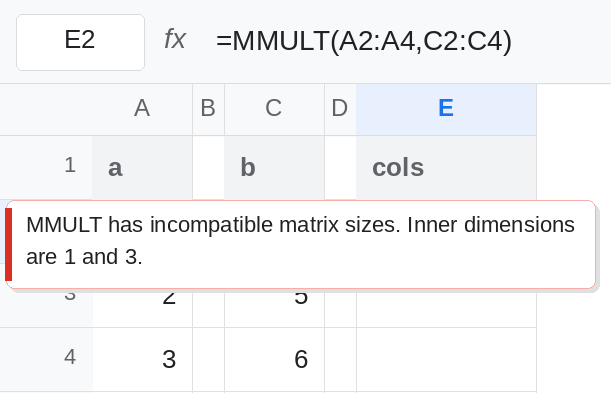
MMULT(matrix1, matrix2) multiplies matrices. The column count of the first has to equal the row count of the second. Two columns of three numbers are both 3×1. The inner sizes are 1 and 3. Those do not match, so the cell is #VALUE!. A dot product of those two columns is a 1×3 row times a 3×1 column, which is one number. TRANSPOSE the first column. Transposing the second column instead is legal and wrong: a 3×1 times a 1×3 spills a 3×3 table of products, not 32.
Inner dimensions for larger blocks are MMULT dimensions. Text inside an otherwise legal shape is MMULT blank / text. Keep the Google Sheets UI in English. Sheet Error is an independent formula-error library, not a Google product.
Recreate it on a blank sheet
Section titled “Recreate it on a blank sheet”- Open a blank spreadsheet. In A1 type
a, C1b. A21. A32. A43. C24. C35. C46. Each range is one column, three rows. The dot product you want is1×4 + 2×5 + 3×6=4 + 10 + 18=32.
Both columns. In E1 type cols. In E2 enter =MMULT(A2:A4,C2:C4). E2 is #VALUE!. The tooltip says the matrices have incompatible sizes, or that the second argument does not have the right row count. Three rows are not one row. Leave E2 broken. The numbers are fine.
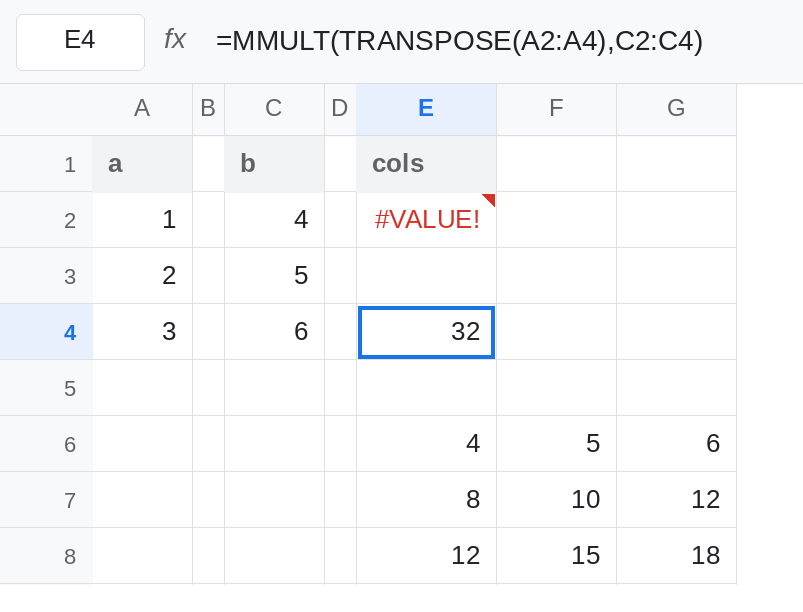
One transpose, the dot product. In E4 enter =MMULT(TRANSPOSE(A2:A4),C2:C4). TRANSPOSE of A2:A4 is a single row, 1×3. Times a 3×1 is a 1×1. E4 is 32. That cell is the control. =SUMPRODUCT(A2:A4,C2:C4) is also 32. SUMPRODUCT does not care that both arguments are columns. MMULT does.
The other transpose is a table. Leave E6:G8 empty. In E6 enter =MMULT(A2:A4,TRANSPOSE(C2:C4)). The first matrix is 3×1. The transposed second is 1×3. The product is 3×3: row1 4,5,6, row2 8,10,12, row3 12,15,18. No #VALUE!. The total you wanted, 32, is not in E6. E6 is 4, which is 1×4, the corner of the outer product. Leave that block up so a successful MMULT can still be the wrong shape.
Two row vectors fail the same way. In A6 1, B6 2, C6 3. In A7 4, B7 5, C7 6. In E10 enter =MMULT(A6:C6,A7:C7). Both ranges are 1×3. Inner sizes 3 and 1. E10 is #VALUE!. In E12 enter =MMULT(A6:C6,TRANSPOSE(A7:C7)). E12 is 32. Leave E10 broken.
Leave E2 and E10 as #VALUE!. Leave E4 as 32. Leave the 3×3 spill starting at E6.
What is actually wrong
Section titled “What is actually wrong”MMULTchecks shape before it multiplies. Two columns do not “pair by row” insideMMULT. Pairing by row is what you get after the first argument is a row. E2 versus E4.- Which argument you transpose chooses the shape of the result. First transposed: one number, the dot product. Second transposed: a full table of every a-value times every b-value. E6 is that table. A dashboard that reads E6 as the dot product is reading
4. SUMPRODUCTof two columns is the dot product without a transpose. Use it when you do not need a matrix product. It still requires numeric cells. Text is#VALUE!for both functions. See MMULT blank / text.- A blocked cell in the
3×3spill is#REF!on E6, which hides the outer product. Clear G6:G8 before you decide the transpose is wrong. The one-cell result in E4 has nothing to overwrite. - Larger mismatched blocks are the same inner-dimension rule. See MMULT dimensions. E2 is the small case: inner
1versus3.
This is not wrong type from 10 + pcs. E2’s tooltip is the matrix size. A text pcs in A3 would also be #VALUE!, with a different reason, and TRANSPOSE would not turn it into 32.
Leave E2 broken. Leave the outer product in E6 so it is not mistaken for the fix.
Dot product of two columns. Keep E4: =MMULT(TRANSPOSE(A2:A4),C2:C4). Or use =SUMPRODUCT(A2:A4,C2:C4), which is 32 without TRANSPOSE. Pick one and label it dot.
Dot product of two rows. Keep E12: =MMULT(A6:C6,TRANSPOSE(A7:C7)). Transposing the first row instead, =MMULT(TRANSPOSE(A6:C6),A7:C7), is the outer product again, a column times a row.
A column times a matrix that really is n×p. If C2:D4 were two columns of weights, 3×2, then =MMULT(TRANSPOSE(A2:A4),C2:D4) is 1×2, two weighted sums. =MMULT(A2:A4,C2:D4) is #VALUE! for the same reason as E2. The transpose is the fix only when it makes the inner sizes match and the orientation is the product you meant. Check the size of the spill. One cell means a dot product. A grid means an outer product or a real matrix product.
If the tooltip says incompatible sizes and both ranges are columns, transpose the first for a dot product. If there is no tooltip and the spill is a grid of products, you transposed the second argument. 32 is the sum of the paired products, not the top-left cell of that grid.