

VSTACK of the raw range puts blank rows back next to a FILTER that had removed them
Updated
FILTER removes rows that do not pass. VSTACK stacks whatever arrays you hand it, including blank rows, and it does not run the filter again. VSTACK(FILTER(...), A2:B6) prints the clean list and then the original list, blanks included. The blanks look like they survived the filter. They arrived from the second argument. A filter on the wrong column does the other version: the city is filled, the name is blank, and that row was never removed.
#N/A padding when one block is narrower is VSTACK cols. How FILTER treats "" versus a truly empty cell is FILTER blank vs empty. Keep the Google Sheets UI in English. Sheet Error is an independent formula-error library, not a Google product.
Recreate it on a blank sheet
Section titled “Recreate it on a blank sheet”- Open a blank spreadsheet. In A1 type
name, B1city. A2Ana, B2East. Leave A3 empty, B3East. A4Bo, B4West. A5Cy, B5East. Leave A6 and B6 empty. Five data rows. Two of them have a blank name. A3’s city is still East.
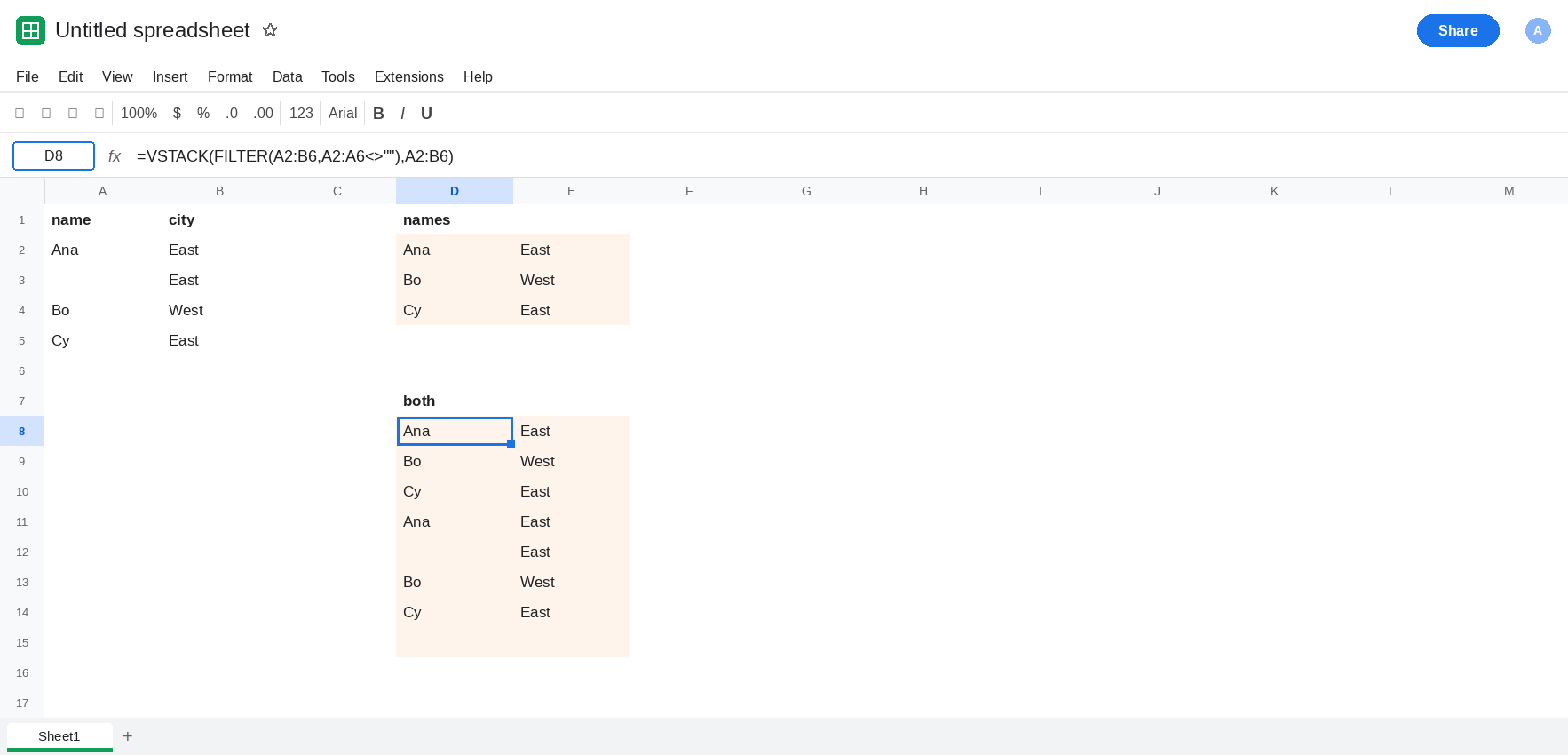
FILTER drops blank names. Leave D2:E5 empty. In D1 type names. In D2 enter =FILTER(A2:B6,A2:A6<>""). The spill is Ana / East, Bo / West, Cy / East. A3 and A6 are gone. That block is the control.
VSTACK puts the raw block back. Leave D8:E13 empty. In D7 type both. In D8 enter =VSTACK(FILTER(A2:B6,A2:A6<>""),A2:B6). The top three rows match D2. Under them, A2:B6 is stacked in full: Ana, a blank name with East, Bo, Cy, and a fully blank row. No error triangle. The filter ran. The second array ignored it. Leave D8 as that taller spill.
The other column. In G1 type cities. In G2 enter =FILTER(A2:B6,B2:B6<>""). B6 is the only fully blank city, so it drops. A3 stays: the name is blank and the city is East. The spill includes a blank name. VSTACK of G2 with anything else will keep that blank, because it was never filtered out. Leave G2 with the blank name visible.
A sheet filter does not remove rows from the range. Turn on Data → Create a filter and hide the blank rows if you want to see it. =VSTACK(A2:B6) still includes them. Hiding is not deleting. See filter hides spill and QUERY and filters. Clear the filter when you are done so D2 stays easy to read.
Leave D2 as three rows. Leave D8 with the blanks back. Leave G2 with one blank name.
What is actually wrong
Section titled “What is actually wrong”VSTACKconcatenates arrays. It has no condition argument. D8’s second argument is the original range, so every original row is in the result, in addition to the filtered copy above it. You also get Ana, Bo, and Cy twice. The blanks are the obvious part. The duplicates are the same mistake.FILTERonly drops rows that fail the condition you wrote.B2:B6<>""keeps A3. The name was never the test. G2 is a successful filter of cities, and it is a bad list of names.- An empty string from a formula and a truly empty cell can disagree inside
<>"". When a “blank” survives a condition that should have removed it, check that page: FILTER blank vs empty. A3 on this sheet is an empty cell, and<>""does remove it when you test column A. - One side with no matches makes the whole
VSTACK#N/A, becauseFILTERreturns#N/AandVSTACKwill not skip an error array.=FILTER(A2:B6,A2:A6="missing")is that#N/A. See FILTER no match. D8 is not that. D8 returned rows, including blanks. - Width padding is a
#N/Aon the right, not a blank name. See VSTACK cols.
Leave D8 as the stack that brings the blanks back.
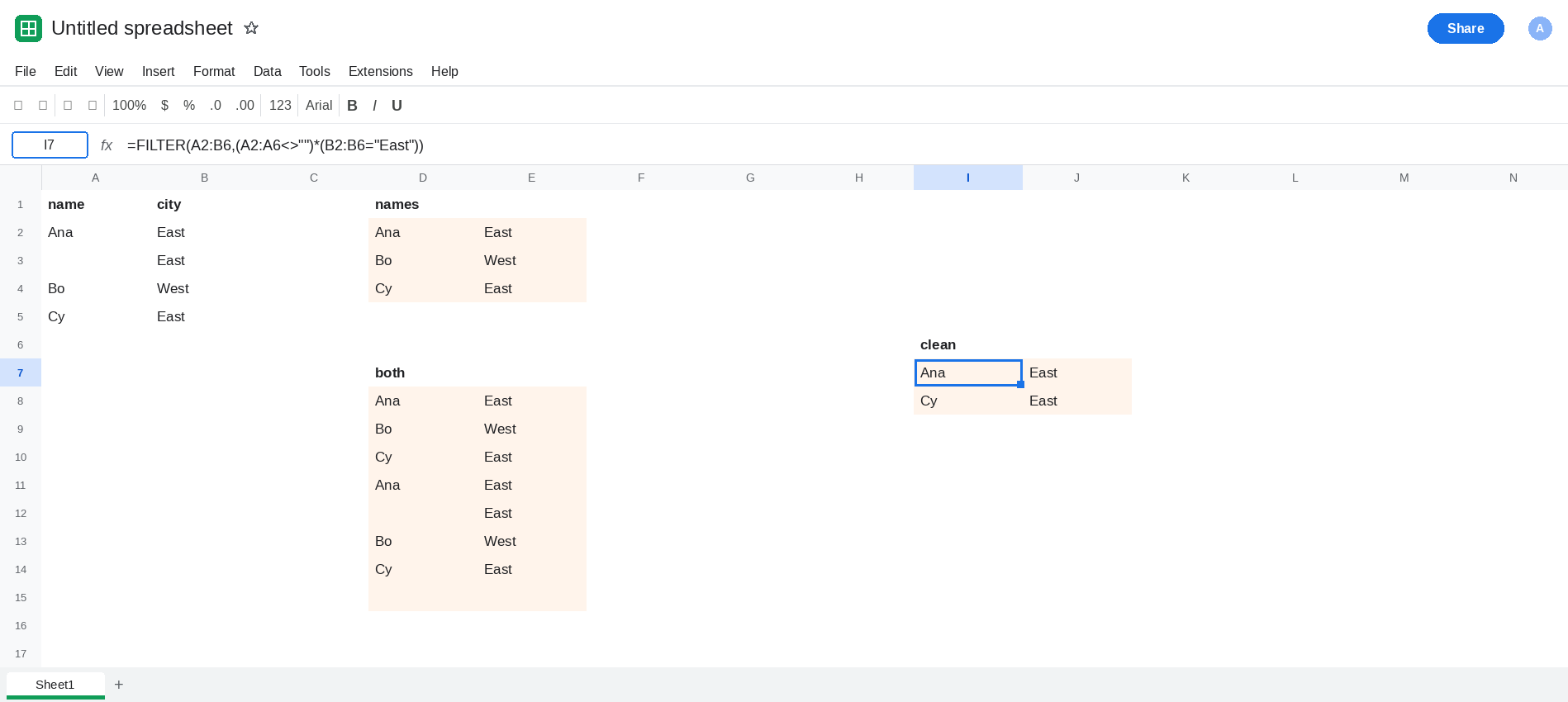
Stack filtered arrays only. In I1 type clean. In I2 enter =VSTACK(FILTER(A2:B6,A2:A6<>""),FILTER(A2:B6,A2:A6="Bo")). The first part is Ana, Bo, Cy. The second part is Bo again, because Bo also met the second test. That shows overlap. For a real split, filter each piece on a condition the others do not share. In I7 enter =FILTER(A2:B6,(A2:A6<>"")*(B2:B6="East")). One FILTER, East rows that also have names: Ana and Cy. No blank, no second copy. Use VSTACK when the pieces come from different ranges.
Test the column you want empty rows removed from. Keep D2 when the blank that matters is the name. Keep a city test only when a blank name with a real city should remain. G2 is that choice, made visible. Do not describe G2 as “the blanks removed.”
Do not wrap D8 in FILTER after the fact without deciding which column is the blank. =FILTER(D8:E13,D8:D13<>"") does drop the blank names, and it also drops a fully blank row. It keeps working only while column D is the name. Prefer filtering before the stack, on the source.
If blank names reappear under a VSTACK, one of the arguments is still the raw range or a FILTER on a different column. Pass the filtered spill only. If the result is #N/A and one FILTER has no rows, that side is FILTER no match, not a blank row.