

PMT and IPMT are negative when the present value is positive
Updated
PMT(rate, number_of_periods, present_value) returns the payment for a loan or an annuity. Cash you pay out is negative. Cash you receive is positive. A loan amount entered as a positive present_value (money you received) produces a negative payment (money you pay back). IPMT for one period uses that same sign. The interest portion of the first payment is negative too. Nothing is #NUM! or #VALUE!. The number looks “wrong” only if the sheet expected a positive bill.
RATE failing to converge is RATE guess. Discounted irregular cashflows are XNPV dates. These figures only show the sign on a fixed payment. This is not lending advice. Keep the Google Sheets UI in English. Sheet Error is an independent formula-error library, not a Google product.
Recreate it on a blank sheet
Section titled “Recreate it on a blank sheet”- Open a blank spreadsheet. In A1 type
rate, B1nper, C1pv. In A2 enter=0.05/12. Five percent a year, monthly. B2360. Thirty years of months. C2200000. The loan proceeds, positive.
The payment. In E1 type pmt. In E2 enter =PMT(A2,B2,C2). E2 is -1073.64 if you format it as a number with two decimals. The minus sign is the convention: you pay that amount each month. Leave the sign visible. Do not format the cell as a date. A payment serial is not a date.
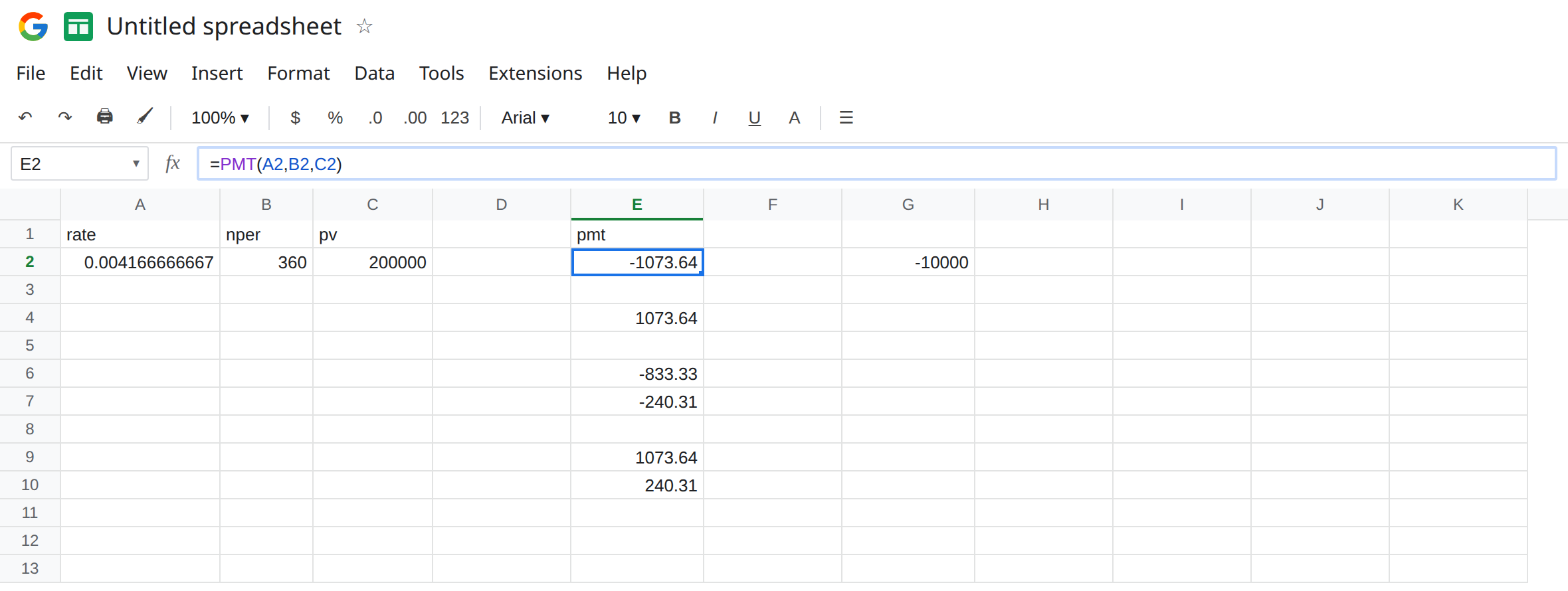
Flip the present value. In E4 enter =PMT(A2,B2,-C2). E4 is 1073.64. Same size, opposite sign. Negative pv means you treat the balance as money you already paid out (you are the lender, or you stored the debt as a negative asset). The function did not “fix” E2. It answered a different cash direction. If a template adds E2 and E4, they cancel, and the budget shows 0.
IPMT is the same sign. In E6 enter =IPMT(A2,1,B2,C2). Period 1, same rate, same term, same positive present value. E6 is -833.33. That is one month of interest on 200000 at 0.05/12 (200000 * 0.05 / 12), signed as cash out. In E7 enter =PPMT(A2,1,B2,C2). E7 is about -240.31. E6 + E7 equals E2 (-1073.64). The parts use the payment’s sign. They are not both positive slices of a positive bill.
ABS breaks the identity. In E9 enter =ABS(E2). E9 is 1073.64. In E10 enter =E9+E6. E10 is 240.31, not 0 and not the principal. You flipped only the payment and left the interest negative. An amortization check that adds ABS(PMT) to IPMT will not equal PPMT. Leave E10 as that broken sum.
Rate per period, a neighbor mistake. In G2 enter =PMT(0.05,B2,C2). The annual rate was not divided by 12, and there are still 360 periods. G2 is -10000. No triangle. The payment is enormous because each “period” is being charged 5 percent. The sign is still negative. Fixing the sign does not fix G2, and dividing the rate does not answer someone who wanted a positive display of E2.
Leave E2 as -1073.64. Leave E4 as the flipped sign. Leave E10 as the bad sum.
What is actually wrong
Section titled “What is actually wrong”- One sign convention for the whole schedule: positive
pv, negativePMT, negativeIPMT, negativePPMT. Or the opposite for every one of them. Mixing a positive payment with a negative interest is E10. end_or_beginning(0end of period, the default, or1beginning) changes the payment slightly. It does not remove the minus sign.=PMT(A2,B2,C2,0,1)is still negative.future_valuedefaults to0(the loan is paid off). A leftover balance is another signed cashflow at the end. Omitting it is correct for a fully amortizing loan. It is not the source of the minus on E2.- Units have to match. Monthly payments mean monthly rate (
0.05/12) and months (360). Annual rate with a monthly count is G2’s-10000. Quarterly would be0.05/4and a period count of years times 4. The function will not infer “per year” from the number0.05. - A red negative format or parentheses is display.
=E2>0is still FALSE.
This is not IRR #NUM!. See IRR / XIRR #NUM!. E2 converged. There is a payment.
This is not RATE given the payment back. If you pass E2 into RATE you must keep the signs consistent: =RATE(B2,E2,C2) uses the negative payment and the positive present value and returns a rate near A2. Passing ABS(E2) with a positive C2 is the same-sign case and #NUM!. See RATE guess.
Leave E4 and E10 on the sheet as the two ways the sign gets lost. Leave G2 as the rate-unit mistake.
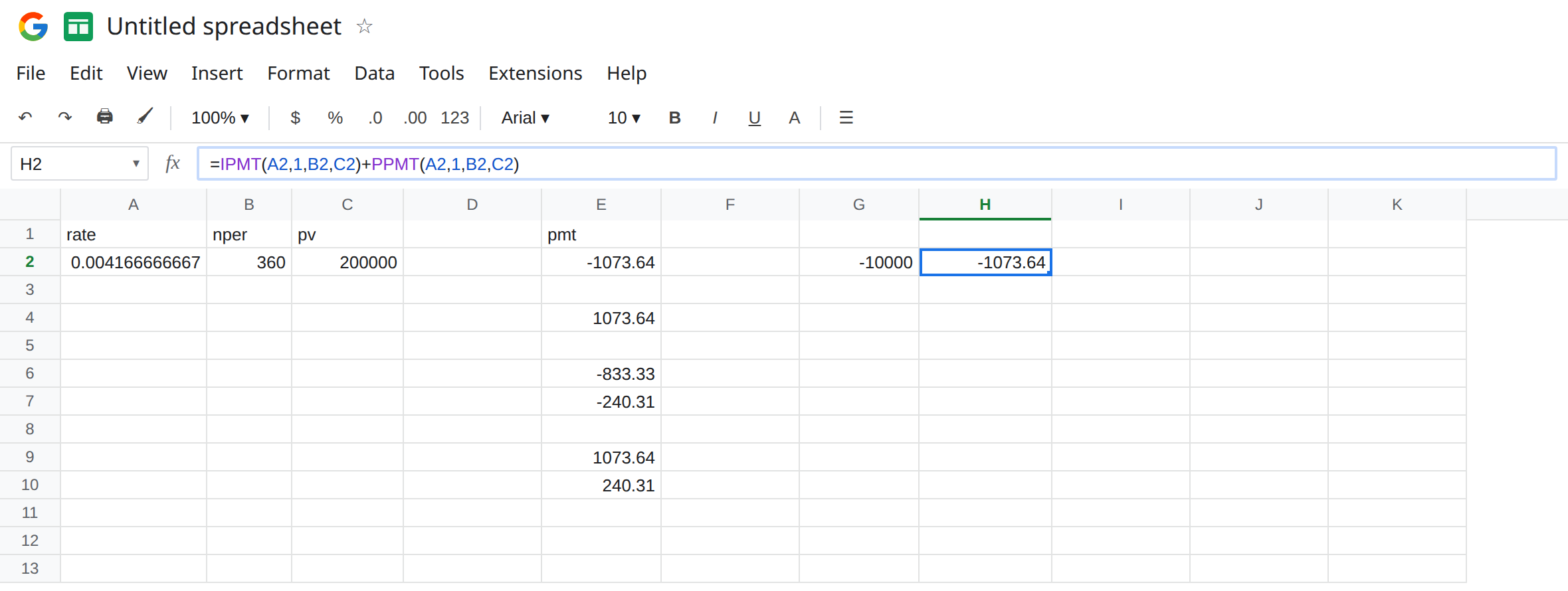
Keep one direction. For a borrower balance stored as a positive 200000, keep E2: =PMT(A2,B2,C2). Show the payment as a bill in a label, or with a number format, without ABS inside the amortization. In H2 enter =IPMT(A2,1,B2,C2)+PPMT(A2,1,B2,C2). H2 matches E2 (-1073.64). That identity is the check.
If the workbook stores debts as negatives, pass that negative present value and expect a positive PMT (E4). Then IPMT and PPMT should be computed from the same negative present value so they are positive too. Do not flip only one function.
Divide the annual rate by the number of periods in a year before you touch the sign. A2 is =0.05/12. G2 is what happens when you skip that.
Do not wrap E2 in IFERROR. There is no error. See IFERROR vs IFNA.
If PMT is negative and pv is positive, the sign is the cash-out convention. If interest plus principal does not equal the payment, one of them went through ABS. If the payment is about -10000 on a 200000 loan at “5% for 360 months,” the rate is still annual (G2).
Signs on this loan
Section titled “Signs on this loan”Positive 200000, rate 0.05/12, 360 periods: PMT is -1073.64, first IPMT is -833.33, first PPMT is about -240.31, and those two parts add to the payment. Negating pv flips every one of those signs. ABS on the payment alone makes the parts fail to add. PMT(0.05,360,200000) is -10000 because the rate is not monthly.