

Array result was not expanded because it would overwrite data
Updated
UNIQUE can return #REF! even when the source list is sitting on the sheet. The formula is fine. Sheets will not spill into a cell that already has data. SORT does the same thing when a cell to the right is occupied, not only when a cell below is occupied.
This page is a blocked spill you can type in a minute. The longer SORT / UNIQUE walkthrough — more spill shapes, move-the-formula, and the other #REF! lookalikes — is SORT / UNIQUE spill. The job here is the overwrite itself, and why it is not a deleted-ref #REF!.
Recreate it on a blank sheet
Section titled “Recreate it on a blank sheet”- Open a blank spreadsheet. In C1 type
apple. C2apple. C3banana. - In A2 type the word
block. Leave A1 empty. - In A1 enter
=UNIQUE(C1:C3). The cell shows#REF!. The tooltip is Array result was not expanded because it would overwrite data in ‘A2’.
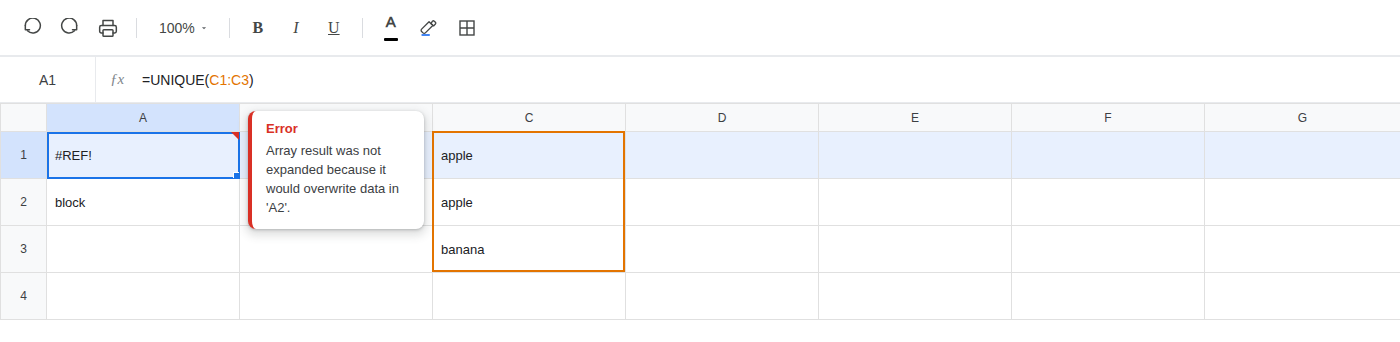
Leave A1 as the broken formula.
Second recreate — SORT blocked to the right. In E1 type sku, F1 name. E2 101, F2 Widget. E3 102, F3 Gadget. In H1 type sort. In I2 type block. Leave H2 empty. In H2 enter =SORT(E2:F3,1,TRUE). The cell shows #REF!. The tooltip is Array result was not expanded because it would overwrite data in ‘I2’.
SORT of two columns returns two columns. It needs H2:I3. I2 already holds block. The spill is blocked to the right, not only down. Leave H2 broken.
A note, a space, or another formula in the path counts as occupied. The cell has to be empty. The source lists in C and E:F are fine.
What is actually wrong
Section titled “What is actually wrong”UNIQUE returns an array. Here that is two cells: apple, then banana. It needs A1 and A2. A2 already holds block. Sheets will not overwrite it, so the whole result stays #REF! in A1. Nothing is written into A2. The formula does not “partially spill.” One occupied cell in the path blocks the entire array.
SORT(E2:F3,1,TRUE) is the same error on a different axis. The function is not wrong. The path is occupied. Clear I2, or put the formula where H and I are empty, and it spills.
This is not a deleted reference. After a delete, Sheets replaces the dead address inside the formula text. You select the cell and the formula bar looks like =A1+#REF! or =#REF!+#REF!. See after you delete. On this sheet the formula bar still reads =UNIQUE(C1:C3) and =SORT(E2:F3,1,TRUE). The ranges exist. C1:C3 still holds fruit. E2:F3 still holds sku and name. #REF! is the cell value because the spill cannot land, not because a name in the formula was destroyed.
That distinction is the whole reason this page exists next to the delete primer. Both errors print #REF! in the cell. Only the delete puts #REF! in the formula bar. If you can still read UNIQUE or SORT and a real range, do not undo a delete and do not rewrite the function. Look at the cells the array would occupy.
This is not a VLOOKUP column index past the range, and not HLOOKUP with a row index that is too tall. Those formulas look like =VLOOKUP(D2,A2:B2,3,FALSE). The tooltip is an out of bounds range. Nothing is spilling. See VLOOKUP bad index and HLOOKUP #N/A / #REF!.
This is not a circular formula. A loop still shows the original cell names and the tooltip is Circular dependency detected. See circular dependency.
This is not IMPORTRANGE waiting for Allow access. That #REF! is a permission prompt. The formula here never left this spreadsheet.
FILTER, QUERY, and ARRAYFORMULA can hit the same overwrite. The tooltip is the same. This page is UNIQUE blocked from below and SORT blocked to the right. For more spill shapes, use SORT / UNIQUE spill.
Do not change the UNIQUE formula.
Delete the value in A2 so that cell is empty. A1 stays =UNIQUE(C1:C3). The array spills: A1 is apple, A2 is banana.
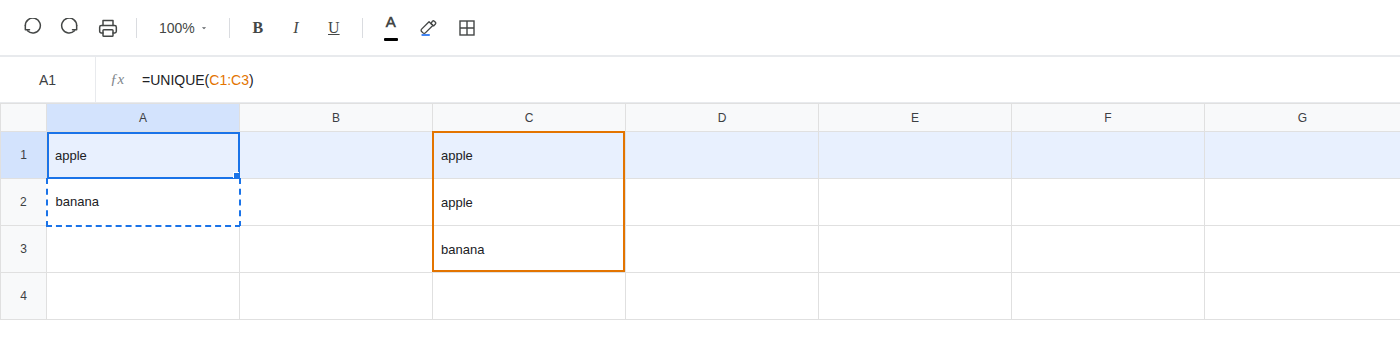
Undo or retype block in A2 if you want the #REF! back. On this sheet you can leave A2 filled so A1 stays #REF! next to a working copy.
Place the formula where it can spill. Leave H2 broken. In K1 type sort_ok. Leave K2:L3 empty (do not put a value in L2). In K2 enter =SORT(E2:F3,1,TRUE). The array spills 101 / Widget in K2:L2 and 102 / Gadget in K3:L3. That is the second fix: empty cells in the path, not a different function.
Do not wrap A1 or H2 in IFERROR. That prints a blank and never spills. See IFERROR vs IFNA.
If #REF! is an overwrite, clear the cells in the spill path, or move the formula onto empty cells. Leave the formula where it is if the path can be cleared. Read the formula bar. If you still see UNIQUE or SORT with a real range, this is the error.