

Fix CHOOSEROWS / CHOOSECOLS index errors in Google Sheets (index out of range)
Updated
CHOOSEROWS returns whole rows from a block by relative position. CHOOSECOLS does the same for columns. 1 is the first row of the range you named, not sheet row 1. 0 is not a row. Past the range is out of range (#VALUE!, sometimes #NUM! / #REF!). There is no fifth roster row to pick.
This page is CHOOSEROWS / CHOOSECOLS indexes. It is not INDEX past range (INDEX #REF! past a range). It is not CHOOSE #VALUE! (a list of arguments, not a range). It is not WRAPROWS / WRAPCOLS (chunk size, not an index). Keep the Google Sheets UI in English.
Recreate it on a blank sheet
Section titled “Recreate it on a blank sheet”- Open a blank spreadsheet. In A1 type
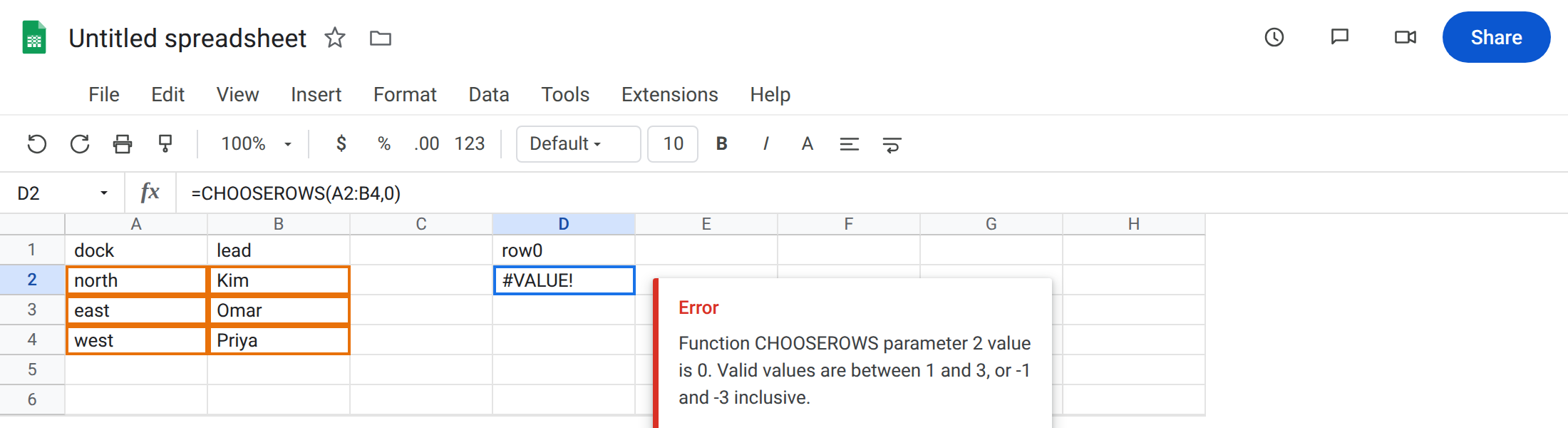
dock, B1lead. A2north. B2Kim. A3east. B3Omar. A4west. B4Priya. Three data rows. The header is row 1 of the sheet, not row 1 ofA2:B4.
Index 0. In D1 type row0. In D2 enter =CHOOSEROWS(A2:B4,0). The cell errors (#VALUE! / #NUM!). CHOOSEROWS counts from 1, or from -1 at the bottom. 0 is neither. Leave D2 broken.
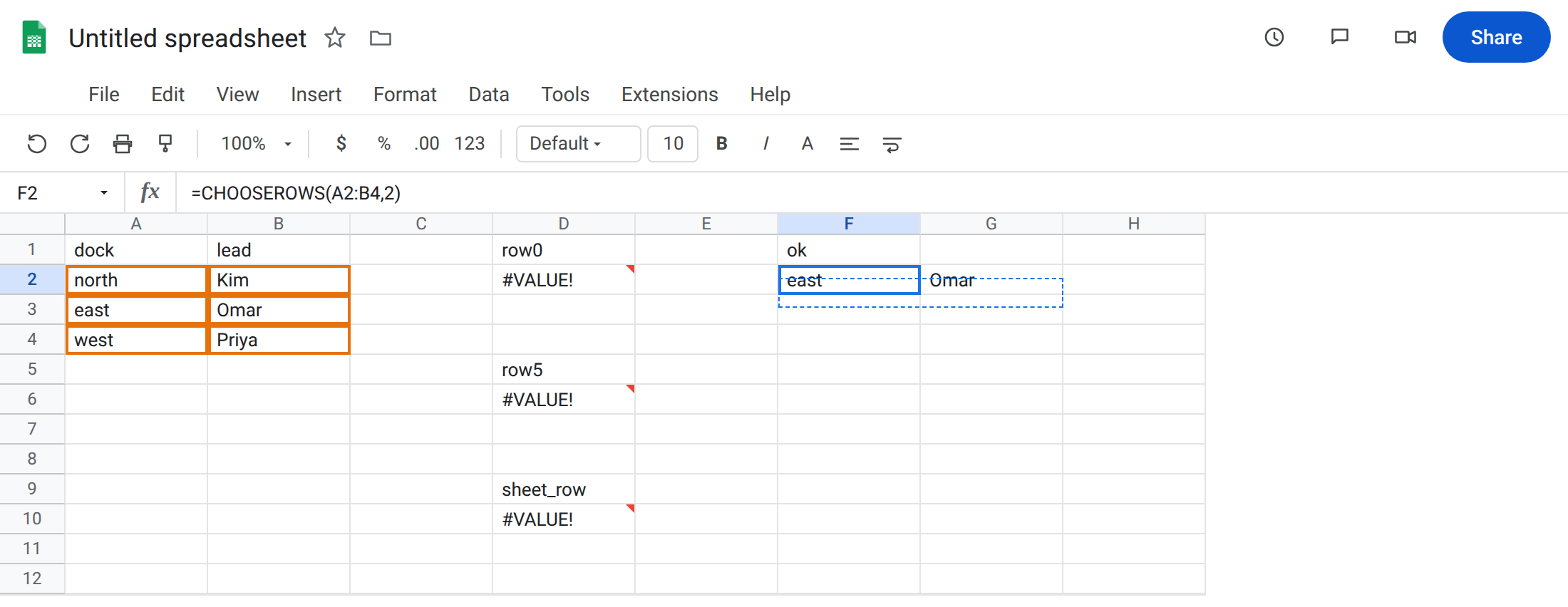
Index past the range. In D5 type row5. In D6 enter =CHOOSEROWS(A2:B4,5). Three rows in the range. 5 asks for a fifth. Same family of out-of-range error. Leave D6 broken.
Sheet row vs relative row. In D9 type sheet_row. In D10 enter =CHOOSEROWS(A2:B4,4). You can see west on sheet row 4. Relative to A2:B4, row 4 does not exist (the block is only three rows). The cell errors. Leave D10 broken. This is the trap: people pass the grid row number.
A control that fits. In F1 type ok. In F2 enter =CHOOSEROWS(A2:B4,2). The spill is east / Omar. Relative row 2 of A2:B4 is sheet row 3.
Negative index from the end. In F5 enter =CHOOSEROWS(A2:B4,-1). The spill is west / Priya. -1 is the last row of the range. Legal. Not 0.
CHOOSECOLS past the width. In H1 type col3. In H2 enter =CHOOSECOLS(A2:B4,3). The block is two columns. Index 3 is past it. Leave H2 broken.
INDEX contrast. In J2 enter =INDEX(A2:B4,4,1). #REF!. Past-the-end on INDEX is #REF!, not the CHOOSEROWS token. See INDEX past range. Leave J2 as the contrast.
Leave D2, D6, D10, and H2 broken. Leave F2 as the working row.
What is actually wrong
Section titled “What is actually wrong”- Indexes are 1-based positions inside the range.
A2:B4has relative rows 1, 2, 3. Sheet row 4 is relative row 3 (west). Passing4because the label sits on row 4 is D10. 0is not “no row” and not “header.” It is invalid. Use1for the first data row ofA2:B4, or include the header in the range and pick1fordock/lead.-1,-2,-3count from the bottom.-4on a three-row block is out of range again. Negative is not a way to pass0.CHOOSECOLS(A2:B4,3)is the same idea on the other axis. Width 2, index 3.- Several indexes are allowed:
CHOOSEROWS(A2:B4,1,3)returns north and west. Any illegal index fails the whole call.CHOOSEROWS(A2:B4,1,5)does not return the good row and skip the bad one.
This is not INDEX #REF!. See INDEX past range. Widening A2:B4 for INDEX will not make 0 a CHOOSEROWS row.
This is not CHOOSE with index 4. CHOOSE picks from a list of arguments. See CHOOSE #VALUE!.
This is not FILTER zero rows. See FILTER no match. You asked for a position.
Leave the broken indexes in D and H.
Use a relative index that exists. Keep F2: =CHOOSEROWS(A2:B4,2) for east. For west, =CHOOSEROWS(A2:B4,3) or =CHOOSEROWS(A2:B4,-1), not 4.
Include the header if you meant sheet rows. =CHOOSEROWS(A1:B4,4) is west / Priya because the range now has four rows and relative 4 is the last. Prefer naming A2:B4 and passing 3.
Columns: =CHOOSECOLS(A2:B4,2) returns the lead column. There is no column 3 until you widen the range.
Do not wrap D2 in IFERROR so a bad picker looks blank. See IFERROR vs IFNA. IFNA will not catch #VALUE!.
If the function errors and you can see the row on the sheet, count from the top of the range, not from A1. If the index is 0, stop. Start at 1 or -1.
Relative row vs sheet row vs INDEX
Section titled “Relative row vs sheet row vs INDEX”Sheet row 4 / relative row 3 is the usual off-by-header. CHOOSEROWS never sees the rows above its range.
INDEX(A2:B4,3,1) and CHOOSEROWS(A2:B4,3) both land on west. INDEX(...,4) is #REF!. CHOOSEROWS(...,4) is this page’s out-of-range error. Same off-by-one, different token.