

EPOCHTODATE reads seconds unless you pass the millisecond unit
Updated
EPOCHTODATE(timestamp, [unit]) converts a Unix timestamp to a UTC date and time. Unit 1, the default, means seconds. Unit 2 means milliseconds. Unit 3 means microseconds. A 10-digit stamp such as 1700000000 is seconds. A 13-digit stamp such as 1700000000000 is milliseconds. Passing the 13-digit number with the unit omitted treats it as seconds and the date is centuries out of range: #NUM!. Passing the 10-digit number with unit 2 does not error. It returns 20 January 1970, because a small millisecond count is still a legal date near the epoch. The result is UTC, not the spreadsheet’s time zone.
DATEVALUE of a date string is DATEVALUE locale. TO_DATE of a serial is TO_DATE serial. Keep the Google Sheets UI in English. Sheet Error is an independent formula-error library, not a Google product.
Recreate it on a blank sheet
Section titled “Recreate it on a blank sheet”- Open a blank spreadsheet. In A1 type
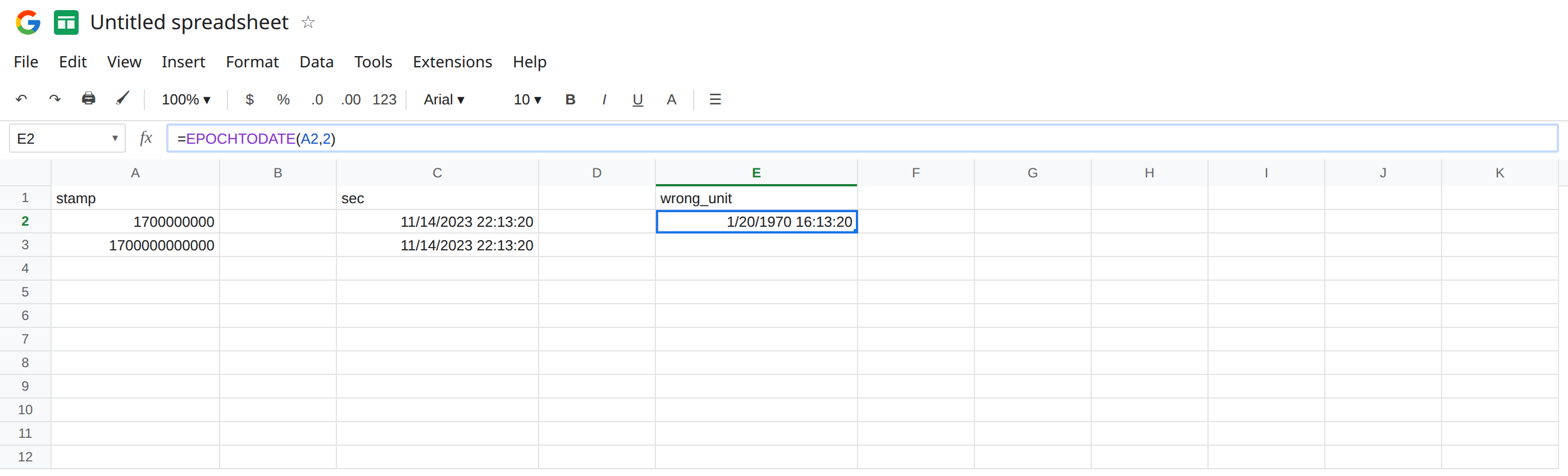
stamp. A21700000000. Ten digits. A31700000000000. Thirteen digits. These two numbers are the same instant if you read A2 as seconds and A3 as milliseconds.
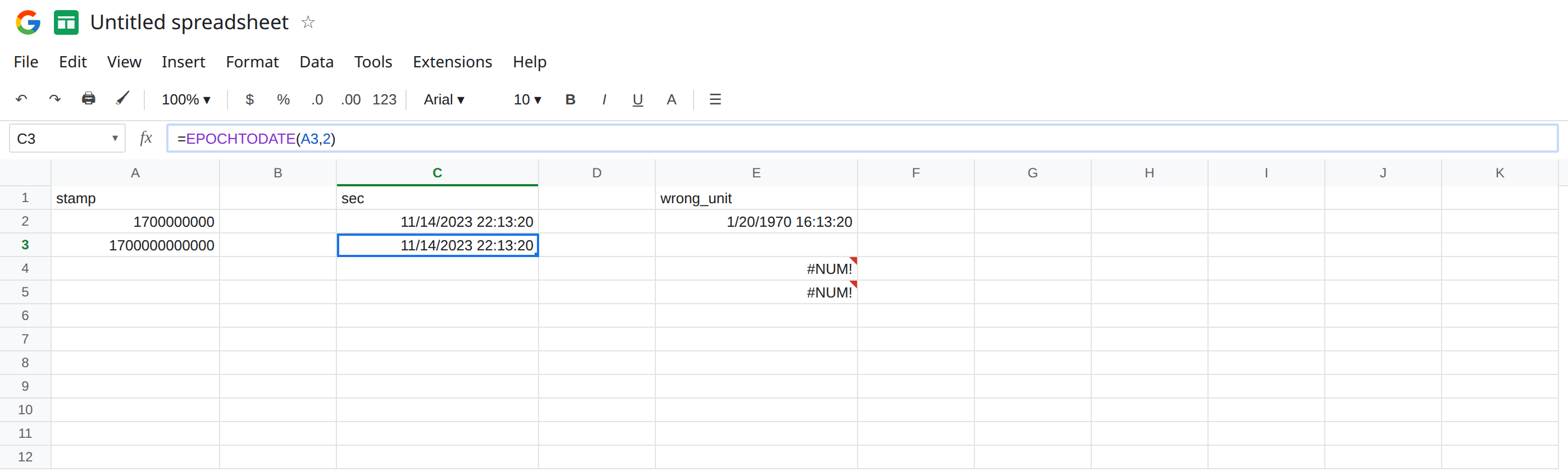
Seconds, the default. In C1 type sec. In C2 enter =EPOCHTODATE(A2,1). Format C2 as Date time (Format → Number → Date time). C2 is 11/14/2023 22:13:20. The same formula with the unit omitted, =EPOCHTODATE(A2), matches C2, because seconds are the default. In C3 enter =EPOCHTODATE(A3,2). Format C3 as Date time. C3 is the same instant: 11/14/2023 22:13:20. Unit 2 on the 13-digit stamp is the correct pair. Those two cells are the control.
Ten digits read as milliseconds. In E1 type wrong_unit. In E2 enter =EPOCHTODATE(A2,2). Format E2 as Date time. E2 is 1/20/1970 16:13:20. No triangle. 1700000000 milliseconds is 1,700,000 seconds after 1970-01-01 UTC, which is the 20th of January, not November 2023. A filter for “this year” drops the row. The formula did what unit 2 says.
Thirteen digits read as seconds. In E4 enter =EPOCHTODATE(A3). The unit is omitted, so this is seconds. 1700000000000 seconds is tens of thousands of years past the dates Sheets will store. E4 is #NUM!. In E5 enter =EPOCHTODATE(A3,1). E5 is #NUM! for the same reason. Leave E4 and E5 broken. The repair is unit 2, which you already have in C3, not a different timestamp.
Negative stamps. In E7 enter =EPOCHTODATE(-1,1). Negative timestamps are not accepted. E7 is #NUM!. Leave E7 broken. A real pre-1970 instant is not a negative argument to this function.
A serial that looks like a plain number. Copy C2 to G2 and format G2 as Number. G2 shows a serial around 45244.93. The formula is fine. The format is hiding the calendar. See TO_DATE serial if you started from a serial. EPOCHTODATE already returned a date value.
Leave E2 as 20 January 1970. Leave E4 as #NUM!. Leave C2 and C3 as 14 November 2023.
What is actually wrong
Section titled “What is actually wrong”- Digit count is the hint. About 10 digits → unit
1. About 13 digits → unit2. About 16 digits → unit3(microseconds). The function will not infer the unit from the size of the number. A 13-digit value is a perfectly good integer. As seconds, it is just too far in the future, hence#NUM!. - Unit
2on a 10-digit stamp is a successful conversion to early 1970.#NUM!is not the symptom. A date in 1970 on a row you know is from 2023 is the symptom. Check the second argument before you add hours to “fix the clock.” - The result is UTC.
22:13:20on 14 November 2023 is not local time. AddingTIME(hours, minutes, 0)shifts the display into a zone. It does not change which unit you needed. A one-hour shift is a zone. A 53-year shift is the unit. EPOCHTODATEis notDATEVALUE. The text2023-11-14is a string. This function wants seconds, milliseconds, or microseconds. A date string is#VALUE!. See DATEVALUE locale.
This is not WORKDAY #NUM! from a bad weekend code. See WORKDAY #NUM!. E4’s inputs are a timestamp and a unit.
This is not a timezone setting in File → Settings. The locale does not pick seconds versus milliseconds.
Leave E2 and E4 broken so the wrong unit stays visible.
Pair the unit with the digits. Keep C2 for the 10-digit stamp: =EPOCHTODATE(A2,1). Keep C3 for the 13-digit stamp: =EPOCHTODATE(A3,2). In H2 enter =IF(A2>10^11,EPOCHTODATE(A2,2),EPOCHTODATE(A2,1)). On A2, H2 matches C2. Copying the idea onto A3 matches C3. Use a threshold only when the column mixes both lengths. If every row is milliseconds, hard-code unit 2 and do not omit it.
Format the cell as Date time. G2’s serial is C2’s value with the wrong format. Format → Number → Date time. Do not add 25569 or divide by 86400 on top of EPOCHTODATE. The function already returned a Sheets date. Dividing again moves you off November 2023.
Shift to local time after the unit is right. =C2+TIME(5,30,0) adds five hours and thirty minutes to UTC. Do that on C2, not on E2. Shifting January 1970 still leaves you in January 1970.
Do not wrap E4 in IFERROR. The #NUM! is the unit. See IFERROR vs IFNA. IFNA does not catch #NUM!.
If EPOCHTODATE is #NUM! on a 13-digit number, pass unit 2. If the date is in January 1970 and the stamp is 10 digits, you passed unit 2 or you divided the seconds by 1000 before calling the function. If the time is a few hours off and the calendar day is right, adjust UTC. If the cell shows 45244.93, change the number format.
Same instant, three calls
Section titled “Same instant, three calls”EPOCHTODATE(1700000000,1) and EPOCHTODATE(1700000000000,2) are 14 November 2023, 22:13:20 UTC. EPOCHTODATE(1700000000,2) is 20 January 1970, 16:13:20 UTC, and it is not an error. EPOCHTODATE(1700000000000) and unit 1 on that 13-digit number are #NUM!. A negative timestamp is #NUM!. The serial 45244.93 is the November instant formatted as a number.