

Fix REGEXREPLACE unchanged text or #N/A in Google Sheets (pattern miss vs extract)
Updated
REGEXREPLACE(text, regular_expression, replacement) rewrites the parts of text that match. If the pattern does not match, Sheets returns the original string unchanged. That is not #N/A. REGEXEXTRACT on the same miss is #N/A. An invalid regular expression is #REF!. Capturing groups in the replacement ($1) only fire when the pattern actually matched.
This page is REGEXREPLACE miss-as-unchanged, plus a bad pattern. It is not REGEX no match (REGEXEXTRACT #N/A, REGEXMATCH FALSE). It is not FIND / SEARCH miss (#VALUE! when a substring is absent). Keep the Google Sheets UI in English. Patterns are RE2.
Recreate it on a blank sheet
Section titled “Recreate it on a blank sheet”- Open a blank spreadsheet. In A1 type
raw, B1replace, C1extract. A2SKU-101. A3Widget. A4SKU-.
A replace that hits. In B2 enter =REGEXREPLACE(A2,"SKU-(\d+)","ID-$1"). The cell shows ID-101. The group (\d+) captured 101. That row is the control.
A miss returns the original text. In B3 enter =REGEXREPLACE(A3,"SKU-(\d+)","ID-$1"). The cell shows Widget. No red triangle. No #N/A. The replacement string was ignored because nothing matched.
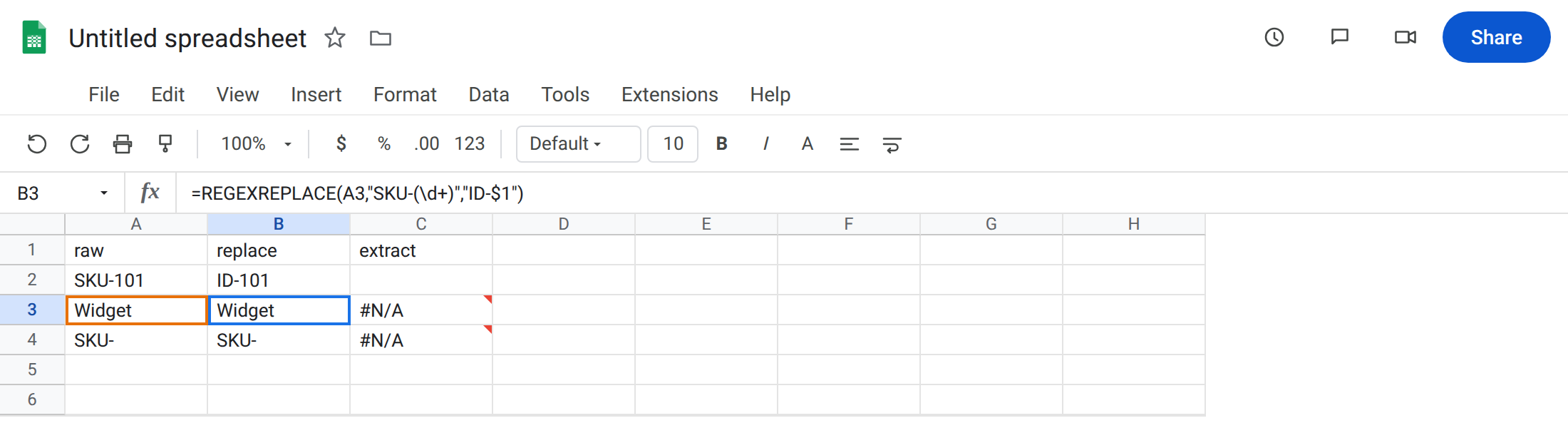
REGEXEXTRACT on the same miss. In C3 enter =REGEXEXTRACT(A3,"SKU-(\d+)"). The cell shows #N/A. Same text, same pattern, different function. Leave C3 as the contrast. That primer is REGEX no match.
Prefix without digits. In B4 enter =REGEXREPLACE(A4,"SKU-(\d+)","ID-$1"). A4 is SKU- with no digits. B4 stays SKU-. Still not #N/A. In C4 enter =REGEXEXTRACT(A4,"SKU-(\d+)"). C4 is #N/A (the group captured nothing). Leave B4 unchanged-looking and C4 broken.
Invalid regex. In E1 type bad_re. In E2 enter =REGEXREPLACE(A2,"SKU-(","ID"). Unclosed ( is #REF!. Tooltip names an invalid regular expression. Leave E2 broken. This is not a miss. The pattern never ran.
REGEXMATCH on the miss. In F3 enter =REGEXMATCH(A3,"SKU-(\d+)"). The cell shows FALSE. Use that test when you must know whether a replace did anything. B3=A3 is another test: equal means no substitution.
Leave B3 as the silent miss. Leave C3 as extract #N/A. Leave E2 as #REF!.
What is actually wrong
Section titled “What is actually wrong”REGEXREPLACEalways returns text when the pattern is valid. A miss is a copy of the input. Dashboards that look for#N/Aafter a replace will not see a problem.REGEXEXTRACTreturns captured text, so a miss is#N/A. Do not debug B3 with the extract page. Do not debug C3 with this page.$1in the replacement is the first group of a match. On a miss there is no group. Sheets does not print$1; it prints the original cell.SKU-fails(\d+)the same wayWidgetdoes. Seeing the prefix is not a match.- Invalid RE2 is
#REF!, not unchanged text. E2 is syntax. B3 is a valid pattern that did not hit.
This is not FIND #VALUE!. See FIND / SEARCH miss. REGEXREPLACE does not use #VALUE! for “needle absent.”
This is not a lookup miss. See what #N/A means. B3 is not #N/A.
This is not SUBSTITUTE instance numbering. See SUBSTITUTE instance. SUBSTITUTE is literal text, no regex.
Leave B3 and E2 as they are. Leave C3 as the extract contrast.
Confirm a miss with REGEXMATCH or equality. In H3 enter =IF(REGEXMATCH(A3,"SKU-(\d+)"),REGEXREPLACE(A3,"SKU-(\d+)","ID-$1"),"none"). The cell shows none. In H2 enter the same formula on A2. The cell shows ID-101.
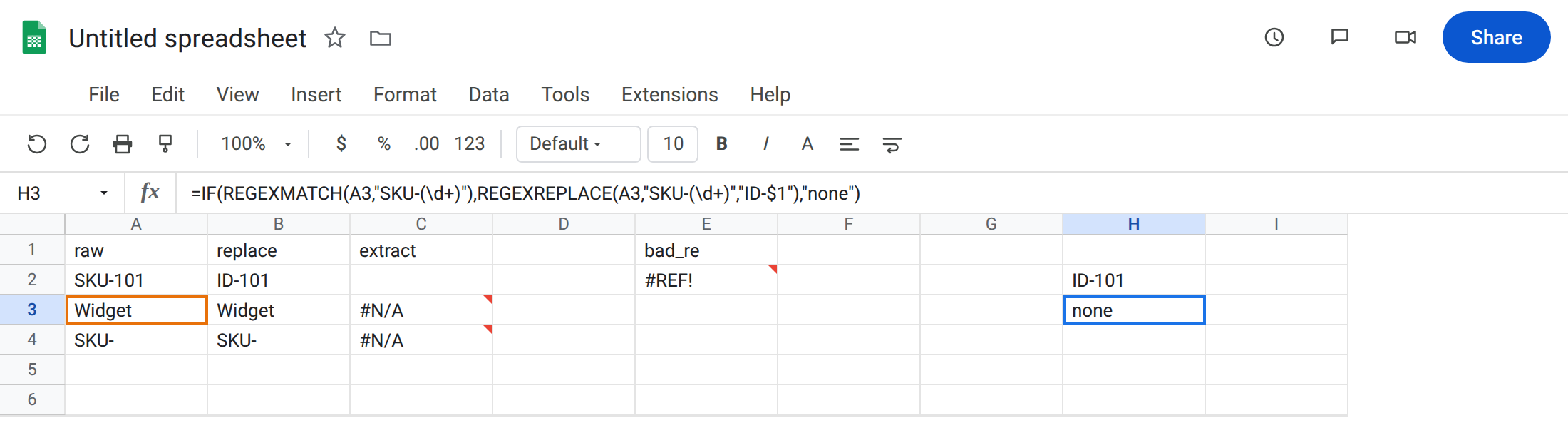
Fix the pattern or the text. If A3 should have been SKU-101, type it. B3 becomes ID-101. If the label is truly Widget, do not rewrite the regex to silence it — branch with REGEXMATCH as H3.
Fix invalid RE2 separately. Close groups, drop a trailing \, do not pass a locale decimal as a regex. E2 is not a candidate for IFNA.
Do not wrap B3 in IFNA. There is no #N/A to catch. IFERROR on E2 would hide a broken pattern. See IFERROR vs IFNA.
If the cell looks like the input after a replace, test REGEXMATCH. If it is #N/A, you are on REGEXEXTRACT. If it is #REF!, the pattern string is invalid.
Unchanged vs EXTRACT #N/A vs MATCH FALSE
Section titled “Unchanged vs EXTRACT #N/A vs MATCH FALSE”Same miss, three returns: original text (REGEXREPLACE), #N/A (REGEXEXTRACT), FALSE (REGEXMATCH). Pick the function by the return type you need. Replace is for rewrite. Extract is for pull. Match is for a boolean gate. This page is the silent rewrite miss — the one that does not paint the cell red.