

A recursive named function calls itself with too few arguments
Updated
A named function (Data → Named functions) can call its own name. The recursive call has to pass every argument the definition lists. WALK2(n, acc) that continues as WALK2(n-1) drops acc. The cell is #N/A. The tooltip is Wrong number of arguments to WALK2. Expected 2 arguments, but got 1 arguments. You called it from the sheet with two arguments. The one-argument call is inside the formula definition.
Calling a non-recursive SHIFT_PAY with one argument is named functions. A deep call that has the right number of arguments and then hits Calculation limit was reached is recursive LAMBDA limit. Keep the Google Sheets UI in English.
Recreate it on a blank sheet
Section titled “Recreate it on a blank sheet”- Open a blank spreadsheet. Data → Named functions → Add new function. Name
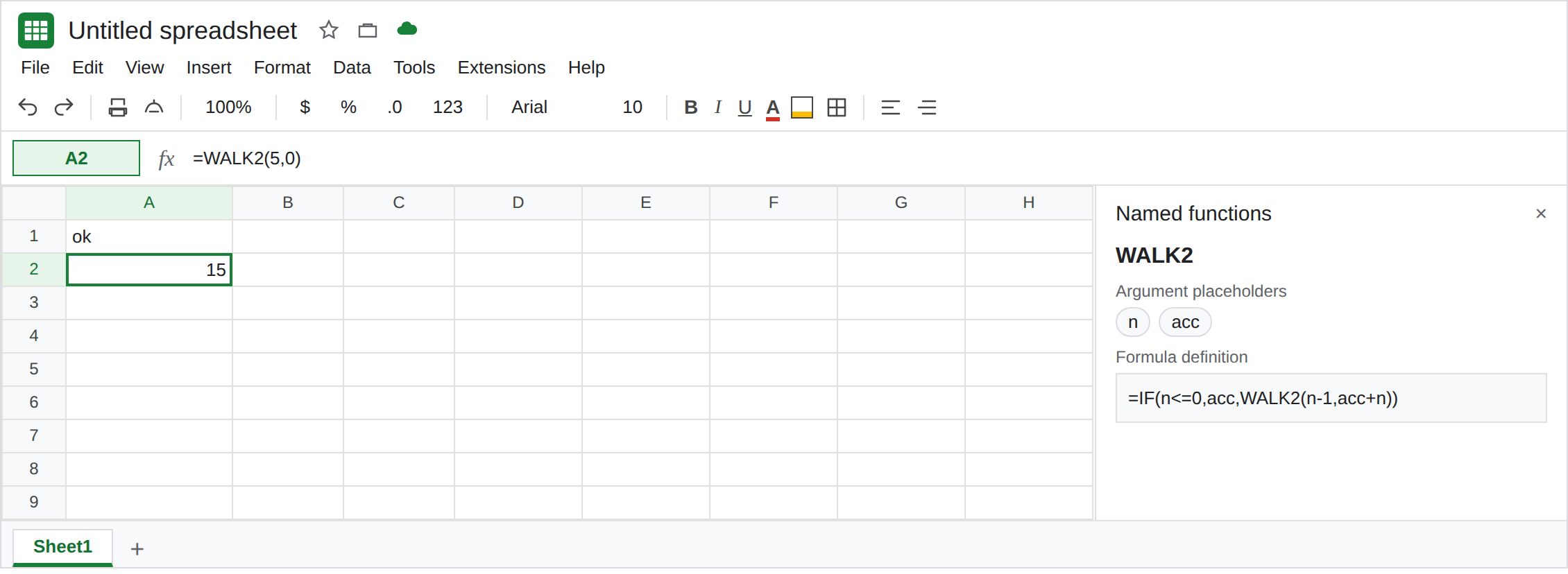
WALK2. Argument placeholders, in order:n, thenacc. Formula definition:
=IF(n<=0,acc,WALK2(n-1,acc+n))
Next, Create. This adds n on the way down and carries acc. Both arguments are on the recursive call.
Two arguments, five steps. In A1 type ok. In A2 enter =WALK2(5,0). A2 is 15 (5+4+3+2+1). That cell is the control. The name exists and the inner call passes n and acc.
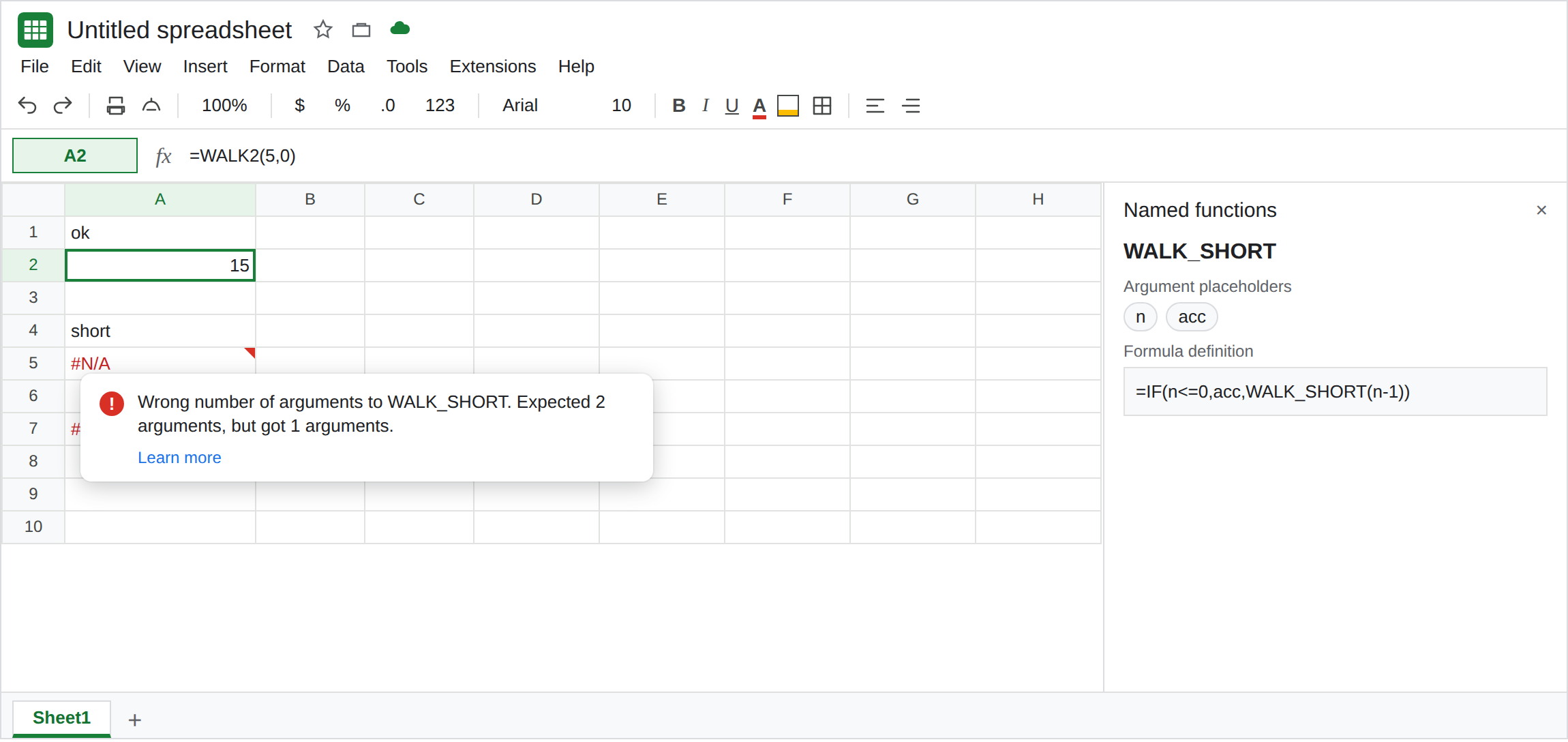
The recursive call drops acc. Add a second function. Name WALK_SHORT. Placeholders: n, then acc. Formula definition:
=IF(n<=0,acc,WALK_SHORT(n-1))
Create. In A4 type short. In A5 enter =WALK_SHORT(5,0). The sheet call has two arguments. A5 is #N/A. Tooltip: Wrong number of arguments to WALK_SHORT. Expected 2 arguments, but got 1 arguments. The 1 is WALK_SHORT(n-1) in the definition. Leave A5 broken.
The sheet call is a different one-argument miss. In A7 enter =WALK2(5). #N/A. Expected 2 arguments, but got 1 arguments. This time the 1 is the formula bar. WALK2’s definition is fine. A2 still shows 15 if you left it. Leave A7 broken. That outer miss is the same tooltip as named functions. A5’s formula bar already had two arguments.
Depth is not arity. =WALK2(20000,0) can stop with Calculation limit was reached while trying to compute this formula, or #NUM!. Both arguments are present. That stop is recursive LAMBDA limit. Do not add a third placeholder to get past it.
What is actually wrong
Section titled “What is actually wrong”- The placeholder list is the contract for every call, including the call written inside the definition.
WALK_SHORT(n-1)is one argument. The function requires two. Sheets reports that when it reaches the inner call, which is immediately, because5is not<=0. - A2 and A5 can show different tooltips for the same words “expected 2, got 1.” Read the formula bar, then open Data → Named functions and read the recursive line. A7 fails in the formula bar. A5 fails in the definition.
- The base case never repairs a short call.
IF(n<=0,acc,...)only returnsaccwhennis already<=0. The first step isn=5, so the short call runs first and errors. You do not get a partial sum. - A placeholder named
A1is rejected in the editor and never becomes this#N/A. See named functions.nandaccare legal names. IFERRORaround A5 turns the arity miss into a blank and looks like a total of zero work. See IFERROR vs IFNA.
Leave A5 and A7 broken. Leave A2 as 15.
Pass both arguments on the way down. The working definition is the one on WALK2: =IF(n<=0,acc,WALK2(n-1,acc+n)). Edit WALK_SHORT to =IF(n<=0,acc,WALK_SHORT(n-1,acc+n)) only after you have read A5’s tooltip. Then =WALK_SHORT(5,0) is 15. Until you edit it, A5 stays the lesson.
Prefer SUM when the job is 1 through n. =SUM(SEQUENCE(5)) is 15 and has no recursive call to under-fill. Keep WALK2 for a walk you have already seen return.
Call it with both inputs. A7 should be =WALK2(5,0), the same shape as A2. Adding a dummy second argument at the sheet does not fix A5. A5’s missing argument is not in A5’s formula bar.
If the tooltip says expected 2 but got 1, open the definition and count arguments on the self-call, then count them in the formula bar. If the tooltip says Calculation limit was reached, both arguments were accepted and the walk is too deep. If the tooltip says Unknown function, the name was never created on this file.