

SWITCH(1, "1", …) misses because a number is not the text "1"
Updated
SWITCH(expression, case1, result1, …) returns the result whose case equals the expression. Equality does not turn the text "1" into the number 1. =SWITCH(1,"1","hit","miss") shows miss. There is no triangle, because the default ran. Drop the default and the same pair is #N/A. Arithmetic will coerce that text: ="1"*1 is the number 1. SWITCH never does that multiply for you. N("1") is 0, not 1, so it is the wrong converter. The cases and the expression have to already be the same kind of value, or you convert one of them on purpose before SWITCH sees it.
The longer picture, including TRUE versus 1 and a missing default’s tooltip, is SWITCH types. A miss where the types already match is SWITCH no match. Keep the Google Sheets UI in English. Sheet Error is an independent formula-error library, not a Google product.
Recreate it on a blank sheet
Section titled “Recreate it on a blank sheet”- Open a blank spreadsheet. In A1 type
code. In A2 enter=1. The formula bar is a number.ISNUMBER(A2)is TRUE.ISTEXT(A2)is FALSE.
Number against a text case, with a default. In C1 type switch. In C2 enter =SWITCH(A2,"1","hit","miss"). C2 is miss. The case "1" is text. A2 is the number 1. They are not equal. The default ran. Leave C2 as miss. Every numeric code on a list will take that default if the cases stay quoted.
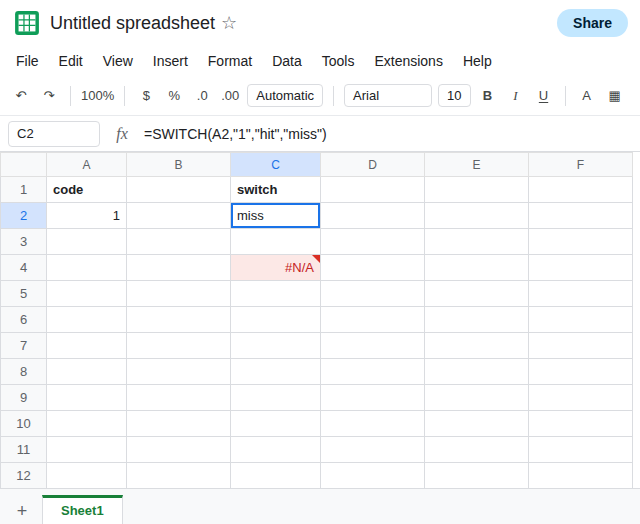
No default. In C4 enter =SWITCH(A2,"1","hit"). C4 is #N/A. The tooltip says it did not find the value in SWITCH. You can see a case that looks like 1. It is text. Leave C4 broken.
Coercion that works in arithmetic and does nothing inside SWITCH. In E2 enter =("1")*1. E2 is 1, a number. In E3 enter =A2="1". E3 is FALSE. In E4 enter =SWITCH(A2*1,"1","hit","miss"). E4 is miss. Multiplying the number by 1 does not turn it into text, and SWITCH still will not compare it to "1" as if they were equal. In E5 enter =N("1"). E5 is 0. N of text is zero, not a parsed number. =SWITCH(N("1"),"1","hit","miss") is miss as well. Leave E4 as miss.
Both numbers, the control. In C6 enter =SWITCH(A2,1,"hit","miss"). The case is a number. C6 is hit.
Both text. In A8 enter =TEXT(1,"0"). A8 displays 1 and ISTEXT(A8) is TRUE. In C8 enter =SWITCH(A8,"1","hit","miss"). C8 is hit. In C9 enter =SWITCH(A8,1,"hit","miss"). C9 is miss. The control in C6 does not protect a text code. A CSV that stored the code as text is CSV text vs number.
Leave C2 as miss and C4 as #N/A. Leave C6 as hit.
What is actually wrong
Section titled “What is actually wrong”- The comparison is equality, not “looks like.”
1and"1"fail it. C2’s default is doing what you asked. It is not a stuck function. Removing it produces C4, the same miss with a triangle. - Operators such as
*coerce numeric text.SWITCHhas no operator between the expression and the case. There is nowhere for that coercion to happen.A2*1when A2 is already a number changes nothing. N("1")is0. It will not line the text up with the number 1.VALUE("1")is1on this locale.TEXT(1,"0")is the text1. Those are the conversions. They belong around the expression or instead of a quoted case, and they follow locale rules. See VALUE() locale.- A percent is the same split. A cell formatted as
100%may store1or it may store the text100%.SWITCHagainst1hits only the number. See TO_PURE_NUMBER percent for the stored fraction. IFScan spell the comparison you wanted:=IFS(A2=1,"hit",TRUE,"miss")ishitwhen A2 is numeric. That is a different function. It does not meanSWITCHstarted coercing. See IFS no default.
Leave C2 as miss and C4 as #N/A.
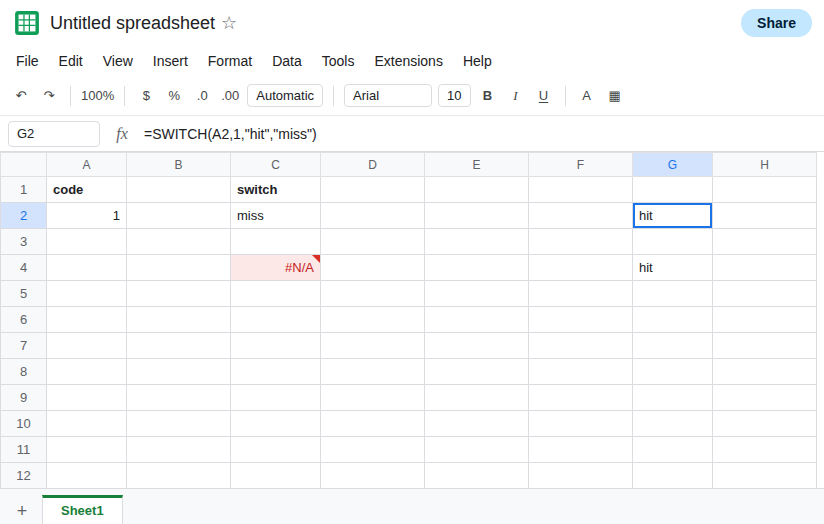
Make the case a number, or make the expression text. In G2 enter =SWITCH(A2,1,"hit","miss"). G2 is hit. In G4 enter =SWITCH(TEXT(A2,"0"),"1","hit","miss"). G4 is hit. Use G2 when the column is numeric. Use G4 when the cases are quoted because they came from text codes, and apply TEXT with a format that does not add decimals or a thousands separator. A code of 1.0 turned into 1.0 by TEXT will miss the case "1".
VALUE when the cell is numeric text. If A8 must be compared to numeric cases, =SWITCH(VALUE(A8),1,"hit","miss") is hit on a locale that parses 1. A failed VALUE is #VALUE! before SWITCH runs. Do not wrap that in IFERROR until you know the text is a number. See VALUE() locale.
If C2 shows the default and ISNUMBER of the code is TRUE while the case is quoted, the types differ. Match them. If both are text or both are numbers and the default still runs, the characters differ. That is SWITCH no match. If the tooltip names SWITCH and there is no default, add a default only after the types match, or you will default every numeric row.