

XLOOKUP still shows #N/A when if_not_found is left empty
Updated
XLOOKUP returns #N/A when the key is missing and you do not pass a fallback. Leaving the fourth argument empty — a trailing comma, or nothing at all — is still “no fallback.” The cell stays #N/A. The tooltip is still Did not find value. A pair of quotes, "", is an actual value: a blank string. That cell looks empty. The two formulas are not the same call.
Sheets names that fourth argument missing_value. Excel callers know the same slot as if_not_found. This page is the blank versus the omitted argument. The miss itself, and "none" as a visible fallback, is XLOOKUP no match. Keep the Google Sheets UI in English.
Recreate it on a blank sheet
Section titled “Recreate it on a blank sheet”- Open a blank spreadsheet. In A1 type
sku, B1name. A2101as a number. B2Widget. A3102. B3Gadget. D1lookup. D2999. That sku is not in column A. D3101.
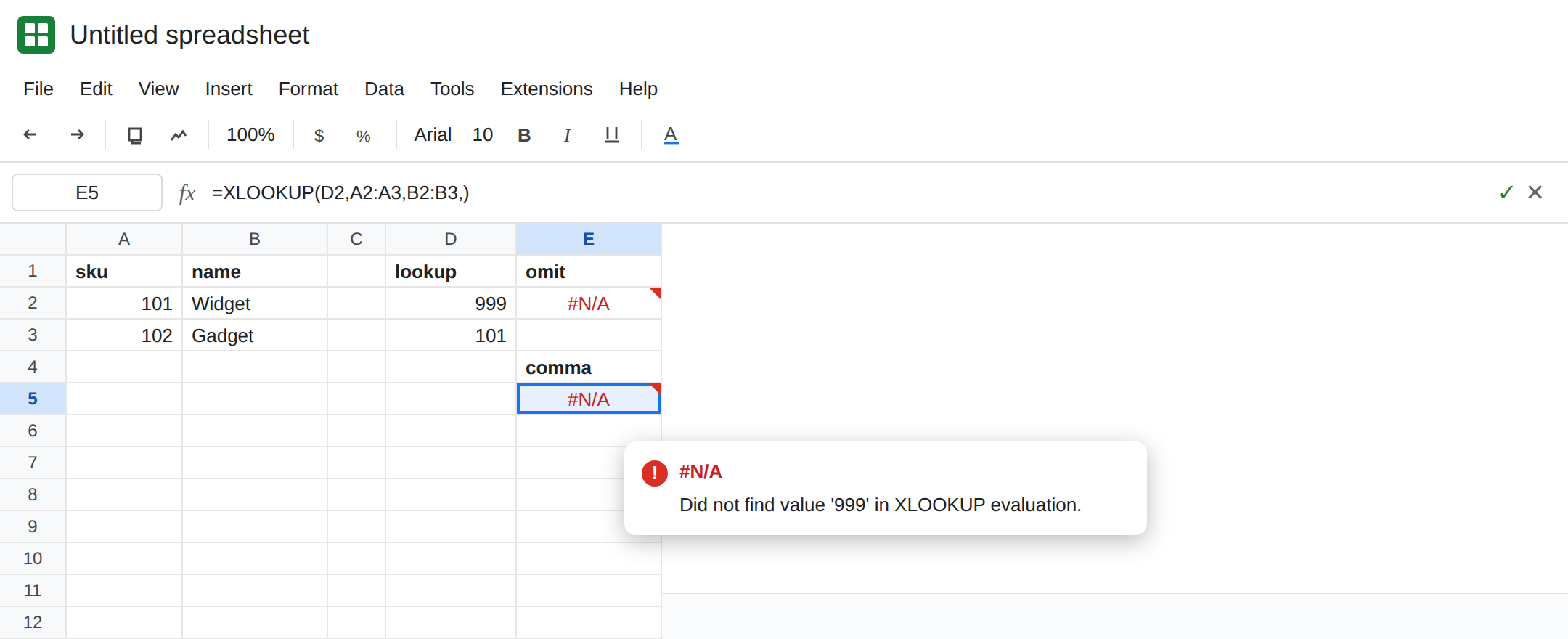
Omitted fallback. In E1 type omit. In E2 enter =XLOOKUP(D2,A2:A3,B2:B3). E2 is #N/A. Tooltip: Did not find value ‘999’ in XLOOKUP evaluation. Leave E2 broken.
A trailing comma. In E4 type comma. In E5 enter =XLOOKUP(D2,A2:A3,B2:B3,). E5 is #N/A with the same tooltip. The comma does not supply a blank. It marks a slot you did not fill. Leave E5 broken.
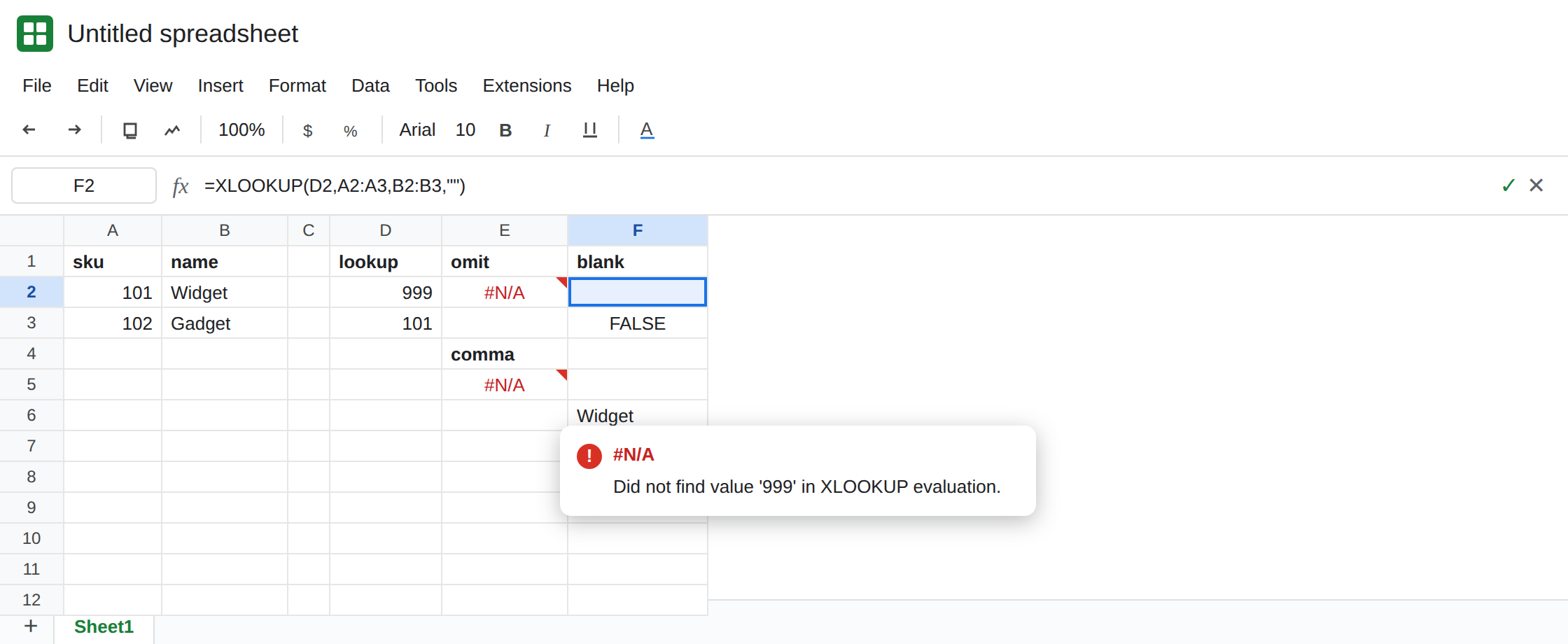
A blank string. In F1 type blank. In F2 enter =XLOOKUP(D2,A2:A3,B2:B3,""). F2 looks empty. The formula bar shows the quotes. In F3 enter =ISBLANK(F2). F3 is FALSE. F2 holds a zero-length string, not an empty cell. In F4 enter =LEN(F2). F4 is 0. Leave F2 as that blank-looking result.
A hit ignores the fallback. In F6 enter =XLOOKUP(D3,A2:A3,B2:B3,""). F6 is Widget. The fourth argument does not fire when 101 is on the sheet.
Skipped slot, later argument. In H1 type later. In H2 enter =XLOOKUP(D2,A2:A3,B2:B3,,0). The fourth slot is empty and match_mode is 0 (exact). On current Sheets this skipped slot is treated as a blank fallback, so H2 can look empty even though E5 is #N/A. That surprise is why a trailing comma and a comma-with-something-after-it are not one recipe. If you need #N/A in this shape, pass it: in H4 enter =XLOOKUP(D2,A2:A3,B2:B3,NA(),0). H4 is #N/A. Leave H4 as that explicit miss.
Not a size error. In I2 enter =XLOOKUP(D2,A2:Z2,B2:B3,""). Lookup and result ranges differ in height. The blank string does not turn that into an empty cell. The error is the range, not the miss. See XLOOKUP no match. Leave I2 broken.
What is actually wrong
Section titled “What is actually wrong”- The default for a missing key is
#N/A. Omittingmissing_value, or ending the formula with a comma and nothing after it, keeps that default. E2 and E5. ""is a value you passed. Sheets returns it on a miss. The cell looks blank and still failsISBLANK. DownstreamCOUNTAwill count it. See ISBLANK vs empty and IF blank vs 0.- When a later argument is present, an empty fourth slot is not always “use the default
#N/A.” H2 can come back blank. If the miss must stay visible, passNA()in that slot. Do not assume the comma means the same thing in E5 and H2. missing_valuereplaces the not-found#N/Aonly. I2’s bad ranges still fail.IFERRORaround the whole call would hide I2 as well. See IFERROR vs IFNA.- Number versus text is still a miss. Text
'101against numeric101is#N/Aeven with a perfect table.""will hide that miss. It will not fix the type. See VLOOKUP no match.
Leave E2 and E5 as #N/A. Leave I2 as the bad range.
When a miss should look blank. Use quotes. Keep F2: =XLOOKUP(D2,A2:A3,B2:B3,""). Know that F2 is text, not a truly empty cell. If a later formula must see a real blank, test LEN or return IF(F2="",,F2) in a helper rather than pretending ISBLANK is true.
When a miss must stay loud. Leave the fourth argument off, as in E2, or pass NA() when you also pass match_mode or search_mode. Do not “clean up” E5 by adding quotes until a blank sku name is an acceptable result.
When you only wanted a word. "none" is the pattern on XLOOKUP no match. Quotes with nothing between them are the blank. They are not a prettier #N/A.
If E5 is #N/A and the formula ends in a comma, you did not pass a fallback. Put "" in that slot only when a blank result is what the column should store. If the key is on the sheet and the cell is still #N/A, stop editing the fourth argument and check type and spaces.