

MOD(0.3, 0.1) returns a long 0.0999… instead of 0
Updated
MOD(dividend, divisor) is the remainder after division. MOD(3, 1) is 0. MOD(0.3, 0.1) should be 0 as well if 0.3 were exactly three times 0.1. It is not. Neither decimal is exact in binary floating point, and the division lands a hair under a whole number of steps. The remainder comes back as a hair under 0.1, which displays as 0.0999999999999999 once you ask for enough decimal places. At two decimals it can look like 0.10. =MOD(0.3,0.1)=0 is FALSE. Tests, tiers, and “is this a clean multiple” checks then fail with no #NUM! and no #DIV/0!.
The same storage limit on ROUND(1.005, 2) is ROUND binary. A zero divisor is divide by zero. Keep the Google Sheets UI in English. Sheet Error is an independent formula-error library, not a Google product.
Recreate it on a blank sheet
Section titled “Recreate it on a blank sheet”- Open a blank spreadsheet. In A1 type
expr, B1result, C1is_zero.
Integers, the control. In A2 type ints. In B2 enter =MOD(3,1). B2 is 0. In C2 enter =B2=0. C2 is TRUE. Exact integers have an exact remainder here.
The decimal pair. In A3 type tenths. In B3 enter =MOD(0.3,0.1). Format B3 as a number with sixteen decimal places. B3 shows a long run of 9s after 0.0, not 0. The default format may show 0.1. The extra places are the bug. In C3 enter =B3=0. C3 is FALSE. Leave B3 expanded and C3 FALSE.
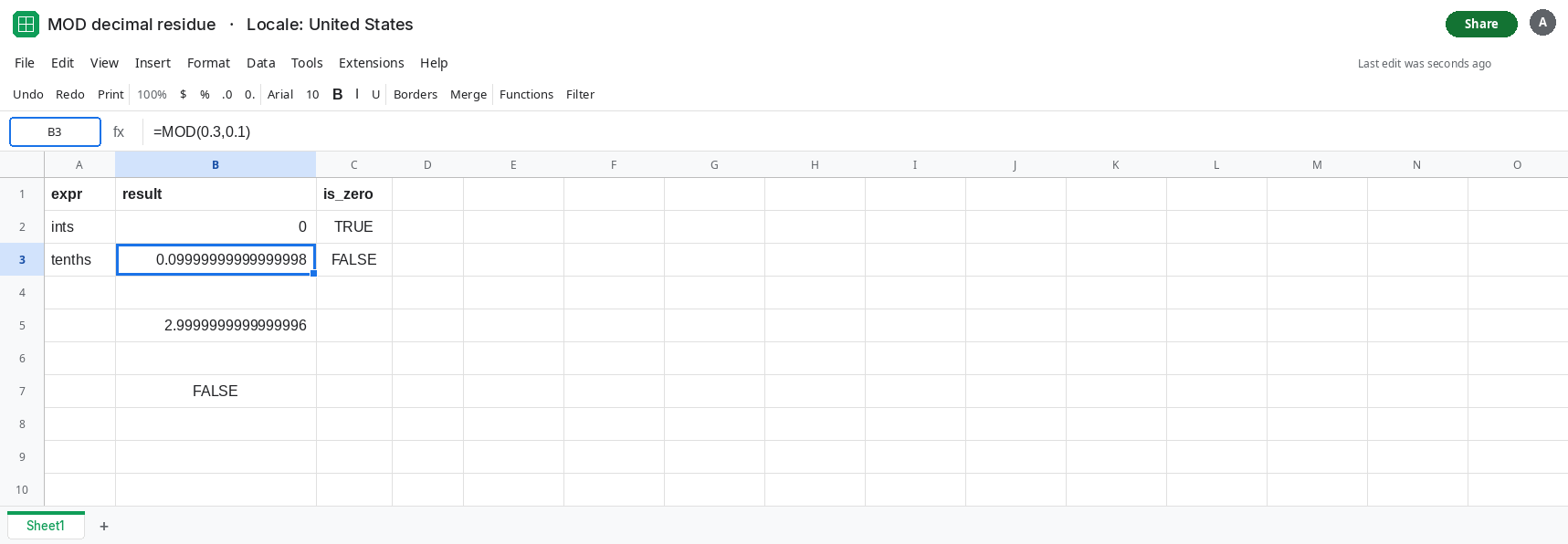
Why the remainder is almost the divisor. In B5 enter =0.3/0.1. Format B5 with many decimals. It is not a clean 3. It sits a hair under 3. MOD then returns the leftover that stops the quotient from reaching the next integer. That leftover is almost 0.1 again, which is why a two-decimal format looks like a full tenth instead of like zero.
A comparison people write. In B7 enter =MOD(0.3,0.1)<1E-10. B7 is FALSE. The residue is about a tenth, not a speck of dust under 1E-10. A tolerance copied from a subtraction residue will not catch this remainder. It is on the scale of the divisor.
Leave B3 showing the long decimal. Leave C3 FALSE.
What is actually wrong
Section titled “What is actually wrong”0.1is a repeating fraction in binary.0.3is three times that idea and still not exact. Their ratio is a hair under3, so the remainder is a hair under0.1rather than0.- The displayed
0.1at two decimal places is formatting. The stored remainder fails=0. AnyIF(MOD(...)=0,"even","off")takes the off branch. - A tiny tolerance fixes a subtraction residue like
0.1+0.2-0.3. It does not fix thisMOD, because the error is almost a whole step, not1e-16. ROUND(MOD(0.3,0.1), 10)rounds the0.0999…up to0.1at ten places. It does not become0. Rounding the remainder after the fact preserves the wrong step.- Integers do not have this particular gap.
MOD(3,1)is0. The fix is to put the tenths on an integer scale beforeMOD, then scale the remainder back.
This is not #DIV/0!. The divisor is 0.1, not 0. See divide by zero if the tooltip names a zero divisor.
Leave B3 and C3 as the broken decimal remainder.
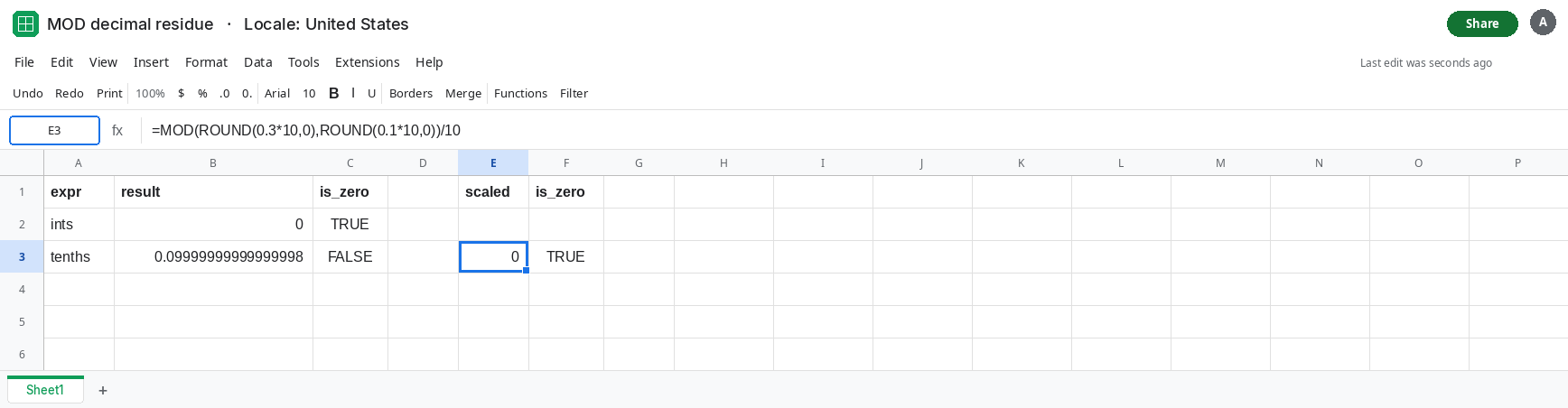
Scale to integers, then MOD, then scale back. In E1 type scaled. In E3 enter =MOD(ROUND(0.3*10,0),ROUND(0.1*10,0))/10. ROUND to 0 places turns the tenths into the integers 3 and 1. MOD(3,1) is 0. Dividing by 10 stays 0. In F3 enter =E3=0. F3 is TRUE.
Use the same scale the data was entered in. If the column is cents, store cents as integers and =MOD(cents, 5) for a nickel, with no /100 until display. If the column is already decimal hours and you need whole quarter hours, =MOD(ROUND(hours*4,0),1) works in quarter-hour counts.
For a residue that really is dust, a subtraction such as =(0.1+0.2)-0.3 is the small one. ROUND that result to a sensible place, or compare with a tolerance on the order of 1E-9. Do not reuse that tolerance on MOD(0.3,0.1). See ROUND binary.
If MOD of two short decimals shows a long 0.0999 and the equality to 0 is FALSE, the values are not exact multiples in binary. If the same MOD on the integer form of those decimals is 0, you have confirmed it. If the result is #DIV/0!, the divisor is zero and this page is the wrong one.