

ARRAYFORMULA around IFS still returns only the first row
Updated
IFS returns the value for the first TRUE condition. Wrapped in ARRAYFORMULA, it still looks at the first row of those conditions and returns one cell. Rows underneath can be East and the spill never appears. If that first row matches nothing, the one cell is #N/A even though a later row would have matched. IF inside ARRAYFORMULA walks the column. MAP can call IFS once per value. ARRAYFORMULA(IFS(...)) does not.
This page is that one-cell result. A single IFS with no TRUE branch, on one cell you typed by hand, is IFS no condition. AND / OR collapsing a whole column to one boolean is ARRAYFORMULA AND/OR. Keep the Google Sheets UI in English.
Recreate it on a blank sheet
Section titled “Recreate it on a blank sheet”- Open a blank spreadsheet. In A1 type
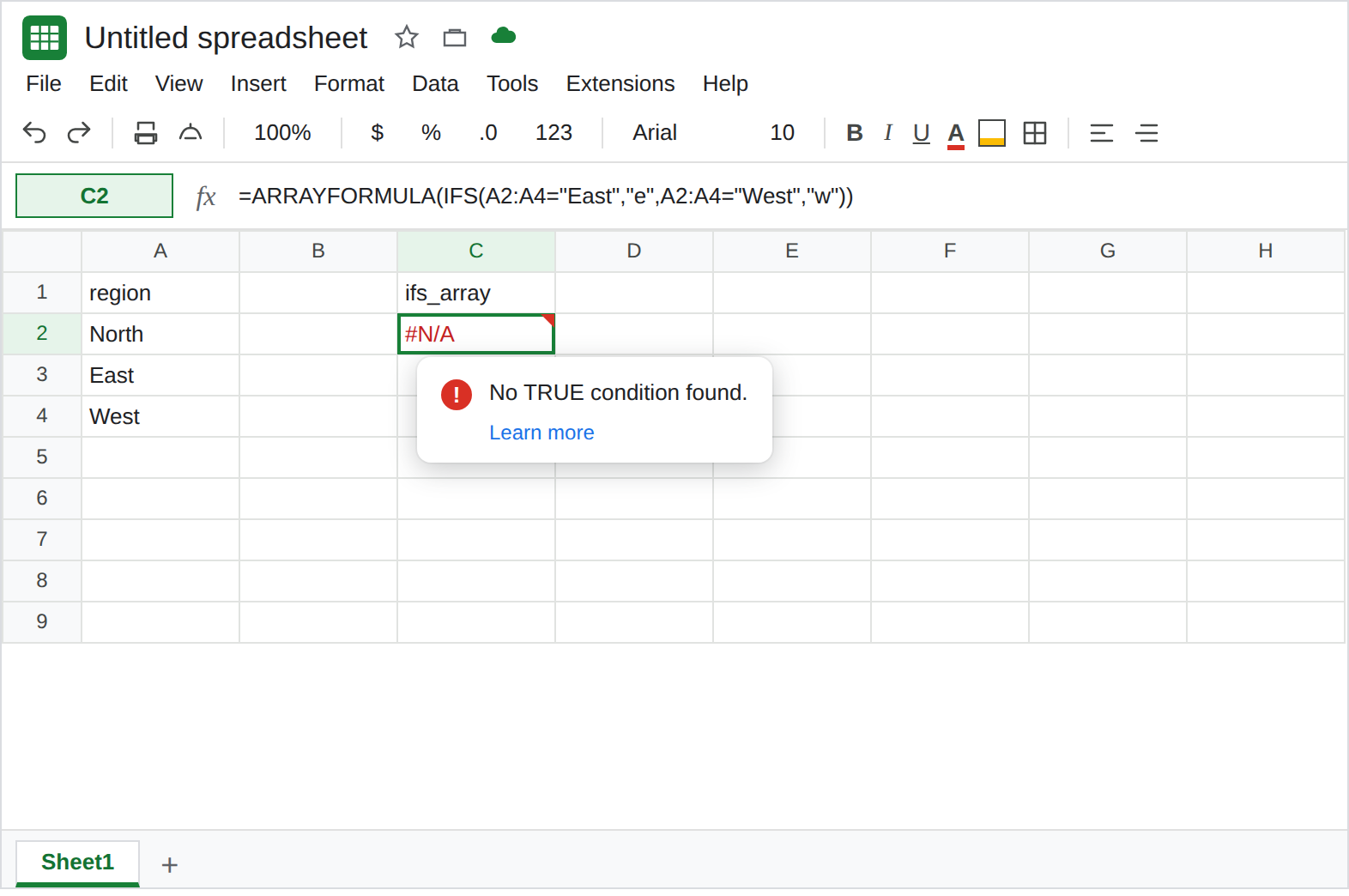
region. A2North. A3East. A4West. Only row 3 is East. Row 2 matches neither East nor West.
IFS under ARRAYFORMULA. In C1 type ifs_array. In C2 enter =ARRAYFORMULA(IFS(A2:A4="East","e",A2:A4="West","w")). The result is one cell. It is #N/A. The tooltip is the same family as a scalar miss: no condition was TRUE. That decision used row 2 (North). Row 3 is East and row 4 is West, and neither letter spilled under C2. Leave C2 broken.
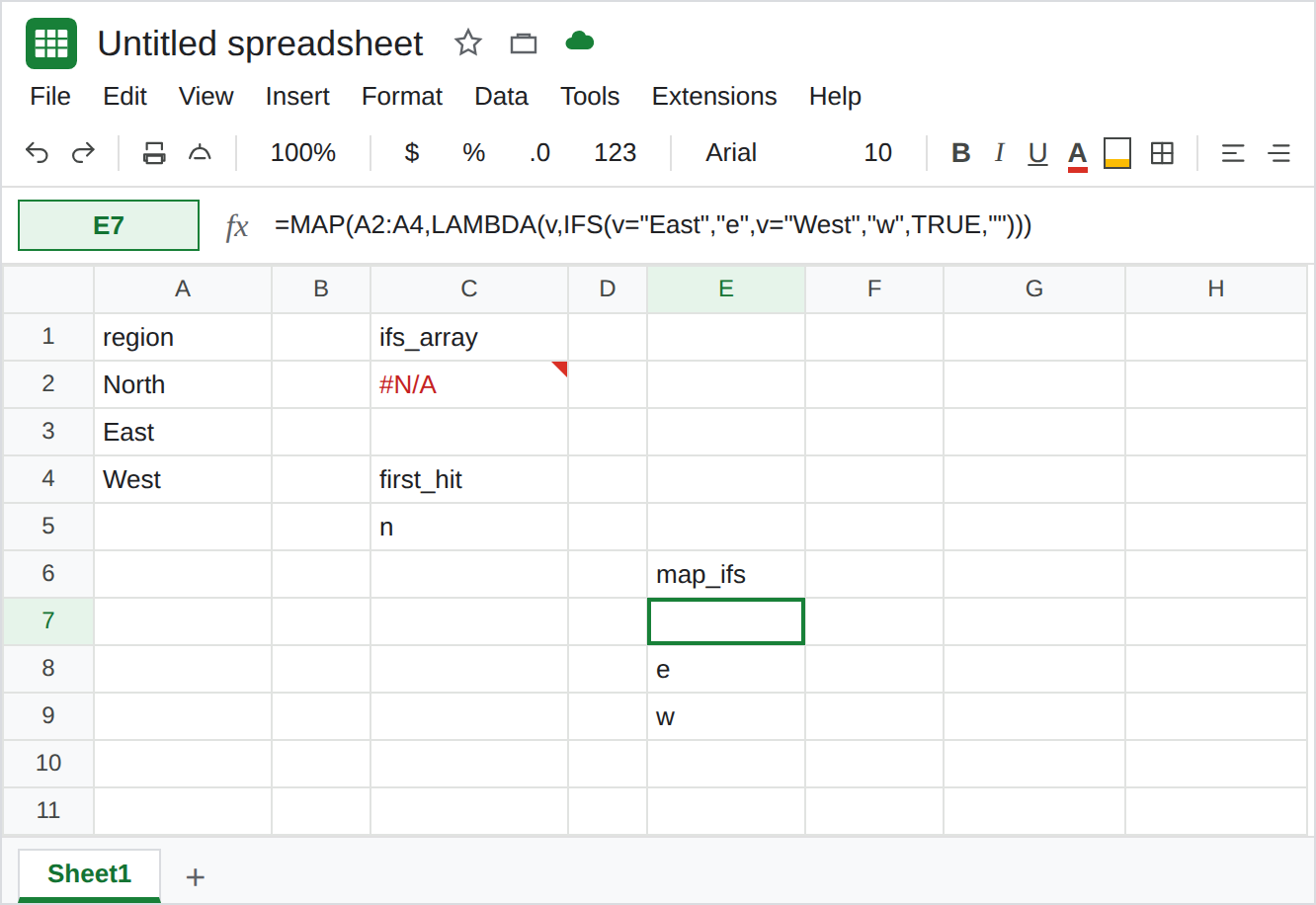
The first row can hide the bug. In C4 type first_hit. Change nothing in column A yet. In C5 enter =ARRAYFORMULA(IFS(A2:A4="North","n",A2:A4="East","e")). C5 shows n. One cell. Row 3 is East, and e is not in C6. The formula looks “fine” because North was the first row and the first condition was TRUE. Leave C5 as that single n. It is not a spill of three labels.
IF walks the column. In E1 type if_rows. In E2 enter =ARRAYFORMULA(IF(A2:A4="East","e",IF(A2:A4="West","w",""))). E2:E4 is blank, e, w. Three cells. That block is the control. The tests are the same words as C2. The function is IF.
MAP runs IFS per row. In E6 type map_ifs. In E7 enter =MAP(A2:A4,LAMBDA(v,IFS(v="East","e",v="West","w",TRUE,""))). The spill is blank, e, w. The final TRUE pair is the default for North. Without that pair, North’s own call would be #N/A and the whole MAP would error. Leave E7 as the three-row spill.
If C2 on your account already spills three labels, this file’s IFS is walking the column. Do not “fix” that spill. Keep E2 as the IF form. The rest of this page is the one-cell result.
What is actually wrong
Section titled “What is actually wrong”ARRAYFORMULAdoes not changeIFSinto a row-wise function. The conditionsA2:A4="East"are an array.IFSstill takes one path and returns one value. C2 is that value, and it is#N/Abecause North failed both tests.- A first-row hit is easy to trust. C5 is
nwith no triangle. East is still unlabeled. Count the spill. One cell under a three-row range is the bug, including when the letter looks right. IFis the array-aware branch function on this sheet. NestedIFin E2 spills. See IF blank vs 0 only if a blank is turning into0. E2’s blank on North is the""you wrote.MAPcalls the lambda once per cell, soIFSinside it seesv, a single region. That is why E7 has three answers. The lambda shape, when it returns an array, is BYROW / MAP LAMBDA. E7 returns one letter.- A scalar
#N/Afrom=IFS(A2="East","e")on North, with no array, is IFS no condition. C2 looks like that tooltip and the range in the formula bar is three rows. Read the formula before you add a default only on A2.
This is not AND returning one FALSE for the whole column. See ARRAYFORMULA AND/OR. C2’s function is IFS.
Leave C2 as #N/A and C5 as the single n.
Use IF or MAP. Keep E2: =ARRAYFORMULA(IF(A2:A4="East","e",IF(A2:A4="West","w",""))). Or keep E7 if you want IFS and a default pair. Both spill blank, e, w.
Add a default only on the per-row call. TRUE,"" belongs inside the MAP lambda, or as the last pair of a scalar IFS. Putting TRUE,"other" on C2’s ARRAYFORMULA(IFS(...)) can turn the one cell into other and still not label East. Check that three rows spilled.
Do not wrap C2 in IFNA. North would look blank and East would still be missing. See IFERROR vs IFNA.
If ARRAYFORMULA(IFS(...)) is one cell, the later rows were not tested. Use IF or MAP. If the tooltip is no TRUE condition and the formula refers to one cell, you are on the scalar IFS page.