

SEQUENCE returns #REF! when the spill runs into a merged cell
Updated
SEQUENCE(rows, columns, start, step) spills from the formula cell. Every cell in that rectangle has to be empty and unmerged. A merge stores its value in the top-left cell and still claims the rest. Those other cells look blank. SEQUENCE cannot write them. The formula cell is #REF!, and the tooltip says the array was not expanded because it would overwrite that cell. Unmerge, and the same formula spills. Clearing the visible text without unmerging leaves the block in the way.
A spill blocked by a typed note, with no merge, is SEQUENCE spill. Merged labels that break VLOOKUP because only the top-left cell holds the text are merged cells lookup. Keep the Google Sheets UI in English. Sheet Error is an independent formula-error library, not a Google product.
Recreate it on a blank sheet
Section titled “Recreate it on a blank sheet”- Open a blank spreadsheet. You want the numbers
1through4down column A, starting at A2.
A merge that looks mostly empty. Select A3:A4. Format → Merge cells → Merge vertically. Do not type anything. The merge’s top-left is A3, and it is empty. A4 looks empty too. =ISBLANK(A4) is TRUE when you are allowed to read it. The cells are still merged. Leave the merge up.
SEQUENCE cannot enter it. Leave A2 empty. In A2 enter =SEQUENCE(4). The spill needs A2, A3, A4, and A5. A3:A4 is merged. A2 shows #REF!. The tooltip says the array result was not expanded because it would overwrite data in A3 (the address Sheets names is the merged cell it hit). You did not type a note. The merge is the data. Leave A2 broken.
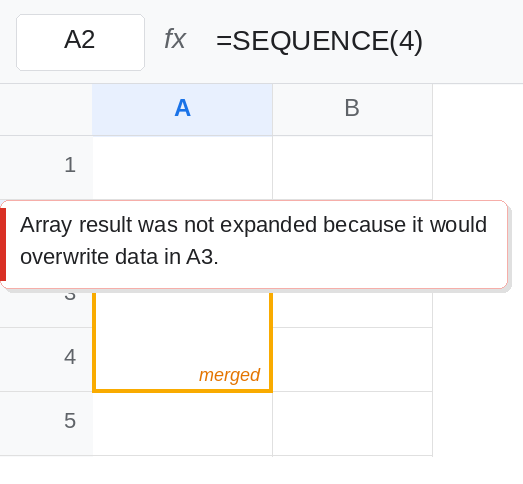
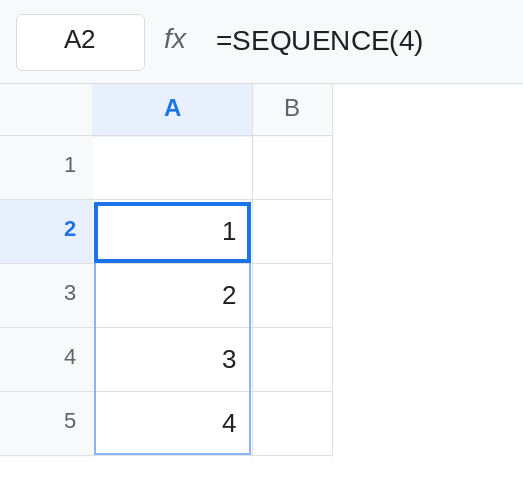
Unmerge, same formula. Select A3:A4. Format → Merge cells → Unmerge. A2 spills 1, 2, 3, 4 into A2:A5. Nothing else changed. The formula was never bad. Merge A4:A5 again while the spill is live and A2 returns to #REF!. Unmerge so the spill is back, and keep that working block for a moment.
A horizontal spill hits a horizontal merge. Unmerge anything left in column A. In C2 enter =SEQUENCE(1,4). It needs C2:F2. Select E2:F2 and merge horizontally. C2 is #REF!. The third and fourth numbers have nowhere to land. Unmerge E2:F2. C2 spills 1 2 3 4 across the row. Leave C2 working.
A typed value is the other blocker. In A7 type note. In A6 enter =SEQUENCE(3). A6 needs A6:A8. A7 is occupied by text, not by a merge. A6 is #REF!. That case, without any merge, is SEQUENCE spill. Leave note in A7 so you can see the two tooltips are the same idea.
Leave one #REF! on the sheet: either re-merge a cell inside a spill, or keep A6 broken on note.
What is actually wrong
Section titled “What is actually wrong”- A merge is a reservation on every cell in the block. The lower cell can be blank and still stop a spill. A2 hit A3:A4.
ISBLANKdoes not report “unmerged.” - The error sits on the formula cell, not on the merge. A2 is
#REF!. A5 never receives4while the formula is broken. Clearing A5 does nothing if the merge is A3:A4. - Unmerge removes the reservation. The formula does not need to be rewritten.
=SEQUENCE(4)then fills four cells. - The tooltip matches a spill blocked by an ordinary value. Read the address it names, then check Format → Merge cells on that address. If it offers Unmerge, you have this page. If the cell contains
note, you have SEQUENCE spill. SEQUENCEinside a merged formula cell is the same failure. Merging A2:A5 and typing the formula into that merge gives the formula one cell of display and nowhere to spill. PutSEQUENCEin an unmerged cell.
This is not after you delete. The formula text is still =SEQUENCE(4). Nothing in it turned into #REF!.
This is not a negative row count. That is #NUM!. See SEQUENCE size.
Leave a merged blocker in place only while you want the #REF! visible. Then unmerge it.
Give the spill an unmerged rectangle. Unmerge A3:A4. Confirm A2 shows 1 through 4. If you still need a visual group for a label, merge cells beside the spill, not inside it. A label in B3:B4 merged does not intersect A2:A5.
Move the formula. If the merge has to stay where it is, put =SEQUENCE(4) in a column that does not cross it. Do not shorten SEQUENCE to SEQUENCE(1) to silence the tooltip. You asked for four numbers.
Dates use the same rectangle. =SEQUENCE(4,1,DATE(2024,1,1),1) also needs four unmerged cells. A merge in the middle is still #REF! before any date formatting matters. Date steps themselves are SEQUENCE dates.
If the tooltip names a cell that looks blank, try Unmerge on that cell before you hunt for a hidden value. If Unmerge is greyed out, the cell really has a value, and clearing it is the fix on SEQUENCE spill.