

Fix SWITCH #N/A in Google Sheets (no matching case)
Updated
SWITCH compares one expression to a list of cases and returns the value for the first match. If none of the cases equal the expression and you did not pass a default, Sheets has nothing to return. The cell is #N/A. The formula ran. You left the last argument off.
This page is SWITCH with no matching case and no default. It is not IFS no condition (IFS walks boolean tests; its else is a final TRUE pair). It is not a lookup miss — see what #N/A means only if the formula is VLOOKUP / XLOOKUP / MATCH.
Recreate it on a blank sheet
Section titled “Recreate it on a blank sheet”- Open a blank spreadsheet. In A1 type
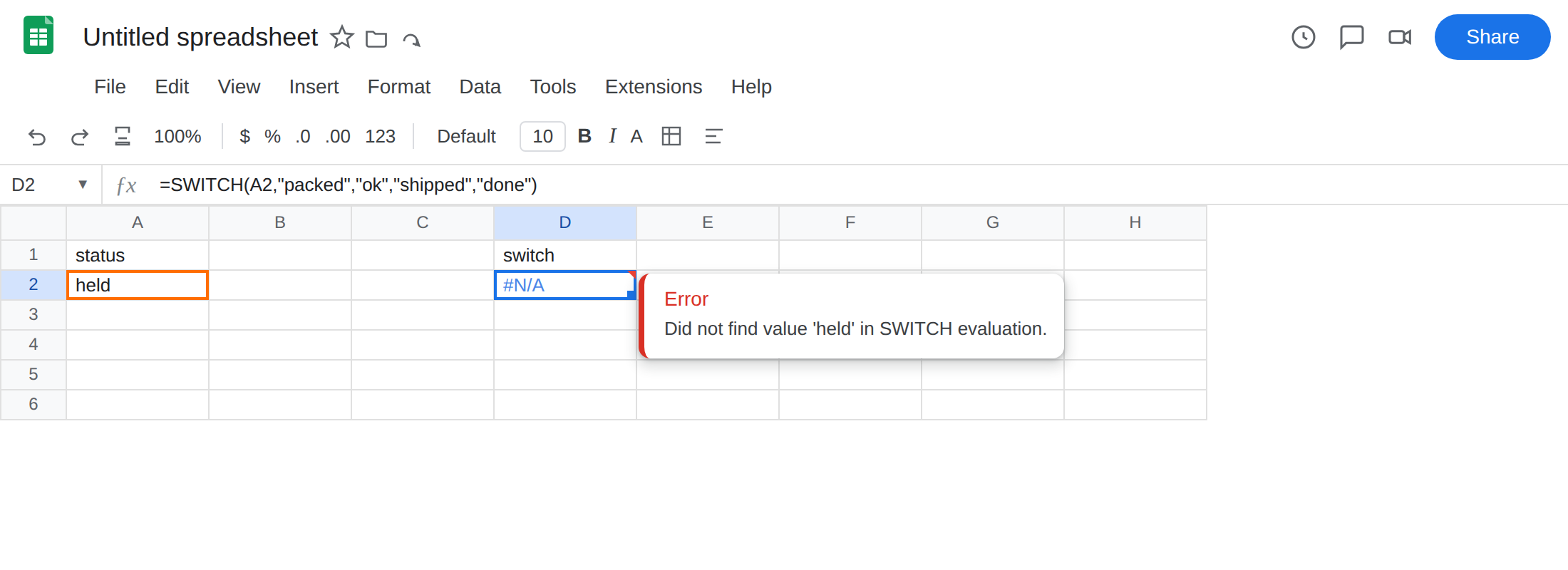
status. In A2 typeheld. D1switch. - In D2 enter
=SWITCH(A2,"packed","ok","shipped","done"). The cell shows#N/A.heldis notpackedand notshipped. There is no third case and no default. Leave D2 broken.
- A case that hits. In A3 type
packed. In D3 enter=SWITCH(A3,"packed","ok","shipped","done"). The cell showsok. Same shape, a matching case. That row is the control:SWITCHworks when a case equals the expression.
Confirm. Type packed in A2. D2 becomes ok. Type shipped. D2 becomes done. Type held. #N/A returns. If that toggle is the only change, the function is working and held has no case.
IFS with no TRUE is a different formula. In F2 enter =IFS(A2="packed","ok",A2="shipped","done"). Also #N/A for held. Same error value: IFS tests conditions, not one expression against constants. Leave F2 as the contrast. The walkthrough is IFS no condition.
What is actually wrong
Section titled “What is actually wrong”SWITCH(expr, case1, val1, case2, val2, …)returnsvalfor the firstcaseequal toexpr. If every case misses, Sheets needs a default. Without one,#N/Ais that hole. A2 isheldon purpose. Nothing is missing from a table.- The default is the last unpaired argument.
SWITCH(A2,"packed","ok","shipped","done","other")has five values after the expression: two complete pairs, thenother.otheris the default.SWITCH(A2,"packed","ok","shipped","done")has four values after the expression — two complete pairs — so there is no default. - A blank A2 is the same hole if you only listed
"packed"and"shipped". Blank is not"packed". You still need a default, or a case for"". - Cases are equality, not conditions.
SWITCHwill not treatA2>=90as a case the wayIFScan. If the test is a comparison, you wantIFS, not a longerSWITCH. #N/Ainside the expression still poisons the call. That is a different bug. This page is a live value with no matching case.
This is not IFS with every condition FALSE. IFS has no default slot; you add TRUE, fallback as a last pair. See IFS no condition. D2 is SWITCH. Do not paste TRUE into SWITCH as if it were IFS. SWITCH(A2,TRUE,"other") compares A2 to the boolean TRUE. That is not an else.
This is not a wrapper question. Wrapping D2 in IFNA will print none and hide the missing case. Wrapping in IFERROR will also hide a #NAME? from SWICH. See IFERROR vs IFNA. The fix is a final default argument, not a wrapper.
This is not XLOOKUP / MATCH missing a key. See XLOOKUP #N/A and MATCH #N/A.
Leave D2 as the two-case SWITCH so #N/A stays on the sheet.
Add a final default argument. In D6 enter =SWITCH(A2,"packed","ok","shipped","done","other"). The cell shows other. held matched nothing, so the last unpaired argument ran. That is the else SWITCH does not have unless you pass it.
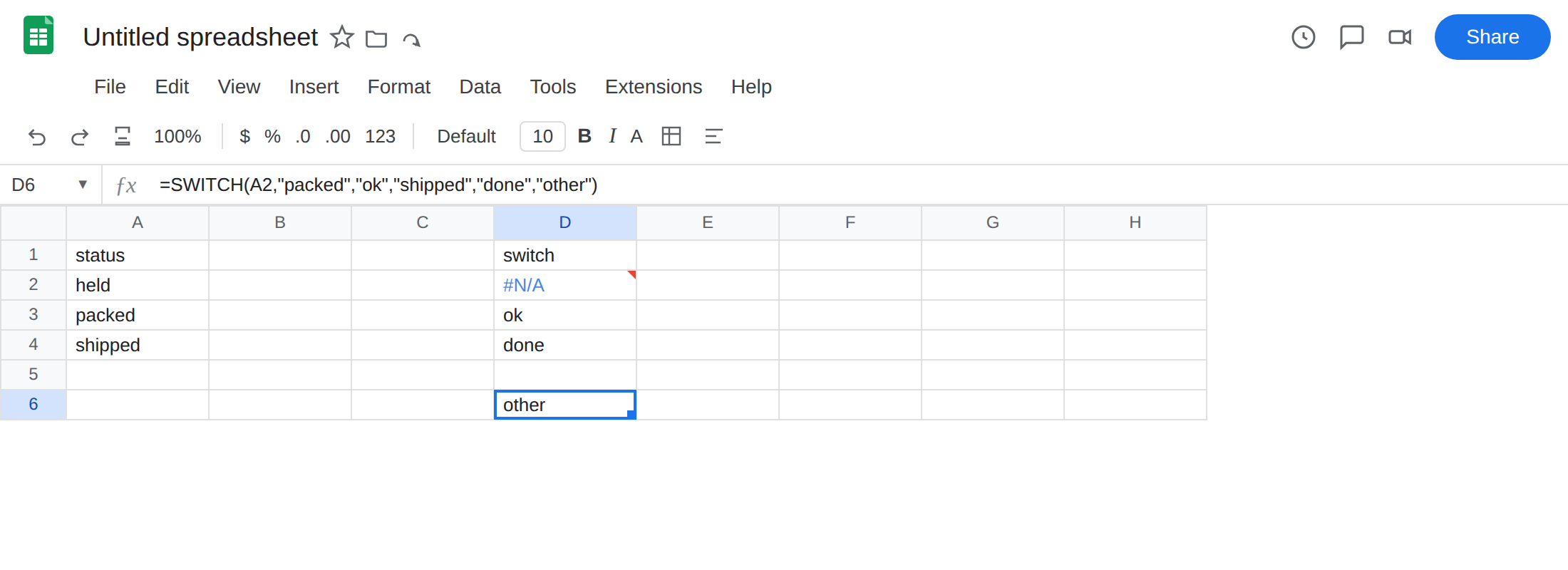
Keep the default last. =SWITCH(A2,"other","packed","ok") treats "other" as a case, not a fallback. The default is only the leftover argument after complete pairs.
When every input must be a listed status. Do not add "other". If held is invalid data, #N/A is a signal. Add the default only when unmatched is allowed. If held is a real status you forgot, add "held","parked" instead of a catch-all.
Do not wrap D2 in IFNA and call the statuses complete. You still have no result for held.
If SWITCH is #N/A and the value you can see is not in the case list, you did not provide a default. The last argument should be the fallback when a fallback is allowed.
SWITCH default vs IFS TRUE
Section titled “SWITCH default vs IFS TRUE”Use SWITCH when you are testing one cell against constants (packed, shipped, a code). The default is a bare last argument. You do not type TRUE.
Use IFS when the branches are conditions (A2>=90, AND(A2="East",B2>10), ISBLANK(A2)). IFS has no unpaired default. The else is TRUE, fallback, and TRUE must be last because the first TRUE wins. That page is IFS no condition.
Do not convert a working SWITCH to nested IF only to clear #N/A from held. Nested IF has an else, but you already have a default slot. Pass it. If the next person reads SWITCH and wonders why held is other, the last argument is the answer — not a wrapper, and not IFS.