

Fix GOOGLEFINANCE #N/A in Google Sheets (symbol, attribute, or market closed)
Updated
GOOGLEFINANCE fills a cell from Google Finance. #N/A is usually a ticker string the service does not serve, an attribute it does not know, or a market it cannot fetch. The spreadsheet is not broken. The formula ran. There was nothing to return.
This page is GOOGLEFINANCE #N/A. It is not what #N/A means (VLOOKUP / MATCH / FILTER), not VLOOKUP no match, and not IMPORTXML / IMPORTHTML. Sheet Error is a formula-error library, not a quotes product and not investment advice. Nothing here is a recommendation to buy or sell anything.
Recreate it on a blank sheet
Section titled “Recreate it on a blank sheet”- Open a blank spreadsheet. In A1 type
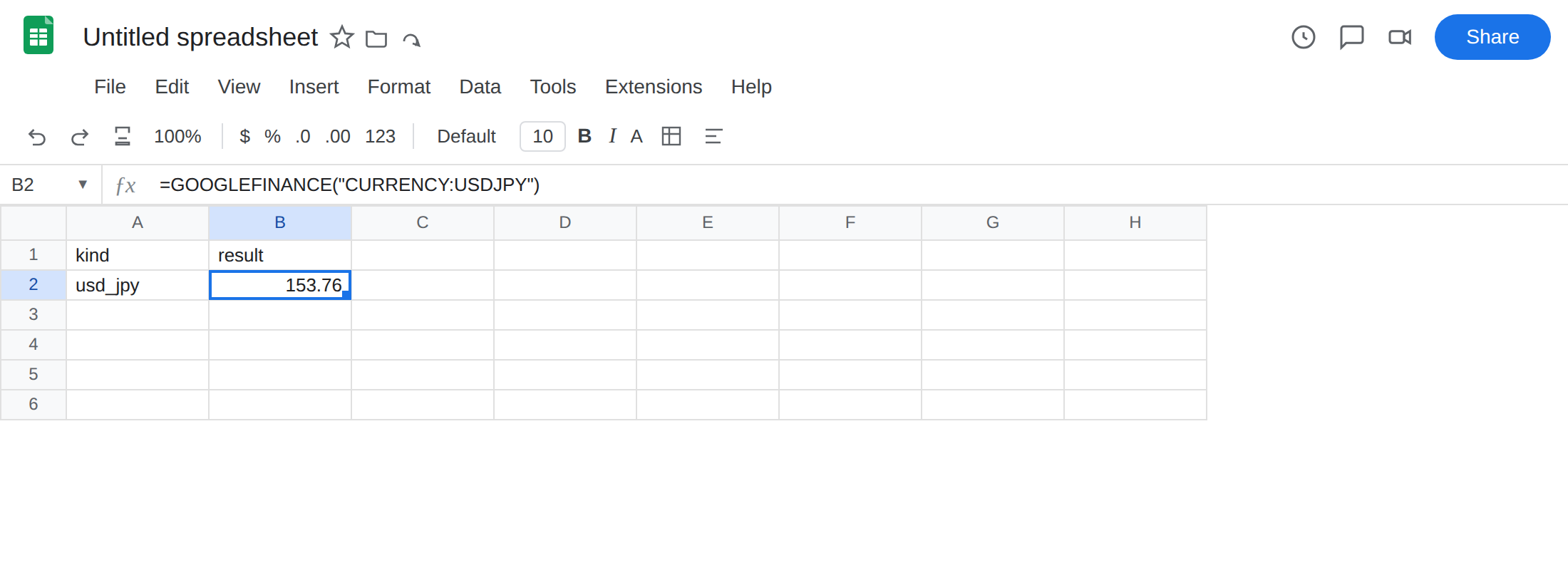
kind, B1result. - A pair the function can fetch. In A2 type
usd_jpy. In B2 enter=GOOGLEFINANCE("CURRENCY:USDJPY"). After a short load, B2 shows a number. That row is the control:CURRENCY:then two ISO codes, no slash.
- A deliberately bad symbol. In A3 type
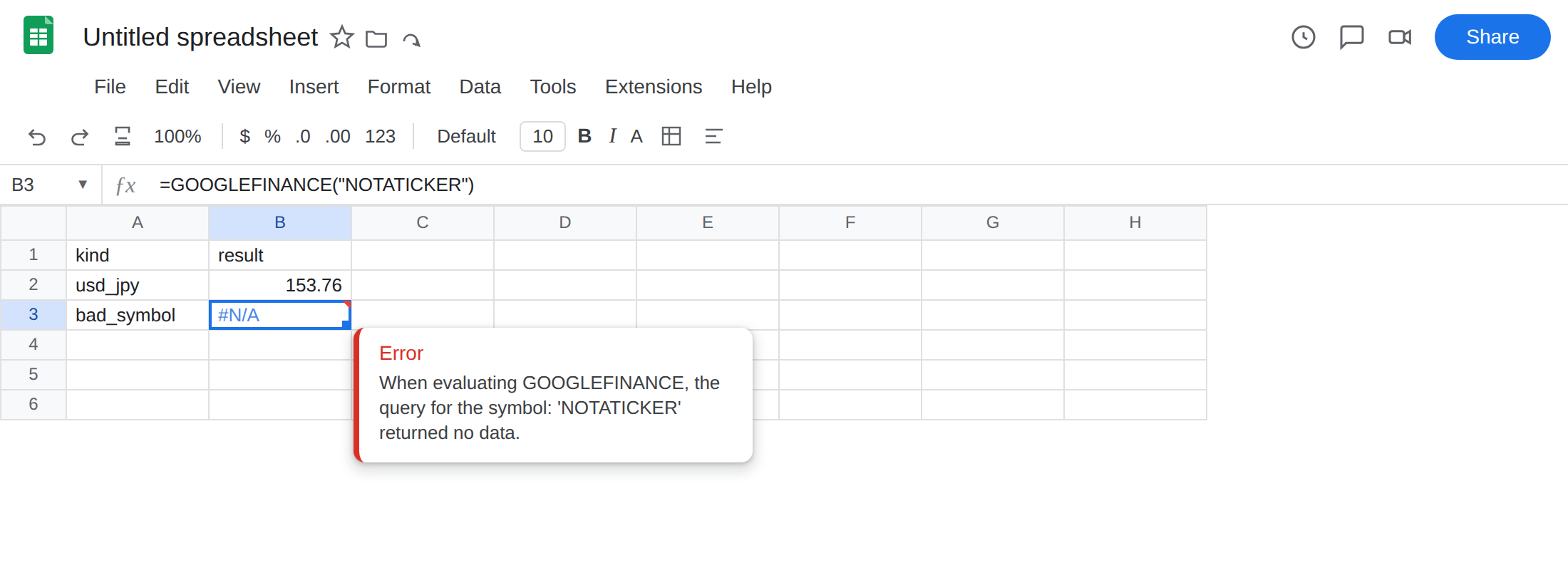
bad_symbol. In B3 enter=GOOGLEFINANCE("NOTATICKER"). The cell shows#N/A. Leave B3 broken.
-
A slash people type for FX. In A4 type
slash_pair. In B4 enter=GOOGLEFINANCE("USD/JPY"). The cell shows#N/A.USD/JPYis prose. It is not this function’s ticker string. Leave B4 broken. -
An unsupported attribute. In A5 type
bad_attr. In B5 enter=GOOGLEFINANCE("CURRENCY:USDJPY","notanattribute"). The cell shows#N/A. The pair in B2 worked. The second argument is not a real attribute. Leave B5 broken.
Delay is not #N/A. Quotes from this function are delayed (often up to about 20 minutes). A slightly old number in B2 is that delay, not a crash. When a session is closed, GOOGLEFINANCE still typically returns the last value it has. #N/A means it cannot fetch this ticker, attribute, or market — not “the market is shut right now.” Do not refresh-spam B2 to force a live print.
Leave B3, B4, and B5 as the broken formulas.
What is actually wrong
Section titled “What is actually wrong”NOTATICKERis not a symbol Google Finance serves. Sheets returns#N/A. Same error value as a lookup miss. Nothing is missing from this sheet.- Ticker syntax matters.
CURRENCY:USDJPYis the FX pattern.USD/JPYlooks right in English and still misses. Some instruments needEXCHANGE:SYMBOL. A string that works on another site can still be#N/Ahere. This page does not pick a listing for you. - The second argument must be an attribute
GOOGLEFINANCEknows.priceis the default. The documented list also includespriceopen,high,low,volume,tradetime,datadelay,closeyest, and others."notanattribute"is not on that list. Currency pairs do not support every equity attribute (pe,eps,marketcapare meaningless on USDJPY). Wrong attribute,#N/A. - Delay is freshness. It does not turn B2 into
#N/A. A market the function cannot fetch is#N/Aeven when the spelling looks professional.
This is not a VLOOKUP key miss. See what #N/A means. This is not number vs text in a lookup column. See VLOOKUP no match. This is not IMPORTXML failing to parse a page. See IMPORTXML / IMPORTHTML.
Leave B3, B4, and B5 broken so #N/A stays on the sheet.
Confirm the function works. B2 already did. If B2 is a number and B3 is #N/A, the function is not dead. The symbol in B3 is.
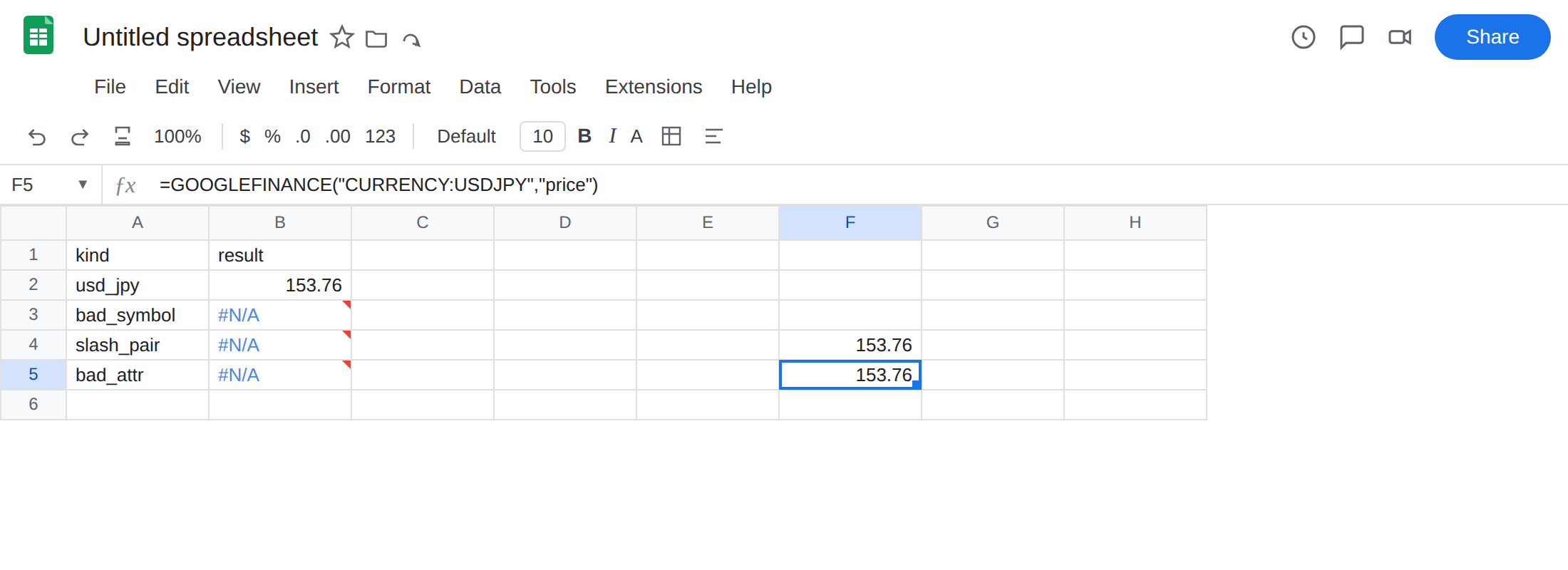
Fix the ticker string. Use a pattern this function actually serves. On this sheet that is CURRENCY:USDJPY. In F4 enter =GOOGLEFINANCE("CURRENCY:USDJPY"). The cell matches B2. Do not “fix” NOTATICKER by inventing an equity ticker. If you have a real instrument in mind, type that instrument’s ticker in the documented syntax. This page will not name one.
Fix the attribute. In F5 enter =GOOGLEFINANCE("CURRENCY:USDJPY","price"). The cell should match B2. Drop attributes that do not apply to that instrument.
When a miss is a valid result. If a cell holds a user-typed ticker that can be absent, then wrap. In F7 enter =IFNA(GOOGLEFINANCE("NOTATICKER"),"none"). The cell shows none. Use IFNA, not IFERROR. See IFERROR vs IFNA. Do not wrap B3 until you have confirmed the string is the problem.
Check syntax, the attribute list, and delay first. Do not wrap #N/A and call the sheet a live quote board.
When it is not GOOGLEFINANCE
Section titled “When it is not GOOGLEFINANCE”#N/A is a shared error value. If the formula is VLOOKUP, MATCH, HLOOKUP, FILTER, or XLOOKUP, start at what #N/A means. If it is REGEXEXTRACT, that is REGEX no match.
If you typed GOOGLEFINANCE because you wanted a table or a heading off a public page, that is not Finance. Use IMPORTHTML or IMPORTXML on a URL you are allowed to fetch, then read IMPORTXML / IMPORTHTML for Allow access, Result too large, and Loading…. Those failures are a banner, a payload cap, or a fetch that never finishes — not a ticker miss.
If the cell is #REF! and the formula still says GOOGLEFINANCE with a date range that spilled into occupied cells, that is a blocked array, same family as SORT / UNIQUE spill. Clear the path. It is not #N/A. If the formula never ran, you have #NAME? from GOOGLEFINACE. See unknown function.