

Fix named functions used as LAMBDA arguments in Google Sheets
Updated
A named function (Data → Named functions) is a formula on this spreadsheet. MAP, BYROW, and REDUCE need a LAMBDA as their last argument. Passing the named function’s name in that slot does not turn it into a lambda. Calling it inside a lambda without parentheses does not run it. Defining the named function as an inner LAMBDA and declaring the same words as placeholders substitutes the cell values into the lambda’s name slots, and those numbers are not valid names.
This page is that boundary. Arity and the A1 placeholder ban are named functions. MAP range sizes are MAP size. Keep the Google Sheets UI in English. Helper names stay English: LAMBDA, MAP.
Recreate it on a blank sheet
Section titled “Recreate it on a blank sheet”- Open a blank spreadsheet. In A1 type
hours. A28. A34. A42. In B1 typerate. B212.
A plain named function. Data → Named functions → Add new function. Name SHIFT_PAY. Argument placeholders: hours, then rate. Formula definition: =hours*rate. Do not wrap that definition in LAMBDA. Next, Create. In D1 type ok. In D2 enter =SHIFT_PAY(A2,B2). The cell shows 96. That call is the control.
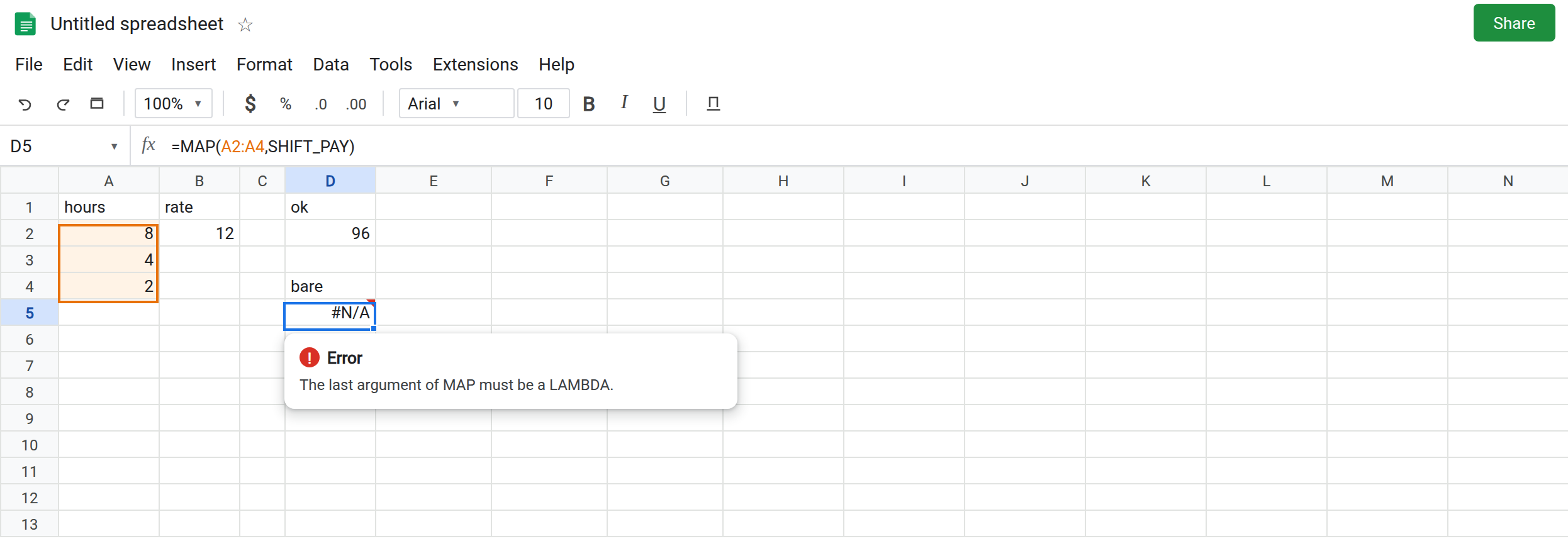
The bare name is not a lambda. In D4 type bare. In D5 enter =MAP(A2:A4,SHIFT_PAY). MAP’s last argument must be a LAMBDA. SHIFT_PAY is a named function, not a lambda value you can hand over. The cell shows #N/A or #VALUE!. The tooltip says the last argument of MAP must be a lambda, or that SHIFT_PAY was given the wrong number of arguments when Sheets tried to evaluate it while building the call. Leave D5 broken. You cannot pass SHIFT_PAY the way some languages pass a function pointer.
Parentheses missing inside an otherwise legal lambda. In D7 enter =MAP(A2:A4,LAMBDA(h,SHIFT_PAY)). There is a LAMBDA, so the “must be a lambda” complaint is gone. The body names SHIFT_PAY and does not call it. No parentheses, no hours, no rate. The cell shows #N/A or #NAME?, wrong number of arguments to SHIFT_PAY, or an unknown name if the function is not visible from that evaluation. Leave D7 broken. A named function runs only when you call it.
One argument to a two-argument function. In D9 enter =MAP(A2:A4,LAMBDA(h,SHIFT_PAY(h))). This one calls SHIFT_PAY. It passes h only. The tooltip is Wrong number of arguments to SHIFT_PAY. Expected 2 arguments, but got 1 arguments. Leave D9 broken. The rate never arrives.
Placeholder text substituted into LAMBDA names. Data → Named functions → Add new function. Name PAY_WRAP. Placeholders: hours, then rate. Formula definition: =LAMBDA(hours,rate,hours*rate). Create. The definition looks like a lambda, and the placeholders use the same words. In D11 enter =PAY_WRAP(A2,B2). Sheets substitutes hours and rate before the inner LAMBDA is built. The body becomes a lambda whose name slots are the values 8 and 12, not identifiers. The cell shows #N/A or #ERROR!. The tooltip says an argument of LAMBDA is not a valid name. Leave D11 broken. SHIFT_PAY did not have this problem because its definition was =hours*rate, which is the right place for those substituted values.
Calling a lambda that the name returns. Add PAY_FN with no argument placeholders. Definition: =LAMBDA(hours,rate,hours*rate). Create. In D13 enter =PAY_FN()(A2,B2). The first parentheses return the lambda. The second run it with 8 and 12. The cell shows 96. =PAY_FN(A2,B2) is the wrong shape: PAY_FN takes no arguments. Leave D13 as 96.
Leave D5, D7, D9, and D11 broken. Leave D2 as 96.
What is actually wrong
Section titled “What is actually wrong”- Named functions and lambda helpers meet only by calling.
MAPwill not accept the name as its function argument. D5. The lambda you write is the walker. Inside it,SHIFT_PAY(h,B2)is an ordinary call. - Parentheses are the call.
SHIFT_PAYwith no parentheses is not “the function applied to the row.” D7. - The placeholder list is the named function’s arguments. An inner
LAMBDAthat repeats those names does not add a second scope. Substitution has already happened. Numbers are not lambda names. D11. The same tooltip appears when a lambda name isA1. See named functions. - A body that is only a lambda, with an empty placeholder list, is called as
PAY_FN()(A2,B2). Mixing that pattern withSHIFT_PAY(A2,B2)is how D11 and D9 get written. ALETcan hold a lambda for one formula:=LET(pay,LAMBDA(h,r,h*r),pay(A2,B2))returns96. See LET name clash if the local name issum.
This is not MAP of two ranges with different heights. See MAP size. D9’s ranges are one column. The tooltip names SHIFT_PAY.
Leave D5, D9, and D11 broken.
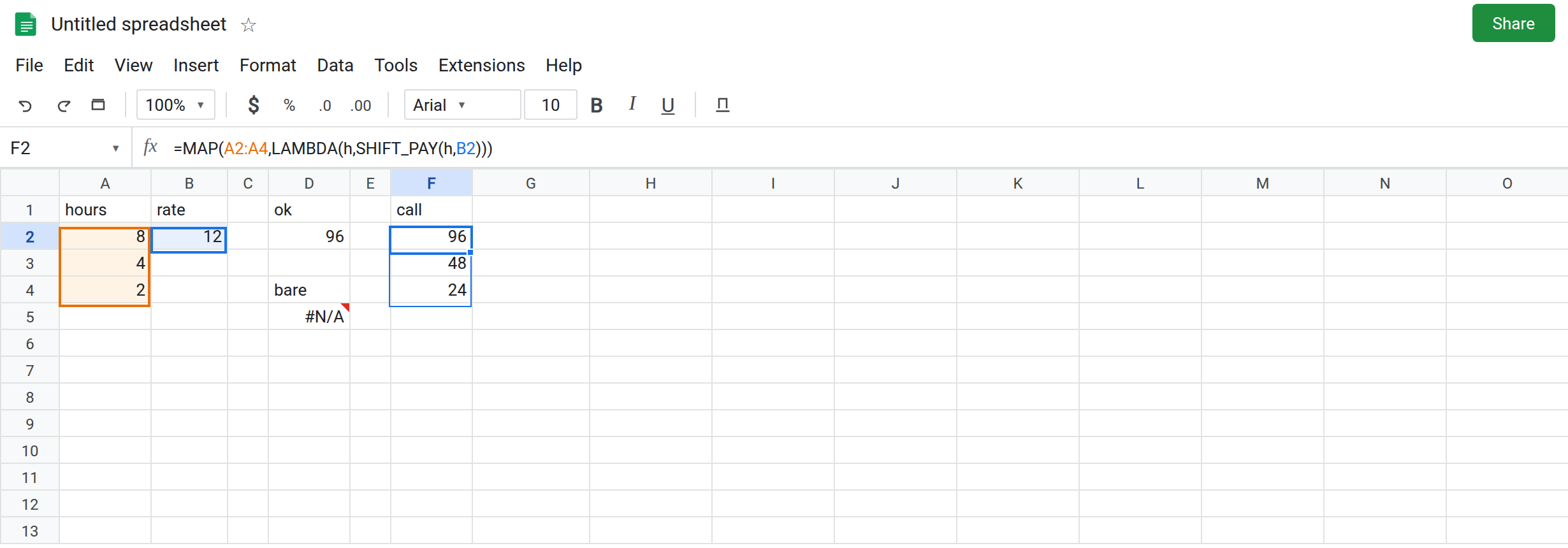
Call the plain function from inside the lambda. In F2 enter =MAP(A2:A4,LAMBDA(h,SHIFT_PAY(h,B2))). One lambda name (h) because MAP has one array. SHIFT_PAY still receives two arguments: the row’s hours and the rate in B2. The spill is 96, 48, 24.
Keep the definition a formula, not a lambda, when placeholders exist. SHIFT_PAY stays =hours*rate. Delete PAY_WRAP or stop calling it. If you want a reusable lambda value, give it no placeholders and call PAY_FN()(A2,B2), and do not also list hours and rate as placeholders.
Do not wrap D11 in IFERROR. The name slots are still numbers. See IFERROR vs IFNA.
If MAP says its last argument must be a lambda, you passed the bare name. If SHIFT_PAY says expected 2 arguments, add the rate inside the parentheses. If LAMBDA says a name is not valid, the named-function placeholders were substituted into the lambda header. Move the math into the named function’s body, or stop declaring those placeholders.