

SORT uses the first column you name as the primary key
Updated
SORT(range, sort_column, is_ascending, ...) reads column index and direction in pairs, and the first pair is the primary key. SORT(A2:C5, 2, TRUE, 1, TRUE) sorts by column 2 ascending, then breaks ties with column 1. It does not sort by column 1 and then glance at column 2. Each TRUE or FALSE belongs to the index written immediately before it, not to the next index. Name the score column first and the rows group by score. Name the department column first and the rows group by department. There is no #N/A and no #VALUE! when those indexes point at real columns. The order is just not the one you described out loud.
A sort column that is a different height from the range is SORT key length. A spill that cannot expand is SORT / UNIQUE spill. Ties inside SORTN are SORTN ties mode and SORTN tie flood. Keep the Google Sheets UI in English. Sheet Error is an independent formula-error library, not a Google product.
Recreate it on a blank sheet
Section titled “Recreate it on a blank sheet”- Open a blank spreadsheet. In A1 type
name, B1dept, C1score. A2Ann, B2East, C23. A3Bo, B3West, C31. A4Cara, B4East, C41. A5Dee, B5West, C53.
Department then score, both ascending, is Cara (East, 1), Ann (East, 3), Bo (West, 1), Dee (West, 3). East is a block, and inside East the lower score comes first. Column 2 has to be the first pair. Column 3 has to be the second pair.
Dept first, the control. In E1 type dept_then_score. Leave E2:G6 empty. In E2 enter =SORT(A2:C5,2,TRUE,3,TRUE). The spill is Cara, Ann, Bo, Dee. East’s rows sit together. Score 1 comes before score 3 inside East. That block is the order to compare against.
Score first, because that index was typed first. In E8 type score_then_dept. Leave E9:G13 empty. In E9 enter =SORT(A2:C5,3,TRUE,2,TRUE). The first pair is column 3. The spill is Cara (East, 1), Bo (West, 1), Ann (East, 3), Dee (West, 3). The two 1s are together. East is not a block. Column 2 only orders rows that already tied on score: inside the 1s, East (Cara) comes before West (Bo). Leave E9 as that spill. It is a successful sort by the wrong primary key.
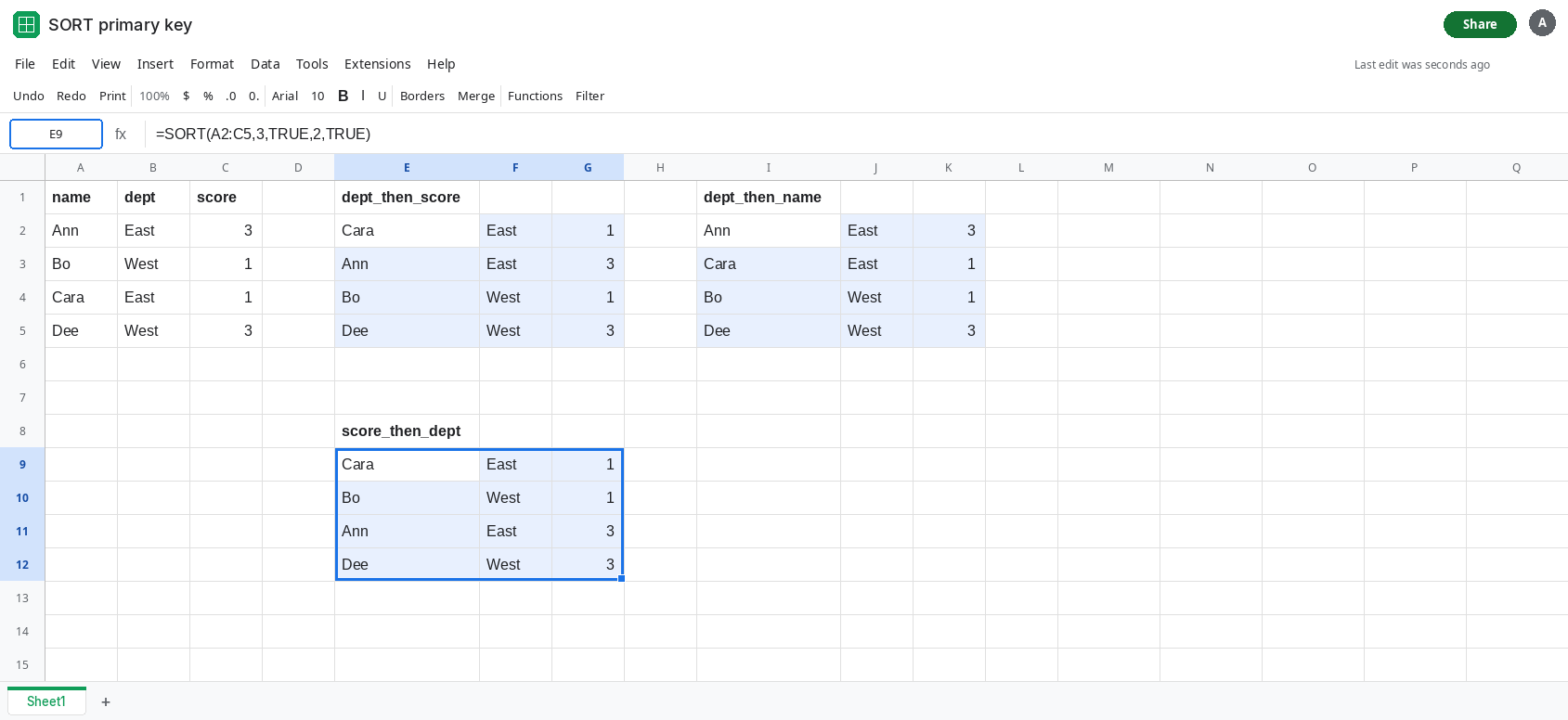
The two-argument shape from the topic, column 2 then column 1. In I1 type dept_then_name. Leave I2:K6 empty. In I2 enter =SORT(A2:C5,2,TRUE,1,TRUE). Primary key is department, tiebreak is name. The spill is Ann (East, 3), Cara (East, 1), Bo (West, 1), Dee (West, 3). East is together, and inside East the names are alphabetical, so Ann’s 3 comes before Cara’s 1. Score was never a key. If the sentence in your head was “sort by name, and also by dept,” this formula did the opposite: dept leads, because 2 is the first index.
TRUE stays with the index before it. =SORT(A2:C5,2,FALSE,3,TRUE) sorts department descending (West, then East) and score ascending inside that. The FALSE does not apply to column 3. Swapping a boolean and an index, =SORT(A2:C5,TRUE,2), is a different failure: the arguments are not pairs anymore. This page is the pairs in the wrong order, which still returns a clean spill.
Leave E9 grouped by score. Leave I2 grouped by dept then name.
What is actually wrong
Section titled “What is actually wrong”- The first
sort_columnis the primary key. Later pairs break ties. They do not “also sort” in a way that regroups the blocks. Once dept differs, the name pair in I2 never moves Ann into pure alphabetical order with Bo. - Argument order is left to right. It is not “the last column I mentioned is the important one.”
2, TRUE, 1, TRUEmentions column 1, and column 1 is secondary. - Each boolean binds to the index on its left. Reading
2, TRUE, 1, TRUEas “true for column 1, and column 2 is just there” invents a pairing the function does not use. - No error is how this survives review. The spill is four rows, the same four people, every score still attached to the right name. Only the sequence changed. A checker that counts rows will pass.
- A one-column
SORT(A2:C5, 1, TRUE)never consults dept or score. Adding a second pair is what creates a tiebreak. Putting that new pair first promotes it to the primary key.
This is not SORT key length. If E2 is #N/A or #VALUE! and the tooltip talks about the sort range, the extra key’s height or type is wrong. A clean four-row spill is this page.
Leave E9 and I2 as the two wrong primaries. E2 is the dept-then-score order.
Write the primary column’s pair first. In M1 type fixed. In M2 enter =SORT(A2:C5,2,TRUE,3,TRUE). M2 matches E2: Cara, Ann, Bo, Dee. For name as the primary key, =SORT(A2:C5,1,TRUE,2,TRUE) spills Ann, Bo, Cara, Dee. Dept would break ties only if two names matched. For score as the primary key, keep E9’s formula on purpose and label the header so the next edit does not “correct” it back.
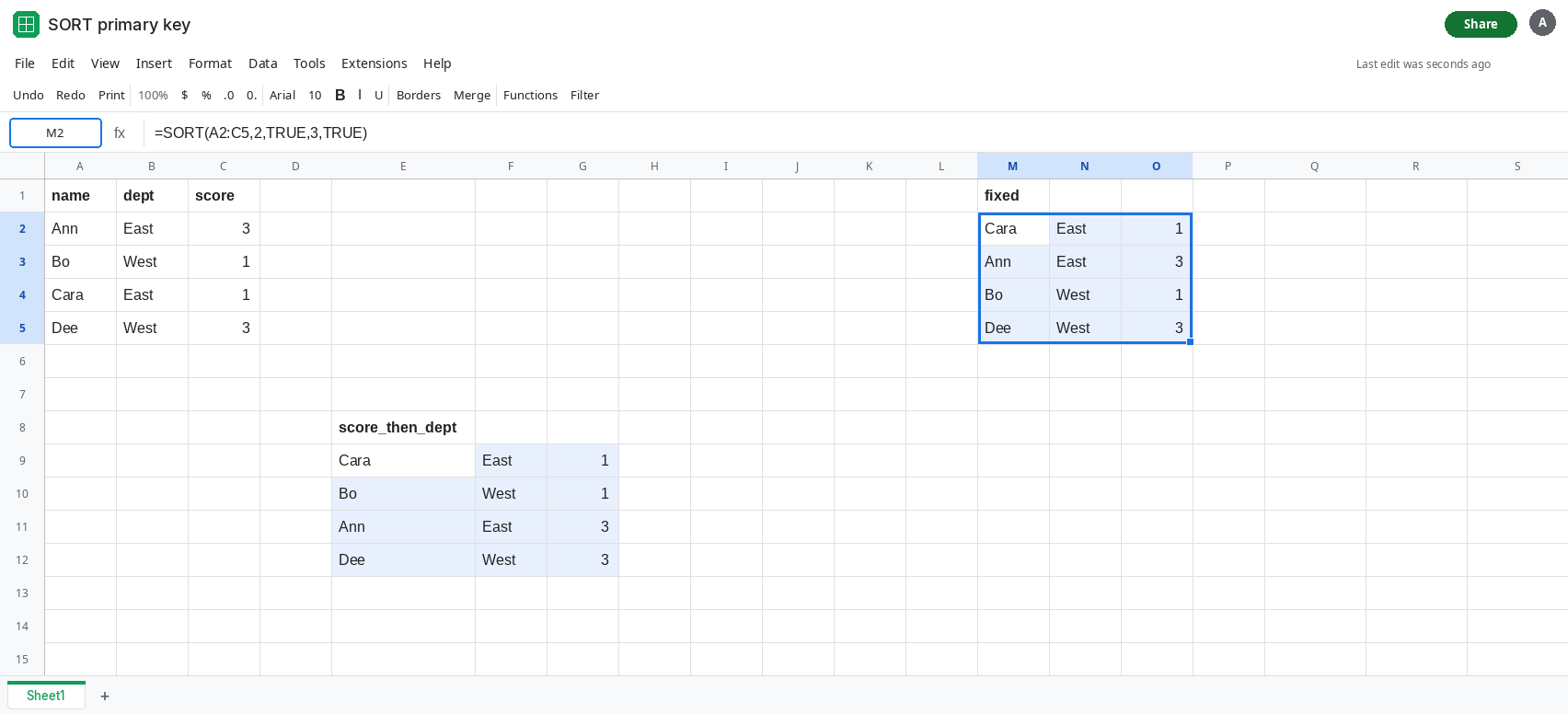
Add a tiebreak only after the key you want to see as blocks. If East must stay together and score must order the inside of East, column 2’s pair stays first even if you also care about names. A third pair, =SORT(A2:C5,2,TRUE,3,TRUE,1,TRUE), still groups by dept. Name breaks ties only when dept and score both match.
If the first index in the formula is 3 and the rows are grouped by score, the primary key is the score. If the first index is 2 and Ann sits above Cara, department led and the names were the tiebreak. If the cell is #N/A, you are on the key-length page, not this one.