

MATCH search type -1 needs a descending list and misses on ascending keys
Updated
MATCH(key, range, -1) is approximate in the descending direction. The range has to run from large to small. On 40, 30, 20, 10, a lookup of 25 returns the position of 30, the smallest value that is still greater than or equal to 25. On 10, 20, 30, 40 the same call is #N/A or a position that is not the exact hit. Type 0 does not care about order. Type 1 is the other sort.
Ascending approximate match, type 1 and the omitted third argument, is MATCH approx unsorted. A pure miss of a key that is not in the list is MATCH #N/A. Keep the Google Sheets UI in English. Sheet Error is an independent formula-error library, not a Google product.
Recreate it on a blank sheet
Section titled “Recreate it on a blank sheet”- Open a blank spreadsheet. In A1 type
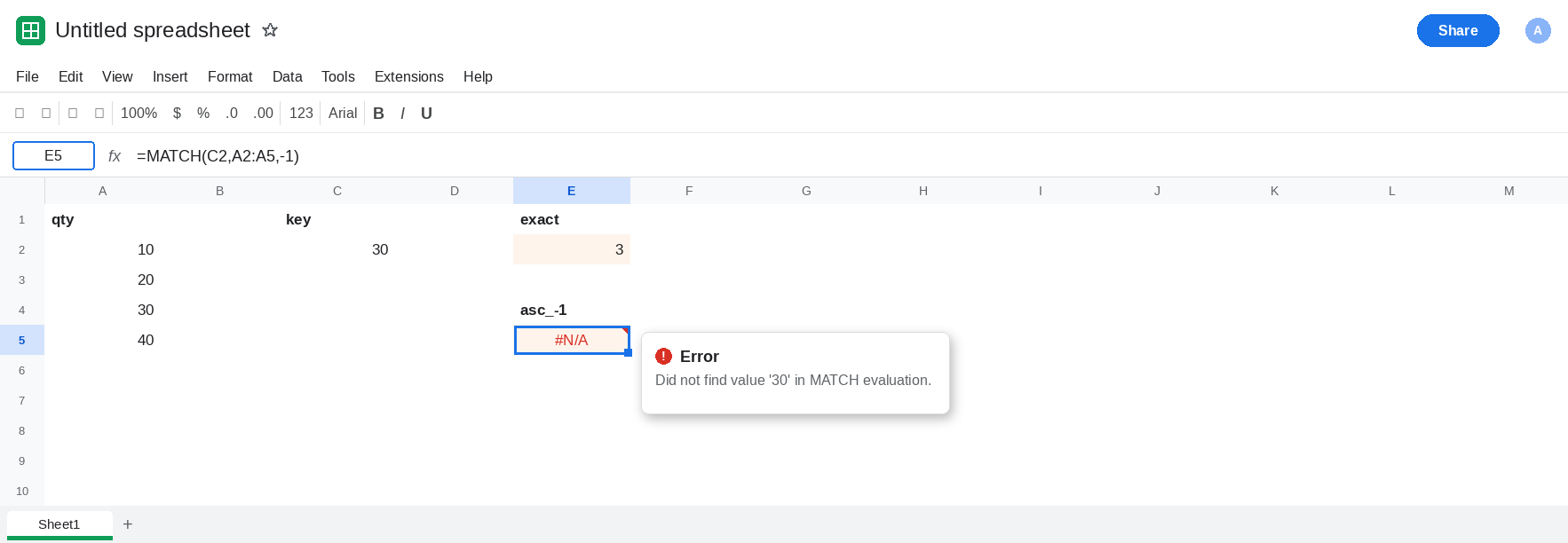
qty. A210, A320, A430, A540. This column ascends. The value30is in position3.
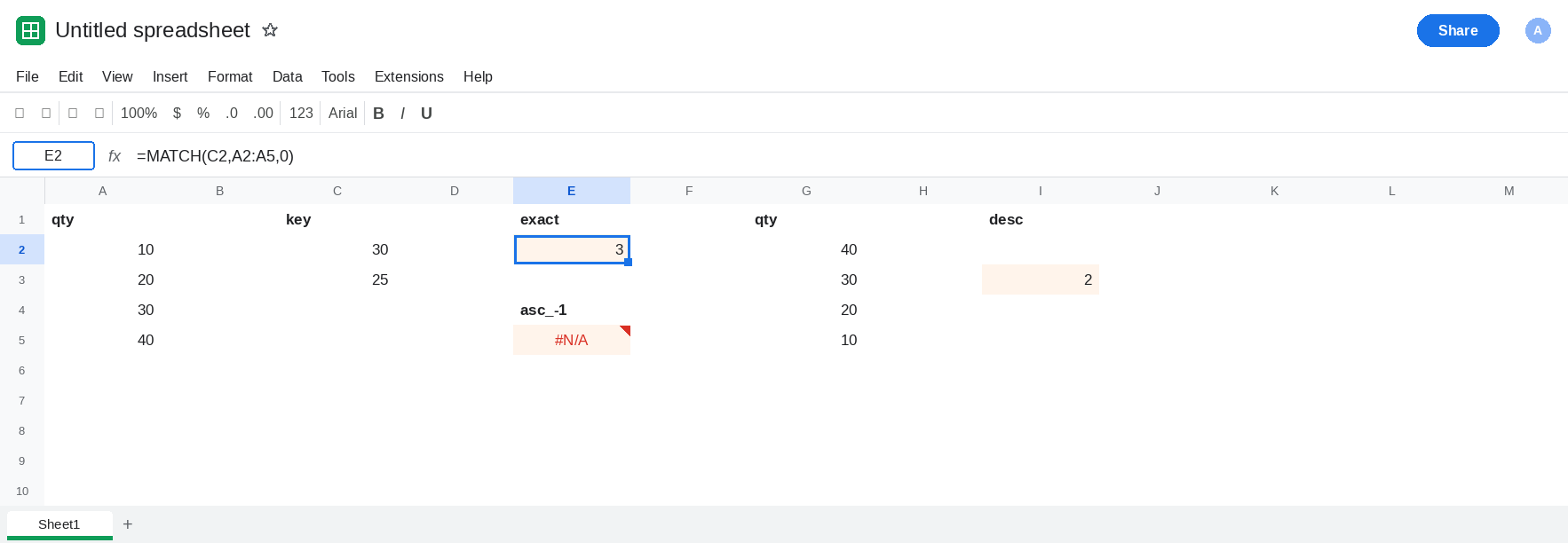
Exact on the ascending column. In C1 type key. C2 30. C3 25. In E1 type exact. In E2 enter =MATCH(C2,A2:A5,0). The cell shows 3. Type 0 finds 30 whether or not the column is sorted. E2 is the control for “where is 30.”
Type -1 on that ascending column. In E4 type asc_-1. In E5 enter =MATCH(C2,A2:A5,-1). E5 is #N/A or a position that is not 3. 30 is on the sheet. The search type is what fails. In E6 enter =MATCH(C3,A2:A5,-1). E6 is not a band you can defend. Leave both if they are not the positions you would quote from a sorted descending list.
Descending, where -1 is the contract. In G1 type qty. G2 40, G3 30, G4 20, G5 10. In I1 type desc. In I2 enter =MATCH(C2,G2:G5,-1). I2 is 2. 30 is the second cell, and it is an exact hit inside a descending list. In I3 enter =MATCH(C3,G2:G5,-1). I3 is 2. 25 is not listed. The smallest listed value that is still >= 25 is 30, in position 2. That is approximate match used on purpose. In I4 enter =MATCH(C3,G2:G5,0). I4 is #N/A. Type 0 is supposed to reject 25. Leave I3 as 2 and I4 as #N/A.
Type 1 does not replace -1 on the descending column. In I6 enter =MATCH(C2,G2:G5,1). I6 is #N/A or not 2. Type 1 wants ascending order. G2:G5 descends. Leave I6 as that failure. The ascending primer is MATCH approx unsorted.
Leave E5 as the ascending -1 result. Leave I2 and I3 as 2.
What is actually wrong
Section titled “What is actually wrong”- Type
-1is not “exact, else nearby,” and it is not the reverse of a linear scan. It is a descending sorted search: smallest value greater than or equal to the key. A2:A5 goes 10, then 20, then 30. The contract is false before the key matters. E5 is that call. - On a real descending list the same type is quiet and correct. I3 returns
2for25with no triangle, because30is the break. That silence is why a wrong position on A2:A5 is dangerous: the function also stays silent when it is right. - Type
0is the exact position. It returns3on A2:A5 and#N/Afor25on G2:G5. Use it when the key has to be present. - Omitting the third argument means type
1, not type-1and not type0. A formula that “used to be exact” because someone dropped the0is the type1page, not this one. INDEXwill return whatever row this position names. A bad index becomes a bad price with no new error. See INDEX/MATCH approx for type1insideINDEX. Pass-1there only after the key column descends.
XLOOKUP approximate modes are a different argument list. Search mode -2 is binary descending, which is XLOOKUP binary search. This page is MATCH.
Leave E5 as the ascending failure.
Exact keys use type 0. Keep E2. In E8 enter =MATCH(C2,A2:A5,0). It shows 3. The column can stay in the order it was typed.
Use -1 only on a descending break column. Keep I3 as the pattern for “smallest value still greater than or equal to the key.” Leave G2:G5 sorted large to small. Do not point I3 at A2:A5.
Do not wrap E5 in IFNA until a missing break should be blank. IFNA does nothing when E5 is a wrong position. See IFERROR vs IFNA.
If MATCH of a value you can see returns #N/A or the wrong index and the third argument is -1, the list is not descending. Pass 0 for an exact list. If the list is a descending table of breaks, -1 belongs on that list. Type 1 belongs on an ascending one.