

QUOTIENT truncates toward zero; INT of a negative division does not
Updated
QUOTIENT(numerator, denominator) divides and drops the fractional part toward zero. QUOTIENT(-7, 2) is -3. INT rounds down, toward negative infinity, so INT(-7/2) is INT(-3.5), which is -4. On positive numbers the two agree: QUOTIENT(7, 2) and INT(7/2) are both 3. A report that mixes them looks fine until the first refund, temperature, or signed variance. TRUNC follows QUOTIENT here, not INT.
FLOOR’s sign rule is FLOOR sign. A zero denominator is divide by zero. Keep the Google Sheets UI in English. Sheet Error is an independent formula-error library, not a Google product.
Recreate it on a blank sheet
Section titled “Recreate it on a blank sheet”- Open a blank spreadsheet. In A1 type
n, B1d. A2 type-7. B2 type2. A3 type7. B3 type2.
Negative, the split. In D1 type quotient. In D2 enter =QUOTIENT(A2,B2). D2 is -3. The fraction -3.5 lost its .5 by moving toward zero. In E1 type int. In E2 enter =INT(A2/B2). E2 is -4. INT moved to the next integer down, away from zero. In F1 type trunc. In F2 enter =TRUNC(A2/B2). F2 is -3. TRUNC matches QUOTIENT on this pair. Leave D2 as -3 and E2 as -4. Neither cell is an error.
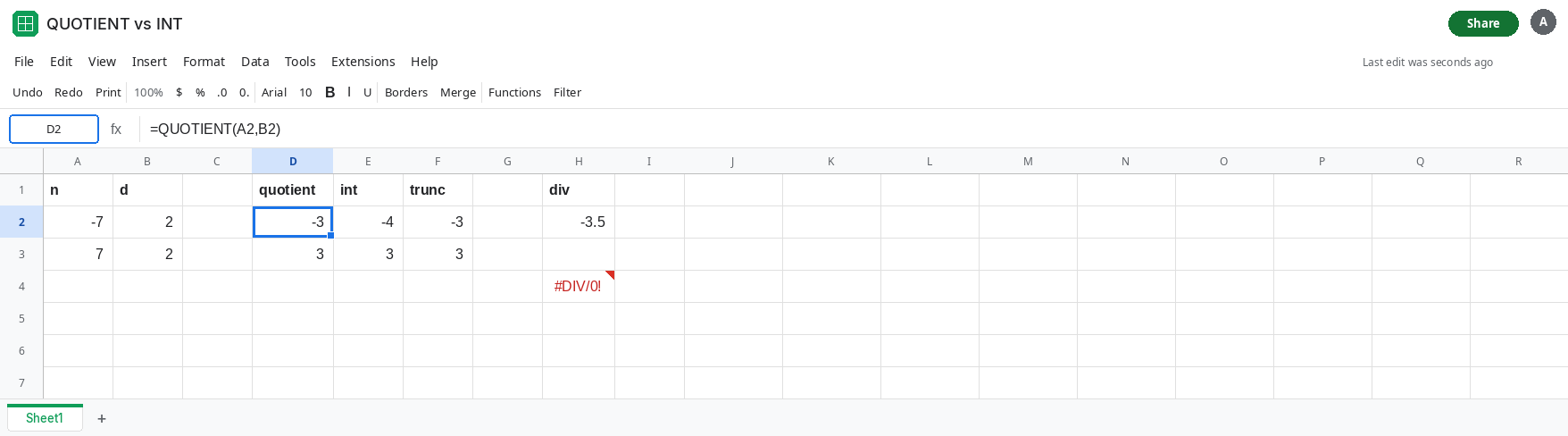
Positive, they match. In D3 enter =QUOTIENT(A3,B3). D3 is 3. In E3 enter =INT(A3/B3). E3 is 3. In F3 enter =TRUNC(A3/B3). F3 is 3. This row is why a test suite of positive quantities never catches the swap. Leave D3 and E3 as 3.
The division both of them start from. In H2 enter =A2/B2. H2 is -3.5. QUOTIENT and TRUNC cut that to -3. INT cuts it to -4. The .5 is the whole disagreement. An exact integer input such as QUOTIENT(-8,2) is -4 for both styles, because there is no fraction to drop.
Zero is a different error. In H4 enter =QUOTIENT(A3,0). H4 is #DIV/0!. That is divide by zero. Leave H4 broken so it is not confused with the -3 versus -4 split. The split has no triangle.
Leave D2 as -3 and E2 as -4.
What is actually wrong
Section titled “What is actually wrong”- Toward zero and toward negative infinity are the same cut when the quotient is positive. They are one apart when the quotient is negative and not already an integer.
QUOTIENTnever returns the fractional part. It also never rounds half away from zero.-3.5does not become-4insideQUOTIENT. People who want “round half up” wantROUND, not either of these.INTis not “drop the decimals” in ordinary speech. It is the greatest integer that is still less than or equal to the value. For-3.5that integer is-4.TRUNC(value)drops toward zero, likeQUOTIENT.TRUNC(value, places)can keep decimals.TRUNC(-3.5, 0)is still-3. ReplacingQUOTIENTwithINTto “simplify” changes signed results.- A displayed
-3.00can be either function if you only look at positive samples and then format the column. Read the formula bar on a negative row before you trust the column.
This is not FLOOR(-7, 2), and it is not a sign #NUM!. See FLOOR sign if the tooltip is #NUM!.
Leave D2 and E2 side by side. They are the two definitions. Use a third cell for the one you meant.
You want the digits toward zero, including on refunds. In J2 enter =QUOTIENT(A2,B2). J2 is -3. =TRUNC(A2/B2) is the same -3. Use this when a partial unit should not count, and a negative partial unit should not count as a full step down either.
You want the integer at or below the quotient. In J3 enter =INT(A2/B2). J3 is -4. Use this when the next bin is always downward, including through zero. Say so in the header. A later reader who swaps in QUOTIENT will lift every negative bin by one.
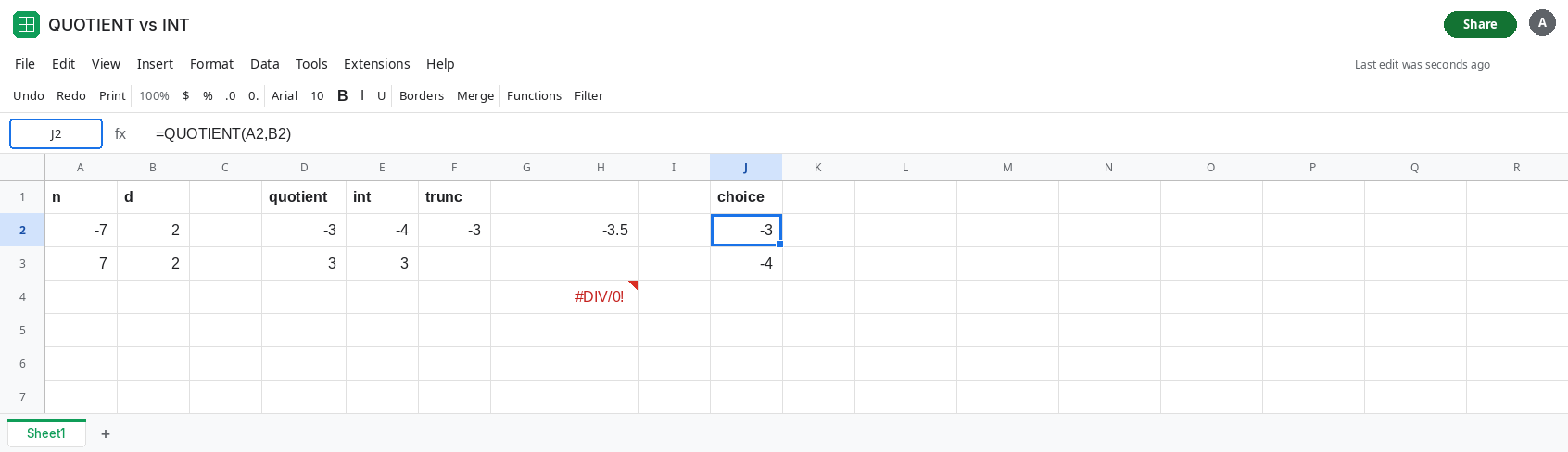
Guard a zero divisor without hiding the sign split. =IF(B2=0,"",QUOTIENT(A2,B2)) blanks the zero case and still returns -3 for the sample. IFERROR around the whole column would also blank a #DIV/0!, and it would not tell you that D2 and E2 differ. See divide by zero.
If the inputs are negative and QUOTIENT is one greater than INT (less negative), both functions are doing what they define. If they differ on a positive row, one of them is not dividing those two cells. If the cell is #DIV/0!, the denominator is zero.