

Fix UNIQUE in Google Sheets when exactly_once drops every repeated row
Updated
UNIQUE(range, by_col, exactly_once) with the third argument TRUE is not a distinct list. It keeps a row only when that entire row appears one time. A sku that shows up twice is removed, not collapsed to a single line. The cell does not show #N/A. The value is simply absent. Default UNIQUE (third argument omitted or FALSE) keeps one copy of each distinct row. That is the list people usually wanted.
This page is exactly_once only. The axis flag by_col is UNIQUE by_col. A blocked spill is SORT / UNIQUE spill. Keep the Google Sheets UI in English.
Recreate it on a blank sheet
Section titled “Recreate it on a blank sheet”- Open a blank spreadsheet. In A1 type
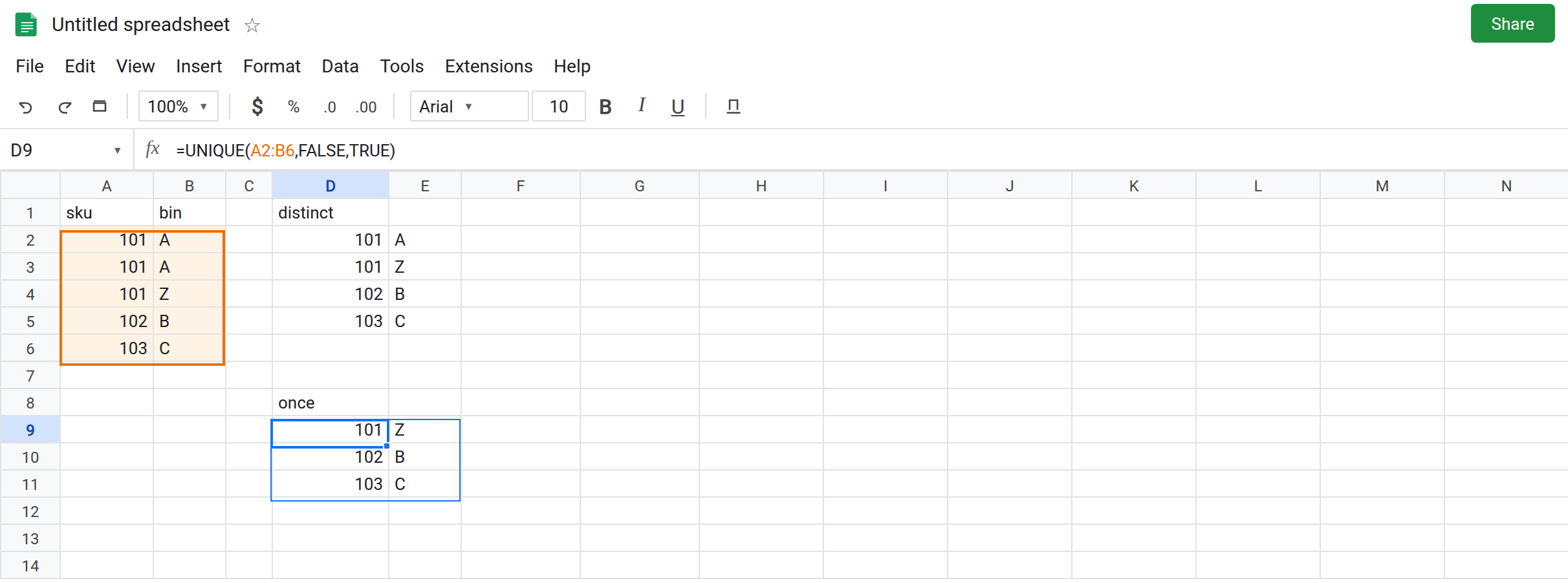
sku, B1bin. A2101, B2A. A3101, B3A. A4101, B4Z. A5102, B5B. A6103, B6C. Row101/Aappears twice. Row101/Zappears once.102and103appear once.
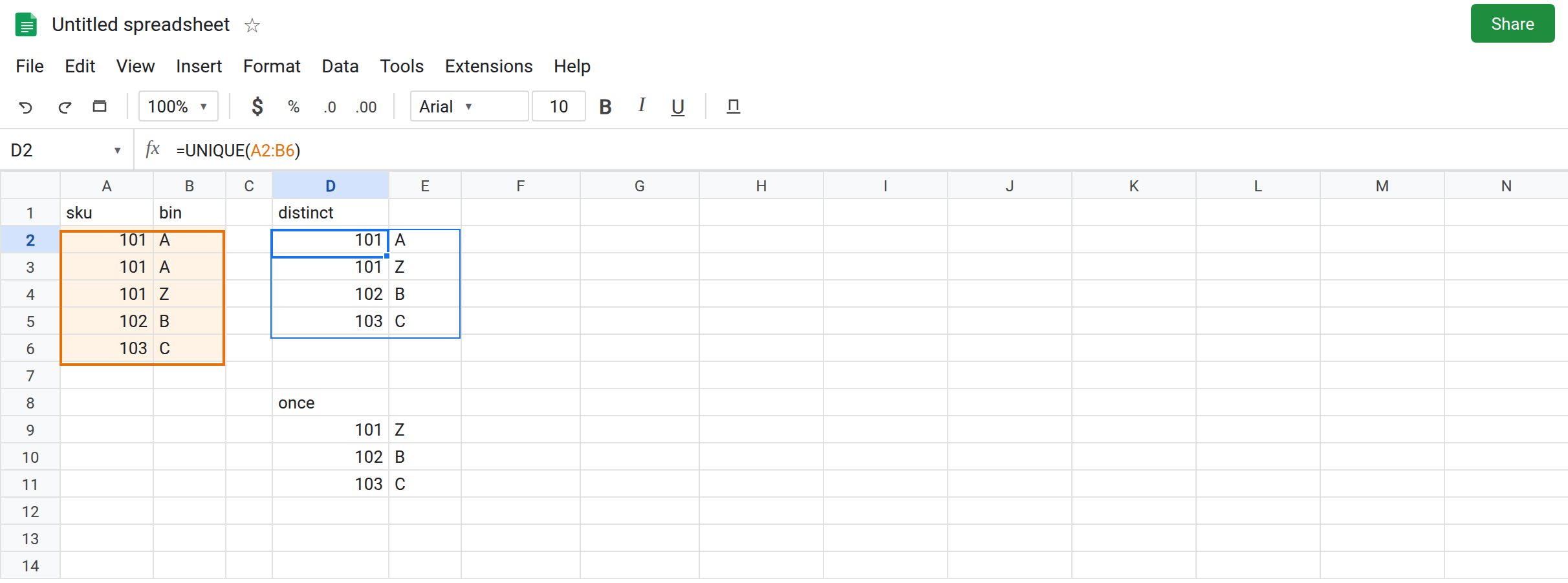
Default distinct rows. In D1 type distinct. Leave D2:E5 empty. In D2 enter =UNIQUE(A2:B6). The spill is four rows: 101/A, 101/Z, 102/B, 103/C. The doubled 101/A remains once. 101/Z stays because the bin differs. That block is the control.
exactly_once removes the pair that repeated. In D8 type once. Leave D9:E11 empty. In D9 enter =UNIQUE(A2:B6,FALSE,TRUE). The spill is 101/Z, 102/B, 103/C. 101/A is gone. It occurred twice, so it is not “unique enough” for this flag. 101/Z remains. The sku 101 did not have to be unique by itself. The row did. Leave D9 as that spill.
A single column is stricter. In G1 type sku_only. In G2 enter =UNIQUE(A2:A6,FALSE,TRUE). The source is only the sku. 101 appears three times, so it drops. The spill is 102 and 103. People compare G2 to D9 and think D9 is broken because 101 survived there. D9 was judging two columns. G2 is judging one.
Two blank rows count as a repeat. In A8 leave the cell blank. Leave A9 blank. In A10 type 104. In G5 enter =UNIQUE(A8:A10,FALSE,TRUE). The two blanks are the same row value repeated, so they drop. The spill is 104 only. One blank row, with no second blank, would have stayed. Leave G5 as that short spill.
A dropdown list that silently shrinks. Distinct skus for a validation list are D2’s first column, or =UNIQUE(A2:A6) with no third argument. That spill includes 101. G2 does not. If a form’s sku list lost 101 after someone added TRUE “to be safe,” this flag is why.
Leave D9 and G2 as the shortened spills. Leave D2 as four rows.
What is actually wrong
Section titled “What is actually wrong”- The third argument is a frequency filter. Frequency is counted on the row
UNIQUEis comparing. Withby_colomitted orFALSE, a row is every column in the range.101/Atwice is out.101/Zonce is in. D9. - Narrowing the range changes the identity.
A2:A6makes the sku the whole row. Three101s vanish together. G2. Adding the bin column back is how101/Zreturns. - Blanks are values. Two empty cells are duplicates of each other.
exactly_oncedrops them. They are not “missing” in theFILTERsense. - Order is first-seen order among the rows that survived. It is not a sort.
102before103because that is the source order. - There is no error to catch.
IFNAaround D9 still will not print101/A. The function returned a normal array that happens to be shorter.
This is not SORTN ties mode 2, which drops duplicate rows after a sort and then keeps n of what remains. See SORTN ties mode and SORTN n / ties.
This is not by_col. See UNIQUE by_col. D9’s second argument is FALSE. The third argument is the whole story.
Leave D9 and G2 in place so the shortened lists stay visible.
One copy of each row, including rows that repeated. Keep D2: =UNIQUE(A2:B6). For a sorted sku list, =SORT(UNIQUE(A2:A6)). 101 is present once.
Keep exactly_once only for orphans. D9 is the right formula when the question is “which full rows never repeated?” Say that in a header above D9 (orphans) so the next edit does not use it as the master list.
Count, when you need the sku even if the bins differ. =UNIQUE(FILTER(A2:A6,COUNTIF(A2:A6,A2:A6)=1)) is the one-column “appears once” list, which matches G2. =UNIQUE(FILTER(A2:B6,COUNTIF(A2:A6,A2:A6)=1)) keeps every bin row whose sku appears once. On this sheet that is 102 and 103 only. 101/Z drops too, because the sku 101 is not once. Choose the identity on purpose. COUNTIF on two columns is not a substitute for D9’s whole-row test. D9 already is that test.
Do not wrap D9 in IFNA to recover 101. See IFERROR vs IFNA.
If a value vanished and the formula shows a third TRUE, you asked for rows that appear once. If the value appears once with a different neighbor column, widen the range or stop using the third argument. If the spill is #REF! and the tooltip names a cell, the flag is fine and the path is blocked.