

IMPORTXML and the other IMPORT functions return #N/A when the request quota is exhausted
Updated
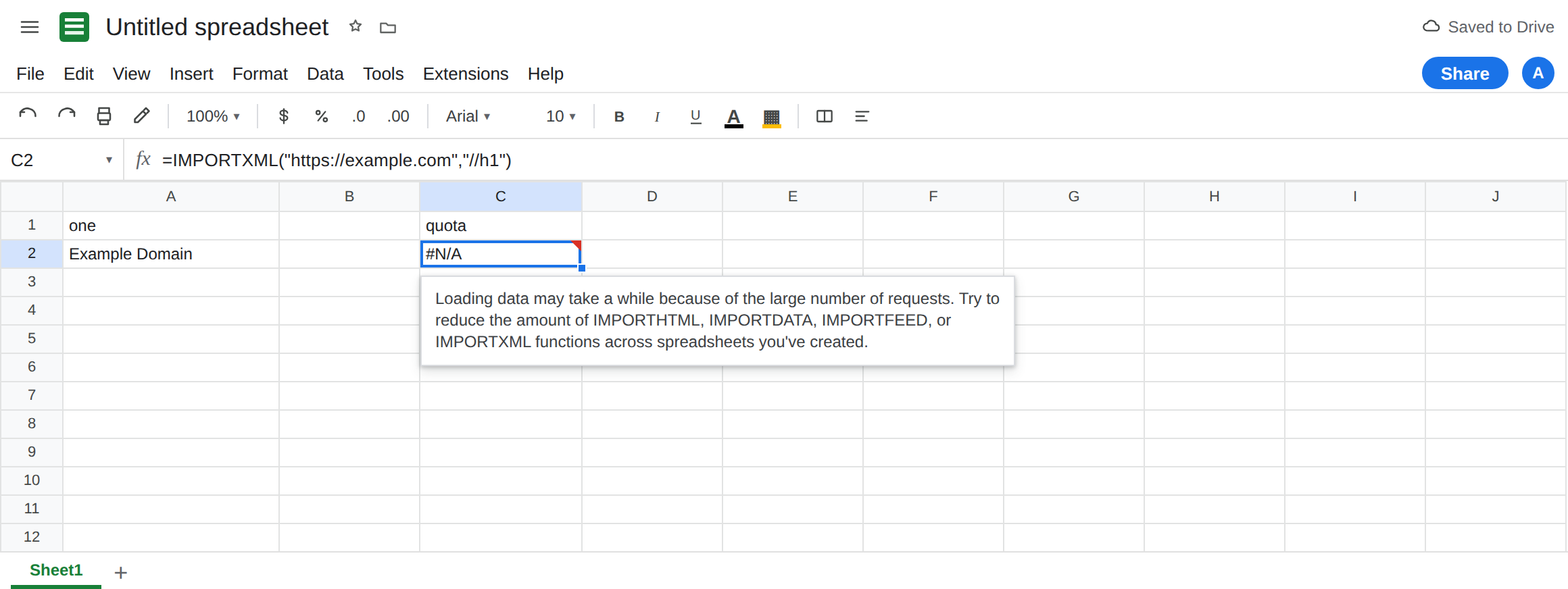
IMPORTXML, IMPORTHTML, IMPORTDATA, and IMPORTFEED share a traffic limit across spreadsheets you created. When that limit is hit, the cell is #N/A (often after a long Loading…) and the tooltip is Google’s cool-down sentence: Loading data may take a while because of the large number of requests. Try to reduce the amount of IMPORTHTML, IMPORTDATA, IMPORTFEED, or IMPORTXML functions across spreadsheets you’ve created. The XPath can be valid. The URL can be reachable. The next refresh does not buy a new quota.
This page is that quota. It is not Allow access, size, loading as a first-use banner or a Result too large pull. It is not IMPORTHTML resource size (the download itself exceeded the maximum size). It is not IMPORTDATA fetch or IMPORTFEED fetch when the host or the file type is wrong. Keep the Google Sheets UI in English. Sheet Error is not a scraping product. Do not point dozens of new formulas at someone else’s site to “prove” the limit.
Recreate it on a blank sheet
Section titled “Recreate it on a blank sheet”- Open a blank spreadsheet. You want one honest import and a clear reading of the quota sentence. You do not want a sheet that fires the same URL from every row.
One call that is allowed to be the control. In A1 type one. In A2 enter =IMPORTXML("https://example.com","//h1"). If Sheets shows Allow access, click it once. When the fetch works, A2 shows Example Domain. That cell is the control: this URL and this XPath can succeed. If A2 is #N/A immediately with Could not fetch url, you are offline or the host blocked the request. That is a fetch miss, not the quota sentence. Fix the network before you diagnose traffic.
The quota sentence. In C1 type quota. Look through this file and other files on the same Google account for IMPORTXML, IMPORTHTML, IMPORTDATA, and IMPORTFEED. If any cell’s tooltip is the long “large number of requests” sentence above, that cell is this page. Paste that formula’s idea into C2 only if it is your URL and you already have the error. Do not duplicate A2 down a thousand rows to force the message. Google counts those calls across spreadsheets you created, and a burst against a third-party host is not a tutorial step.
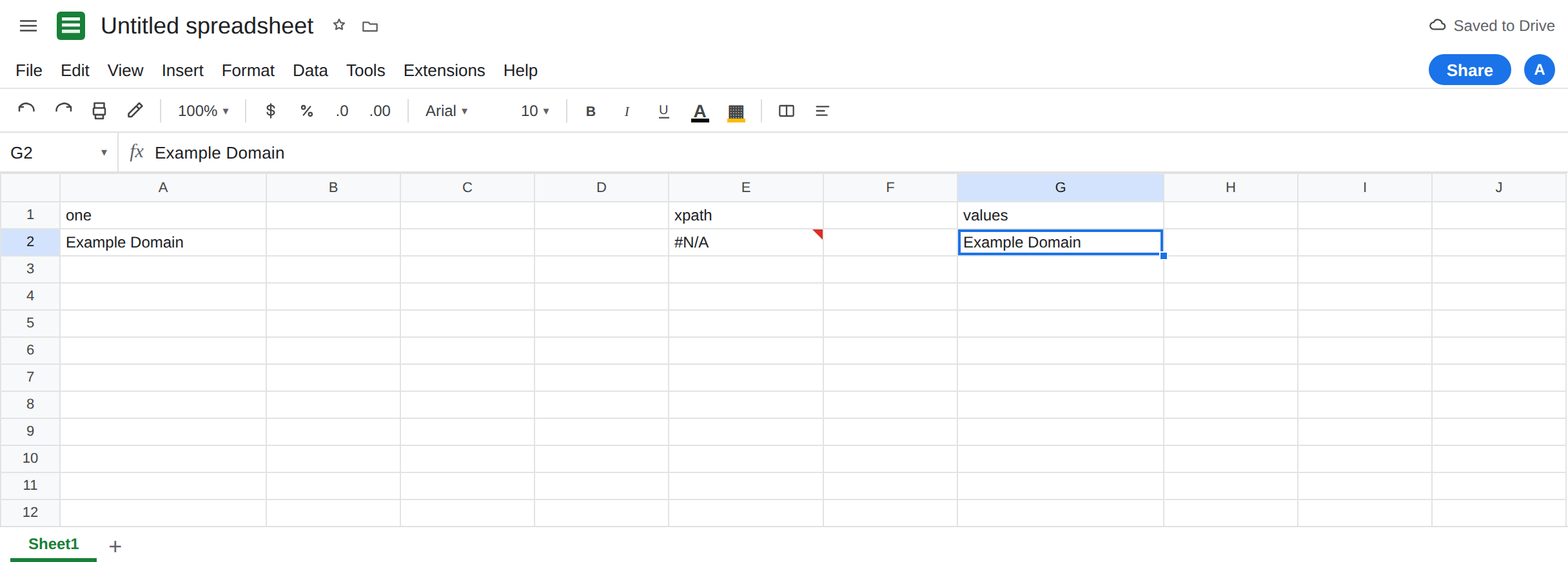
A bad XPath is a different #N/A. In E1 type xpath. In E2 enter =IMPORTXML("https://example.com","//no-such-heading"). The cell is #N/A because the path matched nothing, or the tooltip says the imported content could not be parsed. The sentence does not mention a large number of requests. Leave E2 broken so you can see a content miss beside a quota miss. Do not “repair” E2 by waiting twenty minutes.
Result too large is not this sentence. A query that returns a huge node set can say Result too large. Shrinking the XPath fixes that. It does not fix a quota tooltip on a one-cell //h1. See Allow access, size, loading.
Leave A2 as the working single import if it loaded. Leave the quota cell broken if you already have one. Leave E2 as the bad path.
What is actually wrong
Section titled “What is actually wrong”- The four import functions are volatile external calls. Edits, opening the file, and a timer can all ask the network again. Google’s help tells you the error when those calls create too much traffic, and it names all four functions in one sentence. A sheet that “only” uses
IMPORTHTMLstill counts against an account full ofIMPORTXML. - The limit is per account, across files, not per cell. Copying the spreadsheet copies the formulas. The new file adds more calls. Fifty files with one import can hit the same wall as one file with fifty imports.
Loading…that never settles, then#N/Awith the requests sentence, is the cool-down.Loading…on a firstIMPORTRANGEis a different function. See IMPORTRANGE loading.- A URL that 404s, an HTML page passed to
IMPORTFEED, or a non-CSV passed toIMPORTDATAfails even when you are under the quota. Read the tooltip. If it does not mention the large number of requests, do not wait it out. - Refreshing the browser repeats the call. It does not raise the limit.
IFERRORturns the cool-down into a blank.
This is not IMPORTRANGE. See IMPORTRANGE access.
Leave E2 broken. Leave a quota cell broken until the account is under the limit, so you do not confuse “fixed XPath” with “allowed to call again.”
Cut the number of live calls. Delete import formulas you do not need, including copies in other spreadsheets on this account. One IMPORTXML with two paths joined by | is one request: =IMPORTXML("https://example.com","//h1 | //p"). That is the documented way to avoid a second call for a second node. It is not a way to pull a whole site.
Freeze a snapshot. When A2 shows the text you needed, copy it and Edit → Paste special → Values only into a helper column. The value does not refresh, and it does not count as an import. Use that when the page is a reference you meant to capture once.
Wait, then retry one cell. After you have removed the extra formulas, give the cool-down time. Google does not publish a button that resets the quota. Do not add NOW() beside imports to force recalculation. That increases traffic.
If the tooltip names the large number of requests, stop adding import functions and paste values for anything you already fetched. If the tooltip names the URL, the XPath, or the resource size, you are on a different page. A2 on a quiet account is the picture of a single legal call.