

Fix named range #REF! or #NAME? in Google Sheets (name deleted, sheet renamed, or name never existed)
Updated
A named range is a spreadsheet-local alias (Data → Named ranges). Formulas can use bay_ids instead of A2:A4. #NAME? here means Sheets does not know that alias: you never created it, you deleted it, or you typed it wrong. #REF! here means the name still exists, but the cells (or tab) it pointed at are gone. The formula bar still shows the name. That is the tell versus a deleted A1.
This page is named-range #NAME? / #REF!. It is not unknown function (VLOKUP is not VLOOKUP). It is not after you delete (#REF! inside the formula text: =A1+#REF!). Keep the Google Sheets UI in English.
Recreate it on a blank sheet
Section titled “Recreate it on a blank sheet”- Open a blank spreadsheet. In A1 type
bay. A2N12. A3N18. A4N21. Data → Named ranges. Namebay_ids, rangeA2:A4. Done.
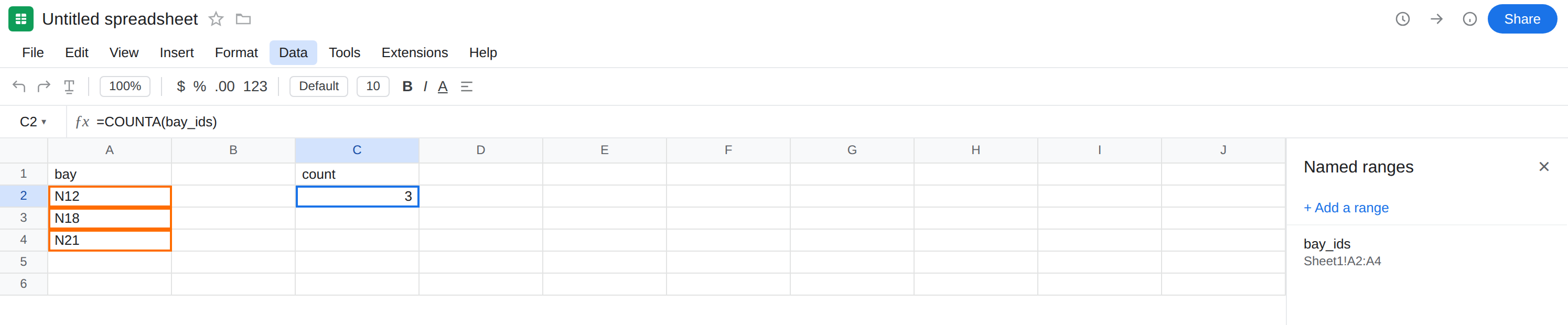
The name works. In C1 type count. In C2 enter =COUNTA(bay_ids). The cell shows 3. That row is the control: the alias resolves.
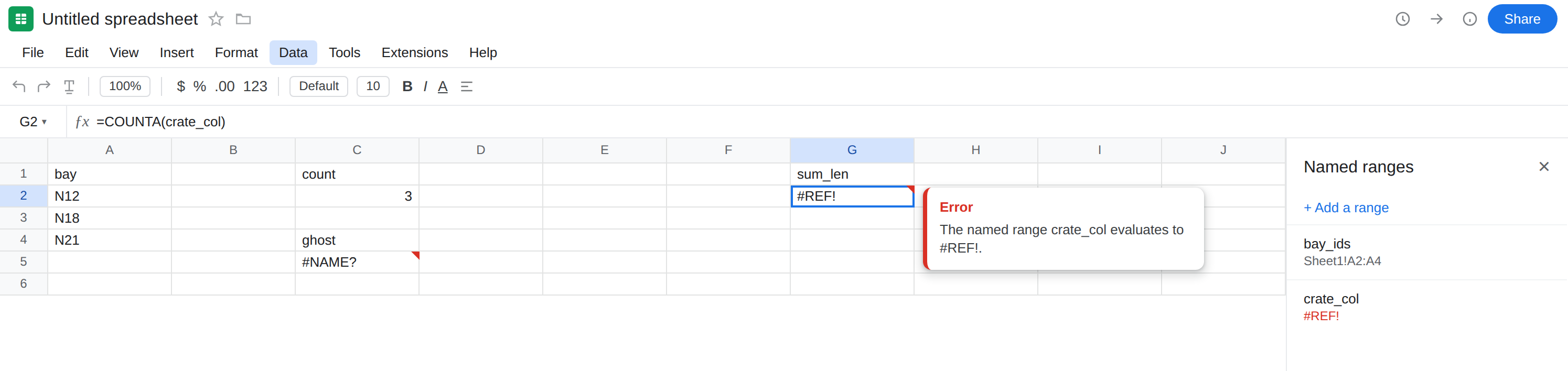
Name never existed. In C4 type ghost. In C5 enter =COUNTA(ghost_bays). The cell shows #NAME?. Tooltip: Unknown named range (or Unknown function) 'ghost_bays'. There is no ghost_bays in Data → Named ranges. Leave C5 broken.
Delete the name. Data → Named ranges → bay_ids → delete. C2 becomes #NAME?. The formula bar is still =COUNTA(bay_ids). Sheets does not rewrite it to A2:A4. Put bay_ids back on A2:A4 after you have seen C2 fail, so the #REF! recreates below have a live alias to contrast. Leave C5 as ghost_bays.
Name exists, target deleted. In E1 type crate. E2 N12. E3 N18. E4 N21. Data → Named ranges → name crate_col = E2:E4. In G1 type sum_len. In G2 enter =COUNTA(crate_col). The cell shows 3. Now select column E → delete the column. G2 shows #REF!. Select G2. The formula bar is still =COUNTA(crate_col), not =COUNTA(#REF!). Open Data → Named ranges. crate_col is listed with #REF! as its range. Leave G2 broken.
Tab deleted. Add a sheet tab named Dock. On Dock, F1 bay, F2 W1, F3 W2. Name dock_list = Dock!F2:F3. On Sheet1, I2 enter =COUNTA(dock_list) (2). Delete the Dock tab. I2 is #REF!. Formula bar still says dock_list. Leave I2 broken.
Misspelled function contrast. In K2 enter =VLOKUP(A2,A2:A4,1,FALSE). #NAME?, tooltip Unknown function: ‘VLOKUP’. That is unknown function. Leave K2 as the contrast. Do not hunt Data → Named ranges for VLOKUP.
What is actually wrong
Section titled “What is actually wrong”- Named ranges are file-local.
bay_idson this spreadsheet is notbay_idson a copy until you create it here. Paste a formula from another file and you get#NAME?until the name exists. - Deleting the name (or never creating it) is
#NAME?. The identifier in the formula is unresolved. Same error value asVLOKUP, different tooltip: a range name, not a function name. - Deleting the target (column, cells in a way that destroys the address, or the whole tab) leaves the name in the manager pointing at
#REF!. Formulas that use the name return#REF!. The formula text still hascrate_col. - Renaming a tab usually updates the named range’s sheet name in Google Sheets. If I2 broke after a rename, look for an
INDIRECT("Dock!F2")string, a stale chart range, or a name you typed as text — not the named-range manager, which typically followed the tab. Deleting the tab is the reliable#REF!recreate.
This is not VLOKUP. See unknown function. K2 never looked at Data → Named ranges. C5 is an alias, not a function spelling.
This is not delete-cell #REF! in the formula bar. See after you delete. =A1+#REF! means that operand was a cell address Sheets replaced. =COUNTA(crate_col) still reads crate_col.
This is not INDIRECT of a bad string. See INDIRECT #REF!. You can combine them (INDIRECT of a name), but this recreate uses the name directly.
This is not #N/A. COUNTA of a live name is a count, not a lookup. See what #N/A means.
Leave C5, G2, I2, and K2 broken so the errors stay on the sheet.
Create or restore the name. Data → Named ranges → Add a range. Name bay_ids, range A2:A4 (or the rectangle you actually meant). Exact spelling. Spaces and underscores count. In L2 enter =COUNTA(bay_ids) after it exists. The cell shows 3.
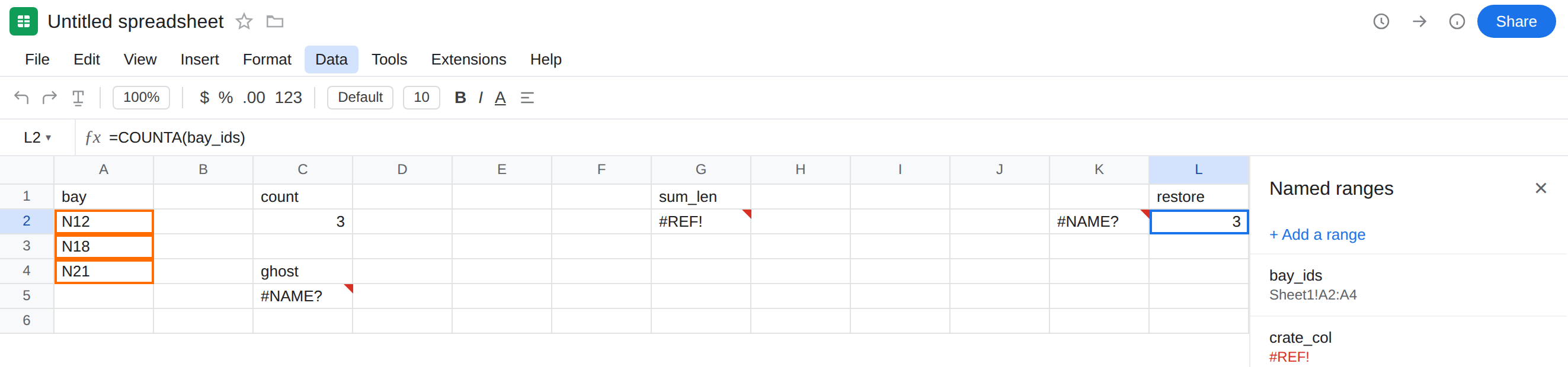
Repair a #REF! name. Data → Named ranges → crate_col → set it to a live range (put crate ids in a new column if you deleted E). Or replace the formula with a plain range: =COUNTA(F2:F4) if that is the new home. Deleting the name without editing G2 turns G2 into #NAME? — a different error, not a fix.
Never-existed names. Type the name you created, or stop using an alias: =COUNTA(A2:A4). Do not wrap C5 in IFERROR while you guess spellings. See IFERROR vs IFNA.
Do not recreate VLOKUP as a named range to silence K2. Spell VLOOKUP.
If the cell is #NAME? and the formula uses a word that is not a function, open Data → Named ranges. If the cell is #REF! and the formula still shows that word, open the same sidebar and look for #REF! in the range box. Formula-bar #REF! tokens are the delete-cell primer.
Named ranges vs #NAME? functions vs deleted cells
Section titled “Named ranges vs #NAME? functions vs deleted cells”A function typo is Unknown function. VLOKUP is not in Data → Named ranges. See unknown function. Change the spelling.
A missing alias is Unknown named range. Create the name or use A2:A4. LET names are not this sidebar. See LET #NAME?.
A deleted cell address puts #REF! in the formula bar. See after you delete. A deleted target of a name puts #REF! in the cell and in the named-range manager, while the formula still says crate_col. Restore the range, or rewrite the formula to a live address.