

Dragging an ARRAYFORMULA down makes #REF! in the spill
Updated
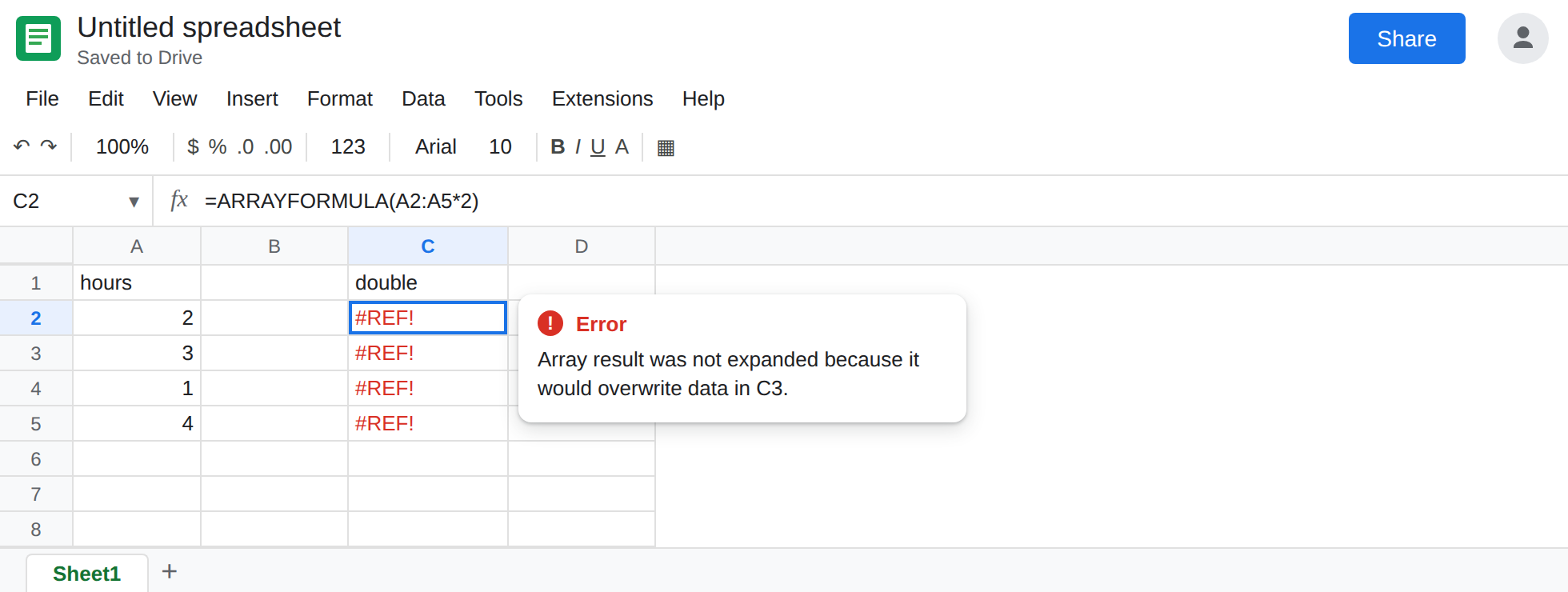
ARRAYFORMULA in the top cell already fills the rows under it. The fill handle copies that formula downward anyway. Each copy is a value in a cell the first formula needed. The top cell becomes #REF!. The tooltip is Array result was not expanded because it would overwrite data in the next row. The copies are often #REF! too, because they block each other.
A UNIQUE or SORT blocked by a cell you typed is array result was not expanded and SORT / UNIQUE spill. This page is the fill handle on ARRAYFORMULA. Keep the Google Sheets UI in English. Sheet Error is an independent formula-error library, not a Google product.
Recreate it on a blank sheet
Section titled “Recreate it on a blank sheet”- Open a blank spreadsheet. In A1 type
hours. A22. A33. A41. A54.
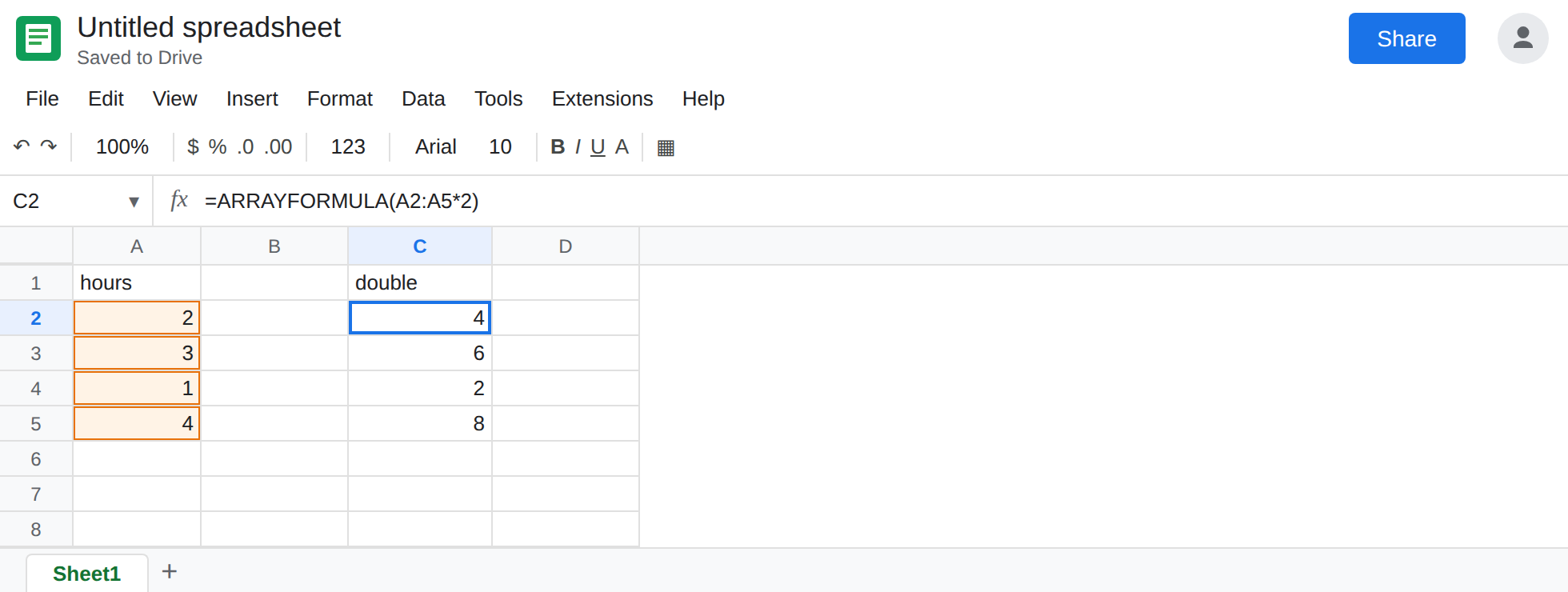
One array formula. In C1 type double. In C2 enter =ARRAYFORMULA(A2:A5*2). The spill is 4, 6, 2, 8 in C2:C5. One formula. Click C3. The formula bar is blank. The number belongs to C2’s spill. That block is the control. You are about to break it.
Drag the fill handle. Select C2. Drag the small handle at the corner down through C5. Sheets copies the formula. The copies adjust. C3 becomes something like =ARRAYFORMULA(A3:A6*2), C4 and C5 follow. C2 shows #REF!. The tooltip names C3: Array result was not expanded because it would overwrite data in C3. Click C3. It is its own ARRAYFORMULA, and it is #REF! as well if C4 is in its way. Leave the dragged formulas in place.
Double-click does the same thing. On a fresh column, put =ARRAYFORMULA(A2:A5*2) in E2, then double-click E2’s fill handle. If Sheets fills E3:E5 with copies, E2 is #REF! for the same reason. Leave E2 broken if the double-click filled it. If the double-click does nothing because the neighbors are empty, the drag in column C is enough.
A typed blocker is the cousin. In G2 enter =ARRAYFORMULA(A2:A5*2) and type block in G3. G2 is #REF! with the same tooltip, and G3 is the word you typed, not another array formula. That recreate is array result was not expanded. Clear block only if you want G2 working as a second control.
Leave C2 as #REF! from the drag.
What is actually wrong
Section titled “What is actually wrong”- An array formula owns the spill. The fill handle’s job is to copy a per-row formula into empty cells. Those cells are not empty from the array’s point of view. The copy is the overwrite.
- Relative references inside the copy shift. You do not get four identical spills. You get four formulas that each want a block starting one row lower. They cannot all expand.
- The tooltip always names the first occupied cell. Here that cell contains the copy. Deleting only C5 leaves C3 and C4 still blocking C2.
ARRAYFORMULA(A2:A*2)down a whole column makes the drag worse: the first formula wants every row under C2, so any copy anywhere below is a block.- The same tooltip on
UNIQUE,FILTER,SORT, andQUERYmeans something is sitting in the spill. The fill handle is one way to put it there. A typed note is another. Read the blocking cell before you delete the top formula.
This is not a deleted reference. The formula bar still contains ARRAYFORMULA. A #REF! written into the formula (=#REF!) is after you delete.
Delete the copies. Keep one formula. Select C3:C5 and delete them. Do not delete C2. C2 calculates again: 4, 6, 2, 8. If C2 itself was overwritten by the fill, put =ARRAYFORMULA(A2:A5*2) back in C2 only, with C3:C5 empty.
Per-row formulas do not use ARRAYFORMULA. If you wanted a formula in every row, enter =A2*2 in C2 and fill that down. Each cell has its own formula. Nothing spills. Do not wrap that in ARRAYFORMULA and also drag it.
Do not fill array results. FILTER, QUERY, UNIQUE, SORT, and SEQUENCE are the same rule. One formula, empty cells in the direction of the spill.
Do not wrap C2 in IFERROR while the copies are still below it. You would hide the #REF! and keep the extra formulas. See IFERROR vs IFNA.
If ARRAYFORMULA is #REF! and the next row contains another ARRAYFORMULA with a shifted range, the fill handle did that. Delete the copies. If the next row contains a label you typed, you are on the overwrite page. Leave one formula at the top.