

Fix TRANSPOSE #REF! in Google Sheets (spill blocked or an overlapping paste)
Updated
TRANSPOSE swaps rows and columns and spills the result from the formula cell. A row of four bay codes becomes a column of four. #REF! here means a cell in that rectangle already has a value, or the formula includes its own spill. The source row is fine. The landing zone is not.
This page is a blocked TRANSPOSE. It is not MMULT dimensions (TRANSPOSE used only to flip a matrix before multiply). It is not SORT / UNIQUE spill (reordering a list). It is not after you delete (#REF! typed inside the formula). Keep the Google Sheets UI in English.
Recreate it on a blank sheet
Section titled “Recreate it on a blank sheet”- Open a blank spreadsheet. In A1 type
bays. A2N1. B2N2. C2N3. D2N4. One row, four codes. Leave column F empty except for the blocker in the next step.
Blocked down. In F1 type down. In F4 type paste. Leave F2, F3, and F5 empty. In F2 enter =TRANSPOSE(A2:D2). The cell shows #REF!. The tooltip is Array result was not expanded because it would overwrite data in ‘F4’. A 1×4 row transposes to a 4×1 column: F2:F5. F4 already holds paste — the value someone dropped into the spill. Leave F2 broken.
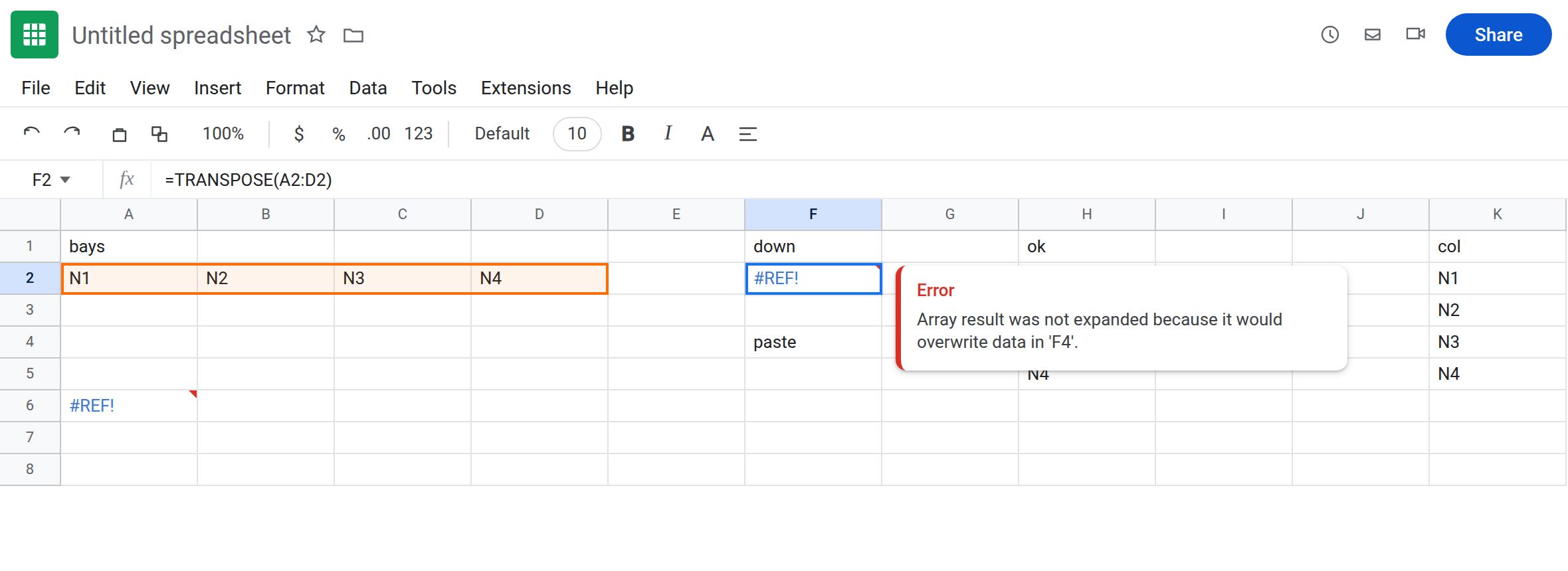
A control on empty cells. In H1 type ok. Leave H2:H5 empty. In H2 enter =TRANSPOSE(A2:D2). The column spills N1, N2, N3, N4. Same formula, clear path. That block is the control.
Paste into a live spill. H2 is working. Type note in H4. H2 flips to #REF! with the same overwrite tooltip, now naming H4. You did not edit the formula. The paste occupied one cell of the rectangle, so the whole transpose refuses. Clear H4 so H2 spills again. Leave F4 filled so F2 stays broken.
Circular transpose. In A6 enter =TRANSPOSE(A6:D6). The result would have to write into A6, which is the formula. The cell shows #REF!. The tooltip is Circular dependency detected. Leave A6 broken. That is circular dependency, arrived at through TRANSPOSE, not through a paste.
Leave F2 and A6 as the broken formulas. Leave H2 spilling N1–N4.
What is actually wrong
Section titled “What is actually wrong”TRANSPOSEof a 1×4 range needs four cells down from the formula, one column wide. One occupied cell blocks the entire result. There is no partial column ofN1,N2above the paste. F2 stays#REF!.pasteis not overwritten.- A value, a note, or another formula counts as occupied. The cell has to be empty.
TRANSPOSEdoes not care that F4’s text is unrelated to bay codes. - The other axis is the same rule.
TRANSPOSEof A2:A5 (four rows, one column) needs four cells to the right. A label in the second column of that spill is#REF!too. - If the formula bar still reads
=TRANSPOSE(A2:D2)and the tooltip names a cell, you pasted into the spill or left a leftover there. If the formula bar contains the token#REF!, a reference was deleted. See after you delete. - A6 is a different
#REF!. The range includes the formula cell. Sheets will not resolve a loop. Clearing a neighbor will not fix A6. Move the formula off the source range.
This is not SORT blocked below a fruit list. See SORT / UNIQUE spill. The overwrite sentence is the same family. The function is a swap, not a sort.
This is not SEQUENCE generating 1–6. See SEQUENCE spill. H2 repeats codes you already typed in row 2.
This is not an MMULT size error. TRANSPOSE of a square matrix is still that size. See MMULT dimensions. F2 is #REF!, not #VALUE!.
Leave F2 and A6 broken so both #REF! stories stay on the sheet. Leave H2 spilling.
Put TRANSPOSE where the swapped shape fits. In K1 type col. Leave K2:K5 empty. In K2 enter =TRANSPOSE(A2:D2). The column spills N1 through N4. Do not paste a label into K3.
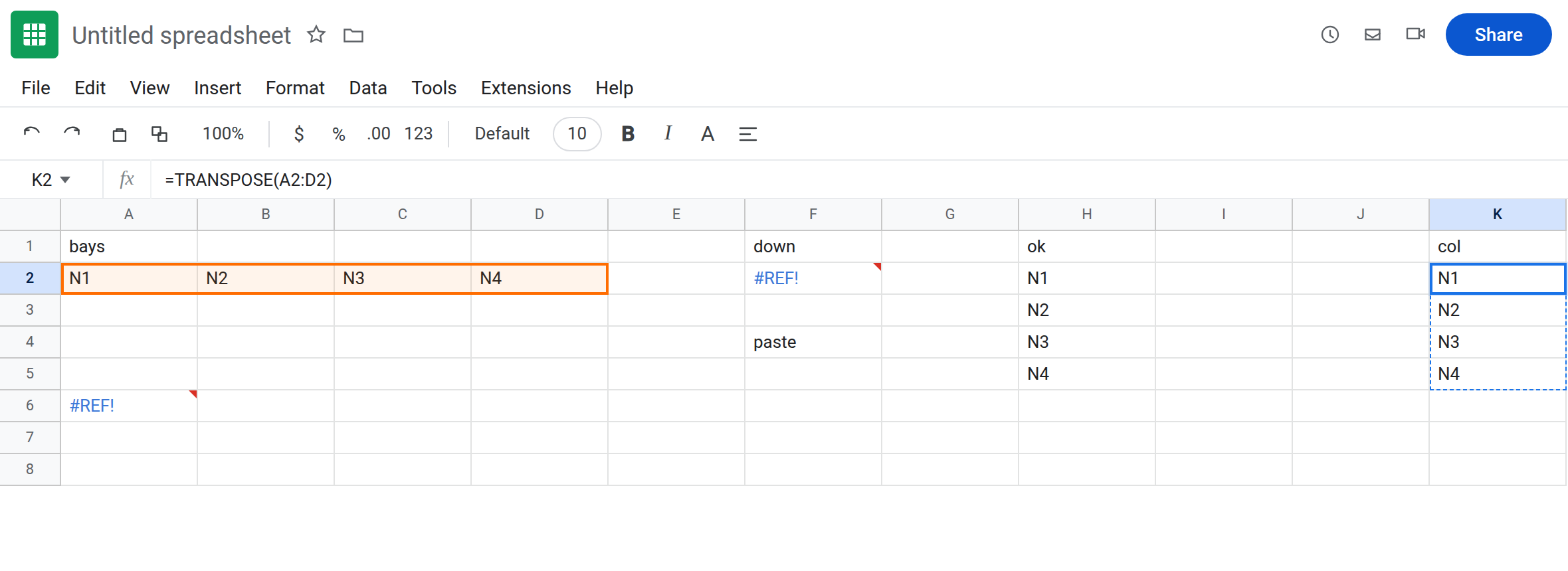
Clear the blocker if the formula must stay in F2. Delete F4. Do not delete row 4 if other formulas depend on that row. F2 spills. On this sheet, leave F4 filled so F2 stays #REF! next to K2.
Move a circular transpose off its source. A6 cannot transpose A6:D6. In A8 enter =TRANSPOSE(A2:D2) only if A8:A11 is empty — or keep K2 and delete A6’s idea. Do not wrap A6 in IFERROR.
Do not wrap F2 in IFERROR. That prints a blank and never lists the bays. See IFERROR vs IFNA. IFNA will not catch #REF!.
If TRANSPOSE is #REF! and the formula still names a real range, count the swapped rectangle: rows become columns and columns become rows. A cell in that rectangle is occupied, or the range includes the formula. Clear the path, or move the formula. The swap itself is not the bug.