

NETWORKDAYS.INTL returns #NUM! for a bad weekend code or string
Updated
NETWORKDAYS.INTL(start, end, weekend, holidays) counts working days with a weekend you choose. The weekend argument is a code or a seven-character string. Codes 1 through 7 and 11 through 17 are legal. 8, 9, and 10 are the gap, and they are #NUM!. A string must be seven characters, each 0 or 1, Monday first, with at least one 1. Weekend code 99 is the same family of #NUM! and already has a recreate on NETWORKDAYS #NUM!. This page uses the gap and the string.
This is not WORKDAY #NUM! (WORKDAY.INTL returns a date). It is not WEEKDAY type (type 1 versus 2 changes which number Sunday gets). Keep the Google Sheets UI in English.
Recreate it on a blank sheet
Section titled “Recreate it on a blank sheet”- Open a blank spreadsheet. In A1 type
start. In A2 enter=DATE(2024,6,3)(a Monday). B1end. In B2 enter=DATE(2024,6,14)(a Friday). Two weeks minus the weekends, if Saturday and Sunday are off.
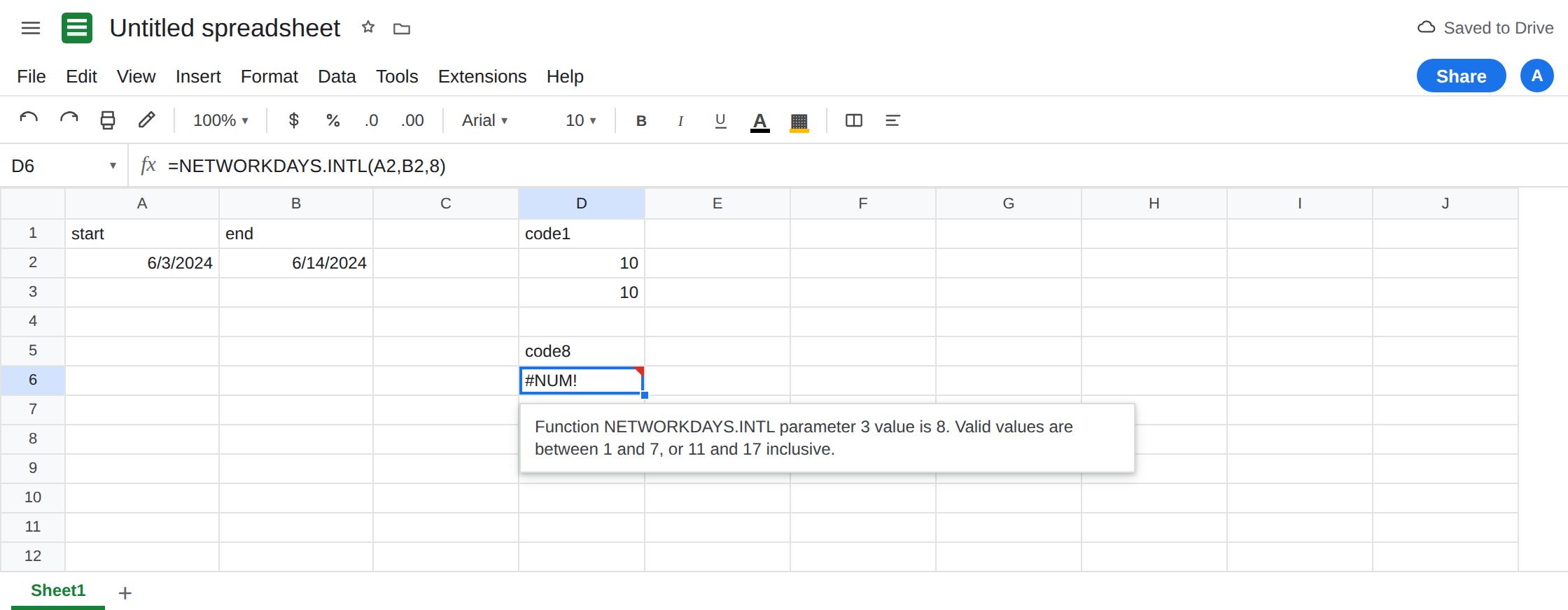
Default weekend, as a control. In D1 type code1. In D2 enter =NETWORKDAYS.INTL(A2,B2,1). Code 1 is Saturday and Sunday, the same weekend NETWORKDAYS uses. D2 is 10. In D3 enter =NETWORKDAYS(A2,B2). D3 is 10. Those cells are the control.
The gap. In D5 type code8. In D6 enter =NETWORKDAYS.INTL(A2,B2,8). The cell shows #NUM!. The tooltip is Function NETWORKDAYS.INTL parameter 3 value is 8. Valid values are between 1 and 7, or 11 and 17 inclusive. 9 and 10 fail the same way. People reach for 8 because 7 was Friday+Saturday and they want “the next pattern.” The next number is not a code. 11 is Sunday only. Leave D6 broken.
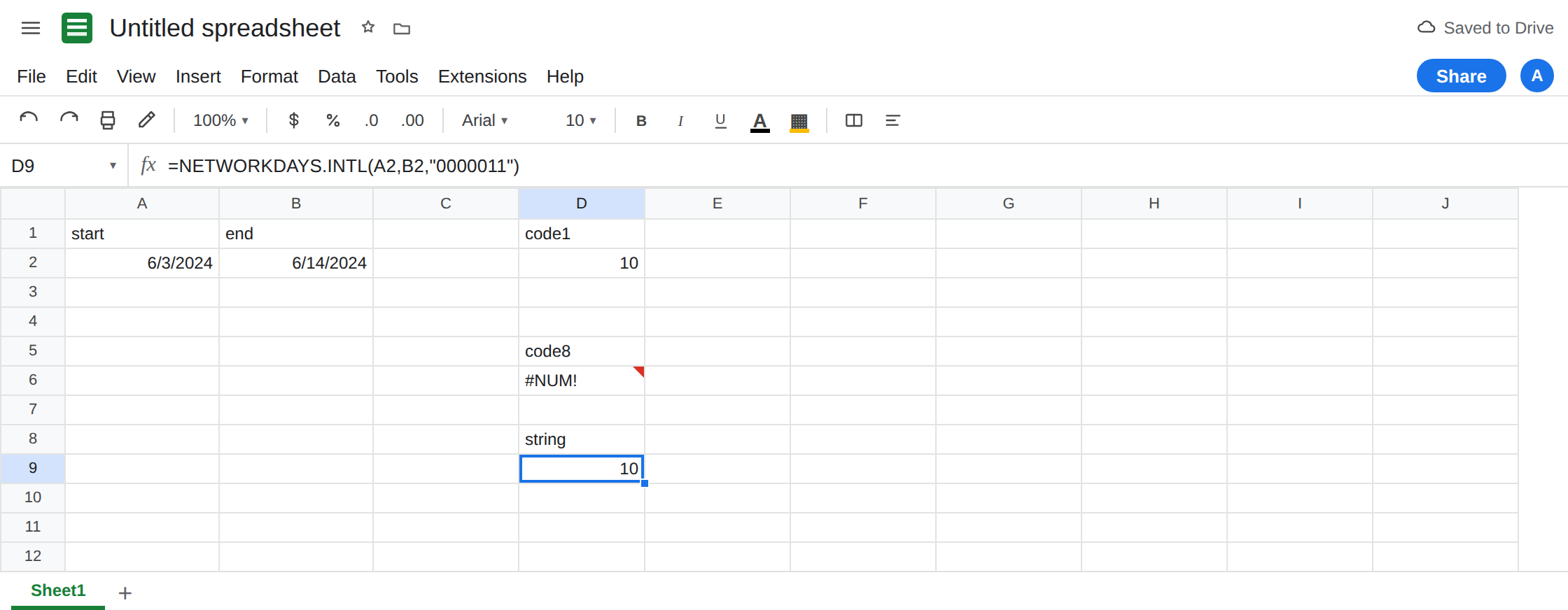
A seven-character string, Monday first. In D8 type string. In D9 enter =NETWORKDAYS.INTL(A2,B2,"0000011"). The seven characters are Mon, Tue, Wed, Thu, Fri, Sat, Sun. 1 means weekend. 0000011 is Saturday and Sunday. D9 is 10, the same count as D2. That string is a second control.
Sunday-first habit. In D11 enter =NETWORKDAYS.INTL(A2,B2,"1100000"). That string marks Monday and Tuesday as the weekend, because the first character is Monday, not Sunday. The count is not 10. It is the count of days in 3 Jun–14 Jun that are not Monday and not Tuesday. Leave D11 as that number. It is not #NUM!. It is the wrong weekend, quietly. A string that starts with Sunday’s bit is the usual import from a note that listed Sun–Sat.
Illegal strings. In D13 enter =NETWORKDAYS.INTL(A2,B2,"0000000"). No 1 anywhere. The cell shows #NUM!. A weekend string has to name at least one non-working day. Leave D13 broken. In D14 enter =NETWORKDAYS.INTL(A2,B2,"000001"). Six characters. #NUM!. In D15 enter =NETWORKDAYS.INTL(A2,B2,"0000012"). A 2 is not a flag. #NUM!. In D16 enter =NETWORKDAYS.INTL(A2,B2,"weekend"). #NUM! or #VALUE!. Leave those broken.
Code 11, so the gap has a neighbor that works. In F2 enter =NETWORKDAYS.INTL(A2,B2,11). 11 is Sunday only. The count is higher than 10 because Saturdays are working days. F2 is a number. 8 is not “Sunday only.”
Leave D6, D13, D14, and D15 broken. Leave D2 and D9 as 10. Leave D11 as the Monday-Tuesday weekend count.
What is actually wrong
Section titled “What is actually wrong”- Numeric weekend codes skip
8,9, and10.1Sat+Sun,2Sun+Mon,3Mon+Tue,4Tue+Wed,5Wed+Thu,6Thu+Fri,7Fri+Sat. Then11Sunday only,12Monday only, and so on through17Saturday only.99is the far miss on NETWORKDAYS #NUM!.8is the near miss. - The string is Monday-first, always, regardless of the spreadsheet locale’s calendar display.
0000011is Sat+Sun.1000000is Monday off. Locale does not rotate the string. See DATEVALUE locale for dates, not for this argument. "0000000"is#NUM!, not a seven-day work week. If you truly have no weekend, the function will not take an all-zero string. Count with=B2-A2+1when every calendar day counts, and subtract holidays yourself."1111111"marks every day as weekend. The count of working days is0. That0is not#NUM!. Do not “fix” a zero count by switching to code8.- A bad holiday serial is still
#NUM!on this function, and it is the other page’s second recreate. A text date instartis#VALUE!. Stay on D6 and D13 for the weekend argument.
This is not WEEKDAY type 2. See WEEKDAY type. That function numbers a single date. It does not count a span.
Leave D6 and D13 broken.
Use code 1 or the string that matches it. Keep D2: =NETWORKDAYS.INTL(A2,B2,1). Keep D9: =NETWORKDAYS.INTL(A2,B2,"0000011"). For Sunday only, use 11 or "0000001", not 8 and not a string that starts with 1 unless Monday is off.
Write the string from a note that lists Monday first. If the requirement says “Friday and Saturday off,” the string is "0000110". Code 7 is the same weekend. Pick one style and label the header weekend so the next edit does not swap in 8.
Do not wrap D6 in IFERROR. A bad code would look like a blank schedule. See IFERROR vs IFNA. IFNA does not catch #NUM!.
If NETWORKDAYS.INTL is #NUM! and the dates are real, the weekend argument is the gap (8–10), a far code like 99, an all-zero string, or a string that is not seven 0/1 characters. D11’s quiet wrong count is the Monday-first string, and it will not show a triangle.