

REGEXMATCH is case-sensitive until the pattern starts with (?i)
Updated
REGEXMATCH(text, regular_expression) returns TRUE or FALSE. The default is case-sensitive. pro does not match Pro. The RE2 flag (?i) at the start of the pattern turns case off for what follows. (?-i) turns it back on. The flag is part of the pattern string. If you write "(?i)B2" in quotes, Sheets looks for the characters B and 2, not for the cell B2. A pattern that is not valid RE2 is #N/A, not FALSE.
FIND versus SEARCH case, without regex, is FIND vs SEARCH case. A dot that matches the wrong sku inside FILTER is FILTER + REGEXMATCH. REGEXEXTRACT on a miss is #N/A, which is REGEX no match. Keep the Google Sheets UI in English. Sheet Error is an independent formula-error library, not a Google product.
Recreate it on a blank sheet
Section titled “Recreate it on a blank sheet”- Open a blank spreadsheet. In A1 type
text. In A2 typeWidget Pro. In A3 typewidget pro. In B1 typeneedle. In B2 typepro.
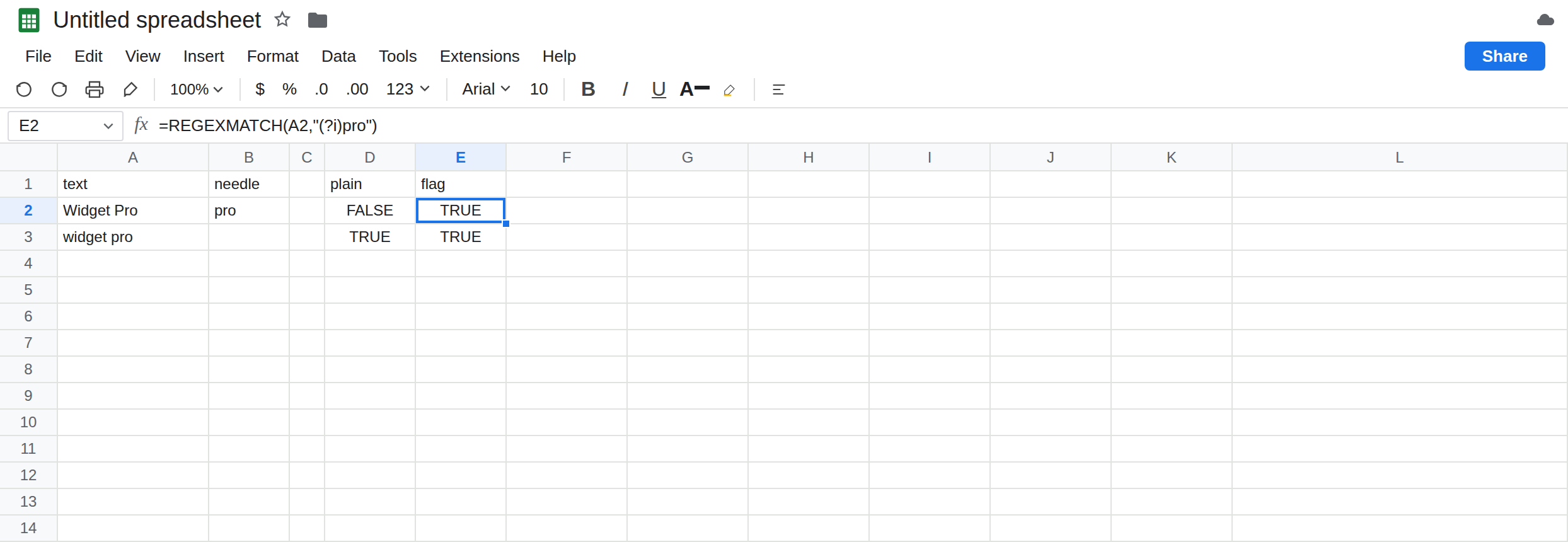
Case-sensitive, the default. In D1 type plain. In D2 enter =REGEXMATCH(A2,"pro"). D2 is FALSE. A2 contains Pro with a capital P. The pattern’s p is lowercase. In D3 enter =REGEXMATCH(A2,"Pro"). D3 is TRUE. Same spot in the sentence, matching case. That TRUE is the control.
The flag. In E1 type flag. In E2 enter =REGEXMATCH(A2,"(?i)pro"). E2 is TRUE. In E3 enter =REGEXMATCH(A3,"(?i)PRO"). E3 is TRUE. (?i) applies to the letters after it, so PRO matches pro in A3 as well. Leave E2 as TRUE next to D2’s FALSE.
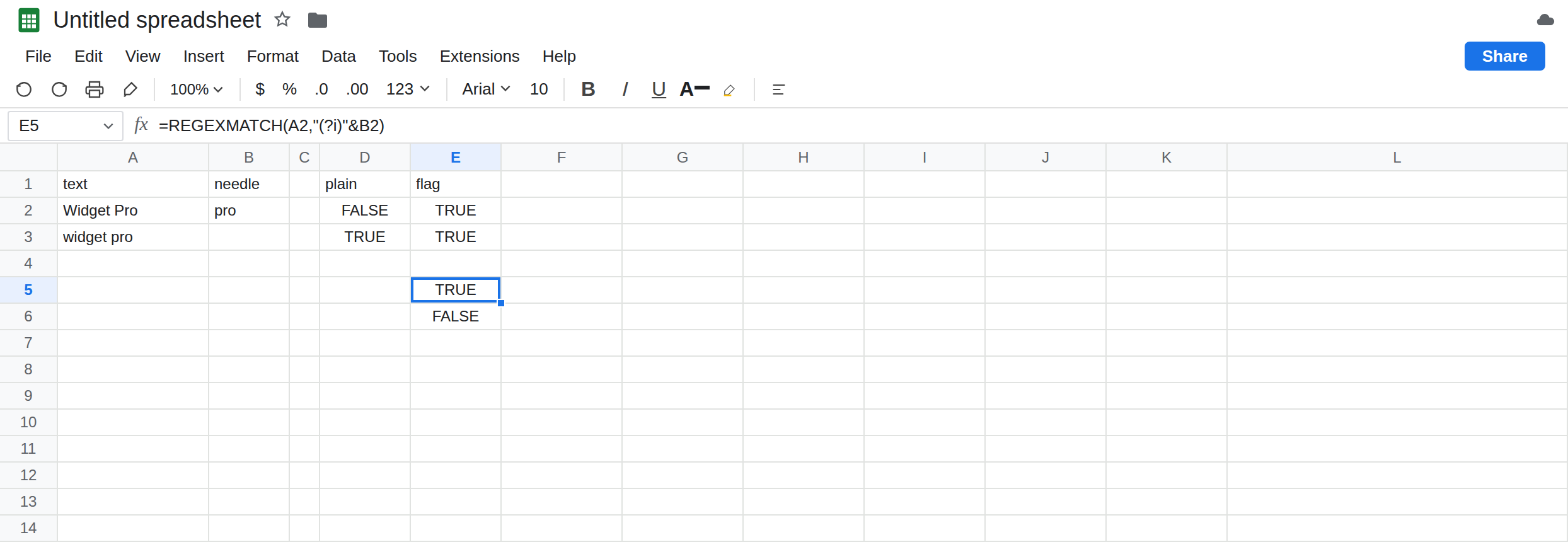
The flag concatenated with a cell. In E5 enter =REGEXMATCH(A2,"(?i)"&B2). B2 is the text pro. The pattern Sheets runs is (?i)pro. E5 is TRUE. In E6 enter =REGEXMATCH(A2,"(?i)B2"). E6 is FALSE. The characters in the quotes are (?i) plus the letter B plus the digit 2. Cell B2 is not read. This is the usual “I added the flag and it still fails” formula. Leave E6 as FALSE.
Turn case back on for a tail. In E8 enter =REGEXMATCH(A2,"(?i)widget (?-i)Pro"). E8 is TRUE. widget folds, and Pro must match case. In E9 enter =REGEXMATCH(A3,"(?i)widget (?-i)Pro"). A3 ends in pro, lowercase. After (?-i) the pattern wants Pro. E9 is FALSE. Leave E9 so a partial flag is not confused with “(?i) ignored the whole string.”
FILTER drops the FALSE rows. In A5 type Widget Pro. In A6 type widget. In G5 enter =FILTER(A5:A6,REGEXMATCH(A5:A6,"pro")). Both rows fail a case-sensitive pro (Widget Pro has Pro, and widget has no pro). G5 is #N/A, no matches. In G7 enter =FILTER(A5:A6,REGEXMATCH(A5:A6,"(?i)pro")). Widget Pro matches. widget does not contain those letters even with case folded. G7 spills Widget Pro only. The flag did not make widget contain pro. Leave G5 as the empty #N/A.
A broken pattern is not FALSE. In E11 enter =REGEXMATCH(A2,"(?i"). The group never closes. E11 is #N/A. The tooltip says the regular expression is not valid. FALSE would mean a valid pattern did not hit. Leave E11 broken. Do not “fix case” on a pattern that never compiled.
Leave D2 as FALSE, E2 as TRUE, and E6 as FALSE.
What is actually wrong
Section titled “What is actually wrong”- Default RE2 matching in Sheets is case-sensitive.
FALSEon D2 is the letters, not a brokenREGEXMATCH.SEARCHwould return a position forproinsideWidget ProbecauseSEARCHfolds case.REGEXMATCHdoes not, until(?i). (?i)and(?-i)are inline flags, not function arguments. They apply from that point in the pattern. Putting(?i)only in front of one word leaves the rest sensitive if you switch back with(?-i), which is E8 versus E9.- A cell reference inside quotes is literal text.
"(?i)"&B2builds the pattern."(?i)B2"searches forB2. The same trap exists anywhere you concatenate a query string; the ampersand has to sit outside the quotes. LOWER(A2)plus a lowercase pattern also folds the whole text. You cannot then keep one word case-sensitive. The flags can. If the needle itself may contain.or*, those are regex operators. Folding case does not escape them. See FILTER + REGEXMATCH.- Invalid RE2 is
#N/AonREGEXMATCH. It is#REF!onREGEXREPLACE. Do not debug E11 as a case miss. See REGEXREPLACE miss for the replace function’s error value, and REGEXREPLACE backslash for\in a pattern.
This is not QUERY contains. contains is also case-sensitive, inside the query language, with no (?i) unless you switch to matches.
This is not a lookup miss. G5’s #N/A is FILTER with zero TRUE rows. See FILTER no match.
Leave D2, E6, E9, E11, and G5 as they are.
Fold the whole pattern. Keep E2, or keep E5 when the needle lives in a cell: =REGEXMATCH(A2,"(?i)"&B2). If B2 might hold a dot or a star, escape it before you concatenate, or the flag will faithfully match “any character.”
Keep one token case-sensitive. Use E8’s shape: (?i) for the part that may vary, (?-i) before the part that may not. Test the lowercase row. E9 should stay FALSE if Pro is required.
A yes/no inside FILTER. Use G7’s pattern, not G5’s, when case should not matter. If every row is a genuine miss, G5’s #N/A is correct. IFNA around that filter is FILTER no match, after you have looked at D2.
Do not wrap E11 in IFNA until the pattern compiles. A typo in (?i) will look like “no match.” See IFERROR vs IFNA.
If REGEXMATCH is FALSE and you can see the letters with different capitals, add (?i) or fix the case. If the needle is in a cell, concatenate it. If the cell is #N/A and the tooltip names the regular expression, the pattern is invalid. If FILTER is #N/A, some rows returned FALSE; check case before you delete the data.
FALSE vs (?i) vs a quoted cell
Section titled “FALSE vs (?i) vs a quoted cell”REGEXMATCH(A2,"pro") on Widget Pro is FALSE. "(?i)pro" is TRUE. "(?i)"&B2 is TRUE when B2 is pro. "(?i)B2" is FALSE. (?-i) restores case for the tail. An unclosed flag is #N/A. SEARCH folds case without a flag and is not this function.