

FLATTEN vs TOCOL in Google Sheets: blanks, errors, and extra ranges
Updated
FLATTEN stacks one or more ranges into a single column, row by row, and keeps blanks and errors. It has no ignore argument and no scan flag. TOCOL stacks one array, and its second argument can drop blanks, errors, or both. Its third argument can walk by column. People replace FLATTEN with TOCOL and the blank rows disappear, or they replace TOCOL with FLATTEN and a #N/A they had filtered comes back. Both can also #REF! when the column below the formula is occupied. That overwrite is the same tooltip family. The function that produced the height is different.
This page is FLATTEN against TOCOL. Ignore codes in detail are TOCOL ignore. A blocked TOCOL as the main primer is TOCOL / TOROW. Keep the Google Sheets UI in English.
Recreate it on a blank sheet
Section titled “Recreate it on a blank sheet”- Open a blank spreadsheet. In A1 type
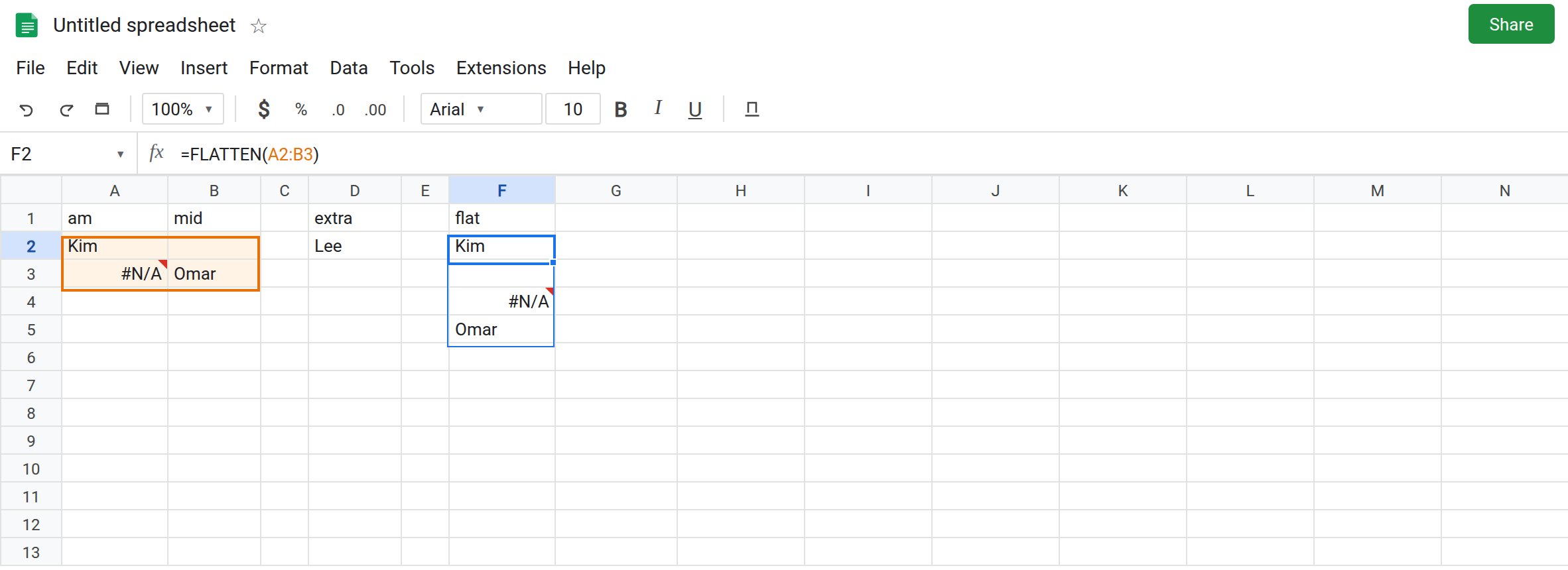
am, B1mid. A2Kim. Leave B2 empty. A3 enter=NA(). B3Omar. A four-cell body with one blank and one#N/A. In D1 typeextra. D2Lee. A second range, not beside the first.
FLATTEN keeps the hole and the error. In F1 type flat. Leave F2:F5 empty. In F2 enter =FLATTEN(A2:B3). The spill is four cells: Kim, blank, #N/A, Omar. Row by row. The blank is a real spilled blank, not a skipped row. Leave F2 as that column.
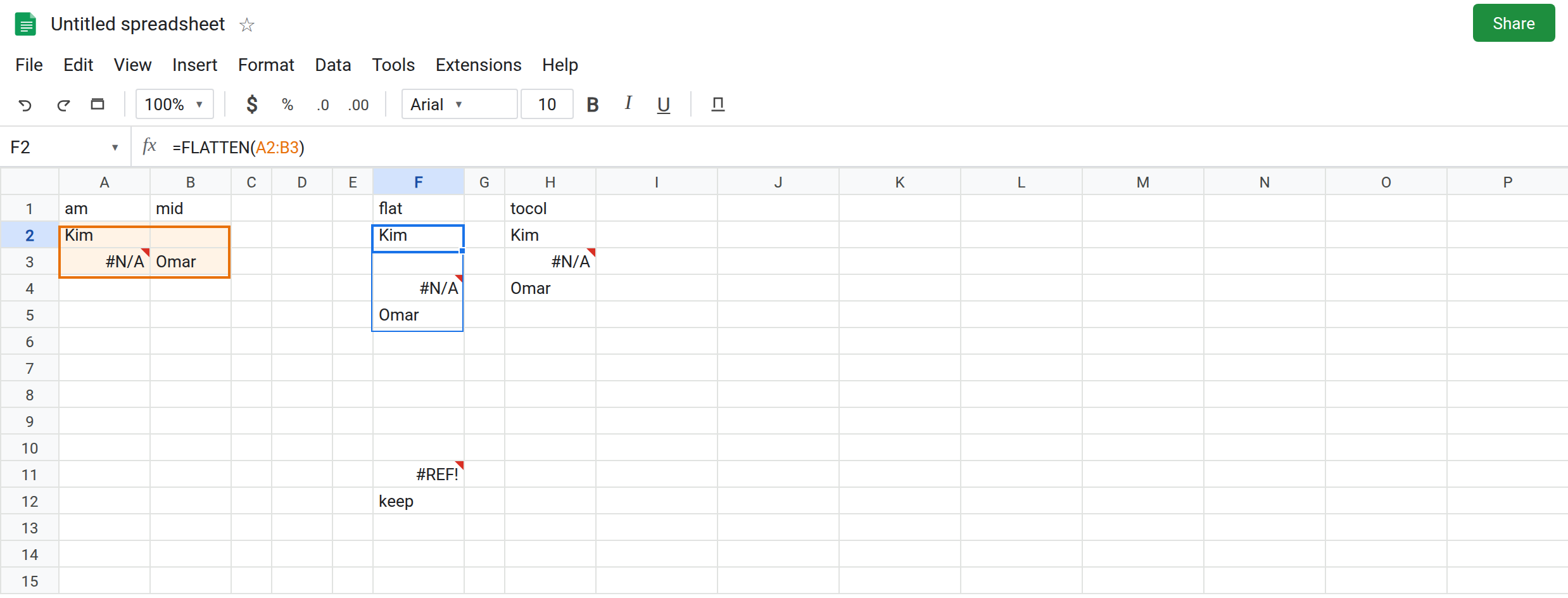
TOCOL can drop the blank. In H1 type tocol. Leave H2:H4 empty. In H2 enter =TOCOL(A2:B3,1). Ignore 1 drops blanks and keeps errors. The spill is Kim, #N/A, Omar. Three cells, not four. H2 is not a broken F2. It is a different contract. Default =TOCOL(A2:B3) matches F2’s four cells. The 1 is what diverged.
FLATTEN takes the extra range. In F7 enter =FLATTEN(A2:B3,D2). The spill appends Lee after Omar’s row pattern: Kim, blank, #N/A, Omar, Lee. One column, two ranges. In H7 enter =TOCOL(A2:B3,D2). That call is wrong. TOCOL’s second argument is an ignore code, not another range. The cell shows #NUM! or #VALUE! because D2 is not 0, 1, 2, or 3. Leave H7 broken. To stack two ranges with TOCOL, use VSTACK first or pass one array: =TOCOL(VSTACK(A2:B3,D2)), and read the pad. See VSTACK cols if the widths differ.
Scan direction exists only on TOCOL. In H9 enter =TOCOL(A2:B3,0,TRUE). The third argument TRUE walks columns: Kim, #N/A, blank, Omar. FLATTEN has no third argument. =FLATTEN(A2:B3,TRUE) tries to flatten the boolean TRUE as another range and appends TRUE at the bottom. It does not scan by column. Leave H9 as the column-wise order so you can compare it with F2.
Blocked spill. In F12 type keep. In F11 enter =FLATTEN(A2:B3). The column needs F11:F14. F12 is occupied. F11 is #REF!. Tooltip: Array result was not expanded because it would overwrite data in F12. TOCOL in that spot fails the same way. Leave F11 broken.
Leave H7 and F11 broken. Leave F2 as four cells including the blank.
What is actually wrong
Section titled “What is actually wrong”FLATTENis “stack everything you pass, in order, blanks included.” Several arguments are several ranges. There is no ignore code hiding in a number.TOCOLis one array plus options. A second range in argument 2 is not appended. It is read asignore. Text or a cell reference is not a legal code. H7.- Ignore
1onTOCOLis why a converted formula gets shorter. The blank in B2 was data toFLATTENand noise to thatTOCOL. See TOCOL ignore before you pick2or3, which also drop#N/A. - Scan-by-column is a
TOCOL/TOROWflag. PassingTRUEtoFLATTENappends the valueTRUE. - Both functions spill downward. One filled cell blocks the whole spill. F11. The formula bar still names the source. Nothing was deleted.
This is not HSTACK padding. See HSTACK / VSTACK pad. A3’s #N/A was already in the grid.
Excel does not have FLATTEN. A file that leaves Sheets may need TOCOL. Inside Sheets, FLATTEN is a real function. It is not unknown function.
Leave F11 and H7 broken.
Keep blanks, maybe several ranges. Use F2 or F7: =FLATTEN(A2:B3) and =FLATTEN(A2:B3,D2).
Drop blanks on purpose. =TOCOL(A2:B3,1). Do not write that and also expect the blank row to remain as a spacer. Spacers are FLATTEN or TOCOL with ignore 0.
Two ranges and ignore. =TOCOL(FLATTEN(A2:B3,D2),1) flattens first (Lee included), then drops blanks. Or VSTACK ranges that share a width, then TOCOL.
Clear the cell below or move the formula when the tooltip names that cell. Do not wrap F11 in IFERROR. See IFERROR vs IFNA.
If the blank survived, you used FLATTEN or TOCOL ignore 0. If the blank vanished, ignore is 1 or 3. If a second range became #NUM!, it was passed as TOCOL’s ignore code. If the tooltip names a cell under the formula, the stack is blocked.