

Fix QUERY #N/A in Google Sheets (the query returned no rows)
Updated
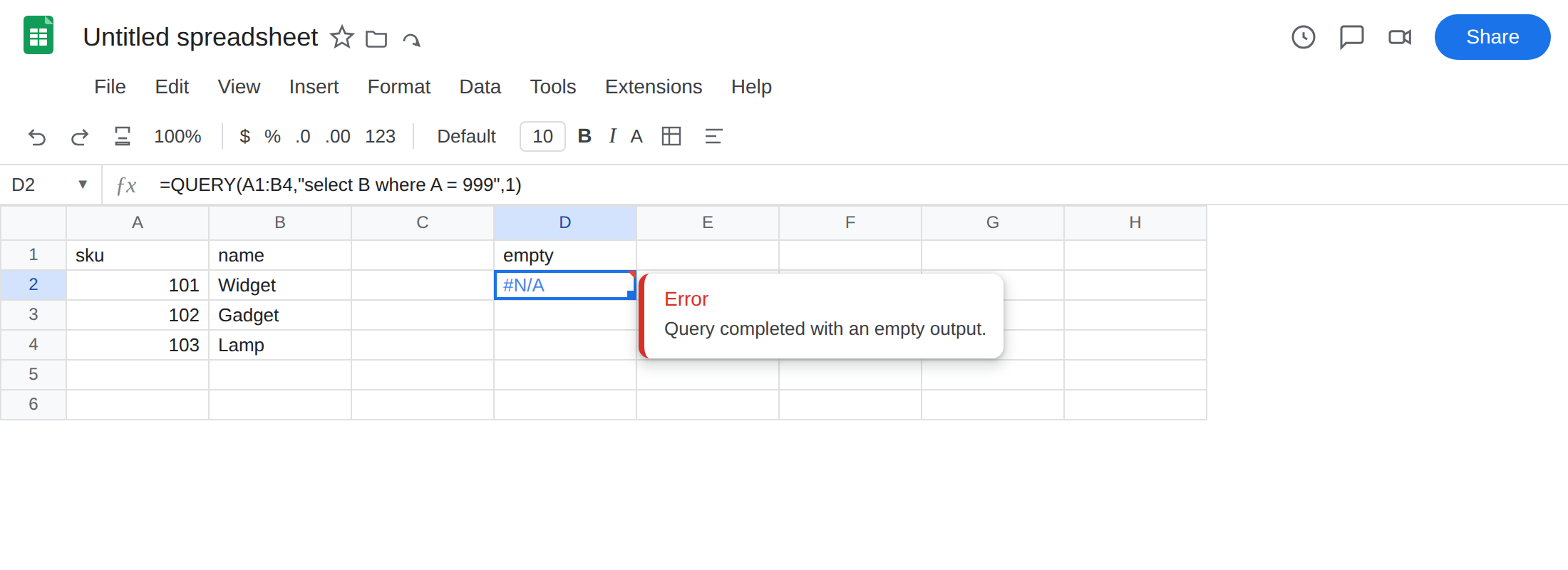
QUERY returns #N/A when the statement runs and the result has no data rows. The query language parsed. The range is the right shape. WHERE simply matched nothing. The tooltip is Query completed with an empty output. That is not Unable to parse query string.
This page is an empty QUERY result. It is not QUERY parse string (quotes, date 'yyyy-mm-dd', Col vs A). It is not QUERY mixed dates (year(A) on TBD). It is not QUERY + IMPORTRANGE Col1 (select A on an import array).
Recreate it on a blank sheet
Section titled “Recreate it on a blank sheet”- Open a blank spreadsheet. In A1 type
sku, B1name. A2101, B2Widget. A3102, B3Gadget. A4103, B4Lamp. WHEREthat matches nothing. In D1 typeempty. In D2 enter=QUERY(A1:B4,"select B where A = 999",1). The cell shows#N/A. Sku999is not in column A. Headers were requested (1). There is still no data row to sit undername. Leave D2 broken.
- The same query with a hit. In D6 enter
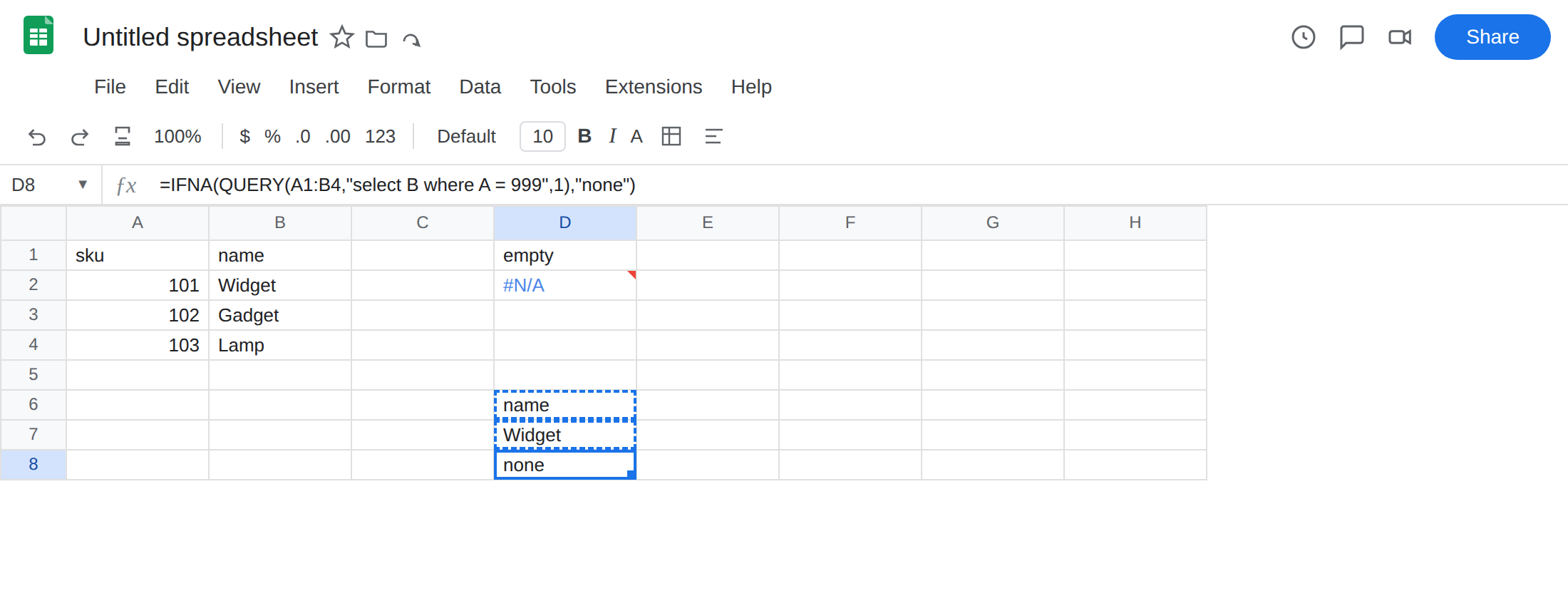
=QUERY(A1:B4,"select B where A = 101",1). The formula spillsname/Widget. Same columns, aWHEREthat matches. That block is the control:QUERYworks when a row qualifies.
Text vs number in WHERE. In F1 type quoted. In F2 enter =QUERY(A1:B4,"select B where A = '101'",1). A is numeric 101. '101' is a string in QUERY. This often returns the same empty #N/A as D2, not a parse error. Leave F2 if it is #N/A. Unable to parse query string is the other primer.
select without WHERE. In F6 enter =QUERY(A1:B4,"select B",1). The formula spills all three names. If D2 is #N/A and F6 spills, the range is fine. The filter is the miss.
Confirm. Change 999 in D2’s formula to 101. The spill appears. Put 999 back. If that toggle is the only change, you have an empty result, not a broken query string.
What is actually wrong
Section titled “What is actually wrong”where A = 999is legal. No row has sku 999.QUERYreturns#N/Afor that empty table. It does not return a header-only spill you can treat as “zero records” in every locale and every headers setting. Plan for#N/A.- The third argument
1means row 1 of the range is headers. Empty output is still#N/A. Setting headers to0does not invent a matching sku. - A type mismatch inside
WHERE(A = '101'vs numeric A) can also yield zero rows. That still presents as empty output, not NO_COLUMN. CheckISNUMBERon the source column if you can see101and the query disagrees. #N/Afromselect AonIMPORTRANGEis usually NO_COLUMN / wrong identifier, often with a different tooltip story. That is Col1 vs A. D2 uses a sheet range andwhere A = 999. ColumnAis valid. It is empty of 999s.
This is not Unable to parse query string. Unquoted Widget, a bare 2024-01-01, or select Col1 on A1:B4 is #VALUE! (or a parse tooltip). See QUERY parse string. D2’s statement parsed.
This is not mixed dates. year(A) on TBD is #VALUE!. See QUERY mixed dates. Column A here is skus.
This is not FILTER mismatched heights. See FILTER no match. FILTER empty and QUERY empty share #N/A and not much else.
Leave D2 as the empty query.
When 999 should have been on the table. Put it on the table, or fix the WHERE (wrong column, extra space, number vs text). Do not wrap. D6 already shows the working where A = 101.
When zero rows is allowed. Wrap IFNA, not IFERROR. In D8 enter =IFNA(QUERY(A1:B4,"select B where A = 999",1),"none"). The cell shows none. IFERROR would also hide a later parse #VALUE! or a #REF! range. See IFERROR vs IFNA.
Pull the criterion from a cell. In H1 type find. H2 999. In H4 enter =IFNA(QUERY(A1:B4,"select B where A = "&H2,1),"none"). For text names, quote inside the statement: "select B where B = '"&H2&"'" — that quoting pattern lives on QUERY parse string when it fails to parse. When it parses and H2 is not in the column, you are back on this page.
Do not change File → Settings locale to fill empty output. Do not switch to IMPORTRANGE to invent rows. Empty FILTER is still #N/A until IFNA.
If QUERY is #N/A and the tooltip is Query completed with an empty output, the statement is fine and the filter matched nothing. Fix the WHERE or the table, or wrap IFNA when empty is allowed.
IFNA around QUERY vs fixing the WHERE
Section titled “IFNA around QUERY vs fixing the WHERE”Wrap when an empty result is a normal outcome (a dashboard tile, a user-typed sku that can be absent). Keep the raw #N/A on a working sheet while you build, then wrap the finished statement.
Do not wrap when you expected Widget. If 101 is on the sheet and where A = 101 is still empty, you have the wrong identifier (Col1 vs A), a type split, or a parse you misread. Read the tooltip. Empty output is this page. Unable to parse is the parse primer. Mixed year(A) is mixed dates. IFNA will not repair any of those. It will only make the empty case look like none.