

IFS uses only the first value when the condition is an array from MAP
Updated
MAP can return a column of TRUE and FALSE. IFS does not walk that column when you pass it in from the outside. It takes the first value, picks one branch, and returns one cell. A later row can be East and stay unlabeled. If the first row’s condition is FALSE, the one cell is the later branch, or #N/A if nothing is TRUE. The rest of the array is ignored.
ARRAYFORMULA wrapped around IFS has the same one-cell habit. That page is ARRAYFORMULA around IFS. This page is the condition that already came out of MAP or another array, with no per-row IFS inside the lambda. Keep the Google Sheets UI in English.
Recreate it on a blank sheet
Section titled “Recreate it on a blank sheet”- Open a blank spreadsheet. In A1 type
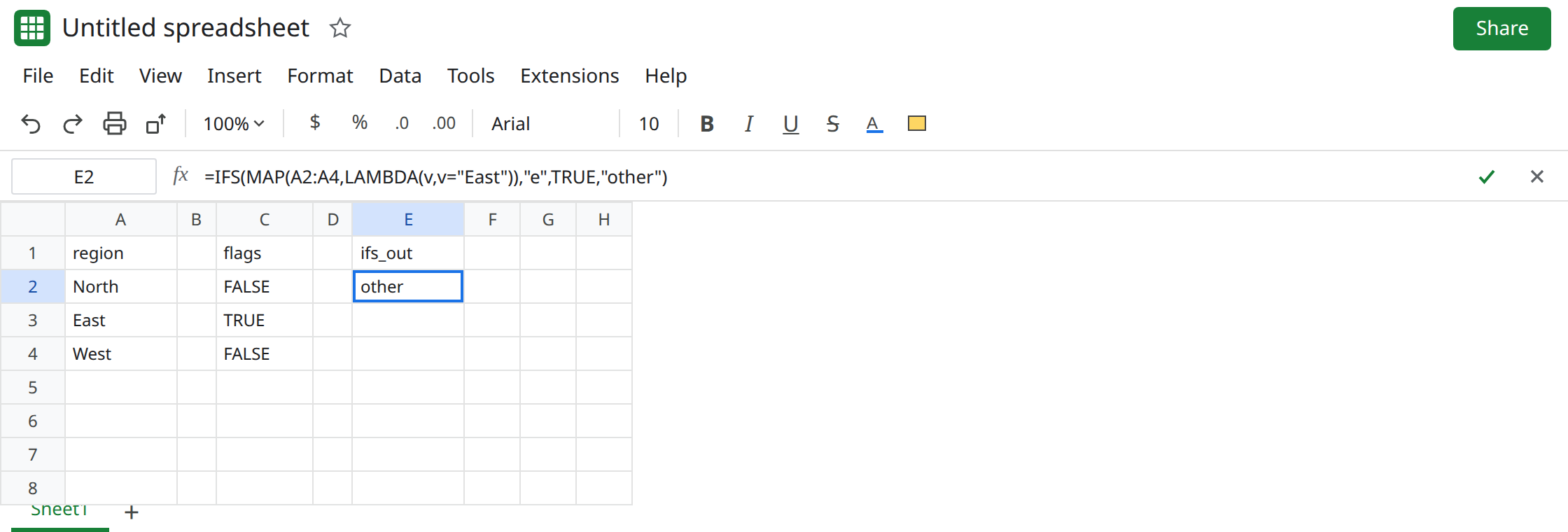
region. A2North. A3East. A4West. Only row 3 is East.
MAP builds three conditions. In C1 type flags. In C2 enter =MAP(A2:A4,LAMBDA(v,v="East")). C2:C4 spill FALSE, TRUE, FALSE. That spill is the control. The lambda ran three times. Leave it.
IFS outside the lambda. In E1 type ifs_out. In E2 enter =IFS(MAP(A2:A4,LAMBDA(v,v="East")),"e",TRUE,"other"). E2 shows other. One cell. E3 and E4 are empty. The first flag is FALSE (North), so IFS takes the TRUE,"other" branch once and stops. East is row 3. Nothing in E3 says e. Leave E2 as other.
The first row can hide it. In A6 type East. In A7 type North. In A8 type East. In E6 enter =IFS(MAP(A6:A8,LAMBDA(v,v="East")),"e",TRUE,"other"). E6 shows e. One cell. A7 is North and A8 is East, and neither spilled. The formula looks finished because the first flag was TRUE. Count the cells. One result under a three-row MAP is the bug. Leave E6 as that single e.
No TRUE pair, first flag FALSE. In E8 enter =IFS(MAP(A2:A4,LAMBDA(v,v="East")),"e"). The first flag is FALSE and there is no other branch. E8 is #N/A. Tooltip: No TRUE condition found. That is the scalar IFS miss, aimed at North only. See IFS no condition. East would have been TRUE and still is not labeled. Leave E8 broken.
IFS inside the lambda, the shape that works. In G1 type inside. In G2 enter =MAP(A2:A4,LAMBDA(v,IFS(v="East","e",TRUE,"other"))). G2:G4 spill other, e, other. Three calls. v is one region each time. Leave G2 as the control.
If E2 on your account already spills three labels, this file’s IFS is walking the array. Do not “fix” that spill. Keep G2. The rest of this page is the one-cell result.
A lambda that returns an array per row is a different error (#CALC! or a size mismatch). See MAP nested return and BYROW / MAP LAMBDA. G2 returns one word.
What is actually wrong
Section titled “What is actually wrong”IFSwants conditions that are a single TRUE or FALSE. An array is not a list of rows to test. The first element is the condition. C2 is FALSE, so E2 isothereven though C3 is TRUE.- Building the flags with
MAPdoes not changeIFS. The spill in C2 proves the lambda is fine. E2 never reads C3. ARRAYFORMULA(IFS(A2:A4="East","e",TRUE,"other"))is the same one-cell result withoutMAP. See ARRAYFORMULA around IFS. Wrapping E2 in anotherARRAYFORMULAdoes not start labeling West.- A scalar
#N/Afrom=IFS(A2="East","e")is IFS no condition. E8 looks like that tooltip. The formula bar still containsA2:A4. Read the range before you addTRUEonly for North.
This is not AND collapsing a column to one FALSE. See ARRAYFORMULA AND/OR. E2’s function is IFS.
Leave E2 as the single other and E6 as the single e.
Put IFS inside MAP. Keep G2: =MAP(A2:A4,LAMBDA(v,IFS(v="East","e",TRUE,"other"))). The TRUE pair is the per-row default. Without it, North’s call is #N/A and the whole MAP errors.
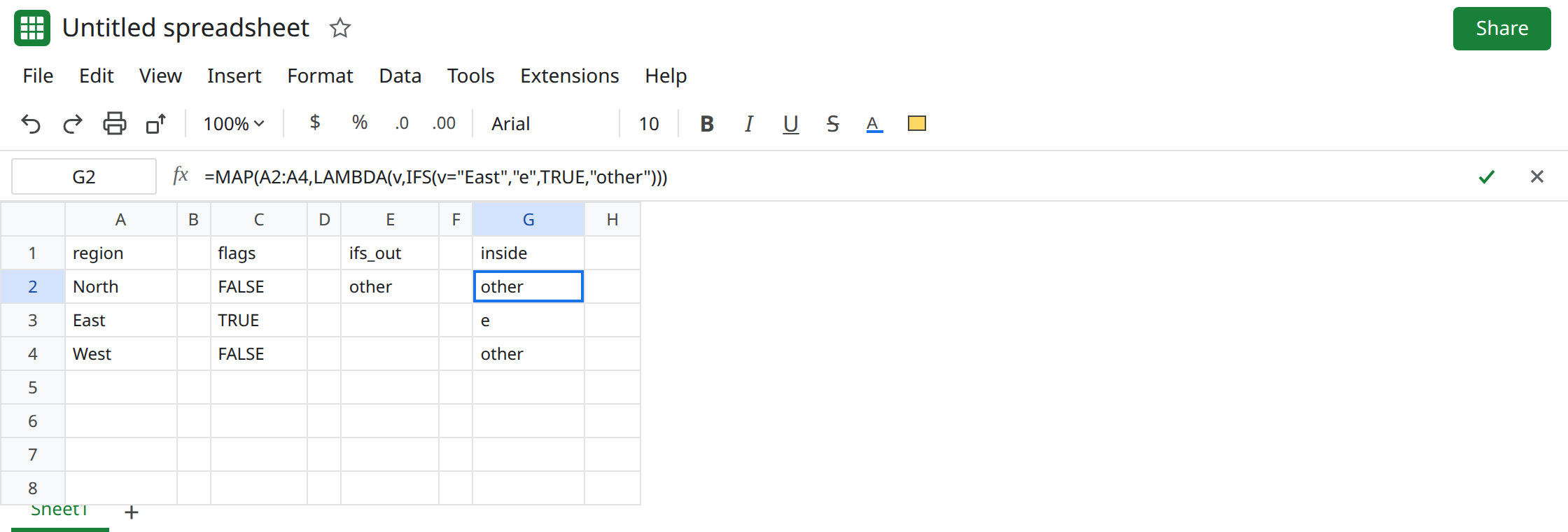
Or use IF, which does walk a column. =ARRAYFORMULA(IF(A2:A4="East","e","other")) spills other, e, other. Use that when the branch is one test. Use MAP when you need several IFS pairs per row.
Do not wrap E2 in IFNA. North would look blank and East would still be missing. See IFERROR vs IFNA.
If IFS’s condition is a MAP or another array and you only see one cell, the later flags were not tested. Move IFS inside the lambda, or use IF. If the formula is ARRAYFORMULA(IFS(...)) with the same one-cell result, you are on that page.