

Named ranges will not store an OFFSET formula
Updated
Data → Named ranges stores a rectangle: Sheet1!A2:A100, or an open Sheet1!A2:A. The range box is not a formula bar. Pasting =OFFSET(A2,0,0,COUNTA(A2:A),1) does not create a dynamic name. The sidebar rejects it as a range, and the name is not saved. Excel’s Name Manager does accept that formula, which is why the same workbook habit fails after you move it to Sheets. A name that should grow with the used rows belongs in the formula that reads the data, or in Data → Named functions, which can contain OFFSET. OFFSET is still volatile there.
The cost of that volatility is OFFSET volatile. An OFFSET that walks off the grid is OFFSET off sheet. Height 0 is OFFSET height 0. Named functions that fail for arity or placeholders are named functions. Keep the Google Sheets UI in English. Sheet Error is an independent formula-error library, not a Google product.
Recreate it on a blank sheet
Section titled “Recreate it on a blank sheet”- Open a blank spreadsheet. In A1 type
qty. A210. A320. A430. Leave A5 empty. The used block is A2:A4. You want a name that always covers those filled cells and picks up A5 when someone types a number there.
A real named range, as the control. Data → Named ranges → Add a range. Name QtyFixed. Range A2:A4. Done. In C1 type fixed. In C2 enter =SUM(QtyFixed). C2 is 60. Type 40 in A5. C2 stays 60. The name does not grow. That is what a named range is. Change the name’s range to A2:A if you want the open column, and C2 becomes 100 after A5 holds 40. Clear A5 again so the used rows are A2:A4 and, if you switched it, set QtyFixed back to A2:A4 so C2 is 60.
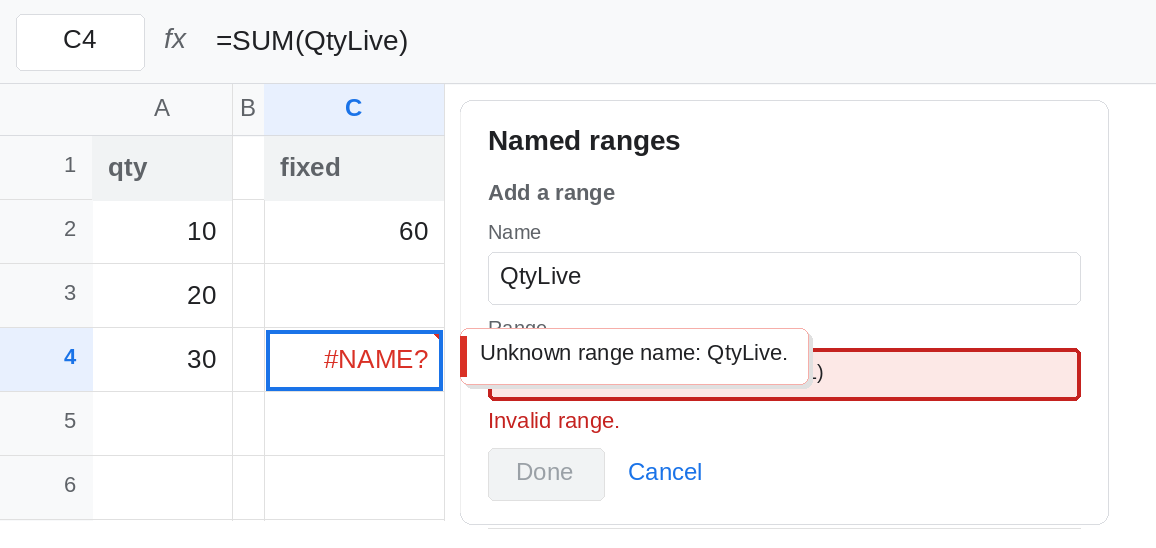
The OFFSET definition the sidebar will not take. Data → Named ranges → Add a range. Name QtyLive. In the range box, type =OFFSET(A2,0,0,COUNTA(A2:A),1) or the same formula without the leading =. Sheets does not treat that text as a formula. The range is invalid, and Done does not save QtyLive. Escape the sidebar. In C4 enter =SUM(QtyLive). C4 is #NAME?, because the name was never created. It is not #REF! from a bad height. Leave C4 as #NAME?.
The formula works in a cell. In C6 enter =SUM(OFFSET(A2,0,0,COUNTA(A2:A),1)). C6 is 60. Type 40 in A5. C6 becomes 100. Clear A5. C6 returns to 60. OFFSET is legal in a cell. The named-range UI is what refused it. Leave C6 as the working sum. Every edit on the spreadsheet recalculates it. That cost is OFFSET volatile.
Excel Name Manager is the other product. In Excel, Formulas → Name Manager → New, name QtyLive, Refers to =OFFSET(Sheet1!$A$2,0,0,COUNTA(Sheet1!$A$2:$A$100),1). Excel accepts it. Open that workbook in Sheets and the name does not become a live OFFSET. It arrives as a plain range, or as a name that shows #REF! when you sum it. Do not debug that #REF! as OFFSET height 0 until you have looked at Data → Named ranges and seen that the formula is gone.
Leave C4 as #NAME?. Leave C2 as 60 on A2:A4.
What is actually wrong
Section titled “What is actually wrong”- Named ranges are ranges. The sidebar parses
Sheet1!A2:A4, not a formula.OFFSET,INDEX,FILTER, andINDIRECTin that box are invalid input. The name is not created. C4. - A cell can use
OFFSETwithCOUNTAand the sum is right. C6. “The function is broken” is the wrong conclusion from a sidebar that rejected the name. - An open range
A2:Ais the Sheets-shaped answer when the column is the data and blanks below are truly empty.SUMignores text and blanks.COUNTAdoes not ignore formula blanks. See COUNTA counts "" before you build a height fromCOUNTA. - Named functions are allowed to contain
OFFSET, because their definition is a formula. They are not a back door the Named ranges sidebar forgot. They are a different feature. A named range with the same name wins over a named function. See named functions. OFFSETremains volatile inside a named function. A large file that lags after you “fixed” the name has OFFSET volatile, not a badCOUNTA.
This is not INDIRECT of a named range. INDIRECT("QtyFixed") can return the fixed range. It cannot invent the OFFSET formula the sidebar discarded.
Leave C4 as #NAME? if QtyLive was never created. Leave C6 as the cell formula you are about to retire.
Open range, no OFFSET. Set QtyFixed to A2:A. =SUM(QtyFixed) picks up a new number in A5. The name is a range the sidebar can store. Blank rows in the middle are included, which is what you want for SUM, and what you may not want for COUNTA or a chart. This is the default fix.
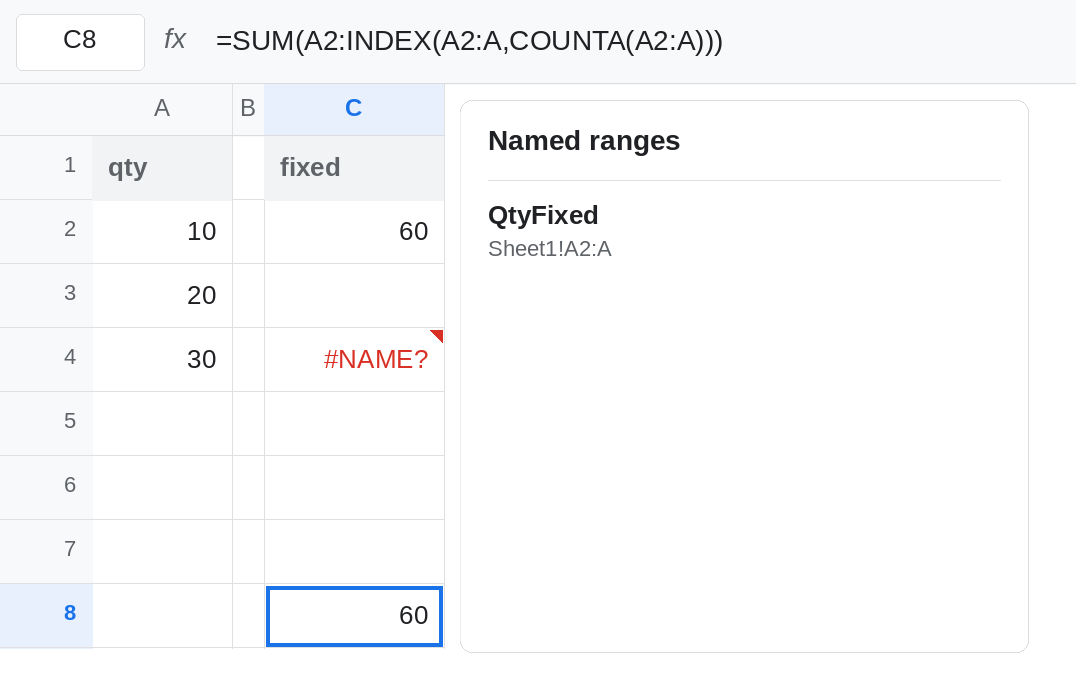
INDEX, when the height must stop at the last value. In C8 enter =SUM(A2:INDEX(A2:A,COUNTA(A2:A))). With A2:A4 filled and A5 empty, C8 is 60. Type 40 in A5 and C8 is 100. INDEX is not volatile the way OFFSET is. Do not put this formula in the Named ranges box either. It will be rejected for the same reason. Put it in the cell, or in a named function.
A named function, if you need a callable name. Data → Named functions → Add new function. Name QTY_USED with no argument placeholders. Formula definition: =OFFSET(A2,0,0,COUNTA(A2:A),1). Create it. =SUM(QTY_USED()) matches C6. The parentheses are required; it is a function. The name QTY_USED must not also exist under Named ranges. Volatility still applies. Prefer C8’s INDEX shape inside the named function when the only goal is the used height: =A2:INDEX(A2:A,COUNTA(A2:A)).
If the sidebar will not enable Done, the box contains a formula. Replace it with A2:A or another real range. If the cell is #NAME?, the name was never saved. If Excel’s name arrived as #REF!, redefine it in Sheets. Do not keep pasting OFFSET into Named ranges.