

Fix SEQUENCE #NUM! in Google Sheets when rows, columns, or the size is illegal
Updated
SEQUENCE(rows, [columns], [start], [step]) builds a grid of numbers. rows and columns must be at least 1. 0 or a negative size is #NUM!. The tooltip names the parameter and says it should be greater than or equal to 1. A negative step is not that error. It counts backward and is legal. A step of 0 repeats the start value and is legal. A grid that cannot spill because a neighbor is full is #REF!, which means the size was already valid.
This page is an illegal size, and the step values that look illegal and are not. It is not SEQUENCE spill. Keep the Google Sheets UI in English.
Recreate it on a blank sheet
Section titled “Recreate it on a blank sheet”- Open a blank spreadsheet. You do not need source data. The arguments are the whole recreate.
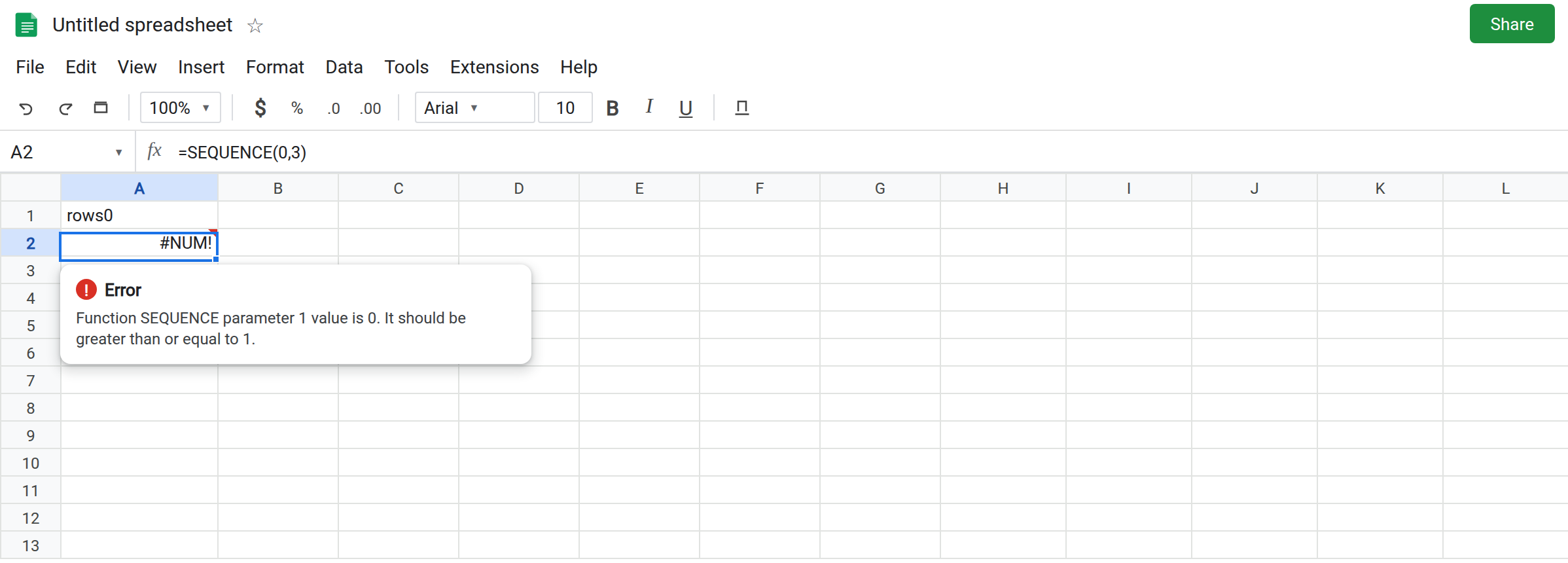
Rows 0. In A1 type rows0. In A2 enter =SEQUENCE(0,3). The cell shows #NUM!. The tooltip says parameter 1 value is 0 and should be greater than or equal to 1. Parameter 1 is rows. Leave A2 broken. 0 is not “one empty row.”
Negative rows. In A4 type rowsneg. In A5 enter =SEQUENCE(-4). The cell shows #NUM!. Same parameter, value -4. Sheets does not count upward by passing a negative height. Leave A5 broken.
Columns 0. In A7 type cols0. In A8 enter =SEQUENCE(3,0). Rows are legal. Columns are parameter 2. #NUM!. The tooltip names parameter 2. Leave A8 broken. Omitting columns means 1. Passing 0 is not omitting them.
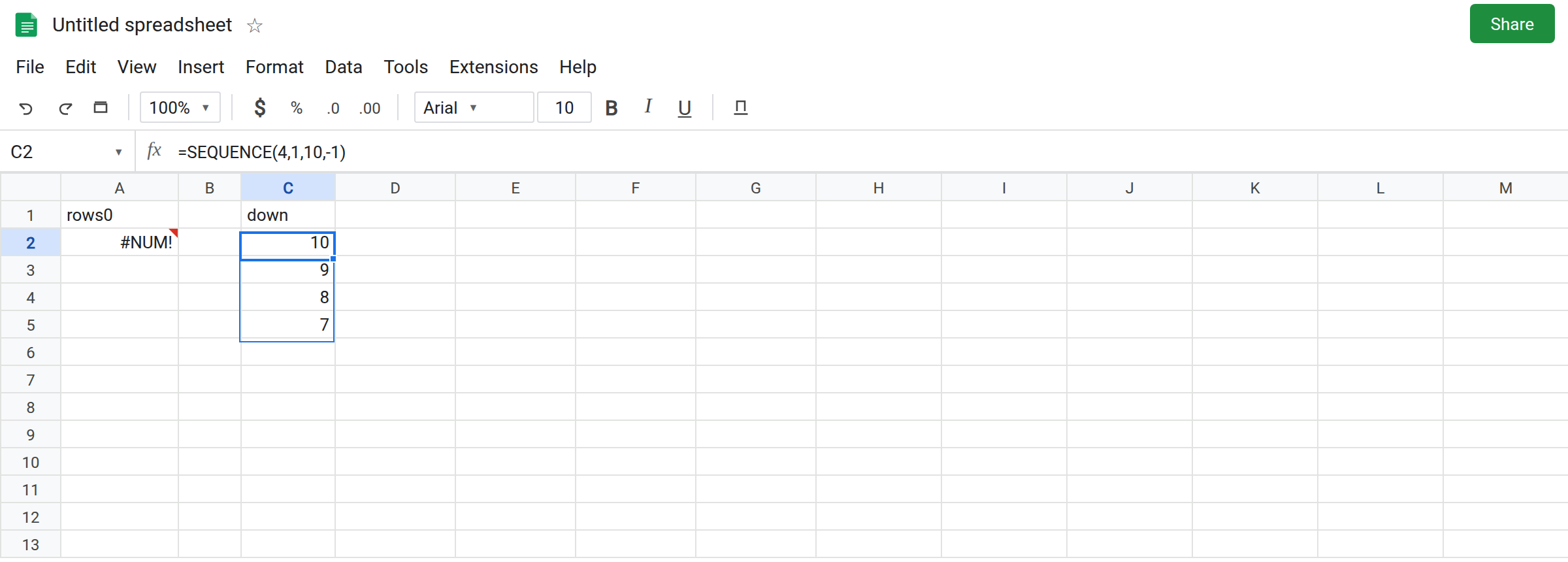
A countdown, which works. In C1 type down. Leave C2:C5 empty. In C2 enter =SEQUENCE(4,1,10,-1). Four rows, one column, start 10, step -1. The spill is 10, 9, 8, 7. No error triangle. A negative step is the direction of the numbers, not the shape of the grid. That block is the control people delete because they think any minus sign is #NUM!.
Step 0 repeats. In E1 type flat. Leave E2:E4 empty. In E2 enter =SEQUENCE(3,1,5,0). The spill is 5, 5, 5. Legal. Use it only when a constant column is what you wanted. It is not a broken countdown.
A blank driver. In G1 type n. Leave G2 empty. In G3 enter =SEQUENCE(G2). A blank is 0. G3 is #NUM!, same as A2. Leave G3 broken.
Spill is the other error. In I1 type keep. Leave H1 empty. In H1 enter =SEQUENCE(3). The column needs H1:H3. I1 is to the right, so it does not block a one-column sequence. Put keep in H2 instead: move the word. In H2 type keep, and in H1 enter =SEQUENCE(3) if H1 is free. H1 is #REF!. The tooltip says the array result was not expanded because it would overwrite H2. The size 3 was legal. That page is SEQUENCE spill. Leave H1 broken if you built it.
Leave A2, A5, A8, and G3 as #NUM!. Leave C2 as 10 through 7.
What is actually wrong
Section titled “What is actually wrong”- Rows and columns are sizes. They start at 1. A computed
COUNTAthat returns0on an empty list becomes A2 the moment it is the first argument. Guard it beforeSEQUENCE. - The tooltip’s parameter index tells you which size failed. 1 rows, 2 columns. A8 is not fixed by changing the row count.
- Start and step are not sizes. Step
-1is C2. Step0is E2. Start may be negative (=SEQUENCE(3,1,-2,1)spills-2,-1,0). None of those are#NUM!. - Non-integers are truncated toward the size Sheets uses for the grid. If the grid is the wrong length but there is no
#NUM!, you passed a decimal size, not a negative one. PassINTonly when you mean to. #REF!after a positiveSEQUENCEis occupancy or the edge of the sheet. Do not change3to-3to “clear” it. That trades#REF!for#NUM!.
This is not MAKEARRAY with zero rows, which is also #NUM! but the function is MAKEARRAY. See MAKEARRAY LAMBDA.
This is not RANDARRAY volatility. See RANDARRAY spill.
Leave A2, A5, and A8 broken.
Ask for at least one cell. Keep a positive grid on empty cells: =SEQUENCE(4,1,10,-1) is C2. A single cell is =SEQUENCE(1).
Blank means “do not build,” or means 1. In G5 enter =IF(G2="", "", SEQUENCE(G2)). G2 is blank, so G5 is blank, not #NUM!. When G2 is 4, you get four numbers. If blank should mean one row, =SEQUENCE(IF(G2="",1,G2)).
Countdown. Keep the negative number in the step slot, the fourth argument, and keep rows positive. Do not swap them.
Do not wrap A2 in IFERROR. You will hide every empty count. See IFERROR vs IFNA. IF on the size, as in G5, is the guard that still lets a real #REF! spill show.
If SEQUENCE is #NUM!, a size is below 1. If it is a countdown with no triangle, the step is negative and the formula is fine. If it is #REF! and the tooltip names a cell, the size is legal and the path is blocked.