

Fix MAKEARRAY LAMBDA errors in Google Sheets (wrong arity or a nested array)
Updated
MAKEARRAY(rows, columns, LAMBDA) builds a grid. The lambda runs once per cell and receives that cell’s row index and column index, both starting at 1. It must return one value. A lambda with one name is #N/A (wrong number of arguments). A lambda that returns {r, c} or another array is #N/A (single value expected). Zero rows is #NUM!. A blocked spill is #REF!. Sheets does not show Excel’s #CALC! for these.
This page is MAKEARRAY. It is not BYROW / MAP LAMBDA (a lambda over rows that already exist). It is not SCAN / REDUCE LAMBDA (an accumulator). Keep the Google Sheets UI in English. Helper names stay English: LAMBDA, MAKEARRAY.
Recreate it on a blank sheet
Section titled “Recreate it on a blank sheet”- Open a blank spreadsheet. You are building a 2×3 code grid: row index times 10, plus the column index. No source table. The size is the first two arguments.
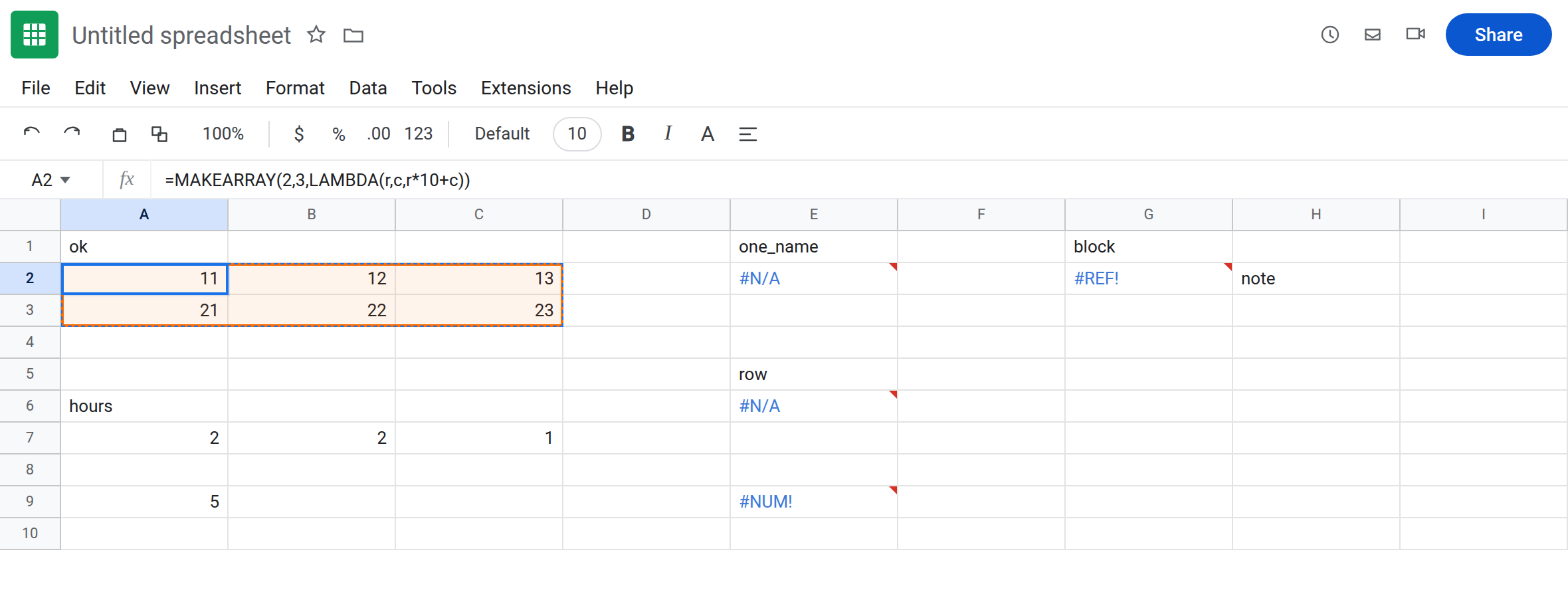
Working grid. In A1 type ok. Leave A2:C3 empty. In A2 enter =MAKEARRAY(2,3,LAMBDA(r,c,r*10+c)). The spill is 11, 12, 13 on the first result row and 21, 22, 23 on the second. r and c start at 1, not 0. That block is the control.
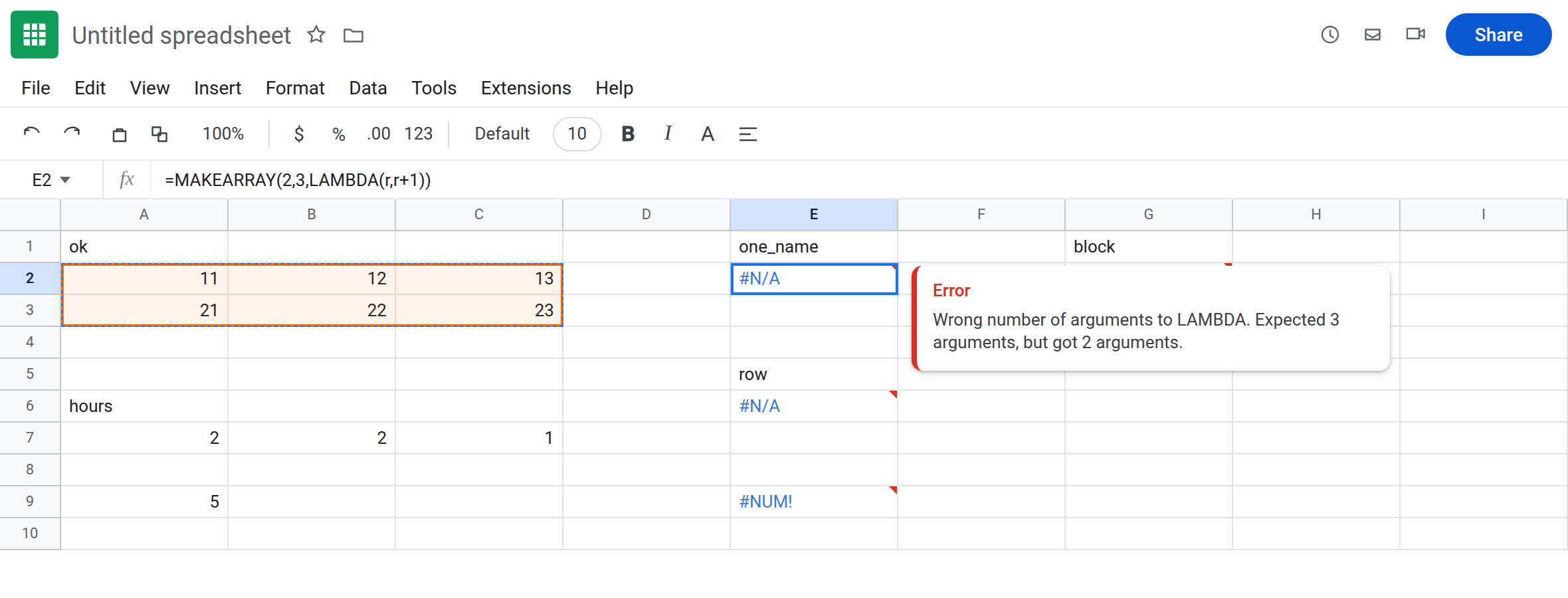
One name instead of two. In E1 type one_name. In E2 enter =MAKEARRAY(2,3,LAMBDA(r,r+1)). The cell shows #N/A. The tooltip is Wrong number of arguments to LAMBDA. Expected 3 arguments, but got 2 arguments. LAMBDA here needs name, name, expression — two indexes plus the formula. You passed one name and an expression. Leave E2 broken.
Lambda returning two cells. In E5 type row. In E6 enter =MAKEARRAY(2,3,LAMBDA(r,c,{r,c})). The cell shows #N/A (or #VALUE!). The tooltip is Single value expected. Nested array results are not supported. Each cell of the grid tried to become two cells. Leave E6 broken.
Zero rows. In E9 enter =MAKEARRAY(0,3,LAMBDA(r,c,1)). The cell shows #NUM!. rows and columns must be greater than 0. Leave E9 broken.
Blocked spill of a legal lambda. In G1 type block. In H2 type note. Leave G2, G3, and H3 empty. In G2 enter =MAKEARRAY(2,3,LAMBDA(r,c,r*10+c)). A 2×3 grid needs G2:I3. H2 is occupied. G2 shows #REF!. The tooltip names H2. The lambda was legal. The rectangle was not. Leave G2 broken.
BYROW contrast. In A6 type hours. A7 2. B7 2. C7 1. In A9 enter =BYROW(A7:C7,LAMBDA(row,SUM(row))). That spills 5. One name, because BYROW passes the row, not a row index and a column index. That page is BYROW / MAP LAMBDA. Do not copy LAMBDA(row, …) into MAKEARRAY.
Leave E2, E6, E9, and G2 broken. Leave A2 as 11–23.
What is actually wrong
Section titled “What is actually wrong”- The lambda signature is fixed:
LAMBDA(row_index, column_index, expression). Google’s “expected 3 arguments” counts those two names plus the expression. E2 has two arguments toLAMBDA(one name, one expression). The error text is easy to misread as “MAKEARRAY needs 3.”MAKEARRAYalready has three arguments. The innerLAMBDAis short. - Indexes are 1-based positions in the new grid, not sheet row numbers.
ris 1 on the first result row even when the formula sits in A2. Adding the sheet row (ROW()) is a different formula and is not required. - Each call must return a scalar.
{r, c},HSTACK, orSPLITmakes a nested array.MAKEARRAYwill not spill a table of tables. E6. rowsorcolumnsof 0 is#NUM!before the lambda runs. A negative size is#NUM!too.- Occupied cells in the result rectangle are
#REF!, same family as SEQUENCE spill. G2’s lambda matches A2. H2 is the only difference. - An illegal name such as
LAMBDA(C1,c,C1)fails becauseC1is a cell address, not a lambda name. The tooltip is Argument 1 of function LAMBDA is not a valid name. That is closer to LET #NAME? than to E2’s argument count.
This is not Excel #CALC!. If a colleague describes #CALC! on MAKEARRAY, look at the Sheets cell: you will see #N/A, #NUM!, or #REF!. Do not search this sheet for the Excel token.
This is not MAP over two ranges of different height. See BYROW / MAP LAMBDA. MAKEARRAY does not take a source array. It takes a height and a width.
Leave E2, E6, E9, and G2 broken.
Two names, one number. Keep A2: =MAKEARRAY(2,3,LAMBDA(r,c,r*10+c)). If you only need the row index, still declare c and ignore it: =MAKEARRAY(2,3,LAMBDA(r,c,r)).
Need two outputs per cell? Use two MAKEARRAY formulas, or build the pair outside a single cell with HSTACK of two grids. Do not return {r, c} from the lambda.
Size at least 1×1, and an empty landing zone. =MAKEARRAY(1,1,LAMBDA(r,c,1)) is a single cell. For G2, delete H2 or move the formula. Do not wrap E2 in IFERROR. Wrong arity would vanish into a blank. See IFERROR vs IFNA. IFNA would hide E2 and E6 and would not hide E9’s #NUM! or G2’s #REF!. Prefer fixing the lambda.
If MAKEARRAY is #N/A, count names inside LAMBDA (exactly two) and check that the expression is one value. If it is #NUM!, the requested size is not a positive grid. If it is #REF!, the lambda already works — clear the spill.