

UrlFetchApp with followRedirects false stops on the short link and never returns the final page
Updated
UrlFetchApp.fetch(url, options) follows HTTP redirects when followRedirects is omitted or true. Set it to false and a shortened or moved URL comes back as the redirect itself. The response code is 301 or 302 (or another 3xx). The body is often empty or a one-line notice. getContentText() is not the final page. The URL is not “down.” The option stopped the client from taking the next hop. Turning the option back on does not guarantee the destination. A redirect to a sign-in page, a non-HTTP scheme, or a chain that is too long still will not become the HTML you expected.
Sheet Error is an independent formula-error library, not a Google product. A cell formula that calls UrlFetchApp is refused before any redirect matters. That refusal is custom function UrlFetch. IMPORTDATA failing on a redirect is IMPORTDATA redirect. Keep the Google Sheets UI in English.
Recreate it on a blank sheet
Section titled “Recreate it on a blank sheet”- Open a blank spreadsheet. You will read the result in the execution log, then write the status code into A1 so the sheet shows it. Extensions → Apps Script. Replace the sample with this. Save.
http://github.com/ answers with a redirect to HTTPS. It is a public hop, not a page you need to scrape. Do not point this test at an address you do not mean to request.
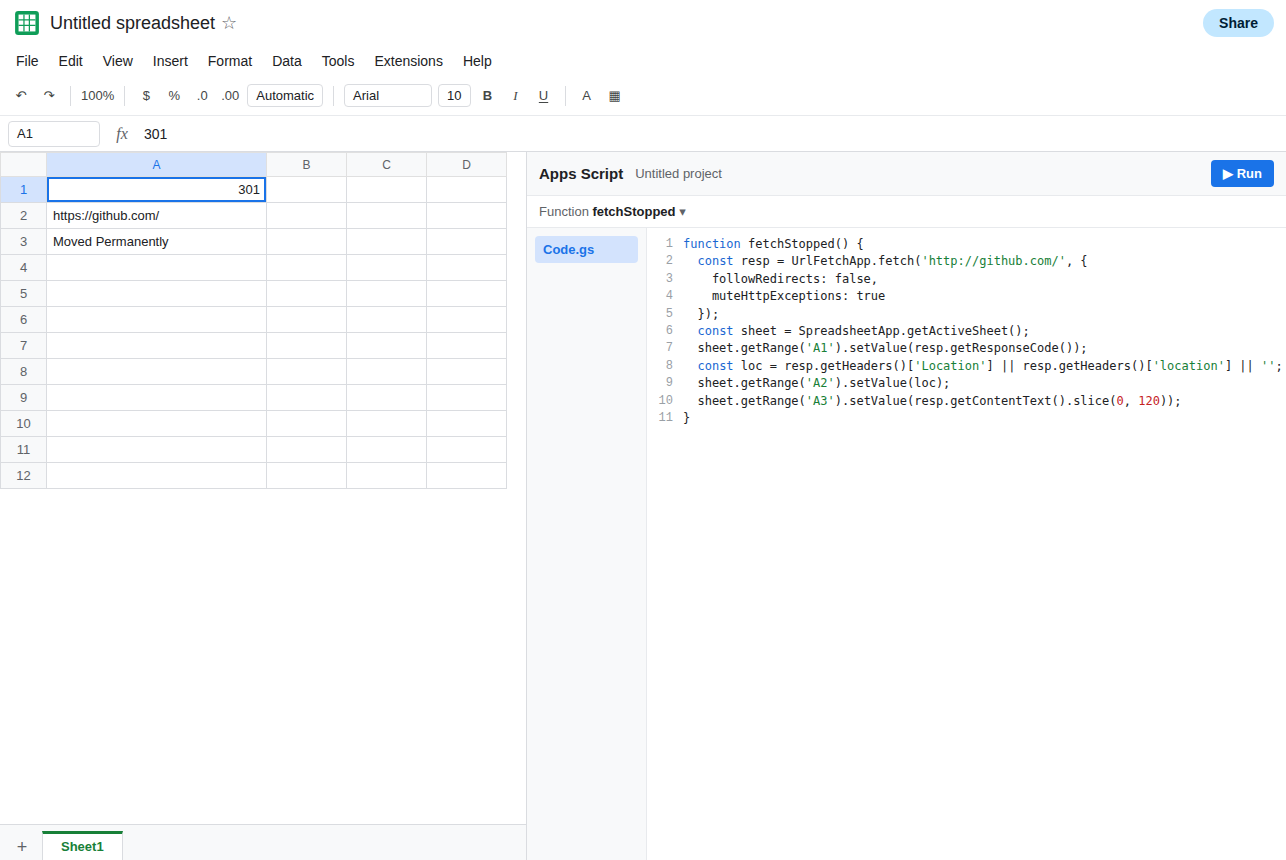
function fetchStopped() { const resp = UrlFetchApp.fetch('http://github.com/', { followRedirects: false, muteHttpExceptions: true }); const sheet = SpreadsheetApp.getActiveSheet(); sheet.getRange('A1').setValue(resp.getResponseCode()); const loc = resp.getHeaders()['Location'] || resp.getHeaders()['location'] || ''; sheet.getRange('A2').setValue(loc); sheet.getRange('A3').setValue(resp.getContentText().slice(0, 120));}Run fetchStopped from the editor. Authorize the external-request scope if this is your file and you want the fetch. A1 is 301 or 302, not 200. A2 is a URL that starts with https://. A3 is a short body or blank, not the GitHub home page. Leave that row. muteHttpExceptions: true is why the 3xx did not throw. Without it, some codes throw and you never see the location.
The same URL with the default. Duplicate the function as fetchFollowed, delete the followRedirects line, and write the code to B1. Run it. B1 is often 200, and the body is the page after the hop. If B1 is still a 3xx or an exception, the host refused the client or the chain did not finish. Read the code. Do not keep flipping the flag and calling a 200 guaranteed.
A formula cannot host this. In D1 enter =FETCHSTOPPED() only if you also created a custom function with that name. The cell reports that it does not have permission to call UrlFetchApp. See custom function UrlFetch. Leave the editor run as the recreate that actually fetches.
What is actually wrong
Section titled “What is actually wrong”followRedirects: falsemeans “return this response.” A short link’s job is to respond with a location and a 3xx. You asked to stop there. The empty body is that response, not a failed DNS lookup.- The default is to follow. Omitting the option and setting
trueare the same follow behavior. A sample you copied that setsfalsewhile debugging headers will keep stopping in production if you leave the line in. - Following is still HTTP. A
200page that says the document moved, with noLocationheader, is not a redirect this option can chase. A hop tojavascript:or an app deep link is not a documentgetContentText()will fill. A sign-in wall returns the login HTML with200after the follow. You did not get the private file. - There is a hop limit. A chain longer than the client will follow ends in a failure or the last redirect, not in an infinite loop you can wait out.
muteHttpExceptionschanges whether that failure throws. It does not follow one more hop. - Quota and authorization still apply. A trigger that lost authorization after a copy never reaches the redirect. See trigger re-auth.
Leave A1 as the 3xx from followRedirects: false.
Follow when you want the page after the hop. Write B1 with the default. This is the function to keep if the goal is the final public page.
function fetchFollowed() { const resp = UrlFetchApp.fetch('http://github.com/', { muteHttpExceptions: true }); const sheet = SpreadsheetApp.getActiveSheet(); sheet.getRange('B1').setValue(resp.getResponseCode()); sheet.getRange('B2').setValue(resp.getContentText().slice(0, 120));}B1 should be 200 for this public URL, and B2 should be HTML rather than an empty redirect body. If B1 is 200 and the HTML is a login form, the follow worked and the destination is not a public document. No option on fetch will sign you in.
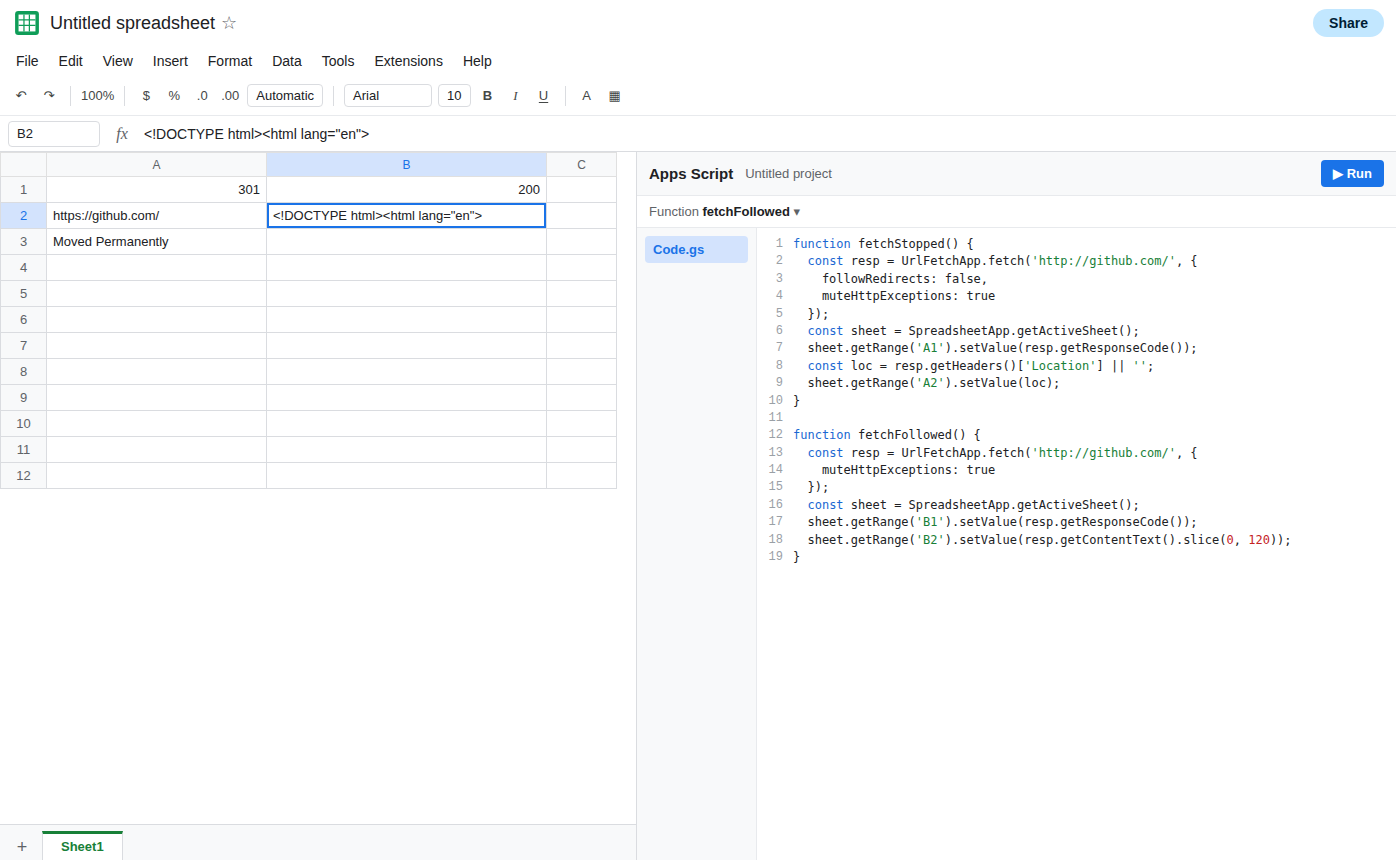
If you set false on purpose, read getResponseCode() and the Location header. Store the header when you need the target URL. Do not store getContentText() and call it the page. A missing location with a 3xx means the host did not send one. You cannot invent the target.
Do not put the fetch in a cell. Run it from the editor, a menu, or an installable trigger, then write a value. The cell reads that value. See simple vs installable if the trigger is silent.
If A1 is a 3xx and A2 has a URL, followRedirects was false and the hop is in the header. If the followed call is 200 but the text is a sign-in page, the redirect already finished. If a custom function threw before any code landed in A1, you are on the permission page, not this one.