

A color scale does not paint a text column
Updated
Format → Conditional formatting has two kinds of rule. Single color paints one fill when a condition is true. Color scale paints a gradient from a minimum number to a maximum number, with an optional midpoint. The scale has no stops for words. A column of open, shut, and hold gets no gradient. The cells stay the default fill. The rule is not broken. There is nothing on the scale to interpolate.
A custom formula that paints only the first column is CF formula range. Text contains is not a regex. That miss is CF text contains. Keep the Google Sheets UI in English. Sheet Error is an independent formula-error library, not a Google product.
Recreate it on a blank sheet
Section titled “Recreate it on a blank sheet”- Open a blank spreadsheet. In A1 type
status, B1hours. A2open, B25. A3shut, B32. A4hold, B49. A5open, B51. Hours are numbers. Status is text.
A scale on the numbers, as the control. Select B2:B5. Format → Conditional formatting. Open the Color scale tab if the panel is on Single color. Leave the default min and max (min value, max value) and a preset scale. Done. B2:B5 show a gradient. 2 and 9 are not the same color. That rule is the control. The scale read the hours.
The same kind of rule on the words. Select A2:A5. Format → Conditional formatting → Color scale. Apply it. A2:A5 do not pick up a gradient. open and shut stay the sheet’s normal fill. There is no error triangle on the cells. The rule is listed in the panel. Leave it. The words did not become colors.
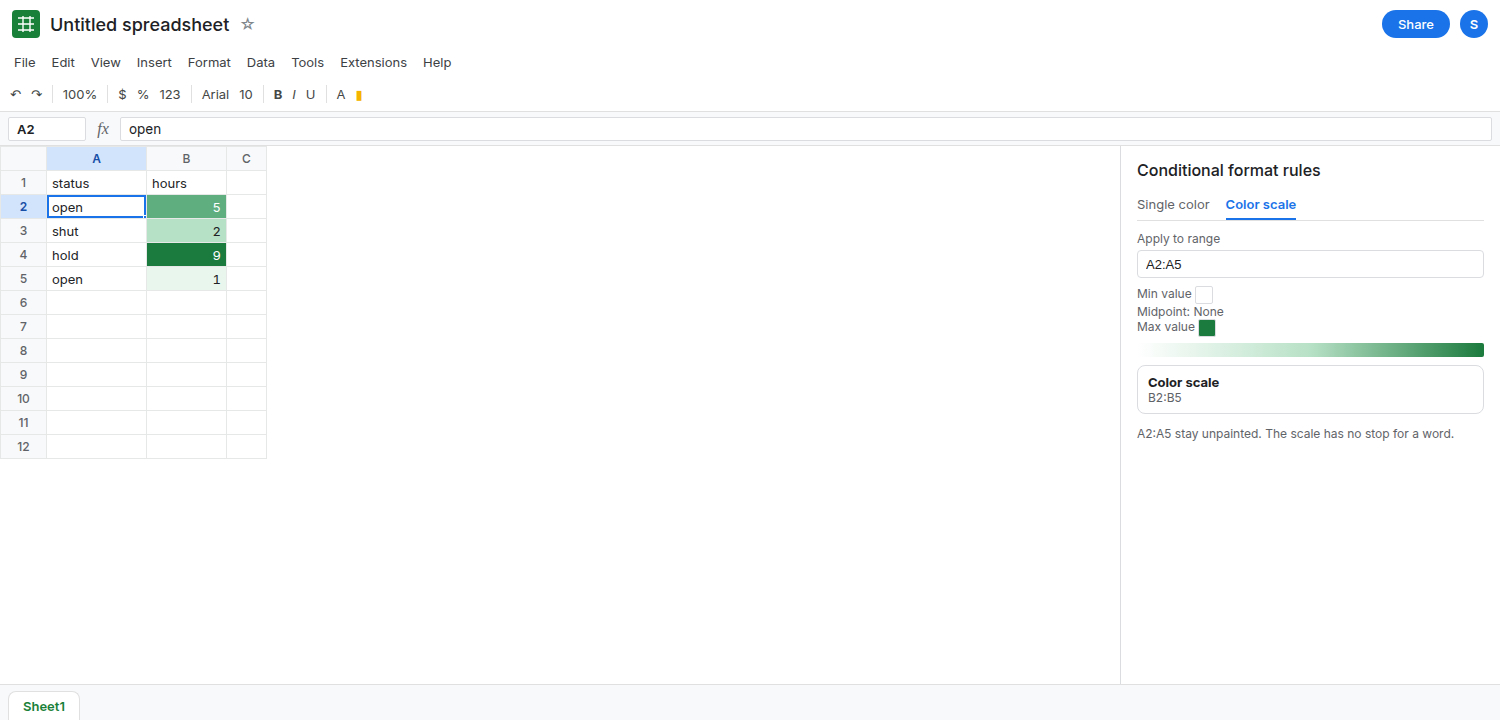
Min and max typed as text do not create categories. Edit the color scale on A2:A5. Set minimum to Number and type open, maximum to Number and type shut. The scale still has no category for a word. The column stays unpainted, or the rule shows a preview that does not match hold. Put the text rule aside. Do not keep typing status words into the number boxes.
A number stored as text is the quiet version of the same miss. In B6 type '4 with a leading apostrophe. If B6 is inside the hours scale, it does not sit on the gradient with the real 5 and 2. ISNUMBER(B6) is FALSE. See CSV text vs number. Leave B6 as text so you can see a digit the scale skipped.
What is actually wrong
Section titled “What is actually wrong”- A color scale interpolates numbers. Min, midpoint, and max are quantities (number, percent, percentile, or min/max of the range).
openis not a quantity. The rule has no “color for this word” field. That field is a single-color condition. - The panel can list a color-scale rule on a text range and still change nothing. A listed rule is not evidence the scale understood the column. Look at the cells.
- Two rules on the same range do not blend if an earlier rule already matched. Order is CF rule order. Fix the type of rule before you fight the order.
- Conditional formatting does not change the value. A scale on hours does not turn
5into a category, and a text rule will not turnopeninto1.
This is not data validation. Validation rejects or warns on input. See reject versus warning. Paint is not a block.
Leave the color scale on B2:B5. Remove the color scale from A2:A5, or leave it in the list so you can see it still does nothing, and add single-color rules.
One single-color rule per status. Select A2:A5. Format → Conditional formatting → Single color. Format cells if Text is exactly open. Choose a fill. Done. Add a rule: Text is exactly shut, a second fill. Add a rule: Text is exactly hold, a third fill. A2 and A5 share the open fill. A3 is shut. A4 is hold. hold did not need a place on a gradient.
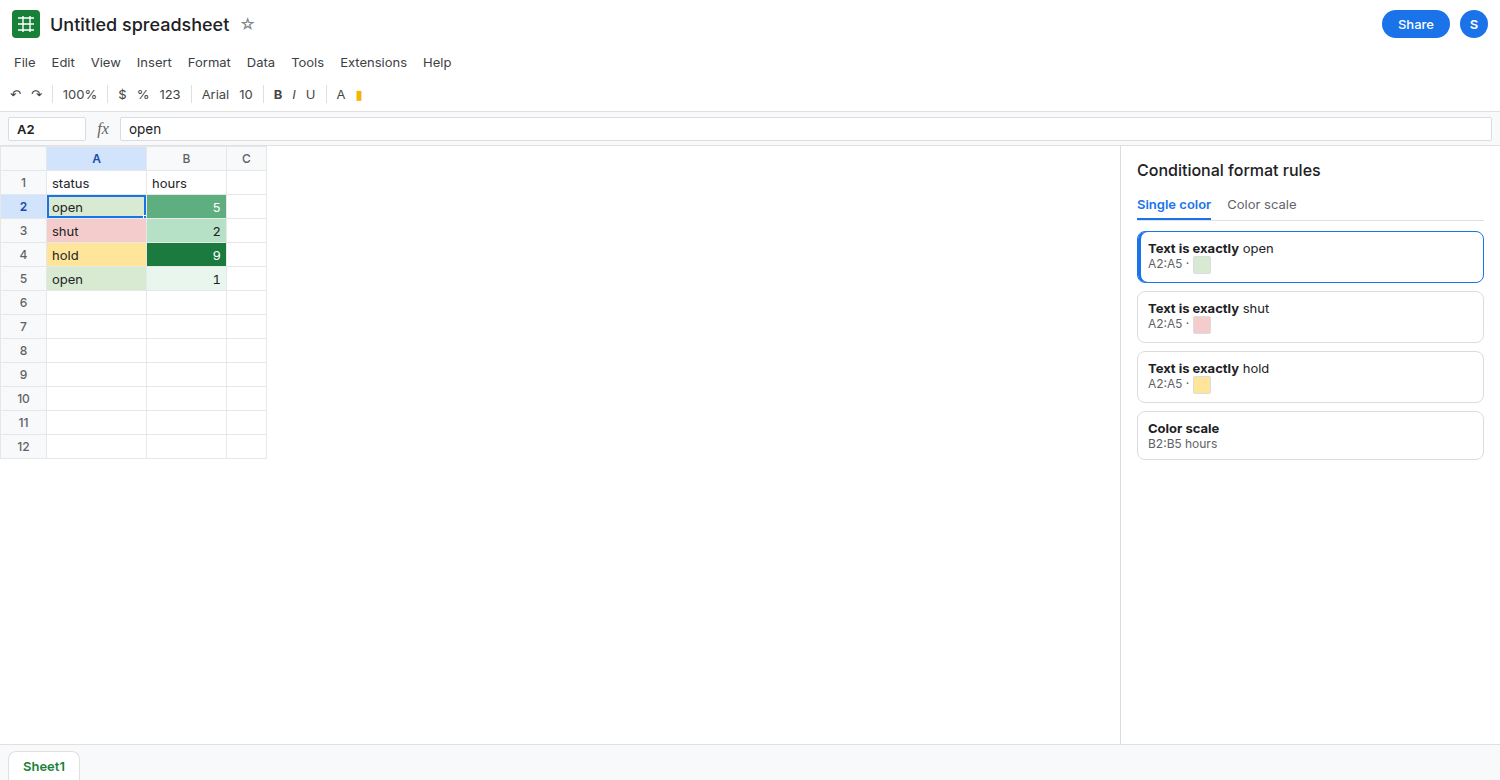
A custom formula is the same paint, one rule. =A2="open" written for the top-left cell of A2:A5 paints the open rows. The relative reference has to stay on column A. See CF formula range. Use Text is exactly when you do not need a formula.
Do not convert statuses to 1, 2, 3 only to feed a color scale, unless those codes are the data you meant to store. The gradient will imply an order open < shut < hold that the words do not have.
If a color scale leaves words unpainted, switch that range to single-color rules. If a number that looks numeric is unpainted, ISNUMBER is FALSE. The scale is for the hours column.