

Fix SPLIT unexpected columns or #REF! in Google Sheets (overwrite / empty delimiter)
Updated
SPLIT takes a text cell and spills pieces across columns, one piece per delimiter. #REF! here means the spill would overwrite a cell that already has a value. An empty delimiter is a different failure: Sheets splits every character, so a short string becomes a wide row — and that wide row #REF!s if anything sits in the path. The function name is fine. The delimiter or the path is not.
This page is SPLIT overwrite and SPLIT with "". It is not UNIQUE overwrite (UNIQUE / SORT blocked below or to the right — same tooltip family, different function). It is not SORT / UNIQUE spill. It is not after you delete (#REF! inside the formula bar).
Recreate it on a blank sheet
Section titled “Recreate it on a blank sheet”- Open a blank spreadsheet. In A1 type
zones. In A2 typenorth|east|west(pipes, no spaces). - Blocked spill. In C1 type
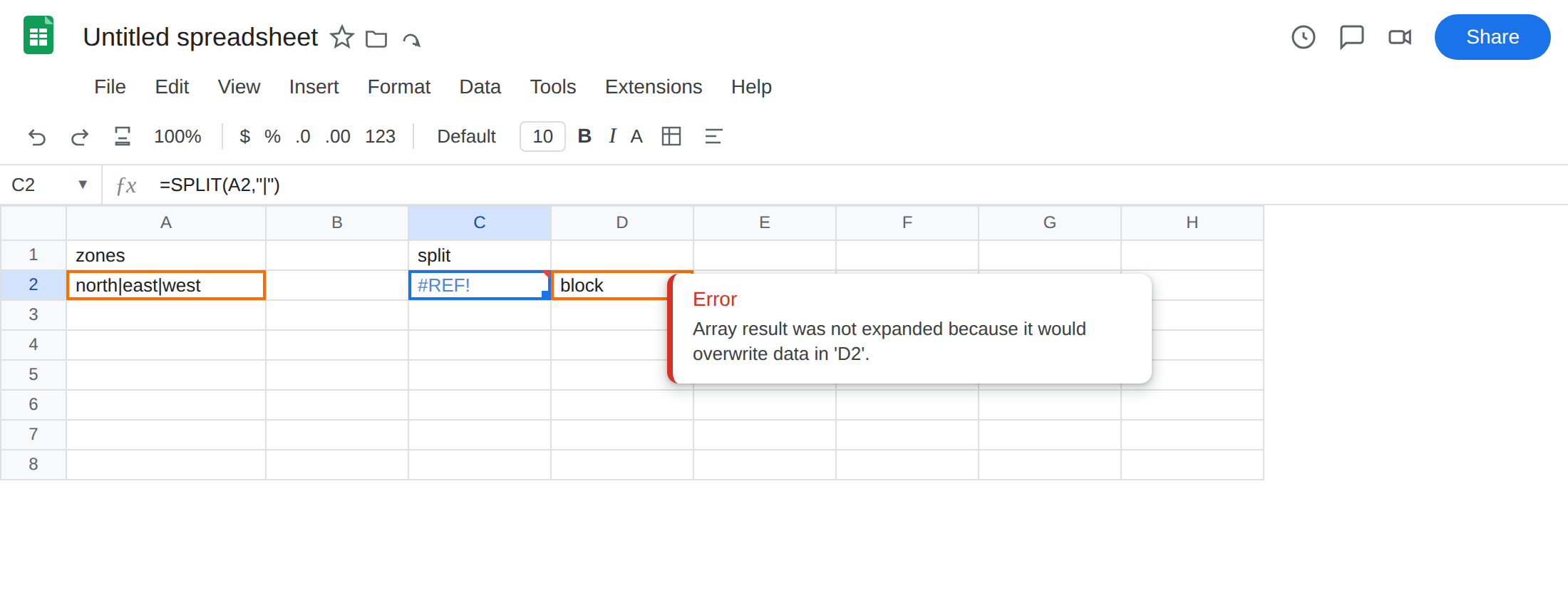
split. In D2 typeblock. Leave C2 empty. In C2 enter=SPLIT(A2,"|"). The cell shows#REF!. The tooltip is Array result was not expanded because it would overwrite data in ‘D2’.SPLITneeds C2, D2, and E2. D2 already holdsblock. Leave C2 broken.
- A working SPLIT on a clear row. In C4 enter
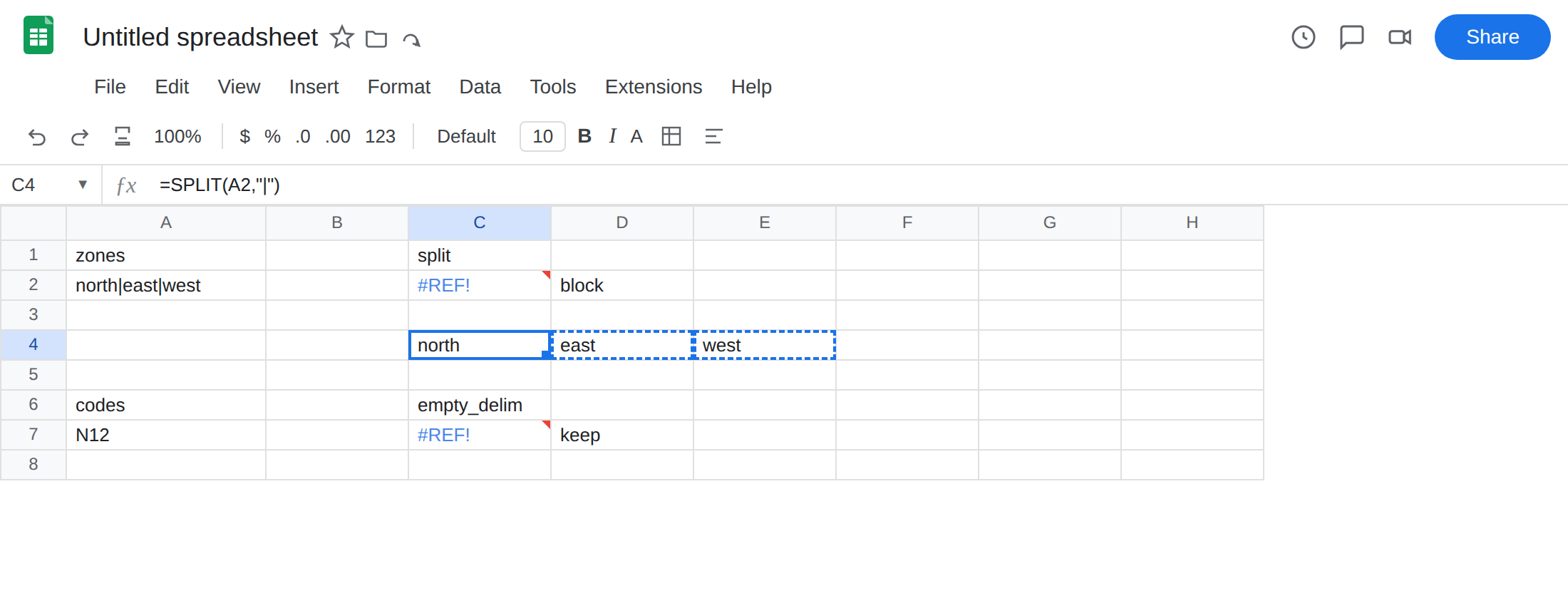
=SPLIT(A2,"|"). Leave D4 and E4 empty. The formula spillsnorth/east/westacross C4:E4. That row is the control: same text, same delimiter, empty path.
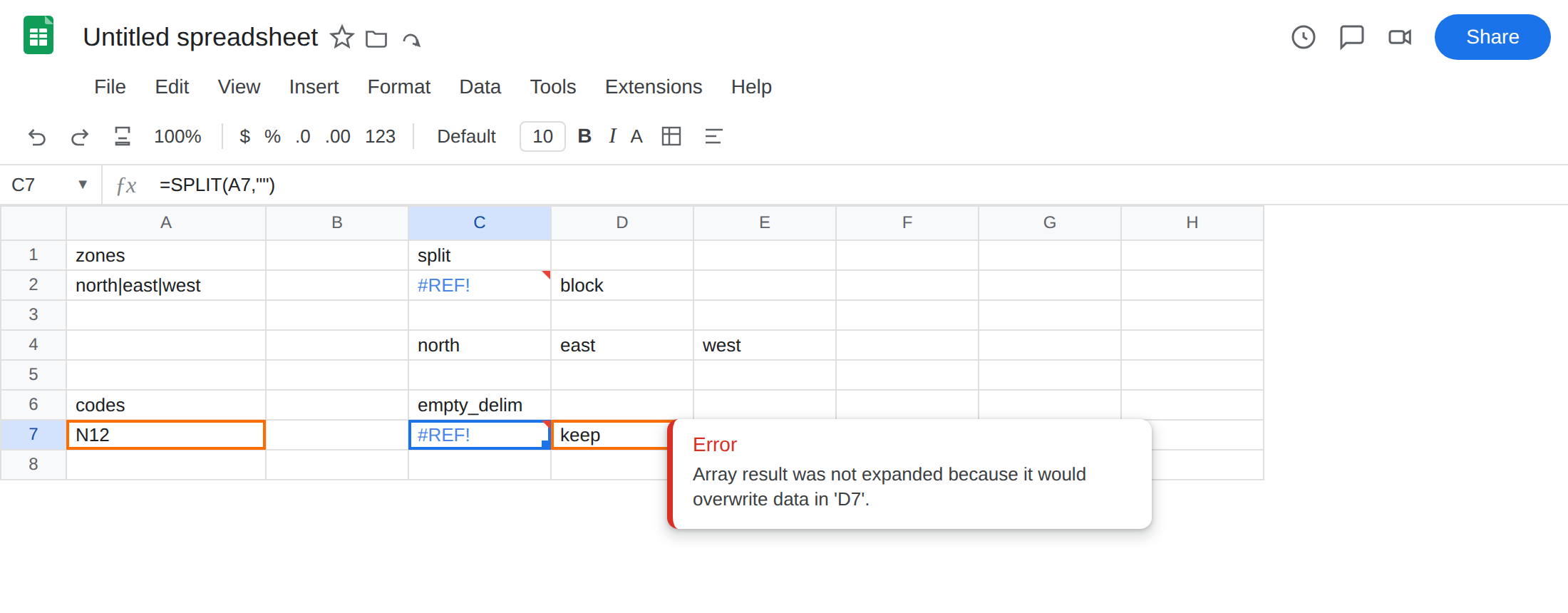
Empty delimiter explodes the row. In A6 type codes. In A7 type N12. In C6 type empty_delim. In D7 type keep. Leave C7 empty. In C7 enter =SPLIT(A7,""). The cell shows #REF! (or a three-column spill of N, 1, 2 if you clear D7 first). "" is not “no split.” It is split-every-character. N12 wants C7:E7. D7 is occupied. Leave C7 broken if it is #REF!. If you already cleared D7 and see N 1 2, that explosion is the bug — put keep back in D7 so #REF! returns.
Confirm the overwrite. Delete block in D2. C2 spills north / east / west. Retype block so C2 is #REF! again. The formula bar still reads =SPLIT(A2,"|"). There is no #REF! inside the formula text.
What is actually wrong
Section titled “What is actually wrong”SPLITreturns an array. Three pipe pieces need three cells on the formula’s row. One occupied cell in that path blocks the entire spill. Nothing is written into D2. The result stays#REF!in C2.SPLIT(text,"")treats the empty string as a delimiter between every character.N12becomes three cells. People type""meaning “do not split.” Sheets does the opposite.- A note, a space, or another formula in the path counts as occupied. The destination cells have to be empty.
This is not a deleted reference. After a delete, Sheets puts #REF! inside the formula bar. See after you delete. C2 still names A2 and "|".
This is not UNIQUE / SORT as the general overwrite primer. Same tooltip, different function. See UNIQUE overwrite and SORT / UNIQUE spill. This page is SPLIT and the empty-delimiter explosion.
This is not a VLOOKUP index #REF!. See VLOOKUP bad index. Nothing here is a column index.
Leave C2 and C7 broken so #REF! stays on the sheet. Leave C4 as the working spill.
Clear the path, or move the formula. Delete block in D2, or put SPLIT on a row where the next cells are empty (C4 already does that). Do not wrap C2 in IFERROR. That prints a blank and never spills. See IFERROR vs IFNA.
Pass the delimiter you actually have. Keep "|" for A2. Do not pass "". If the source uses commas, pass ",". Empty pieces and occupied cells are different bugs. Fix the delimiter first. Prefer a clear row.
Do not change File → Settings locale to “make pipes work.” | is not a locale separator. Array literals { } with commas vs backslashes are array literal locale.
If SPLIT is #REF! and the formula bar still shows SPLIT, look one cell to the right. If the delimiter is "", stop. Pass the character that actually sits in the text.
Empty delimiter vs occupied spill
Section titled “Empty delimiter vs occupied spill”Two ways to get here, one tooltip.
Occupied path: the delimiter is right (|), D2 is not empty. Clear D2. Same family as UNIQUE overwrite. Here the spill is one row, N columns.
Empty delimiter: you asked for a split between every character. Even a clear row is the wrong result (N 1 2 instead of N12). #REF! is only how that collides with neighbors. Fix "" whether or not a neighbor is filled.