

MOD(-3, 2) is 1, because the remainder takes the sign of the divisor
Updated
MOD(dividend, divisor) is the remainder after division, and the remainder takes the sign of the divisor. MOD(3, 2) is 1. MOD(-3, 2) is also 1, not -1. MOD(3, -2) is -1. MOD(-3, -2) is -1. The definition Sheets uses is dividend - divisor * INT(dividend / divisor), and INT rounds toward negative infinity. A programming % that keeps the sign of the dividend returns -1 for -3 % 2. Rebuilding the remainder with QUOTIENT, which truncates toward zero, reproduces that -1. It does not reproduce MOD. Neither result is #NUM!. They are two remainder rules.
Sheet Error is an independent formula-error library, not a Google product. A decimal remainder that is a long 0.0999 instead of 0 is MOD decimal. QUOTIENT versus INT on a negative quotient is QUOTIENT vs INT. A zero divisor is divide by zero. Keep the Google Sheets UI in English.
Recreate it on a blank sheet
Section titled “Recreate it on a blank sheet”- Open a blank spreadsheet. In A1 type
n, B1d. A2 type-3. B2 type2. A3 type3. B3 type-2. A4 type-3. B4 type-2. A5 type3. B5 type2.
The negative dividend. In D1 type mod. In D2 enter =MOD(A2,B2). D2 is 1. The divisor is positive, so the remainder is positive. In E1 type js. In E2 enter =A2-B2*QUOTIENT(A2,B2). QUOTIENT(-3, 2) is -1 (toward zero). E2 is -3 - 2*(-1), which is -1. Leave D2 as 1 and E2 as -1. The sheet and a language that uses truncating division disagree, and both cells look like “the remainder.”
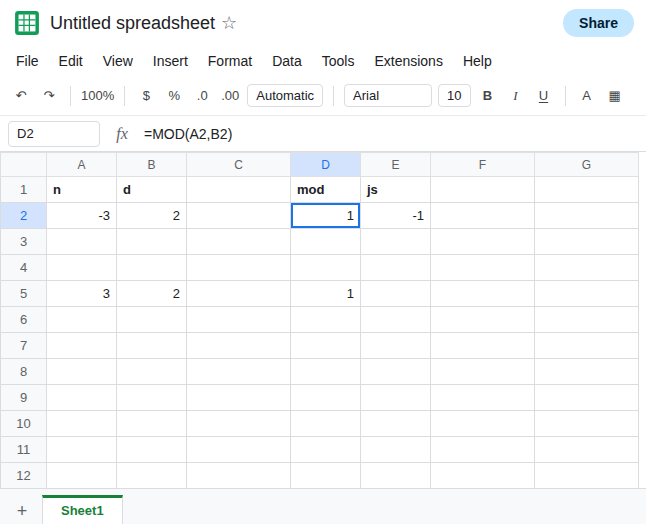
The sign follows the divisor on the other rows. In D3 enter =MOD(A3,B3). D3 is -1. Positive dividend, negative divisor. In D4 enter =MOD(A4,B4). D4 is -1. Both negative. In D5 enter =MOD(A5,B5). D5 is 1. Both positive. D5 matches the everyday remainder. It is the control, and it is also the row that hides the rule.
INT matches MOD. QUOTIENT matches the other rule. In F2 enter =A2-B2*INT(A2/B2). F2 is 1, the same as D2. INT(-3/2) is INT(-1.5), which is -2, not -1. That extra step is why the remainder comes out positive. Leave F2 as 1 and E2 as -1.
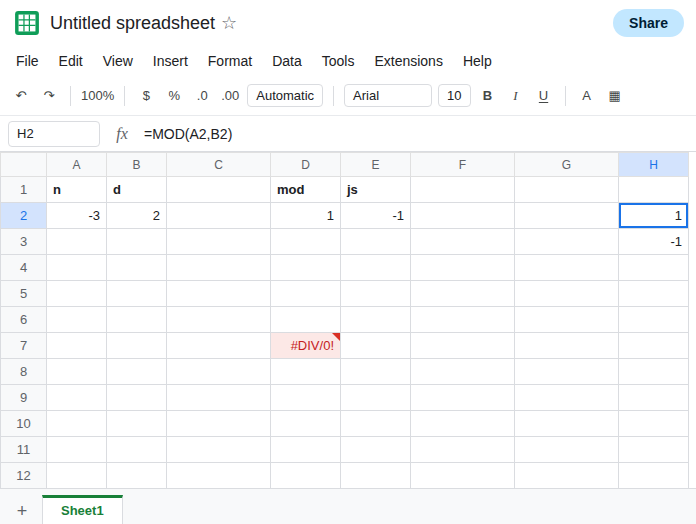
Zero is a different error. In D7 enter =MOD(A2,0). D7 is #DIV/0!. See divide by zero. Leave D7 broken so it is not confused with a sign.
Leave D2 as 1 and E2 as -1.
What is actually wrong
Section titled “What is actually wrong”- The remainder’s sign is the divisor’s sign, including when the dividend is negative.
MOD(-3, 2)is1. Expecting-1imports a rule Sheets does not use. QUOTIENTtruncates toward zero. The identityn - d * QUOTIENT(n, d)is the truncating remainder. On-3and2it is-1. See QUOTIENT vs INT. SubstitutingQUOTIENTforINTinside theMODidentity changes negative results and leaves positive ones alone. D5 would still be1.INTtoward negative infinity is the function inside Sheets’MOD. F2 matching D2 is the check. You do not need a second definition unless you are matching another language on purpose.- A tiny decimal remainder is a different bug.
MOD(0.3, 0.1)is not this sign rule. See MOD decimal. - Wrapping
MODinABSforces a positive remainder and destroys the divisor-sign rule. Do that only when you have decided the sign must be positive. It is not a fix for D2, because D2 is already positive.
Leave D2 and E2 side by side.
You want Sheets’ remainder. In H2 enter =MOD(A2,B2). H2 is 1. Use this when the next bin should follow the divisor, including a positive remainder for a negative dividend and a positive divisor. Cycle indexes and “how far past the last multiple” in spreadsheet models are this rule.
You want the truncating remainder some languages return. In H3 enter =A2-B2*QUOTIENT(A2,B2). H3 is -1. Label the column. A later reader who replaces it with MOD will flip the sign of every negative dividend paired with a positive divisor.
Guard a zero divisor without hiding the sign. =IF(B2=0,"",MOD(A2,B2)) blanks the zero case and still returns 1 for the sample. IFERROR would also blank a #DIV/0! and would not tell you that H2 and H3 differ. See divide by zero.
If MOD(-3, 2) is 1 and a QUOTIENT remainder is -1, both are the rules above. If MOD of two positive numbers is wrong, the inputs are not those numbers. If the cell is #DIV/0!, the divisor is zero. If the result is a long decimal near the divisor, you are on the precision page.