

TODAY flips the dashboard at the spreadsheet midnight, which may be UTC
Updated
TODAY() is the calendar date in File → Settings → Time zone, with no clock time attached. The day changes when that zone crosses midnight, not when your laptop does. A sheet left on (GMT+00:00) GMT or a UTC zone rolls the date at UTC midnight. In New York that is evening, hours before local midnight. Filters that compare “today,” headers that say the business date, and a NOW() stamp used as an as-of time all flip together. The functions are not early. The zone’s midnight is not the office’s midnight.
Sheet Error is an independent formula-error library, not a Google product. The general case, any zone versus the laptop, is NOW / TODAY timezone. An Apps Script clock that uses the script project zone instead of the sheet is script vs sheet timezone. NOW copied down every row is NOW in ARRAYFORMULA. Keep the Google Sheets UI in English.
Recreate it on a blank sheet
Section titled “Recreate it on a blank sheet”- Open a blank spreadsheet. File → Settings. Write down Time zone. Do not change Locale for this test. Locale is argument separators and date order.
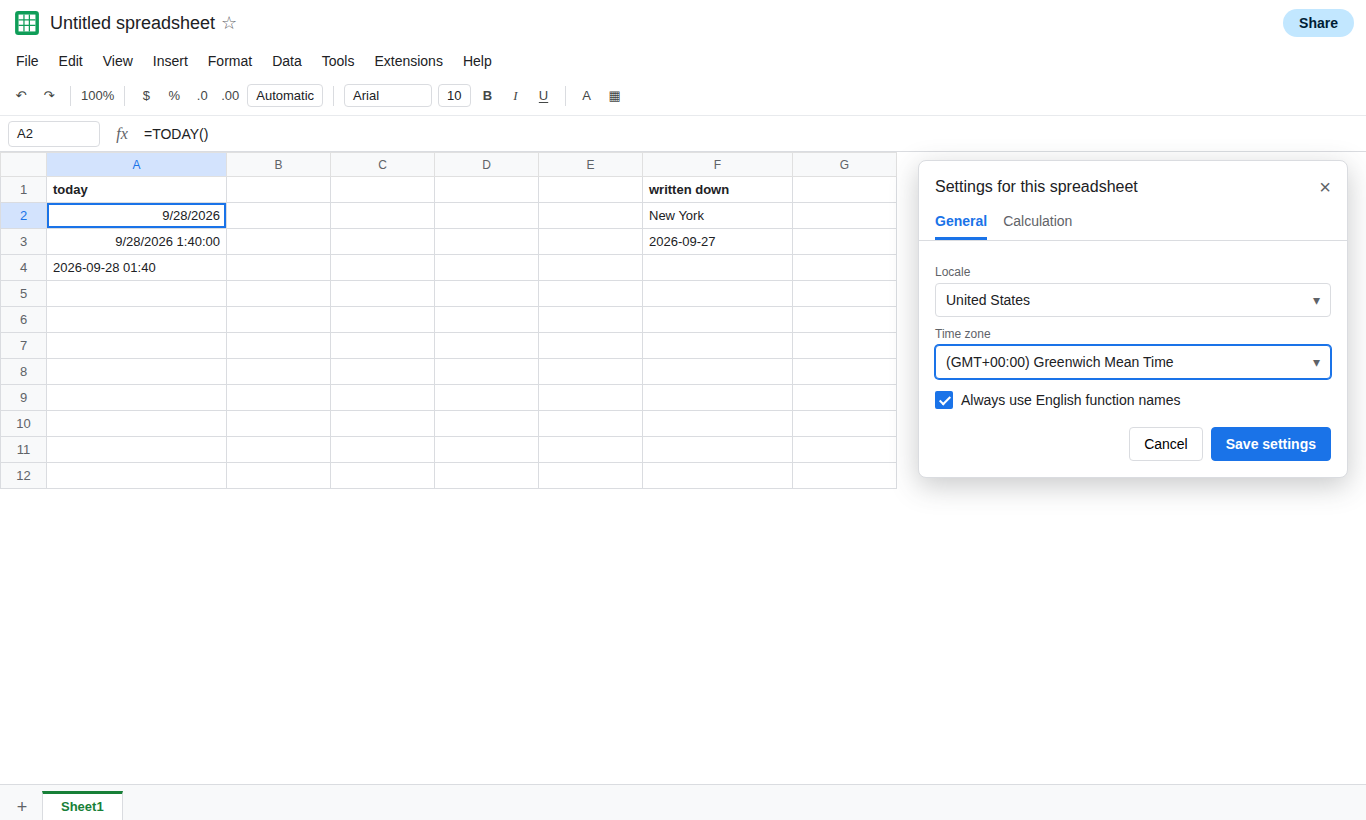
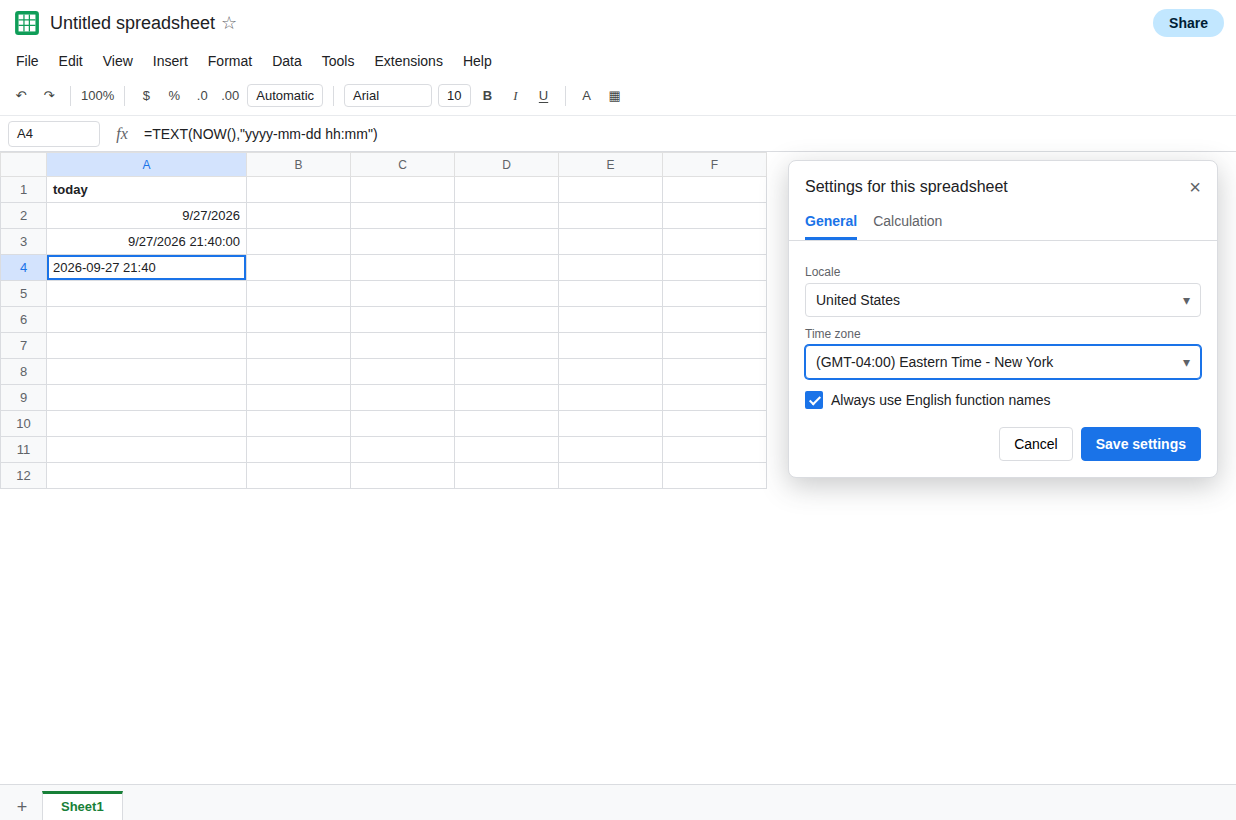
What this file calls today. In A1 type today. In A2 enter =TODAY(). In A3 enter =NOW(). Format A3 as a date time. In A4 enter =TEXT(NOW(),"yyyy-mm-dd hh:mm"). A4 is the zone’s wall time as text, so a format cannot disguise the date. A2 and A4 are the control for the zone you wrote down.
Compare the business zone to UTC. File → Settings → Time zone. Choose a GMT or UTC entry, the offset +00:00. Save settings. Read A4. Then switch the zone to the place the business treats as midnight, for example New York, and save. Read A4 again. When those two zones are on different calendar dates, A2’s day changes and the laptop’s clock does not. The hour in A4 moves by the offset. The flip you see in the evening, while the office is still on yesterday’s date, is this pair. If both zones happen to share a calendar date right now, the date line has not been crossed this hour. Pick a zone far enough away that the dates differ, observe A2, then set the zone back to the business one if this file is real. Leave A2 as =TODAY() the whole time.
A filter that uses that midnight. In C1 type stamp. In C2 enter a date time that is “today” on the business clock and “yesterday” or “tomorrow” on the UTC clock, if you are in the hours when they disagree. In D2 enter =C2>=TODAY(). D2 is TRUE or FALSE with the sheet’s date, not with the laptop. A report that hides the row when D2 is FALSE is flipping with the spreadsheet midnight. See FILTER date+time when the stamp has a time and TODAY() does not.
A stored date does not flip. In F2 enter =DATE(2024,6,1). F2 stays 1 June 2024 when the zone changes. DATE is a serial. TODAY asks the zone what day it is.
What is actually wrong
Section titled “What is actually wrong”- One file, one time zone, one midnight. Every
TODAY()andNOW()on every tab uses it. Editors in other cities share that midnight. The person whose clock matches the setting thinks the dashboard rolls at the right time. Everyone else sees the roll early or late. TODAY()is volatile. It recalculates on edit and on open. It does not tick on a timer you can watch. Staring at A2 through local midnight does nothing if the sheet’s zone already crossed midnight hours ago, or has not crossed it yet.- A business day that ends at 2:00 in the morning is not
TODAY(). The function has no close-of-business argument. A cutoff has to compareNOW()to a time you build, in the same zone. - Display format does not move midnight.
TEXTin A4 shows the zone you saved. If A4’s date is not the business date, the setting is the cause. - The script project has its own zone. A timestamp written by Apps Script can be hours off
TODAY()even after the sheet zone is right. See script vs sheet timezone.
Set the zone to the midnight the business uses. File → Settings → Time zone. Choose that place, not UTC, unless the business really rolls at UTC midnight. Save settings. A2 and A4 follow. Tell editors which zone you picked. Their laptops will disagree with TODAY() around the boundaries. That disagreement is the setting.
A cutoff after local midnight stays a formula. If rows belong to “yesterday” until 02:00, compare NOW() to TODAY()+2/24 in the business zone and branch on that. Do not keep a second hidden TODAY() on a UTC tab and hope the two files match. They will not, unless both zones are set on purpose.
Do not array-enter TODAY() down a log to freeze the day. Every row will show the same date, and all of them will flip together at the zone midnight. A stored date is DATE or a value written once. See NOW in ARRAYFORMULA.
If the dashboard changes date while the office clock is still on the previous evening, the spreadsheet zone’s midnight has already passed. Set the zone to the office. If A4 matches the office and a script cell does not, the script zone is the other page.